ikiwiki
ikiwiki turns wiki pages into HTML for publishing on a website, generating a static site and updating pages when their source changes.
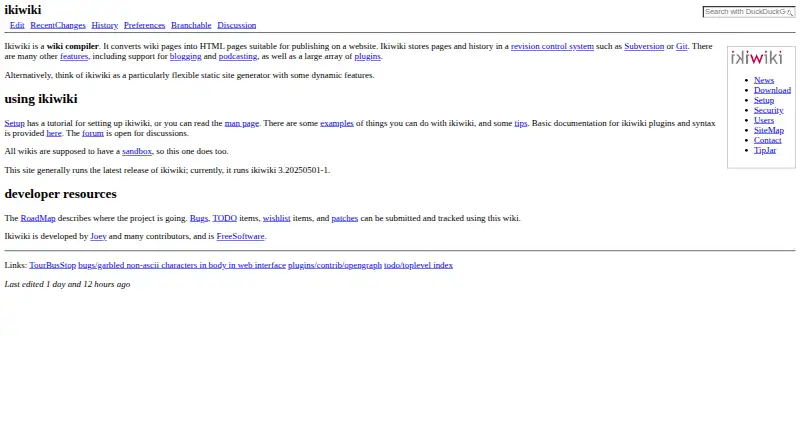
What ikiwiki is
ikiwiki turns wiki pages into HTML for publishing on a website, generating a static site and updating pages when their source changes. It can keep page history in Git or Subversion, or run without a revision control system. Markdown is the default markup, and plugins can add formats such as WikiText, HTML, reStructuredText, and Textile. Any page can function as a blog, with RSS or Atom feeds. Plugins also extend the software with directives, revision-control backends, and CGI functionality. Site owners can adjust generated pages using templates, CSS, and themes. Optional web editing supports registration, authentication options including OpenID and HTTP basic authentication, and configurable page edit controls. Xapian can add full-text search. ikiwiki is free and open source under GNU GPL version 2 or later, with Linux, macOS, web, and self-hosted availability. Custom domains, SSO, and version history are supported. A setup tutorial describes creating a working wiki with one command, while noting that advanced users may prefer manual setup.
Good
- Generates static pages and updates them when sources change.
- Can store history in Git or Subversion.
- Pages can publish RSS or Atom feeds.
- Plugins add formats and other capabilities.
- Free and open source under GNU GPL version 2 or later.
Watch out
- Allowing others to edit introduces security issues.
- Perl taint checking is disabled in production builds.
- No free trial is listed.
Who it suits
ikiwiki suits people creating a wiki or blog for publication as a website, especially those who want static pages and optional revision control. Advanced users can choose manual setup.
Verdict
ikiwiki combines wiki editing and static site generation, with optional feeds, revision history, and web editing. Its flexible setup comes with security considerations when other people can edit.
Plans and prices
From ikiwiki's own pricing page, checked 9 Oct 2026.
| Plan | Price | What it gives you |
|---|---|---|
| ikiwiki | Free | Free software; no paid plans stated |
The facts
Each one read from ikiwiki's own pages, with the date it was checked.
What it does
- Blogging and feeds
- Pages can be used as blogs with RSS or Atom feeds, and ikiwiki can aggregate external blogs.checked 9 Oct 2026
- Custom domain
- Yeschecked 20 Sep 2026
- Customization
- Templates, CSS, and themes can be used to change the appearance and layout of generated pages.checked 8 Oct 2026
- Editing and access
- Optional CGI features include browser-based editing and registration, with configurable authentication and edit controls.checked 9 Oct 2026
- Installation
- The project offers source downloads and packages for Debian/Ubuntu, Fedora, BSD systems, openSUSE, Arch Linux, Homebrew, and Guix.checked 9 Oct 2026
- Intended users
- Its setup guide describes creating a wiki or blog and notes that advanced users may prefer a manual setup.checked 9 Oct 2026
- Known security caveat
- The security page says Perl taint checking is disabled for production builds because of a Perl bug.checked 9 Oct 2026
- License
- The project describes ikiwiki as Free Software.checked 9 Oct 2026
- Markup
- Markdown is the default markup, and plugins add support for formats including HTML, reStructuredText, Textile, and WikiText.checked 9 Oct 2026
- Plugins
- Plugins can add markup languages, directives, revision control backends, CGI behavior, and other features; plugins may be written in Perl or as external programs in any language using XML-RPC.checked 9 Oct 2026
- Project contributors
- The homepage says ikiwiki is developed by Joey and many contributors.checked 8 Oct 2026
- Purpose
- ikiwiki converts wiki pages into HTML pages for publishing on a website.checked 9 Oct 2026
- Revision control
- It stores pages and history in revision control systems such as Git or Subversion, and can also run without revision control.checked 9 Oct 2026
- Search
- Full-text search can be added using the Xapian search engine.checked 9 Oct 2026
- Security
- The project advises that public or multi-user editing requires attention to security risks, and provides configuration-specific security guidance.checked 9 Oct 2026
- Setup
- The setup tutorial says a fully functional wiki can be created with one command and describes web-based and revision-control-based editing.checked 8 Oct 2026
- SSO support
- Yeschecked 20 Sep 2026
- Static site generation
- It builds a static wiki website and updates pages when their source changes.checked 9 Oct 2026
- Support
- The project provides a forum, bug tracker, TODO list, and discussion pages, and says developers monitor RecentChanges and respond in a timely fashion.checked 9 Oct 2026
- Version history
- Yeschecked 20 Sep 2026
- What it does
- ikiwiki is a wiki compiler that turns wiki pages into HTML pages for publishing on a website.checked 8 Oct 2026
The full review of ikiwiki
ikiwiki is a self-hosted wiki compiler for publishers who want editable source pages turned into a fast, controllable website. It fits technically confident individuals and small teams who can manage hosting and configuration, rather than readers seeking a managed collaboration service.
Overview
ikiwiki converts wiki pages into HTML and republishes the site when source files change. You can keep revisions in Git or Subversion, or omit a revision-control system entirely, giving personal wikis, blogs, and documentation sites a choice between history and a simpler setup. The project is free, open source, and licensed under GNU GPL version 2 or later.
The setup tutorial describes creating a functional wiki with one command, while advanced users can configure it manually. Packages are provided for Debian or Ubuntu, Fedora, BSD, openSUSE, Arch Linux, Homebrew, and Guix. A forum, bug tracker, TODO list, and discussion pages provide project support, with developers monitoring RecentChanges.
Key features
Markdown is the default markup. Plugins can add WikiText, HTML, reStructuredText, and Textile, along with directives, revision-control backends, and CGI functionality. This plugin architecture is the main reason to choose ikiwiki when a standard wiki is too restrictive, but it also makes the final system depend on the extensions and configuration you select.
Any page can operate as a blog and produce RSS or Atom feeds, so a single installation can combine reference pages with news publishing. Templates, CSS, and themes control the generated site's appearance and layout. Full-text search can be added through Xapian, useful when a growing static output becomes difficult to navigate.
Optional web editing supports registration, OpenID and HTTP basic authentication, and configurable page edit controls. Page-level permissions help separate public content from restricted areas. The trade-off is operational responsibility: the project's security guidance warns that allowing other people to edit introduces risks around configuration and uploaded content, and notes that Perl taint checking is disabled in production builds because of a Perl bug.
Pricing
The ikiwiki plan costs free. It is free software with no paid plans stated, no trial period, seat charge, storage quota, or renewal term. You supply and administer the hosting yourself, so this price removes licensing cost rather than infrastructure or maintenance work.
Platforms
ikiwiki runs on Linux and macOS, supports self-hosted deployment, and provides a web interface for editing and publishing. Custom domains and SSO support are available, making it possible to present the generated site under your own address and connect access to an existing identity setup.
Who it's for
Choose ikiwiki for a personal wiki, blog, or documentation site when static publishing, optional Git or Subversion history, and deep markup and theme customization matter more than a turnkey service. It is especially suitable for administrators comfortable with Linux-style packages, web configuration, and access controls. Readers who want vendor-managed hosting, built-in operational safeguards, or a polished team workspace should look elsewhere.
Pros and cons
Pros
- Static HTML publishing: source changes become generated pages, a useful model for controlled website delivery.
- Revision flexibility: Git or Subversion history is available, but not mandatory.
- Extensible formats: plugins add multiple markup languages, directives, backends, and CGI features.
- Blog and feed support: any page can publish RSS or Atom feeds.
- Free and self-hosted: there is no software charge, and custom domains and SSO are supported.
Cons
- Security burden: public editing requires careful authentication, permissions, and upload configuration.
- Configuration complexity: plugin-driven capabilities reward experienced administrators and can make deployments less predictable.
- No managed service: hosting, updates, backups, and runtime administration remain your responsibility.
Alternatives
For a broader directory of options, see Wiki Software and Knowledge base software.
- TiddlyWiki is a free, open-source choice spanning Android, iOS, desktop, self-hosted, and web deployments when wider device coverage matters.
- Confluence suits teams wanting a hosted freemium service, with a free-forever plan for 10 users, 2 GB storage, and three active whiteboards per user.
- Tiki Wiki CMS Groupware is another free, self-hosted open-source option for users seeking a broader CMS groupware package.
- Foswiki is a community-supported, self-hosted wiki available across desktop and web-oriented platforms.
- PmWiki is free, open source, self-hosted software requiring PHP, with paid technical support and development also offered.
- MediaWiki is free GNU GPL software for self-hosted deployments and broad platform support.
- MoinMoin is free GNU GPL software for self-hosted wiki installations.
- TWiki is free GPL Perl CGI software for administrators who can manage a web server.
Verdict
ikiwiki is a strong choice for technically capable site owners who want static publishing, optional revision history, and a highly configurable plugin system without licensing fees. Look elsewhere if you need a managed workspace or do not want to own the security and administration involved in enabling collaborative editing.
Alternatives to ikiwiki
- 1

Confluence
Free planAndroidiOSWebSelf-hosted8.2From $5.42 a month - 2
Wikidot
Free planOpen sourceWebAPILinuxmacOS8.1From $49.90 a year - 3
TiddlyWiki
Free planAndroidiOSWebLinux7.4Free plan - 4
Avidemux
Free planOpen sourceWebLinuxmacOSWindows7.3Free plan - 5

BookStack
Free planWebAPILinuxSelf-hosted7.2From £450 a year - 6
PmWiki
Free planWebLinuxmacOSSelf-hosted7.2€60 one-time