
Hanzi Writer
Hanzi Writer is a Chinese handwriting practice app that checks stroke order, direction, starting point, shape, and proportion as you write.
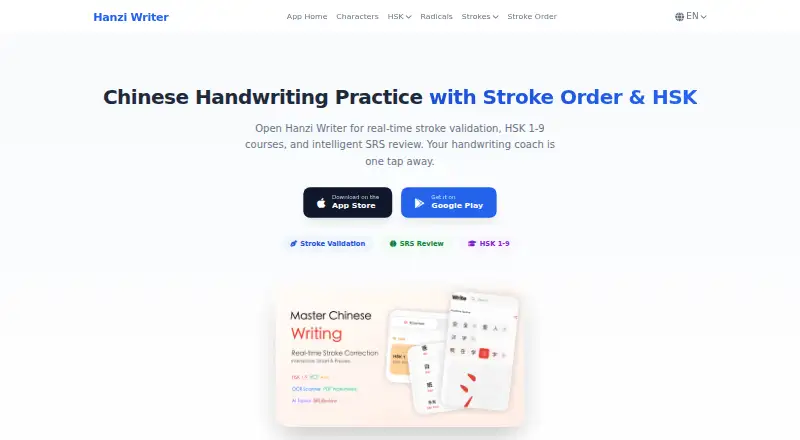
What Hanzi Writer is
Hanzi Writer is a Chinese handwriting practice app that checks stroke order, direction, starting point, shape, and proportion as you write. It supports HSK 1–9, YCT 1–4, AP Chinese, iGCSE Chinese, and Singapore Primary School curricula, including 24 volumes for the latter. The app covers more than 7,450 characters and provides 16 interface languages. Spaced repetition schedules review around Again, Hard, Good, and Easy ratings. Core writing practice, stroke animations, review, and OCR work offline or on-device. OCR uses Google ML Kit, and camera images are not uploaded or cloud processed. Users can import Anki .apkg and .colpkg decks for interactive practice, and create customizable A4 PDF worksheets with pinyin, stroke guides, and tracing grids. The free plan includes core writing practice. Pro adds unlimited daily practice, AI-generated custom topics, cloud sync, and an ad-free experience, but subscription prices are displayed in the app rather than listed here. The topic generator sends entered descriptions to Google Gemini through Firebase Vertex AI; those inputs are not used to train Google AI models.
Good
- Checks multiple parts of each written stroke
- Core practice, review, animations, and OCR work offline
- OCR images stay on-device
- Creates customizable A4 PDF worksheets
Watch out
- Pro subscription prices are displayed in the app
- Custom topic descriptions are sent to Google Gemini
Who it suits
It suits learners practicing Chinese handwriting who want stroke feedback, curriculum-based study, or scheduled review. It may also suit Anki users who want to turn imported decks into handwriting practice.
Verdict
Hanzi Writer offers detailed handwriting feedback, a wide range of curricula, and offline core practice. The free plan covers core writing practice; Pro adds further practice, topic-generation, sync, and ad-free features, with prices shown in the app.
Plans and prices
From Hanzi Writer's own pricing page, checked 30 Sep 2026.
| Plan | Price | What it gives you |
|---|---|---|
| Free | Free | core writing practice features |
| Pro annual | — | unlimited daily practice · AI-generated custom topics · cloud sync · ad-free experience · price displayed in app |
| Pro monthly | — | unlimited daily practice · AI-generated custom topics · cloud sync · ad-free experience · price displayed in app |
The facts
Each one read from Hanzi Writer's own pages, with the date it was checked.
What it does
- AI topic generator
- Smart Topic Generator sends user-entered descriptions to Google Gemini through Firebase Vertex AI, and those inputs are not used to train Google AI models.checked 30 Sep 2026
- Anki integration
- Users can import .apkg and .colpkg Anki decks into interactive handwriting practice.checked 30 Sep 2026
- Character coverage
- The app covers more than 7,450 Chinese characters and provides 16 interface languages.checked 30 Sep 2026
- Cloud security
- Progress synchronization uses encrypted cloud backup, with encryption in transit using TLS and encryption at rest where applicable.checked 30 Sep 2026
- Curricula
- Supported curricula include HSK 1–9, YCT 1–4, AP Chinese, iGCSE Chinese, and Singapore Primary School with 24 volumes.checked 30 Sep 2026
- Data deletion
- Users can delete their account and associated data in the app or by email, with processing within 30 days.checked 30 Sep 2026
- OCR privacy
- OCR runs on the device with Google ML Kit, and camera images are not uploaded or cloud processed.checked 30 Sep 2026
- Payments
- Subscriptions are processed through Apple App Store or Google Play, and cancellations take effect at the end of the billing period.checked 30 Sep 2026
- Purpose
- Hanzi Writer is a Chinese handwriting practice app with real-time stroke correction, HSK 1–9 courses, on-device OCR, and spaced repetition review.checked 30 Sep 2026
- Spaced repetition
- Its Anki-compatible SRS schedules reviews using Again, Hard, Good, and Easy confidence ratings.checked 30 Sep 2026
- Stroke validation
- The app validates stroke order, direction, starting point, shape, and proportion while users write.checked 30 Sep 2026
- Support
- Terms and privacy questions can be sent to [email protected].checked 30 Sep 2026
- Worksheets
- The app generates customizable A4 PDF worksheets with pinyin, stroke guides, and tracing grids.checked 30 Sep 2026
- Works offline
- Core writing practice, stroke animations, SRS review, and OCR work offline or on-device.checked 30 Sep 2026
The company
- Headquarters
- Canal District, Cangzhou, Hebei, Chinachecked 23 Sep 2026
The full review of Hanzi Writer
Hanzi Writer is a Chinese-character handwriting app for learners who want their writing corrected as they practice. It suits both curriculum-led study and self-directed review, with much of its core toolkit usable offline.
Overview
Hanzi Writer’s defining strength is the specificity of its feedback: it evaluates stroke sequence, direction, starting point, shape, and proportion. That makes it more useful for learning how to write characters than a tool that only presents characters or worksheets. Its breadth—more than 7,450 characters, 16 interface languages, and curricula from HSK 1–9 to YCT, AP Chinese, iGCSE, and Singapore Primary School—gives learners several ways to organize practice.
There is a meaningful distinction between this broad study toolkit and the paid extras. Free includes core writing practice; Pro adds unlimited daily practice, AI-generated topics, cloud sync, and an ad-free experience. Readers who need only guided handwriting can start without paying, while the value of Pro depends on whether those additions matter to their routine.
Key features
Feedback and review
Stroke validation catches more than an incorrect final shape: it checks how the character is constructed. Pen-control exercises, progress tracking, and custom word practice broaden the app beyond following a fixed course. This is a strong fit for learners who want deliberate handwriting practice, though it is not a substitute for a general-purpose Chinese study app based on these features alone.
The Anki-compatible spaced repetition system schedules reviews from Again, Hard, Good, and Easy ratings. Importing .apkg and .colpkg decks turns a learner’s existing Anki material into interactive handwriting practice, a useful bridge for users who already maintain their own vocabulary sets.
Offline tools and privacy
Core writing practice, stroke animations, SRS review, and OCR work offline or on-device. OCR uses Google ML Kit, and camera images are not uploaded or cloud processed. That is a practical privacy advantage for character lookup and makes these core tools usable without a dependable connection.
Customizable A4 PDF worksheets include pinyin, stroke guides, and tracing grids, so learners can take practice away from the screen. The Smart Topic Generator is different: it sends user-entered descriptions to Google Gemini through Firebase Vertex AI. Those inputs are not used to train Google AI models, but users should still consider what they choose to submit.
Pricing
| Plan | Price | What it includes |
|---|---|---|
| Free | free | Core writing practice features |
| Pro monthly | Custom pricing | Unlimited daily practice, AI-generated custom topics, cloud sync, and ad-free use |
| Pro annual | Custom pricing | Unlimited daily practice, AI-generated custom topics, cloud sync, and ad-free use |
The free plan is the sensible starting point for learners focused on core handwriting practice. Pro is for those who expect to practice without a daily cap or want generated topics, synchronized progress, and no ads. Subscription prices are displayed in the app; payments go through the Apple App Store or Google Play, and cancellation takes effect at the end of the billing period.
Platforms
Hanzi Writer is available on Android, iOS, and macOS. Encrypted cloud backup supports progress synchronization, with TLS encryption in transit and encryption at rest where applicable. Users can request account and associated-data deletion in the app or by email; processing takes up to 30 days.
Who it's for
Choose Hanzi Writer if stroke accuracy is a priority, you want a structured curriculum or your own words and Anki decks, or you need offline handwriting practice. Its curriculum range also makes it relevant to learners following school or exam-oriented material. It is a weaker fit if you want a free plan with unlimited daily practice, or if you specifically need a platform outside Android, iOS, and macOS.
Pros and cons
- Detailed stroke correction: feedback covers construction and proportions, not only the finished character.
- Flexible study paths: extensive character coverage, multiple curricula, custom words, and Anki imports accommodate different study routines.
- Useful offline core: writing, animations, review, and OCR remain available without cloud processing.
- Pro pricing requires a check in-app: the plan features are clear, but the billed price is displayed in the app, making costs harder to compare in advance.
- Topic generation sends prompts to a third party: inputs are not used to train Google AI models, but the feature is not entirely on-device like OCR.
Alternatives
Handwriting Practice Apps is the broader category to browse if you want to compare handwriting tools beyond Chinese study.
Kanji Dojo is a free, open-source alternative for learners who value a broader platform range, including Linux, web, and Windows, alongside Android, iOS, and macOS.
Skritter is worth considering if you want a paid option with a 7-day free trial; its monthly plan is $14.99 a month. KanjiPad, Kitsunewa Writing Practice, Writing Wizard, Copybook Club, Chinese Stroke Order, and Zishu are other options to compare.
Verdict
Hanzi Writer is a strong choice for learners who want precise handwriting correction, substantial curriculum coverage, and offline review in one app. Its free core makes it easy to start; look elsewhere if unlimited daily practice is essential without a paid subscription or if you need a platform it does not support.
Getting started
- Open the Hanzi Writer website or install it on Android, iOS or macOS
- Start with the Free plan for core writing practice
- Select a supported curriculum or character practice
- Import an Anki .apkg or .colpkg deck if needed
- Create worksheets or enable Pro features through the app
Limits worth knowing
The Free plan includes core writing practice features. Pro plans add unlimited daily practice, AI-generated custom topics, cloud sync and an ad-free experience; prices are shown in the app.
Questions
Is Hanzi Writer free?
Yes. The Free plan costs nothing and includes core writing practice features.
What do Pro plans add?
Pro monthly and Pro annual plans provide unlimited daily practice, AI-generated custom topics, cloud sync and an ad-free experience. Their prices are displayed in the app.
Which platforms are supported?
Hanzi Writer supports Android, iOS and macOS.
Does it work offline?
Core writing practice, stroke animations, spaced-repetition review and OCR work offline or on-device.
Can I use Anki decks?
Yes. The app imports .apkg and .colpkg Anki decks into interactive handwriting practice.
How does OCR handle privacy?
OCR runs on the device with Google ML Kit, and camera images are not uploaded or cloud processed.
Alternatives to Hanzi Writer
- 1

LetterSchool
Free planAndroidiOSmacOSWindows8.1From $59.99 a year - 2

Nazoru
Free planAndroidiOSmacOS7.8From $39.99 a year - 3
Writing Wizard
Free planAndroidiOSWindows7.8From $2.49 a month - 4
Letterpaths
Free planOpen sourceAndroidiOSWebAPI7.7Free plan - 5
Handwriting Repeater
Free planAndroidiOSWeb7.3Free plan - 6
Kitsunewa Writing Practice
Free planAndroidiOSWeb7.2From $4.08 a month