
KanjiPad
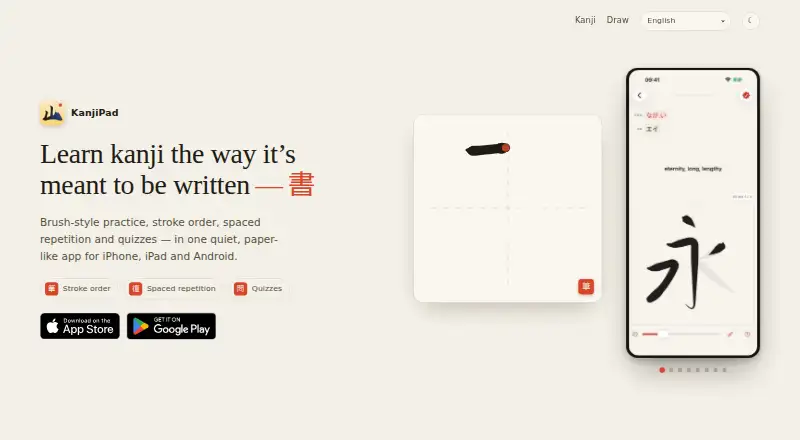
KanjiPad teaches Japanese kanji with on-screen brush-style writing practice, stroke-order guidance, quizzes, and spaced repetition.
What KanjiPad is
KanjiPad teaches Japanese kanji with on-screen brush-style writing practice, stroke-order guidance, quizzes, and spaced repetition. Its guided library covers all 2,136 jōyō kanji, arranged by JLPT levels N5 through N1, with readings and example words. As learners draw, the app checks their strokes. Character pages add meanings, on and kun readings, Heisig keywords, example words, and speech synthesis. Learners can look up characters by meaning or reading, or draw one for recognition; the browser lookup compares stroke shape, direction, and order and runs without uploading the drawing or requiring an account or app installation. A Today dashboard tracks a streak, JLPT progress, and activity over 12 weeks, while the maker suggests five minutes of daily practice. The app is free on Android, iOS, and macOS, and works offline without an account or sign-up, keeping progress on the device. The JLPT N5 list is also available free on the web without sign-up.
Good
- Covers all 2,136 jōyō kanji.
- Checks strokes during writing practice.
- Includes quizzes and spaced repetition.
- Works offline without an account.
- Browser lookup uploads no drawing data.
Watch out
- Mobile app may collect usage and device data.
- Collected data may include learning progress.
- Some information may be shared under stated conditions.
Who it suits
KanjiPad suits learners working through JLPT levels N5 to N1 who want handwriting practice and structured kanji review. Its lookup tools may also help people identifying a character from a drawing.
Verdict
KanjiPad combines a broad JLPT-organized kanji library with handwriting practice, review, and lookup tools. Its offline use and browser lookup without uploads offer alternatives for different study needs, while its privacy policy lists several kinds of app data it may collect.
The facts
Each one read from KanjiPad's own pages, with the date it was checked.
What it does
- Audience
- The app is presented for learners from JLPT N5 through N1.checked 4 Oct 2026
- Character details
- Character entries include on and kun readings, meanings, Heisig keywords, example words and speech synthesis.checked 4 Oct 2026
- Coverage
- The site offers stroke order, readings and words for all 2,136 jōyō kanji, organized by JLPT level.checked 5 Oct 2026
- Data sharing
- The policy says KanjiPad does not sell personal information and may share it with consent, for legal obligations, to protect rights or safety, or in a business transfer or merger.checked 5 Oct 2026
- Data use
- The policy says collected information is used to provide and maintain the app, personalize experiences, track learning progress, analyze performance, fix issues, and communicate about updates or support.checked 5 Oct 2026
- JLPT library
- Its guided library organizes kanji by JLPT levels N5 through N1.checked 5 Oct 2026
- Kanji library
- Its library covers all 2,136 jōyō kanji, grouped by JLPT level, with stroke order, readings and words.checked 4 Oct 2026
- Lookup
- Learners can search by meaning or reading, or draw a character for handwriting recognition.checked 4 Oct 2026
- Lookup results
- A kanji result page includes animated stroke order, meanings, on and kun readings, JLPT level, stroke count, and example words with furigana and translations.checked 5 Oct 2026
- Mobile data collected
- The privacy policy says the app may collect preferences, learning progress, support communications, device information, usage statistics, and performance and error data.checked 5 Oct 2026
- Offline use
- The Google Play listing says the app works fully offline, requires no account or sign-up, and keeps progress on the device.checked 4 Oct 2026
- Privacy
- The privacy policy says KanjiPad does not sell personal information and describes collecting preferences, learning progress, device information, usage statistics and performance data.checked 4 Oct 2026
- Progress tools
- The Today dashboard shows a streak, JLPT progress and a 12-week activity map.checked 4 Oct 2026
- Purpose
- KanjiPad teaches kanji through brush-style practice, stroke order, spaced repetition and quizzes.checked 5 Oct 2026
- Review schedule
- The maker describes spaced repetition and recommends five minutes of practice a day.checked 4 Oct 2026
- Security
- The privacy policy says it uses technical and organizational measures to protect information against unauthorized access, alteration, disclosure or destruction.checked 5 Oct 2026
- Spaced repetition
- Spaced repetition helps keep kanji fresh with a suggested five minutes of practice a day.checked 5 Oct 2026
- Support
- The privacy policy lists [email protected] for questions about the policy.checked 5 Oct 2026
- Writing practice
- The app uses brush-style tracing with real stroke order to help build muscle memory.checked 5 Oct 2026
Where it runs
- Browser lookup
- The browser tool recognizes drawn kanji by comparing stroke shape, direction and order against 2,136 jōyō kanji.checked 5 Oct 2026
- Browser privacy
- The drawing lookup runs in the browser, uploads nothing and requires no account or app installation.checked 5 Oct 2026
- Platforms
- The site describes the app as available for iPhone, iPad and Android.checked 5 Oct 2026
Money
- Free web content
- The JLPT N5 list is available free with no sign-up.checked 4 Oct 2026
Alternatives to KanjiPad
- 1

LetterSchool
Free planAndroidiOSmacOSWindows8.1From $59.99 a year - 2
Nazoru
Free planAndroidiOSmacOS7.8From $39.99 a year - 3
Writing Wizard
Free planAndroidiOSWindows7.8From $2.49 a month - 4
Letterpaths
Free planOpen sourceAndroidiOSWebAPI7.7Free plan - 5
Handwriting Repeater
Free planAndroidiOSWeb7.3Free plan - 6
Kitsunewa Writing Practice
Free planAndroidiOSWeb7.2From $4.08 a month