Kitsunewa Writing Practice
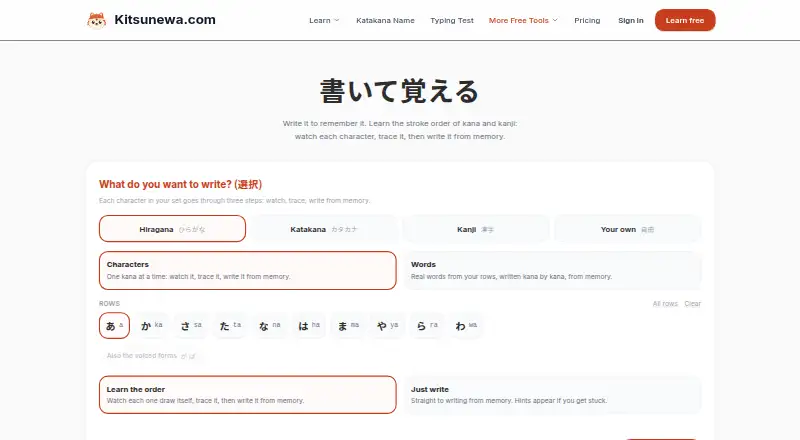
Kitsunewa Writing Practice helps learners study Japanese kana and kanji stroke order by watching characters, tracing them, and writing them from memory.
What Kitsunewa Writing Practice is
Kitsunewa Writing Practice helps learners study Japanese kana and kanji stroke order by watching characters, tracing them, and writing them from memory. Practice can focus on characters or words, with the option to study stroke order first or attempt recall with hints. The “Your own” option turns Japanese text, such as a word, name, or sentence, into a set of unique characters for practice. Free writing practice runs in a browser without signup and has no rounds or scores; learners can select characters to watch, tap, trace, or write repeatedly. A mouse or trackpad works, as does finger input on phones and tablets. Personal bests are saved on the learner's device. Writing practice is available on web, Android, and iOS. The Free plan is $0.00 USD. Pro costs $4.08 a month on an annual basis, billed $49 yearly, and includes Advanced Essentials after a free preview, higher AI conversation caps, and unlimited guided speaking lessons. Advanced Essentials batches require an account.
Good
- Free browser writing practice requires no signup
- Practice characters, words, or custom Japanese text
- Supports tracing and memory writing with hints
- Saves personal bests on the learner's device
Watch out
- Advanced Essentials batches require an account
- Pro is billed annually at $49
- Free practice has no rounds or scores
Who it suits
It suits independent Japanese learners who want repeated kana and kanji writing practice, including practice from their own Japanese text. The free browser practice is useful for learners who do not want to sign up.
Verdict
Kitsunewa Writing Practice offers a straightforward way to repeat stroke-order and recall exercises, including custom text. Free practice needs no account; Advanced Essentials batches do.
Plans and prices
From Kitsunewa Writing Practice's own pricing page, checked 4 Oct 2026.
| Plan | Price | What it gives you |
|---|---|---|
| Free | Free | Writing practice and other tools · no signup for writing practice |
| Pro | $4.08 a month | Advanced Essentials · higher AI conversation caps · unlimited guided speaking lessons · $49 billed yearly · save 31% |
The facts
Each one read from Kitsunewa Writing Practice's own pages, with the date it was checked.
What it does
- Access
- Writing practice is free, runs in the browser, requires no signup, and saves personal bests on the user's device.checked 4 Oct 2026
- Audience
- The maker describes Kitsunewa as a set of tools for independent Japanese learners who like to learn through practice.checked 4 Oct 2026
- Custom text
- The “Your own” option accepts Japanese text such as a word, name, or sentence and makes its unique characters available for practice.checked 4 Oct 2026
- Limits
- Advanced Essentials batches require an account and are included in Pro after the free preview.checked 4 Oct 2026
- Payments
- Stripe processes Pro payments; Kitsunewa says it does not see or store full card details.checked 4 Oct 2026
- Practice modes
- Learners can practice characters or words, learn stroke order first, or go straight to writing from memory with hints.checked 4 Oct 2026
- Privacy
- Kitsunewa says it does not sell personal data and does not use advertising or tracking cookies.checked 4 Oct 2026
- Purpose
- The tool teaches Japanese kana and kanji stroke order through watching, tracing, and writing characters from memory.checked 4 Oct 2026
- Security
- The privacy policy says user information is encrypted in transit and at rest, while noting that absolute security cannot be guaranteed.checked 4 Oct 2026
- Stroke data
- Stroke order data is sourced from KanjiVG by Ulrich Apel under CC BY-SA 3.0.checked 4 Oct 2026
- Subscription cancellation
- Pro can be cancelled from account settings at any time, with Pro access continuing until the end of the billing period.checked 4 Oct 2026
- Support
- Users can send feedback or questions through a contact form after signing in, and the maker says every message is read by a real person.checked 4 Oct 2026
- Touch input
- A mouse or trackpad works, and on phones or tablets learners can write with a finger.checked 4 Oct 2026
Money
- Free practice
- Free practice has no round or score and lets users choose any character in their set to watch, tap, trace, or write repeatedly.checked 4 Oct 2026
The full review of Kitsunewa Writing Practice
Kitsunewa Writing Practice is a browser tool for learning Japanese kana and kanji stroke order through demonstration, tracing and recall. It is best for independent learners who want to repeat selected characters or personal Japanese text without an account. Its flexible, no-signup practice is compelling, but learners who need scored sessions or a broader curriculum should consider other options.
Overview
The tool supports a progression from watching stroke order to tapping, tracing and writing from memory, with hints when recall falters. You can practise individual characters or words, then use “Your own” to turn a Japanese word, name or sentence into the distinct characters it contains. That personalisation makes it practical for vocabulary you actually use, while the product remains focused on handwriting rather than serving as a complete Japanese course.
Free practice is deliberately open-ended: choose any character in your set and repeat it as often as needed, without rounds or scores. Personal bests are stored on the device. Stroke-order information is sourced from KanjiVG by Ulrich Apel under CC BY-SA 3.0.
Key features
From model to memory
Watching and tracing lower the barrier to unfamiliar kana and kanji before a memory attempt. Hints provide support without forcing every exercise into a test. This suits steady, self-directed repetition; the absence of rounds and scoring is a drawback for learners who rely on measurable sessions or competitive feedback.
Custom text practice
“Your own” accepts Japanese text and extracts its unique characters for practice. It is a useful way to work on a name, sentence or current study list instead of being limited to a fixed sequence. Custom word practice is therefore a meaningful strength for learners with specific writing goals.
Pen control and device input
A mouse or trackpad works on a computer, while phones and tablets accept finger writing. The same browser-based activity can therefore move between desktop and mobile hardware, although no dedicated native app is required for access.
Account-free starting point
Writing practice runs free in a browser with no signup, and device-based personal-best storage keeps the initial experience frictionless. Advanced Essentials batches require an account and are included with Pro after the free preview, so more structured material comes with a commitment to account access.
Pricing
| Plan | Price | Includes |
|---|---|---|
| Free | free | Writing practice and other tools; writing practice needs no signup. |
| Pro | $4.08 a month, billed $49 yearly (save 31%) | Advanced Essentials, higher AI conversation caps and unlimited guided speaking lessons. |
The free tier is the right choice for handwriting repetition, custom text and device-saved bests without an account. It does not include the Advanced Essentials batches beyond the free preview. Pro suits learners who also want those batches and Kitsunewa’s wider AI and speaking tools; its annual billing means the stated monthly rate is tied to a $49 yearly charge. There is no free trial. Pro can be cancelled in account settings, with access continuing through the current billing period. Stripe handles payment, and Kitsunewa says it does not see or store full card details.
Platforms
Kitsunewa Writing Practice runs on the web, including browser use on Android and iOS devices. Touch input supports finger writing on phones and tablets; desktop learners can use a mouse or trackpad.
Who it's for
This is a strong fit for independent Japanese learners who learn through repeated practice and want to target particular kana, kanji, words or personally relevant sentences. It also suits anyone who values starting immediately without registration. Learners needing scored rounds, a prescribed progression or a dedicated handwriting curriculum will find the open-ended free mode less suitable.
Pros and cons
- Pro: Custom Japanese text turns names, words and sentences into targeted character drills.
- Pro: Watching, tracing, hints and memory writing support several stages of learning.
- Pro: Free browser access requires no signup, and personal bests remain on the device.
- Pro: Finger, mouse and trackpad input cover common phones, tablets and computers.
- Con: Free practice has no rounds or scores, limiting progress measurement for test-oriented learners.
- Con: Advanced Essentials batches require an account and Pro after the preview.
- Con: Pro’s advertised $4.08 monthly rate is annual billing, not a month-to-month price.
Alternatives
Handwriting Practice Apps is a useful category starting point when you want to compare several handwriting-focused choices.
Kanji Dojo is the better pick if you want an open-source option across Android, iOS, Linux, macOS, web and Windows; its free plan is 0.00.
Writing Wizard suits learners seeking a children-oriented handwriting app on Android, iOS or Windows, with remaining letters and custom words sold through purchase or subscription.
Handwriting Repeater is preferable for completely free, unlimited sentence repetition with no account or premium tier.
Hanzi Writer is an alternative for Android, iOS or macOS users wanting core writing practice and optional AI-generated custom topics in Pro.
LetterSchool is aimed at early handwriting learners and offers a limited free app plus a free trial.
Nazoru fits learners who want Japanese study-path integrations, two full free practices per day and no ads or tracking.
Copybook Club is an iOS choice for worksheet generation, PDF export and handwriting-oriented creative practice.
Cursive: Learn Cursive is an alternative focused on cursive handwriting across Android, iOS and macOS.
Verdict
Choose Kitsunewa Writing Practice for flexible Japanese handwriting drills, especially when custom text and account-free repetition matter most. Look elsewhere if scored rounds, unlimited structured content without Pro, or a broader language-learning path is your priority.
Alternatives to Kitsunewa Writing Practice
- 1

LetterSchool
Free planAndroidiOSmacOSWindows8.1From $59.99 a year - 2
Nazoru
Free planAndroidiOSmacOS7.8From $39.99 a year - 3
Writing Wizard
Free planAndroidiOSWindows7.8From $2.49 a month - 4
Letterpaths
Free planOpen sourceAndroidiOSWebAPI7.7Free plan - 5
Handwriting Repeater
Free planAndroidiOSWeb7.3Free plan - 6

Skritter
AndroidiOSWeb7.2From $99.99 a year