
Kanji Dojo
Kanji Dojo is an open-source app for learning Japanese character writing, meanings, readings, and related vocabulary.
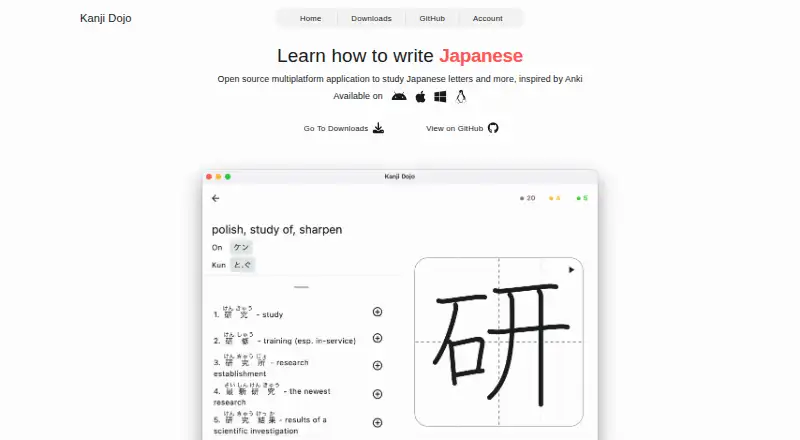
What Kanji Dojo is
Kanji Dojo is an open-source app for learning Japanese character writing, meanings, readings, and related vocabulary. It covers hiragana, katakana, and more than 6,000 characters. Learners can organize study by JLPT level, school grade, or WaniKani level, or combine those groupings. Flashcards and spaced repetition support practice, including vocabulary examples, and a searchable dictionary looks up characters and words. After downloading the required learning materials, users can continue studying offline. The learning content is free; some extra features are paid to help cover backend and development expenses. Kanji Dojo is available on Android, iOS, Linux, macOS, web, and Windows. Its privacy policy says analytics use aggregated information without personal identifiers and that crash diagnostics are collected; it also says user information is not shared or sold for marketing. The project is community driven, so feature requests may depend on a contributor choosing to implement them. The linked GitHub repository was archived on August 27, 2026, and is read-only.
Good
- Covers hiragana, katakana, and over 6,000 characters
- Study paths include JLPT, school grade, and WaniKani levels
- Spaced repetition and vocabulary flashcards
- Searchable character and word dictionary
- Offline study after downloading learning materials
Watch out
- Some extra features are paid
- Feature requests may not be implemented
- Linked GitHub repository is archived and read-only
Who it suits
Kanji Dojo suits learners who want structured practice with Japanese writing, readings, meanings, and vocabulary. Its offline mode may suit users who download study materials in advance.
Verdict
Kanji Dojo offers broad character study paths, spaced-repetition practice, a dictionary, and offline use. The repository is archived, so the project is read-only there and new feature requests may depend on community contributions.
Plans and prices
From Kanji Dojo's own pricing page, checked 30 Sep 2026.
| Plan | Price | What it gives you |
|---|---|---|
| Free | Free | App content is completely free and open source; some extra features are paid |
The facts
Each one read from Kanji Dojo's own pages, with the date it was checked.
What it does
- Data sharing
- The policy says Kanji Dojo does not share or sell user information to third parties for marketing purposes.checked 29 Sep 2026
- Dictionary
- The app includes a searchable dictionary for characters and words.checked 29 Sep 2026
- Feature requests
- The maker says the project is community driven and a requested feature may not be implemented unless a contributor is interested.checked 29 Sep 2026
- Integrations and analytics
- The privacy policy says the app uses Firebase Analytics and Firebase Crashlytics; the repository notes Google Play includes Firebase Analytics and Play services for in-app review.checked 29 Sep 2026
- Integrations and data
- The privacy policy says the app uses Firebase Analytics and Firebase Crashlytics for aggregated usage information and crash diagnostics.checked 30 Sep 2026
- Learning paths
- Learners can study by JLPT level, school grade, or WaniKani level, or mix those paths.checked 30 Sep 2026
- Offline use
- After downloading the necessary learning materials, users can continue studying offline.checked 30 Sep 2026
- Open source
- The maker describes the app as open source; the linked GitHub repository lists the GNU GPL version 3 or later license.checked 30 Sep 2026
- Practice
- The app uses spaced repetition and flashcards, including vocabulary examples.checked 29 Sep 2026
- Pricing
- The learning content is free and open source, while some extra features are paid to cover backend and development expenses.checked 29 Sep 2026
- Privacy
- The privacy policy says Kanji Dojo does not share or sell user information to third parties for marketing purposes.checked 30 Sep 2026
- Project and updates
- The maker describes development and updates as community driven, and says feature requests may not be implemented without an interested contributor.checked 30 Sep 2026
- Project status
- The GitHub repository page states that it was archived on August 27, 2026 and is now read-only.checked 29 Sep 2026
- Purpose
- Kanji Dojo helps learners practice writing Japanese characters and learn their meanings, readings, and related words.checked 30 Sep 2026
- Review and dictionary
- The app uses spaced repetition and includes a searchable dictionary.checked 30 Sep 2026
- Study content
- It supports hiragana, katakana, and kanji, with more than 6,000 characters and additional vocabulary.checked 30 Sep 2026
- Support
- Users can request help or report issues through Discord, the in-app feedback menu, GitHub discussions or issues, or email.checked 30 Sep 2026
Where it runs
- Platforms
- The site lists Windows, Linux, macOS, Android, and iOS; iOS is available as a TestFlight version while the first release is being prepared.checked 30 Sep 2026
The full review of Kanji Dojo
Kanji Dojo is a Japanese-character study app for learners who want handwriting practice alongside vocabulary and review. It is strongest for people who value broad study paths and offline access, and less compelling if they need a project with active upstream development.
Overview
The app brings writing systems, study organization, review, and reference into one place. Its open-source license is a plus for readers who value inspectable, reusable software, but the archived repository makes future changes a community-dependent prospect.
Key features
- Hiragana, katakana, and kanji: More than 6,000 characters provide room to move beyond a small beginner set.
- Study paths: Organize practice by JLPT level, school grade, or WaniKani level, or combine them. That flexibility suits learners following a defined curriculum, though it does not replace choosing a study goal.
- Writing and review: Pen-control exercises, flashcards, and spaced repetition pair active character practice with recall. Vocabulary examples help connect characters to words.
- Dictionary and offline use: A searchable dictionary serves as a reference alongside study. Download the needed materials first and continue learning offline, useful when connectivity is unreliable.
- Privacy: Firebase Analytics collects aggregated usage information without personal identifiers, while Crashlytics collects crash logs and diagnostics. The policy says user information is not shared or sold to third parties for marketing.
- Community support: Help and issue reporting are available through Discord, the in-app feedback menu, GitHub discussions or issues, and email. The maker describes development as community driven; feature requests may wait for an interested contributor.
Pricing
The Free plan costs nothing. Learning content is free and open source; some extra features are paid to help cover backend and development expenses. There is no free trial. This is a strong fit for learners who mainly need the core study material, but readers seeking every extra feature should expect that some may require payment.
Platforms
Kanji Dojo supports Android, iOS, Linux, macOS, Windows, and web, making it a flexible option across mobile and desktop devices.
Who it's for
Choose Kanji Dojo if Japanese learners want character writing practice, structured routes through a sizable character collection, vocabulary-supported spaced repetition, and the ability to study offline. Look elsewhere if ongoing feature development is a priority: the GitHub repository was archived on August 27, 2026 and is read-only.
Pros and cons
Pros
- Hiragana, katakana, and kanji study across more than 6,000 characters.
- JLPT, school-grade, and WaniKani paths can be combined to suit different study plans.
- Free, open-source learning content and offline study after downloading materials.
- Spaced repetition, flashcards, writing exercises, and a searchable dictionary cover complementary study needs.
Cons
- The archived repository is read-only, so future development depends on community contributions.
- Some extra features are paid, so the free content does not guarantee access to every feature.
- Firebase Analytics and Crashlytics collect usage and diagnostic data, which may not suit readers who want to avoid those services.
Alternatives
For other handwriting-focused options, browse Handwriting Practice Apps.
- Writing Wizard may suit readers after a general handwriting app with a free download and paid access to remaining letters and custom words.
- Hanzi Writer is another freemium writing-practice option, with core practice features free and a Pro plan for unlimited daily practice and AI-generated custom topics.
- LetterSchool may fit early learners who want a free starter set and a trial of its broader offering.
- Handwriting Repeater is a free choice for repeating sentences, with no account, subscription, or limits on sentences and repetitions.
- iTrace offers a free version with warm-ups, three letters, and an interactive scene, plus a one-time premium unlock.
- LearnWell Languages is a paid option for iOS and macOS, with Premium at $6.99 a month.
- Letterpaths is a free alternative; its public project describes a headless TypeScript library for generating handwriting geometry.
- Chinese Stroke Order Practice is a web-based freemium alternative with Pro plans for stroke-order practice.
Verdict
Kanji Dojo is a good match for Japanese learners who want writing practice, structured character study, and offline review without paying for the learning content. Its breadth and free core make it easy to recommend for self-directed study; choose another app if active upstream development is essential.
Getting started
- Visit https://kanji-dojo.com/.
- Choose Android, iOS, Linux, macOS, web, or Windows.
- Download the learning materials needed for offline study.
- Begin with a JLPT, school-grade, or WaniKani path, or combine them.
Limits worth knowing
The learning content is free, while some extra features are paid. Offline study requires downloading the necessary learning materials first.
Questions
Is Kanji Dojo free?
Its learning content is free and open source. Some extra features are paid.
Which platforms does it support?
Kanji Dojo is available on Android, iOS, Linux, macOS, web, and Windows.
What Japanese writing does it cover?
It covers hiragana, katakana, and more than 6,000 characters, with meanings, readings, and related words.
Can I study offline?
Yes. Download the necessary learning materials before studying offline.
Is Kanji Dojo open source?
Yes. The linked GitHub repository lists the GNU GPL version 3 or later license.
Is the project still being updated?
The GitHub repository was archived on August 27, 2026, and is read-only. The maker describes development and updates as community driven.
Alternatives to Kanji Dojo
- 1

LetterSchool
Free planAndroidiOSmacOSWindows8.1From $59.99 a year - 2

Nazoru
Free planAndroidiOSmacOS7.8From $39.99 a year - 3
Writing Wizard
Free planAndroidiOSWindows7.8From $2.49 a month - 4
Letterpaths
Free planOpen sourceAndroidiOSWebAPI7.7Free plan - 5
Handwriting Repeater
Free planAndroidiOSWeb7.3Free plan - 6
Kitsunewa Writing Practice
Free planAndroidiOSWeb7.2From $4.08 a month