Handwriting Repeater
Handwriting Repeater is a free browser-based tool for practicing handwriting by placing repeated sentences on a digital canvas.
What Handwriting Repeater is
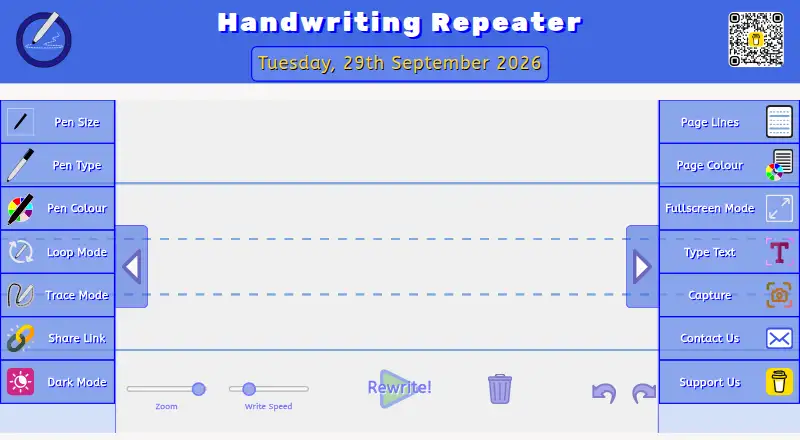
Handwriting Repeater is a free browser-based tool for practicing handwriting by placing repeated sentences on a digital canvas. Loop Mode repeats writing to fill a page, while Trace Mode provides faded guide text to follow. Users can choose among three pen sizes, four pen types, eleven ink colours, ten page-line styles, and five page colours. Its Type Text panel offers repeated text, seven font options, and preset templates for alphabets, numbers, cursive, calligraphy, and signatures. The canvas can be saved as a PDF, captured as a PNG, or printed through the browser. A share link preloads the selected settings for students. The canvas extends as lines are added, with no hard repetition limit stated. Text entered on the canvas stays in the browser rather than being sent to or stored on the operator’s servers. It works in modern browsers on desktop and laptop computers and on iOS and Android devices. Use is permitted for personal, educational, and non-commercial purposes.
Good
- Loop and Trace modes support different practice styles.
- Eleven ink colours and three pen sizes.
- Canvas can be saved, captured, or printed.
- Share links preload selected settings.
- Canvas text stays in the browser.
Watch out
- Use is limited to personal, educational, or non-commercial purposes.
- Requires a modern browser.
Who it suits
The tool is aimed primarily at students, teachers, and parents, in the UK and internationally. It suits handwriting practice that benefits from repeatable text, tracing guides, or shareable settings.
Verdict
Handwriting Repeater offers repeat and trace practice with customizable pens and pages, plus several ways to export or share a canvas. It is free to use without an account or subscription fees.
Plans and prices
From Handwriting Repeater's own pricing page, checked 15 Oct 2026.
| Plan | Price | What it gives you |
|---|---|---|
| Free | Free | Unlimited sentence repetitions · all features included · personal, educational, and non-commercial use · No subscription, premium tier, account, or payment required |
The facts
Each one read from Handwriting Repeater's own pages, with the date it was checked.
What it does
- Accessibility controls
- Dark mode, fullscreen mode, page-colour choices, zoom, and writing-speed controls are provided.checked 15 Oct 2026
- Analytics and advertising
- The site uses consent-based Google Analytics and Google AdSense cookies, including personalised advertising cookies when accepted.checked 15 Oct 2026
- API and SDKs
- The reviewed official pages describe a browser canvas and shareable URLs but provide no public API, SDK, webhook, or developer documentation.checked 15 Oct 2026
- Audience
- The tool is designed primarily for students, teachers and parents in the United Kingdom and internationally.checked 1 Oct 2026
- Children's privacy
- Children can use the tool without accounts or personal information, and the operator says it does not knowingly collect data from under-13 users.checked 15 Oct 2026
- Classroom use
- The maker says teachers use the tool on projectors to model stroke order and letter joins.checked 15 Oct 2026
- Data processing
- Text entered in the canvas stays in browser memory and is not sent to the operator's servers.checked 15 Oct 2026
- Documentation and support
- Support is offered through a contact form and [email protected], with FAQ and blog guidance linked from the site.checked 15 Oct 2026
- Export
- Completed canvases can be saved as PDF, captured as PNG screenshots, or sent to the browser print dialog.checked 15 Oct 2026
- Independent classroom reference
- Greenway Primary's handwriting policy directs teachers to edu-tools.github.io Handwriting Repeater for modelling letter formation and joins with specified background and pen settings.checked 15 Oct 2026
- Independent description
- KiwiBee describes a handwriting repeater as a browser practice board supporting trace, copy, dictation, and stroke replay.checked 15 Oct 2026
- Independent model choices
- Calihand documents UK joined, UK print, and US cursive handwriting models as alternatives for classroom practice.checked 15 Oct 2026
- Independent print workflow
- Calihand's comparable repeater is presented as a no-sign-in web page for interactive whiteboards that produces ruled printable sheets.checked 15 Oct 2026
- Independent privacy observation
- KiwiBee says its comparable repeater keeps word lists and strokes only in active browser state and resets when the session ends.checked 15 Oct 2026
- Independent school adoption
- Fou roaks Primary's spring 2026 policy lists Handwriting Repeater on edu-tools.github.io as an online supporting tool.checked 15 Oct 2026
- Licence
- The service is not released as open source; its terms say the core engine originated in an open-source project while modified code, interface, content, and additions belong to Dhiraj.checked 15 Oct 2026
- Limit: acceptable use
- The terms restrict use to personal, educational, and non-commercial purposes and prohibit commercial exploitation without consent.checked 15 Oct 2026
- Limit: persistence
- Canvas text is deleted when the browser tab closes, so the official privacy policy provides no server-side saving or account history.checked 15 Oct 2026
- Limit: reliability
- The operator provides the service as-is, disclaims uninterrupted or error-free operation, and does not guarantee browser or device compatibility.checked 15 Oct 2026
Where it runs
- Browser guidance
- Chrome is recommended for best performance, with Edge and Firefox described as working well and iOS Safari supported with possible canvas differences.checked 15 Oct 2026
- Device support
- The tool works in modern browsers on iOS and Android devices and on desktop and laptop computers.checked 1 Oct 2026
- Independent device support
- KiwiBee reports that handwriting canvases accept stylus, finger, and mouse input in modern browsers and work on interactive whiteboards.checked 15 Oct 2026
The company
- Founded
- 2026checked 28 Sep 2026
- Headquarters
- United Kingdomchecked 28 Sep 2026
The full review of Handwriting Repeater
Handwriting Repeater is a browser-based handwriting practice tool for students, teachers and parents who want to create repeatable writing drills. It is a strong fit for tracing and sentence practice; look elsewhere if you want a wider learning curriculum or a dedicated mobile app.
Overview
Loop Mode repeats writing across a page, while Trace Mode places faded guide text beneath the writing area. That gives learners two distinct ways to practise, from filling a page with a sentence to following letter shapes. Repetitions have no hard cap, and the canvas expands as lines are added, so longer drills do not run into a preset sentence limit.
Text entered in the canvas stays in the browser and is not sent to or stored on the operator’s servers. The site is served over HTTPS and operates under UK GDPR jurisdiction. Google Analytics, Google AdSense and Web3Forms are third-party services; Web3Forms handles the contact form.
Key features
Pen controls include three sizes, four types and eleven ink colours. Users can also choose among ten line styles and five page colours, including Montessori-style guides and blank pages. These options make it possible to adapt a drill to different practice needs, though the tool remains focused on handwriting rather than full worksheet design.
The Type Text panel accepts repeated text and offers seven fonts, including cursive and calligraphy, along with templates for alphabets, numbers, cursive, calligraphy and signatures. This supports both custom word practice and prepared exercises. Once a canvas is ready, users can save it as a PDF, capture a PNG screenshot or print through the browser. Share Link creates a URL that preserves the canvas settings, a practical way for teachers to send students a ready-to-use exercise.
Pricing
Handwriting Repeater’s Free plan costs nothing, billed always and forever. It includes unlimited sentences and repetitions, requires no account and has no subscription fees or premium tier. That makes it suitable for individual learners, families and teachers who need repeatable drills without a paid plan; there are no lower-cost tiers with reduced allowances to weigh against it.
The Terms permit personal, educational and non-commercial use. Users can contact Dhiraj by email or contact form, and privacy enquiries receive a response within 30 days.
Platforms
Handwriting Repeater runs in modern browsers on iOS and Android devices, as well as desktop and laptop computers. It is browser-based rather than a dedicated mobile app, so it suits people who are comfortable practising in a browser and want to move between phone and computer.
Who it's for
Students, teachers and parents are the clearest fit, whether they want to practise custom words, trace guides or distribute a consistent exercise. Its all-ages audience and personal and educational use terms suit home and classroom practice. It is less suitable for learners seeking a structured course beyond handwriting drills.
Pros and cons
- Pros: Unlimited repetitions and an automatically extending canvas support open-ended practice without an account.
- Pros: Pen, page and text options let families and teachers tailor a drill, then export or share the resulting canvas.
- Pros: Canvas text remains in the browser rather than being sent to the operator’s servers.
- Cons: The tool concentrates on handwriting exercises, not a broader learning program.
- Cons: Browser access works across mobile and desktop, but there is no dedicated app experience.
Alternatives
Handwriting Practice Apps is the broader category page for comparing options. Choose Kanji Dojo instead if open-source software and support across desktop operating systems matter more; it has Android, iOS, Linux, macOS, web and Windows versions, with a free plan.
Writing Wizard is worth considering for a mobile or Windows app: its free download gives way to an in-app purchase or subscription for remaining letters and custom words. For core writing practice on Android, iOS or macOS, Hanzi Writer has a free plan, with a Pro monthly option for unlimited daily practice and AI-generated custom topics.
Kitsunewa Writing Practice offers writing practice without signup on Android, iOS and web, with a free plan and a Pro plan at $4.08 a month, billed $49 yearly. LetterSchool may suit learners who want a dedicated app and are comfortable starting with a limited free set: its free version includes five uppercase and lowercase letters, five shapes and three CVC flashcards.
Nazoru is another option for Android, iOS and macOS users; its free plan allows two full practices per day and includes several study paths and service syncs. Copybook Club is iOS-only and offers a free plan with three worksheet generations per week, up to two pages per worksheet and PDF export. Cursive: Learn Cursive is also available on Android, iOS and macOS.
Verdict
Choose Handwriting Repeater for no-cost, open-ended handwriting drills that can be customized, exported and shared without an account. Its main advantage is the combination of unlimited repetitions and flexible practice formats; look elsewhere if you need a dedicated app or a curriculum that goes beyond handwriting.
Getting started
- Open https://www.handwritingrepeater.org/ in a modern browser
- Choose Loop Mode or Trace Mode
- Enter repeated text or select a preset template
- Adjust the pen, page lines, and page colour
- Use the canvas for practice, then save, screenshot, print, or share the settings link
Questions
How much does Handwriting Repeater cost?
It is free, with a Free plan priced at 0.00 USD and no subscription fees.
Do I need an account?
No account is required to use the tool.
Which devices and platforms are supported?
It works in modern browsers on web, iOS, Android, desktop, and laptop computers.
Can I repeat sentences without a fixed quota?
Yes. The canvas extends as lines are added, and the FAQ states there is no hard repetition limit.
What happens to text entered into the canvas?
The text runs entirely in the browser and is not sent to, stored on, or accessed from the operator’s servers.
Alternatives to Handwriting Repeater
- 1

LetterSchool
Free planAndroidiOSmacOSWindows8.1From $59.99 a year - 2
Nazoru
Free planAndroidiOSmacOS7.8From $39.99 a year - 3
Writing Wizard
Free planAndroidiOSWindows7.8From $2.49 a month - 4
Letterpaths
Free planOpen sourceAndroidiOSWebAPI7.7Free plan - 5
Kitsunewa Writing Practice
Free planAndroidiOSWeb7.2From $4.08 a month - 6

Skritter
AndroidiOSWeb7.2From $99.99 a year