Griply
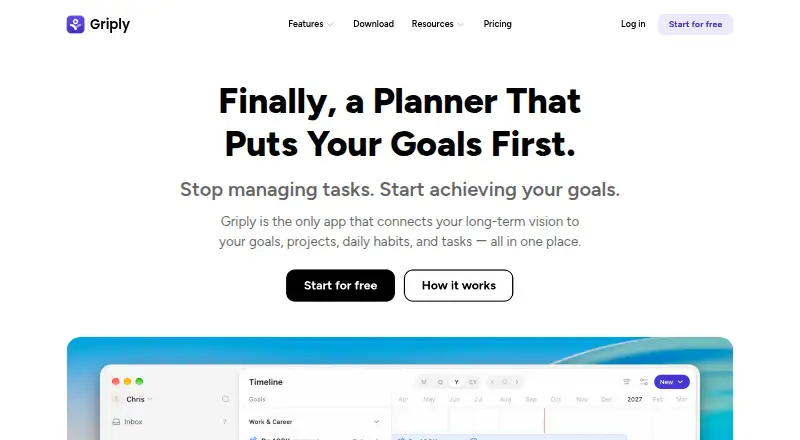
Griply is a planning app that connects a long-term vision with goals, projects, daily habits, and tasks.
What Griply is
Griply is a planning app that connects a long-term vision with goals, projects, daily habits, and tasks. Its Life Planner lets users define a vision and map life areas, while the Goal Planner supports subgoals, success metrics, projects, tasks, and habits as steps toward goals. Calendar views and time blocking help users plan a week around that work. Griply can show Google or Outlook Calendar events alongside goal work, and supports recurring tasks and focus sessions. Task Smart Recognition accepts plain-English entries and can capture, schedule, and assign tasks. It is available in browsers and on desktop, iPhone, and Android, with MacOS and Windows downloads. The free plan includes up to 2 goals, 2 habits, and 5 projects, plus unlimited tasks. Premium is listed at $2.49 a month, and a 7-day trial is offered. Griply says it does not store Google Calendar event content or metadata, instead retrieving events in real time with an encrypted OAuth access token. Its Lifetime plan excludes paid third-party integrations and future AI features. Griply says it uses commercially acceptable means to protect personal information but cannot guarantee absolute security.
Good
- Links goals, projects, habits, and daily tasks
- Google or Outlook Calendar events can appear alongside goal work
- Supports recurring tasks and focus sessions
- Free plan includes unlimited tasks
Watch out
- Free plan limits goals, habits, and projects
- Lifetime plan excludes paid third-party integrations and future AI features
- Griply cannot guarantee absolute security
Who it suits
Griply suits people who want daily tasks and habits linked to longer-term personal goals. Its free plan may fit users with up to 2 goals, 2 habits, and 5 projects.
Verdict
Griply brings life planning, goal breakdowns, time blocking, and task entry together in one app. Check the free-tier limits and the Lifetime plan exclusions before choosing a plan.
Plans and prices
From Griply's own pricing page, checked 4 Oct 2026.
| Plan | Price | What it gives you |
|---|---|---|
| Free | Free | 2 Goals · 2 Habits · 5 Projects · Unlimited Tasks · 9 Life Areas · 3 Smart Lists |
| Premium | $2.49 a month | Unlimited goals · Unlimited habits · Calendar and timeblocking · Goal timeline · Subgoals · Habit targets · billed monthly |
| Premium (Year) | $29.99 a year | Unlimited Goals · Unlimited Habits · Unlimited Projects · Calendar & Timeblocking · Goal Timeline · Subgoals · Habit Targets · Unlimited Smart Lists · $29.99 billed yearly |
| Lifetime | $89.99, paid once | One time purchase · Premium features · Excl. paid third-party integrations · $119.99 |
The facts
Each one read from Griply's own pages, with the date it was checked.
What it does
- Audience
- Griply presents itself for people who want daily tasks and habits connected to long-term personal goals.checked 4 Oct 2026
- Calendar sync
- Yeschecked 22 Sep 2026
- Focus sessions
- Yeschecked 22 Sep 2026
- Integrations
- Griply can show Google or Outlook Calendar events alongside goal work in a unified view.checked 4 Oct 2026
- Lifetime limit
- The Lifetime plan excludes paid third-party integrations and future AI features.checked 4 Oct 2026
- Privacy
- Griply says it does not store Google Calendar event content or metadata and uses an encrypted OAuth access token to retrieve events in real time.checked 4 Oct 2026
- Product
- Griply connects a long-term vision to goals, projects, daily habits, and tasks in one place.checked 4 Oct 2026
- Quick entry
- Task Smart Recognition lets users enter tasks in plain English and capture, schedule, and assign them.checked 4 Oct 2026
- Recurring tasks
- Yeschecked 22 Sep 2026
- Security
- Griply says it uses commercially acceptable means to protect personal information but cannot guarantee absolute security.checked 4 Oct 2026
- Support
- Griply directs users to contact support by email and offers help through its communities.checked 4 Oct 2026
- Time management
- Griply offers time blocking and calendar views to plan the week around goals.checked 4 Oct 2026
The company
- Company location
- Griply says it is built in the Netherlands.checked 4 Oct 2026
Where it runs
- Devices
- Griply is available for desktop, iPhone, Android, and browsers, with MacOS and Windows desktop downloads.checked 4 Oct 2026
- Mobile platforms
- ioschecked 22 Sep 2026
Money
- Free plan
- Yeschecked 22 Sep 2026
- Free tier limits
- The Free plan includes up to 2 goals, 2 habits, and 5 projects, with unlimited tasks.checked 4 Oct 2026
- Goal planning
- The Goal Planner supports subgoals, success metrics, projects, tasks, and habits as steps toward goals.checked 4 Oct 2026
- Life planning
- The Life Planner lets users define a long-term vision and map out life areas.checked 4 Oct 2026
- Planning method
- time blockingchecked 22 Sep 2026
The full review of Griply
Griply is a personal planning app for people who want their everyday schedule to serve longer-term goals. Its linked goal, habit, and task structure is its strongest reason to choose it; the free plan’s caps make it harder to use as a full-time planning system without upgrading.
Overview
Griply brings life planning, goal setting, habits, projects, and tasks into one workflow. That connection is useful when a user wants to translate broad priorities into concrete weekly work. If the need is simply a place to collect tasks, its layered planning tools may be more than necessary.
Key features
Goals with actionable steps
The Goal Planner supports subgoals, success metrics, projects, tasks, and habits. This gives users several ways to break down and track progress toward an objective, rather than leaving goals as standalone statements. The trade-off is that users who do not want to manage goals and daily tasks together may not benefit from the added structure.
Life planning and time blocking
The Life Planner lets users set a long-term vision and map life areas; calendar views and time blocking help turn that perspective into a weekly schedule. Recurring tasks and focus sessions add support for repeated routines and focused work. This combination suits planners who want their calendar to reflect their priorities, but it is less compelling for someone who only needs an agenda.
Calendar connection and task entry
Griply can show Google and Outlook Calendar events alongside goal work. Task Smart Recognition accepts plain-English entries and can capture, schedule, and assign tasks, making quick task entry part of the planning flow. Griply says it retrieves calendar events in real time using an encrypted OAuth access token and does not store event content or metadata. It also says it uses commercially acceptable safeguards for personal information, while acknowledging that absolute security cannot be guaranteed.
Pricing
Griply has a free plan, paid plans, and a 7-day trial. Premium costs $2.49 a month, billed monthly, and includes unlimited goals and habits, calendar and time blocking, goal timeline, subgoals, and habit targets. It is the straightforward upgrade for users whose goals or habits exceed the free caps or who need calendar-based planning.
The Free plan costs nothing and allows 2 goals, 2 habits, 5 projects, unlimited tasks, 9 life areas, and 3 smart lists. Unlimited tasks make it viable for task capture, but the small goal, habit, and project quotas limit how much of Griply’s connected planning system a user can build without paying.
Premium (Year) is $2.49 a year, billed $29.99 billed yearly, and includes unlimited goals, habits, and projects, calendar and time blocking, goal timeline, subgoals, habit targets, and unlimited smart lists. It offers broader project and list capacity than the monthly Premium plan’s stated inclusions. Lifetime is shown at $119.99 a month and includes all Premium features and future core updates, but excludes paid third-party integrations and future AI features. Those exclusions matter for anyone choosing it in expectation of every add-on or future capability.
Platforms
Griply is available on Android, iOS, macOS, web, and Windows. That range makes it usable across mobile, desktop, and browser workflows rather than tying planning to a single device.
Who it's for
Griply is best suited to people who want daily tasks and habits connected to longer-term personal goals, especially those who use time blocking to organize a week. It is a weaker fit for people seeking only a simple task list or who need paid third-party integrations or future AI features as part of a Lifetime purchase.
Pros and cons
- Pros: Goals can connect to subgoals, projects, tasks, habits, and success metrics, giving users a way to turn broad aims into trackable work.
- Pros: Time blocking, calendar views, recurring tasks, and focus sessions support planning and routine-building in one app.
- Pros: Unlimited tasks on the free plan allow ongoing task capture even before upgrading.
- Cons: The free plan caps goals at 2, habits at 2, projects at 5, and smart lists at 3, limiting its usefulness for users with several parallel priorities.
- Cons: Lifetime excludes paid third-party integrations and future AI features, so it does not cover every add-on.
Alternatives
For a broader set of daily-planning choices, browse Daily Planner Apps. Choose Routine instead if its free plan’s 3 integrations, 3 custom databases, and 250 AI credits suit your workflow. TimeFinder is another freemium option with a free tier and a Premium Lifetime plan. Pick FlowSavvy if its Basic plan’s scheduling-hours profile, repeating auto-scheduled tasks, task lists, and two-week scheduling range fit your needs. Tiimo may suit readers who want selected planning tools in free iOS and Android apps, with its free plan excluding the web app. Reclaim AI is an option for readers looking for a web or extension-based freemium planner. Ellie Planner offers unlimited tasks on its free plan alongside Brain Dump and iPhone, iPad, and web access. Amie is another freemium option, with free access and a Pro plan. Week Plan may be a better fit for readers who want a Lite planner with High Impact Tasks or an annually billed Ultimate plan.
Verdict
Choose Griply if you want a single personal planning system that connects long-range goals to habits, projects, tasks, and time-blocked weeks. Its main advantage is that joined-up workflow; look elsewhere if the free quotas are too restrictive or Lifetime’s exclusions conflict with the features you expect to use.
Alternatives to Griply
- 1
Power Planner
Free planOpen sourceAndroidiOSWebAPI9.0$4.99 one-time - 2
TimeFinder
Free planAndroidiOSWebmacOS8.9$119.99 one-time - 3

Routine
Free planAndroidiOSWebLinux8.8From $5 a month - 4

Amie
Free planiOSWebAPIExtension8.8From $20 a month - 5

Sunsama
AndroidiOSLinuxmacOS8.5 - 6

Tweek
Free planAndroidiOSWebmacOS8.5From $49.99 a year