
GPTExcel
GPTExcel is a conversational web app for working with Excel and Google Sheets, with connections to CSV, MySQL, and PostgreSQL.
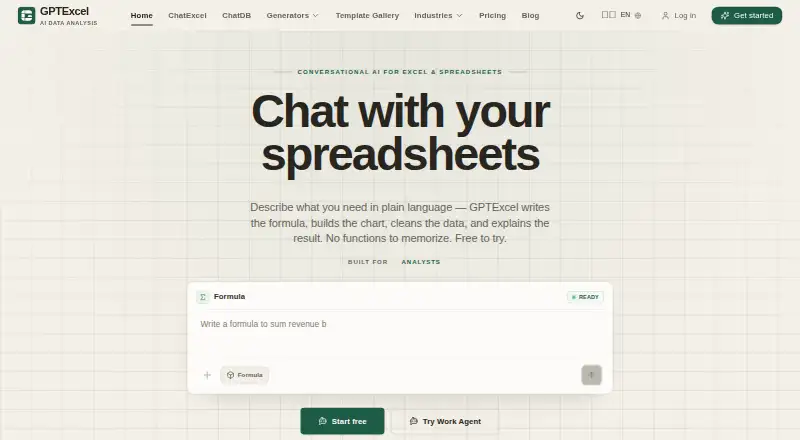
What GPTExcel is
GPTExcel is a conversational web app for working with Excel and Google Sheets, with connections to CSV, MySQL, and PostgreSQL. It generates, explains, and fixes spreadsheet formulas, and can clean, reshape, split, merge, or deduplicate data with a before-and-after preview. Spreadsheet analysis, custom functions, and workflow automation are also listed. Work Agent runs multi-step data workflows and connects to data sources, while saved analyses and templates can be reused across a team. The template library contains more than 299 ready-to-use templates, and the service supports 18 languages. ChatDB runs read-only queries and cannot modify connected data. Database passwords are encrypted at rest and are not returned to the browser or written to logs; files, sheets, and connections remain scoped to the account and request. The free plan provides up to 90 credits per month through daily check-ins, and the service can be tried without a credit card. API access is listed for Teams Max use cases.
Good
- Generates, explains, and fixes Excel and Google Sheets formulas.
- Cleans and reshapes data with a before-and-after preview.
- Connects to spreadsheets, CSV, MySQL, and PostgreSQL.
- Free plan provides up to 90 credits monthly.
- Includes more than 299 templates and 18 languages.
Watch out
- Free plan is limited to 90 credits per month.
- ChatDB queries are read-only and cannot change connected data.
Who it suits
GPTExcel suits spreadsheet users who want help with formulas, data cleanup, analysis, or multi-step data workflows. Its database connections and team-reusable templates may also suit teams working across spreadsheet and database sources.
Verdict
GPTExcel offers spreadsheet formula assistance, data transformation, connected sources, and workflow automation in a conversational web app. The free tier is credit-limited, and database queries through ChatDB cannot alter connected data.
Plans and prices
From GPTExcel's own pricing page, checked 27 Sep 2026.
| Plan | Price | What it gives you |
|---|---|---|
| Free | Free | Up to 90 credits/month via daily check-in · 90 credits/month · $0 forever |
| Pro | $19.90 a month | 300 credits/month · 300 credits/month · ~150 formulas · ~75 charts and analyses · billed monthly |
| Max | $29.90 a month | Unlimited usage · billed monthly |
| Lifetime | $599, paid once | Unlimited lifetime access · Unlimited usage · One-time payment |
| 650-credit pack | $14.99 a month | 650 credits · ~325 formulas · ~162 charts and analyses · Credit pack |
| Power credit pack | $29.99 a month | 1400 credits · ~700 formulas · ~350 charts and analyses · Credit pack |
| Mega credit pack | $79.99 a month | 4000 credits · ~2000 formulas · ~1000 charts and analyses · Credit pack |
| Ultra credit pack | $179.99 a month | 10000 credits · ~5000 formulas · ~2500 charts and analyses · Credit pack |
| Popular | $14.99, paid once | 650 credits |
| Teams Max | $29.90 a month | Unlimited usage |
| Power | $29.99, paid once | 1400 credits |
| Mega | $79.99, paid once | 4000 credits |
| Ultra | $179.99, paid once | 10000 credits |
The facts
Each one read from GPTExcel's own pages, with the date it was checked.
What it does
- Account privacy
- Files, sheets, and connections stay scoped to the account and answer the user request only.checked 27 Sep 2026
- API access
- Yeschecked 20 Sep 2026
- API availability
- API access is listed as a Teams Max use case.checked 27 Sep 2026
- Credential encryption
- Database passwords are encrypted at rest and are not returned to the browser or written to logs.checked 27 Sep 2026
- Custom functions
- Yeschecked 20 Sep 2026
- Data features
- It cleans, reshapes, splits, merges, and deduplicates data with a before-and-after preview.checked 27 Sep 2026
- Data integrations
- It connects Excel, CSV, Google Sheets, MySQL, and PostgreSQL.checked 27 Sep 2026
- Formula features
- It generates, explains, and fixes Excel and Google Sheets formulas.checked 27 Sep 2026
- Formula generation
- Yeschecked 20 Sep 2026
- Language support
- The service works with 18 languages.checked 27 Sep 2026
- Read-only queries
- ChatDB runs only read-only queries and cannot modify connected data.checked 27 Sep 2026
- Spreadsheet analysis
- Yeschecked 20 Sep 2026
- Support resources
- The site provides a Help Center and Docs.checked 27 Sep 2026
- Table transformation
- Yeschecked 20 Sep 2026
- Template library
- The template library contains more than 299 ready-to-use templates.checked 27 Sep 2026
- Workflow agent
- Work Agent runs multi-step data workflows end to end and connects to data sources.checked 27 Sep 2026
The company
- Company copyright
- The site displays a 2026 GPTExcel copyright notice.checked 27 Sep 2026
- Team reuse
- Saved analyses and templates can be reused by the whole team.checked 27 Sep 2026
Money
- Free plan
- Yeschecked 20 Sep 2026
- Free tier limit
- The free plan provides up to 90 credits per month through daily check-ins.checked 27 Sep 2026
- Free trial
- The service is free to try and requires no credit card.checked 27 Sep 2026
- Pricing and billing
- Monthly plan credits refresh automatically, with extra credit packs available.checked 27 Sep 2026
Where it runs
- Primary platform
- multiplechecked 20 Sep 2026
- Supported platforms
- It supports Excel and Google Sheets through a conversational web app.checked 27 Sep 2026
The full review of GPTExcel
Overview
GPTExcel brings formula help, data cleanup, analysis, and workflow automation into a conversational web app for Excel and Google Sheets. It is a strong fit for spreadsheet users who want help with both formulas and connected data; the main trade-off is that regular use depends on a credit plan or an unlimited-usage tier.
Key features
GPTExcel can generate, explain, and fix formulas in Excel and Google Sheets. That makes it useful both when building a calculation and when trying to understand or repair one. Its data tools clean, reshape, split, merge, and deduplicate tables, with a before-and-after preview that gives users a chance to review changes.
It connects Excel, CSV, Google Sheets, MySQL, and PostgreSQL. ChatDB can query connected databases but is read-only, a useful safeguard for analysis that also rules it out for workflows that need to change database records. Database passwords are encrypted at rest and are not returned to the browser or written to logs. Files, sheets, and connections stay scoped to the account and answer the user's request only.
Work Agent runs multi-step data workflows and connects to data sources. More than 299 templates offer starting points for common tasks, while teams can reuse saved analyses and templates. GPTExcel also supports spreadsheet analysis, custom functions, and API access; API access is a Teams Max use case. The service works in 18 languages, and its Help Center and Docs provide support resources.
Pricing
The free plan costs nothing, billed $0 forever, and provides up to 90 credits per month through daily check-ins. It is a sensible way to try the service without a credit card, but the monthly cap makes it better for occasional tasks than sustained work.
Pro costs $19.90 a month, billed monthly, for 300 credits—about 150 formulas or 75 charts and analyses. It suits individual users with recurring but bounded needs. Max costs $29.90 a month, billed monthly, for unlimited usage; it is the clearer fit for frequent, credit-heavy work. Teams Max is also $29.90 a month for unlimited usage and is the relevant plan for API access.
Lifetime costs $599, paid once for unlimited lifetime access and usage. It avoids a recurring plan charge, but its one-time price is a substantial commitment compared with monthly options.
Credit packs add usage without switching to an unlimited plan: Popular costs $14.99, paid once for 650 credits; Power costs $29.99, paid once for 1,400; Mega costs $79.99, paid once for 4,000. Larger packs are offered at $14.99 a month for 650 credits, $29.99 a month for 1,400, $79.99 a month for 4,000, and $179.99 a month for 10,000. The monthly packs are billed as credit packs and are better suited to users who need a larger quota than Pro provides but do not want unlimited usage. Monthly plan credits refresh automatically, and extra credit packs are available.
Platforms
GPTExcel is available through a web app and API. The conversational app supports Excel and Google Sheets; API access is a Teams Max use case.
Who it's for
Choose GPTExcel if you want formula assistance alongside table transformations, database queries, and multi-step spreadsheet workflows in one service. It is less suitable if you need database queries to edit connected records, or if occasional use makes a monthly plan's quota more than you need.
Pros and cons
- Pro: Formula generation, explanations, and fixes cover both Excel and Google Sheets, making the service useful across several stages of spreadsheet work.
- Pro: Before-and-after previews make data transformations easier to review before accepting the result.
- Pro: Read-only database queries and encrypted credentials support safer analysis of connected MySQL and PostgreSQL data.
- Con: The free plan is capped at 90 monthly credits through daily check-ins, so it is restrictive for frequent use.
- Con: ChatDB cannot modify connected data, ruling out write-oriented database workflows.
Alternatives
For a broader spreadsheet app comparison, consider the category list. To compare tools focused on AI-assisted spreadsheet work, see AI Spreadsheet Tools.
- Quadratic is another freemium option with a free plan and a wider range of platform listings, including desktop, mobile, web, and self-hosted options.
- Rows is a freemium alternative with a free plan and a free trial.
- Grist is a freemium alternative with a free plan, a free trial, and web, desktop, and self-hosted platform options.
- ChatGPT for Excel is a freemium web alternative with a free plan.
- Pelayar AI Spreadsheet Agent is a freemium option available on web and through an API.
- Formula Bot (now Better Analyst) is a freemium web alternative with a free plan.
- Bricks is a freemium web alternative with a free plan and trial.
- Ajelix is a freemium alternative available as a browser extension and on the web.
Verdict
GPTExcel is a good choice for spreadsheet users who want formula help, reviewable data transformations, and read-only access to connected databases in one conversational service. Its strongest reason to choose it is that breadth, including multi-step workflows and reusable team templates; look elsewhere if you need database writes or want to avoid managing credits.
Getting started
- Open the GPTExcel website.
- Try the service without entering a credit card.
- Use the web app with Excel or Google Sheets, or connect CSV, MySQL or PostgreSQL.
- Use daily check-ins for up to 90 free monthly credits, or choose a paid plan.
- For API access, consider the Teams Max use case.
Limits worth knowing
The free plan provides up to 90 credits per month through daily check-ins. Pro provides 300 credits per month; the Max plan lists unlimited usage.
Questions
Is GPTExcel free?
Yes. The Free plan costs nothing and provides up to 90 credits per month through daily check-ins. The service can be tried without a credit card.
What does Pro cost?
Pro costs $19.90/mo and includes 300 credits per month.
Which spreadsheets and data sources does it support?
It supports Excel and Google Sheets through its web app, and connects to CSV, MySQL and PostgreSQL.
Can ChatDB change connected data?
No. ChatDB runs read-only queries and cannot modify connected data.
Does GPTExcel provide API access?
API access is listed as a Teams Max use case.
What are the Max and Lifetime prices?
Max costs $29.90/mo and lists unlimited usage. Lifetime costs $599.00 per once and lists unlimited lifetime access and usage.
Alternatives to GPTExcel
- 1

Quadratic
Free planAndroidiOSWebAPI8.9From $18 a month - 2

Sourcetable
Free planAndroidiOSWebAPI8.7From $29 a month - 3

Grist
Free planWebAPILinuxmacOS8.1From $96 a year - 4

Bricks
Free planWebAPISelf-hosted8.0From $17.50 a month - 5
SheetFactorys
Free planAndroidiOSWebmacOS8.0From $19 a month - 6

remio
Free planAndroidiOSExtensionmacOS8.0From $13.90 a month