
GoFullPage
GoFullPage is a browser extension that captures an entire webpage as one screenshot.
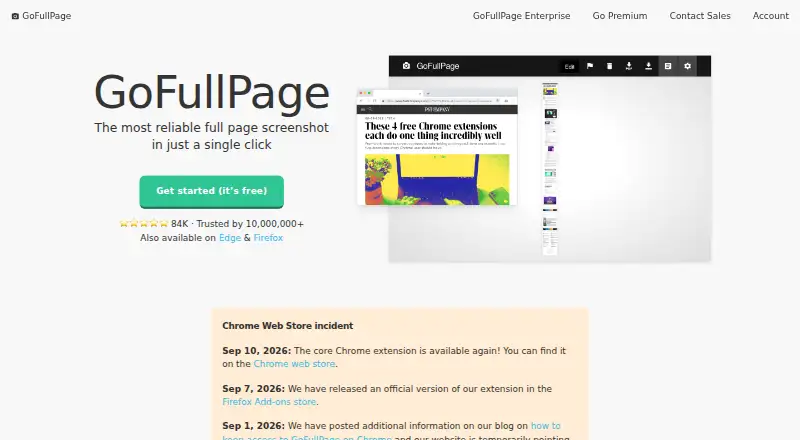
What GoFullPage is
GoFullPage is a browser extension that captures an entire webpage as one screenshot. It scrolls through the page and combines the captured sections into a single image, which can be downloaded as PNG or JPG or exported to PDF with a selected page size. The free plan costs nothing and allows unlimited screenshots with advanced scroll capture. Official extensions are available for Chrome, Microsoft Edge, and Firefox. Premium costs $12 a year, billed annually, and includes a 7-day free trial. It adds cropping, date and timestamp details, smart PDF page splitting, and blur, text, and highlight annotations, plus priority support. The FAQ says screenshots remain in browser storage on the user's computer rather than GoFullPage servers. Permissions are requested when needed, including Downloads for file saving and iFrame access for scrolling embedded content. Enterprise is available by demo request for guaranteed capture, multi-user accounts, group sessions, and security audits.
Good
- Captures complete webpages in one image
- Free plan allows unlimited screenshots
- Exports PNG, JPG, and PDF
- Works with Chrome, Edge, and Firefox
- Premium adds annotation tools
Watch out
- Premium auto-renews annually
- Enterprise pricing requires a demo request
- Browser extension only
- Some permissions are required
Who it suits
GoFullPage suits people who need full-page captures from supported desktop browsers. Premium is aimed at users needing annotation or PDF tools, while Enterprise targets legal, compliance, and archival work.
Verdict
GoFullPage offers straightforward full-page capture with broad browser support and a no-cost unlimited screenshot option. Premium adds editing and PDF controls, while Enterprise covers organizational requirements.
Plans and prices
From GoFullPage's own pricing page, checked 11 Oct 2026.
| Plan | Price | What it gives you |
|---|---|---|
| GoFullPage Free | Free | Unlimited screenshots · Advanced scroll capture · Free |
| GoFullPage Premium | $12 a year | 7-day free trial · Cropping · Date and timestamp · Smart PDF page splitting · Blur, text, and highlight annotations · Priority support · $12 USD per year; auto-renews annually |
| GoFullPage Enterprise | Priced on request | Guaranteed capture · Multi-user accounts · Group demo and webinar · Security audit · Request a demo |
The facts
Each one read from GoFullPage's own pages, with the date it was checked.
What it does
- Capture
- The extension scrolls across the page and assembles the scroll windows into a single image.checked 11 Oct 2026
- Editing
- Premium adds cropping, date and timestamp, smart PDF page splitting, and blur, text, and highlight annotations.checked 11 Oct 2026
- Enterprise
- Enterprise is aimed at legal, compliance, and archival needs and offers group accounts and security audits.checked 11 Oct 2026
- Enterprise users
- The company says it is trusted by institutions in government, legal and financial services, insurance, and higher education.checked 11 Oct 2026
- Exports
- Screenshots can be downloaded as PNG or JPG or exported to PDF with a chosen page size.checked 11 Oct 2026
- Permissions
- The extension requests permissions when needed; the FAQ identifies Downloads and iFrame permissions for downloads and scrolling embedded content.checked 11 Oct 2026
- Privacy
- The FAQ says screenshots are stored in browser storage on the user's computer and are not stored on GoFullPage servers.checked 11 Oct 2026
- Purpose
- GoFullPage is a browser extension that captures an entire webpage as a screenshot.checked 11 Oct 2026
- Scrolling capture
- Yeschecked 19 Sep 2026
- Support
- The FAQ directs users with unresolved questions to submit a customer support ticket.checked 11 Oct 2026
The company
- Founded
- 2012checked 28 Sep 2026
- Headquarters
- New York, NY, United Stateschecked 28 Sep 2026
Money
- Free limits
- The homepage says there is no limit to the number of screenshots users can take with the free extension.checked 11 Oct 2026
- Free plan
- Yeschecked 19 Sep 2026
Where it runs
- Supported browsers
- GoFullPage is available through official extensions for Chrome, Microsoft Edge, and Firefox.checked 11 Oct 2026
Alternatives to GoFullPage
- 1
Gyazo
Free planAndroidiOSWebExtension8.0Free plan - 2

Awesome Screenshot
Free planiOSWebExtensionmacOS7.6From $5 a month - 3

Microsoft Edge
Free planAndroidiOSWebExtension7.5Free plan - 4

Monosnap
Free planWebExtensionLinuxmacOS7.5From $2.50 a month - 5

Greenshot
Free planWindows7.0$1.99 one-time - 6
Screention
Free planLinuxmacOSWindows7.0Free plan