Glorious CORE
Glorious CORE is free software for configuring most Glorious gaming gear on Windows and macOS.
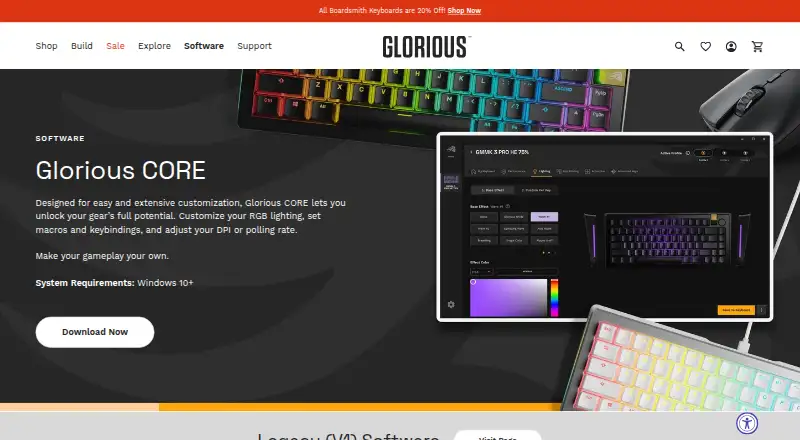
What Glorious CORE is
Glorious CORE is free software for configuring most Glorious gaming gear on Windows and macOS. It can adjust RGB lighting, macros, keybindings, DPI sensitivity, and polling rate, and supports onboard device memory. CORE is recommended for full feature control and firmware updates, although Glorious products work out of the box. It does not support GMMK 1 or the Model O/O- Wired (V1) and Model D/D- Wired (V1) mice; Glorious provides legacy software for those devices and lists CORE V1 as a legacy download. The Windows system requirement is Windows 10 or later. The macOS download requires macOS Big Sur through Sonoma and an Apple M1 or later. A Glorious ID is not needed to configure products, but is required to save profiles to the cloud. Users of 4KHz/8KHz PRO Series mice need CORE to use polling rates above 1KHz. Automatic update checks can run at launch, or users can check manually in settings.
Good
- Free software for configuring Glorious products
- Adjusts lighting, macros, keybindings, and DPI
- Supports onboard device memory
- Cloud profile saving is optional for configuration
Watch out
- Does not support several listed legacy devices
- macOS download requires an Apple M1 or later
- Cloud profile saving requires a Glorious ID
Who it suits
Glorious CORE suits Glorious gear owners who want to customize controls, lighting, or polling rate. It is also required for 4KHz/8KHz PRO Series mice to use polling rates above 1KHz.
Verdict
CORE offers configurable settings for most Glorious products and is needed for higher polling rates on certain mice. Check device support and operating system requirements before downloading.
Plans and prices
From Glorious CORE's own pricing page, checked 3 Oct 2026.
| Plan | Price | What it gives you |
|---|---|---|
| Glorious CORE | Free | For configuring Glorious products; most products supported · Cloud profile saving requires a Glorious ID |
The facts
Each one read from Glorious CORE's own pages, with the date it was checked.
What it does
- Account requirement
- A Glorious ID is not required to configure products, but is required to save profiles to the cloud.checked 3 Oct 2026
- Audience
- Glorious describes its gear as being for gamers who want a customizable setup.checked 3 Oct 2026
- Legacy software
- Glorious provides legacy software for GMMK 1 and the listed wired V1 mice, and lists CORE V1 as a legacy download.checked 3 Oct 2026
- Polling rate control
- Yeschecked 20 Sep 2026
- Polling rate limit
- 4KHz/8KHz PRO Series mice require CORE to use polling rates above 1KHz.checked 3 Oct 2026
- Privacy
- Glorious's privacy policy says it describes the information the company collects and how it uses, maintains, protects, and discloses it.checked 3 Oct 2026
- Purpose
- Glorious CORE lets users customize Glorious gear, including RGB lighting, macros, keybindings, DPI, and polling rate.checked 3 Oct 2026
- Recent release
- The changelog says CORE 2.1.21 for Windows added GMMK Eternal 96% support and additional GHS Wireless InfinitePlay game equalizer presets.checked 3 Oct 2026
- Sensitivity controls
- Yeschecked 20 Sep 2026
- Software updates
- Glorious says CORE is regularly updated with features, bug fixes, and functionality improvements.checked 3 Oct 2026
- Support
- Glorious directs software users to customer support by email and live chat.checked 3 Oct 2026
- Supported gear
- CORE supports most Glorious products, with GMMK 1 and Model O/O- Wired (V1) and Model D/D- Wired (V1) listed as exceptions.checked 3 Oct 2026
- Supported operating systems
- cross-platformchecked 20 Sep 2026
- Update checks
- CORE can check for updates at launch when automatic updates are enabled, and users can also check manually in settings.checked 3 Oct 2026
Where it runs
- Device use
- Glorious says its products work out of the box; CORE is recommended for full feature control and firmware updates.checked 3 Oct 2026
- Macro support
- Yeschecked 20 Sep 2026
- Mac support
- The macOS download requires macOS Big Sur through Sonoma and an Apple M1 or later.checked 3 Oct 2026
- Onboard device memory
- Yeschecked 20 Sep 2026
- Windows support
- The software page lists Windows 10+ as the PC system requirement.checked 3 Oct 2026
The company
- Founded
- 2014checked 28 Sep 2026
- Headquarters
- Dallas, Texas, United Stateschecked 28 Sep 2026
Money
- Free plan
- Yeschecked 20 Sep 2026
The full review of Glorious CORE
Glorious CORE is the free control application for configuring compatible Glorious keyboards, mice, and other peripherals. It is aimed at gamers building a customized setup, especially owners who need macros, onboard profiles, or fine-grained sensitivity and polling controls. The software is most worthwhile when your hardware supports its full feature set, while older exceptions require separate downloads.
Overview
CORE brings Glorious device settings into one Windows and macOS application. Glorious gear works out of the box, so installing CORE is not necessary for basic operation. It is the practical route to fuller customization and firmware updates, however, and it is required for a specific performance feature: 4KHz and 8KHz PRO Series mice cannot use polling rates above 1KHz without it.
Most Glorious products are supported, but GMMK 1, Model O/O- Wired (V1), and Model D/D- Wired (V1) are exceptions. Their owners should use Glorious's legacy software instead; CORE V1 is also offered as a legacy download. That compatibility split is the main pre-installation check, since the current application is not a universal controller for every Glorious generation.
Configuration does not require a Glorious ID. An account becomes necessary only for saving profiles to the cloud, so users who keep settings on the device or computer can avoid account creation.
Key features
Peripheral controls
CORE handles RGB lighting, macros, keybindings, DPI, sensitivity, and polling rate. This combination lets keyboard and mouse owners adapt controls to particular games or work habits instead of accepting factory behavior. Macro and key-assignment tools are useful for repeatable shortcuts, while sensitivity and DPI controls help maintain a consistent pointer feel.
Onboard device memory allows supported hardware to retain settings. That matters when moving between computers or when you want your preferred configuration available without relying on a running background application. The benefit depends on the individual device's memory support, but the capability is present in CORE's feature set.
High-polling and firmware support
For PRO Series mice rated at 4KHz or 8KHz, CORE is not merely a lighting utility: it is the gateway to polling rates above 1KHz. Users who bought those models for high-report-rate operation have a clear reason to install it. CORE is also recommended for firmware updates, reducing the need to treat device maintenance as a separate process.
Updates
Glorious says the application receives regular feature, bug-fix, and functionality updates. Automatic update checks can run at launch when enabled, and a manual check is available in settings. Windows CORE 2.1.21 added support for the GMMK Eternal 96% and additional GHS Wireless InfinitePlay game equalizer presets, showing that device and preset coverage continues to expand.
Pricing
Glorious CORE — free. The plan covers configuration for Glorious products, with most products supported. There is no paid tier and no trial period because the application is free software. The meaningful limitation is hardware compatibility: owners of the listed legacy devices need different software, and cloud profile saving requires a Glorious ID. There are no published seat or usage quotas.
Platforms
CORE is cross-platform across Windows and macOS, but the operating-system requirements differ. The Windows requirement is Windows 10 or later. The macOS download requires macOS Big Sur through Sonoma and an Apple M1 chip or later. Users on older macOS releases or Intel Macs should verify compatibility before choosing CORE.
Who it's for
CORE is the right choice for owners of supported Glorious keyboards, mice, and peripherals who want RGB, macro, keybinding, DPI, sensitivity, or polling-rate control in one place. It is particularly important for 4KHz/8KHz PRO mouse owners and for anyone who wants to keep firmware current.
It is less suitable for owners of GMMK 1 or the wired V1 Model O/O- and Model D/D- mice, because those products use legacy software. It is also a poor fit if your computer falls outside the stated Windows or Apple-silicon macOS requirements. Users who only need basic operation can skip installation, since Glorious devices function out of the box.
Pros and cons
Pros
- Broad customization: RGB, macros, keybindings, DPI, sensitivity, and polling controls address the settings most enthusiast gamers want.
- Onboard memory: Supported devices can retain configurations, making profiles less dependent on a computer-side application.
- Required high-polling support: PRO Series mice need CORE for rates above 1KHz.
- Free access: The sole plan costs nothing, with no paid upgrade or trial clock.
- Optional account: Local configuration works without a Glorious ID; an account is only needed for cloud profile saving.
Cons
- Compatibility exceptions: Several older Glorious products require legacy software rather than the current CORE release.
- Platform boundaries: Windows 10+ and Apple M1-or-later macOS requirements exclude older systems.
- Cloud profiles require an account: Users wanting cloud storage must create a Glorious ID.
Alternatives
Keyboard and Mouse Customization Software is the broader category to browse when your peripherals are not from Glorious or you want a wider selection of controllers.
Gaming Peripheral Software is the better starting point for managing several brands or different peripheral types from one directory.
Logi Options+ suits Logitech-device owners who want free configuration on Windows 10+ or macOS 12+.
be quiet! IO Center is a free alternative with Linux, macOS, web, and Windows availability.
Rebind is worth considering when you want freemium keyboard and mouse remapping with a Luau scripting runtime and no account requirement in its free mode.
Logitech G HUB is the natural choice for Logitech G hardware, offering free LIGHTSYNC RGB, device presets, and game profiles.
Dygma Bazecor is an alternative for users interested in Dygma's open-source keyboard software and firmware.
Cosmic Byte Orbit is free for Cosmic Byte device owners and includes the free Cosmic Byte Connect helper.
Razer Synapse is a free option for Razer users across macOS, web, and Windows.
SteelSeries GG is a free Windows 10+ download for SteelSeries hardware.
Verdict
Choose Glorious CORE if you own supported Glorious gear and want comprehensive lighting, input, sensitivity, memory, and polling controls without paying. Its strongest justification is the requirement for above-1KHz polling on 4KHz/8KHz PRO mice, reinforced by firmware-update support. Look elsewhere if you have one of the legacy exceptions, an unsupported operating system, or hardware from another ecosystem that is better served by its maker's software.
Alternatives to Glorious CORE
- 1
SteelSeries GG
Free planAndroidiOSWebAPI8.3Free plan - 2
be quiet! IO Center
Free planWebLinuxmacOSWindows7.9Free plan - 3
Rebind
Free planLinuxmacOSWindows7.8$199 one-time - 4

Akko Cloud Driver
Free planWebmacOSWindows7.8Free plan - 5
MonsGeek Driver
Free planWebLinuxmacOSWindows7.8Free plan - 6
ROCCAT Swarm II
Free planAndroidiOSWindows7.8Free plan