Rebind
Rebind is a keyboard and mouse remapping engine for Windows, macOS, and Linux.
What Rebind is
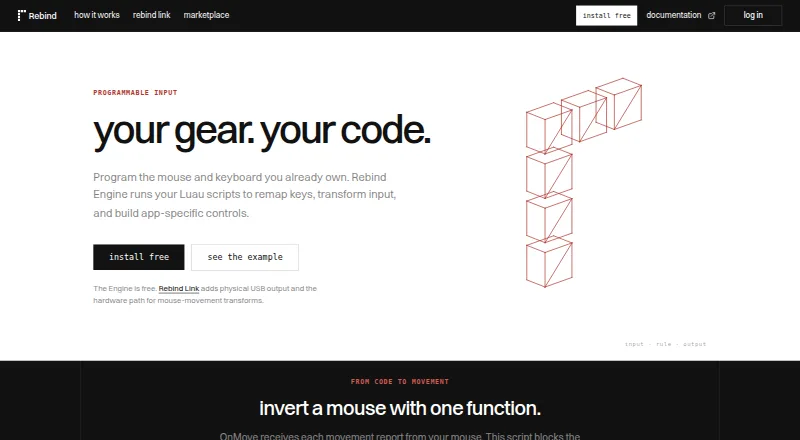
Rebind is a keyboard and mouse remapping engine for Windows, macOS, and Linux. Its free software mode runs Luau scripts and includes remapping, macros, sensitivity controls, per-app controls, per-game profiles, and HTTP and WebSocket support; it does not require an account or Rebind Link. Free scripts without source protection can be installed as a guest, while paid marketplace scripts require signing in and buying credits. Developers can connect tools through Luau, HTTP, or TypeScript, Python, and Rust clients. Rebind also provides an MCP server for screenshots, keyboard and mouse actions, and script execution. The optional Rebind Link adds hardware-isolated USB keyboard and mouse output, a dedicated processor, multi-device support, and a report rate up to 8,000 Hz. It costs $199 as a one-time purchase, includes 12 months of Pro, and carries no recurring device-license fee. It is backordered. Hardware attachment requires Windows or macOS; Linux capture is not implemented.
Good
- Free software mode needs no account or Link
- Supports macros and per-app controls
- Runs on Windows, macOS, and Linux
- Link includes 12 months of Pro
Watch out
- Rebind Link costs $199 as a one-time purchase
- Rebind Link is backordered
- Hardware attachment requires Windows or macOS
- Linux capture is not implemented
Who it suits
It suits users who want software-based keyboard and mouse remapping across Windows, macOS, or Linux. The optional Rebind Link is for those who want hardware-isolated USB output, with platform restrictions to consider.
Verdict
Rebind offers a free software mode, with an optional $199 hardware device for USB output. Check the Link's availability and operating-system limits if hardware attachment is important to your setup.
Plans and prices
From Rebind's own pricing page, checked 28 Sep 2026.
| Plan | Price | What it gives you |
|---|---|---|
| Rebind Engine | Free | Free software mode; no account or Rebind Link required · Luau scripting runtime · Keyboard and mouse remapping · Macros · HTTP and WebSocket support · RebindGPT included · Windows, macOS, and Linux · Free; no trial clock |
| Rebind Link | $199, paid once | Backordered; includes 12 months of Pro and free shipping · Hardware-isolated USB HID output · Up to 8,000 Hz USB report rate · Dedicated onboard processor · 12 months of Pro included · Multi-device support · Lifetime device license · One-time purchase |
The facts
Each one read from Rebind's own pages, with the date it was checked.
What it does
- Batch size
- The first Rebind Link batch has 50 units.checked 28 Sep 2026
- Capture isolation
- Selected peripherals are forwarded into an isolated capture environment.checked 28 Sep 2026
- Developer clients
- Developers can connect tools through Luau, HTTP, or TypeScript, Python, and Rust clients.checked 28 Sep 2026
- Engine pricing
- Rebind Engine is free software.checked 28 Sep 2026
- Included Pro
- Rebind Link includes a Pro entitlement lasting 12 months.checked 28 Sep 2026
- MCP integration
- Rebind provides an MCP server for screenshots, keyboard and mouse actions, and script execution.checked 28 Sep 2026
- Paid from
- 199checked 22 Sep 2026
- Paid scripts
- Paid marketplace scripts require signing in and buying with credits.checked 28 Sep 2026
- Script language
- Rebind Engine runs Luau scripts.checked 28 Sep 2026
- Sensitivity controls
- Yeschecked 22 Sep 2026
- Supported operating systems
- cross-platformchecked 22 Sep 2026
- Support resources
- Rebind provides documentation, platform guides, setup requirements, and setup guides.checked 28 Sep 2026
The company
- Company location
- Rebind is designed, assembled, and shipped in the USA.checked 28 Sep 2026
Money
- Free access
- Software mode needs no account or Rebind Link.checked 28 Sep 2026
- Free plan
- Yeschecked 22 Sep 2026
- Free scripts
- Free scripts without source protection can be installed as a guest.checked 28 Sep 2026
- Hardware billing
- Rebind Link uses permanent activation with one payment and no recurring device-license fee.checked 28 Sep 2026
- Hardware price
- Rebind Link costs $199.checked 28 Sep 2026
Where it runs
- Hardware platforms
- Hardware peripheral attachment requires Windows or macOS; Linux capture is not implemented.checked 28 Sep 2026
- Macro features
- Gaming workflows include chat macros, layered binds, and per-game profiles.checked 28 Sep 2026
- Macro support
- Yeschecked 22 Sep 2026
- Per-app controls
- The Engine supports per-app controls and per-game profiles.checked 28 Sep 2026
- Per-app profiles
- Yeschecked 22 Sep 2026
- Supported platforms
- Rebind Engine installs on Windows, macOS, and Linux.checked 28 Sep 2026
The full review of Rebind
Overview
Rebind is a keyboard-and-mouse customization engine with an optional USB hardware device for physical input output. It suits people who want scripting and game-specific controls across desktop platforms, especially developers and gaming users who need more than device configuration presets. The free software stands on its own; the $199 Link is a separate choice for hardware-isolated USB output, not a requirement for using the Engine.
The platform split is important: the Engine runs on Windows, macOS, and Linux, but attaching peripherals through Link requires Windows or macOS, and Linux capture is not implemented. Choose the software mode on Linux; do not buy Link expecting peripheral attachment there.
Browse the Keyboard and Mouse Customization Software category for other options.
Key features
Controls and gaming workflows
Engine combines keyboard and mouse remapping with sensitivity controls, macros, per-app controls, and per-game profiles. Chat macros and layered binds give gaming setups room for context-specific actions; profiles help keep those configurations organized. This is a broader workflow toolkit than a simple device preset utility, though its Luau scripting model may be more than someone seeking only basic hardware settings needs.
Scripting and integrations
The Engine runs Luau scripts and supports HTTP and WebSocket connections. Developers can connect using Luau or clients for TypeScript, Python, and Rust. An MCP server can handle screenshots, keyboard and mouse actions, and script execution, making Rebind relevant to tool-connected workflows as well as manual remapping. RebindGPT is included with the free Engine plan.
Optional USB hardware
Rebind Link provides physical USB keyboard and mouse output, with hardware mode supporting up to 8,000 Hz USB report rate. It has a dedicated onboard processor, multi-device support, and forwards selected peripherals into an isolated capture environment. These are the reasons to pay for Link; they do not change the Linux attachment limitation.
Pricing
Rebind Engine — free. The free plan includes the Luau runtime, remapping, macros, HTTP and WebSocket support, RebindGPT, and Windows, macOS, and Linux support. Software mode needs no account or Link, and the free Engine plan has no trial clock. Free scripts without source protection can be installed as a guest, so trying the core software does not require a purchase or account. Paid marketplace scripts require sign-in and credits; the Engine's free price does not make every script free.
Rebind Link — $199, paid once. The one-time purchase includes hardware-isolated USB HID output, up to 8,000 Hz report rate, an onboard processor, multi-device support, free shipping, a lifetime device license, and 12 months of Pro. The device license has no recurring fee, but the included Pro entitlement lasts only 12 months. The first batch has 50 units and the Link is backordered, so it is not an immediate hardware option. The $199 price makes sense for users who specifically need physical USB output; everyone else can use the free Engine without it.
Rebind's free-trial field is yes, but the Engine itself is free with no trial clock. There is no separate paid software price stated beyond the Link purchase.
Platforms
Rebind Engine installs on Windows, macOS, and Linux. Link peripheral attachment requires Windows or macOS; Linux capture is not implemented. That makes the Engine cross-platform, but the hardware workflow is not. Rebind is designed, assembled, and shipped in the USA.
Who it's for
Rebind is a strong fit for users who want remapping, macros, sensitivity controls, and profiles organized per app or game, and for developers who want scriptable input or tool integrations. Its free software mode lowers the barrier to evaluating those workflows. Link is for the narrower group that needs USB keyboard and mouse output through an isolated capture environment and accepts the platform restriction and backorder.
It is a weaker fit for someone who only needs configuration software for a particular brand's devices, or for a Linux user whose goal is hardware peripheral attachment through Link.
Pros and cons
- Pro: The Engine is free on three desktop platforms and software mode requires neither account nor Link, so the core remapping workflow is accessible without hardware spend.
- Pro: Luau, HTTP and WebSocket support, additional language clients, and MCP actions make it useful beyond conventional macros and presets.
- Pro: Link's one-time device payment includes a lifetime device license, avoiding recurring device-license charges.
- Con: Link attachment is limited to Windows and macOS; Linux capture is not implemented.
- Con: Link is backordered, and the first batch is only 50 units, which makes it a poor choice when hardware is needed promptly.
- Con: Link's included Pro entitlement lasts 12 months, so the lifetime device license should not be confused with lifetime Pro.
- Con: Paid marketplace scripts need an account and credits, unlike free unprotected scripts that can be installed as a guest.
Alternatives
Pick Logi Options+ if you use supported Logitech devices and want free configuration software for Windows 10 or later or macOS 12 or later. Choose Logitech G HUB for Logitech G gaming mice, game profiles, device configuration, and LIGHTSYNC RGB customization on macOS or Windows.
Razer Synapse is another free option for macOS, web, and Windows. Consider Glorious CORE when configuring supported Glorious products; cloud profile saving requires a Glorious ID. MonsGeek Driver is a free choice for keyboard drivers and configuration downloads, with supported models varying by driver.
ROCCAT Swarm II is free device configuration software for compatible Turtle Beach devices and supports Android, iOS, and Windows. Rapoo A HUB is a free alternative for macOS, web, and Windows. Choose ASUS Armoury Crate if you want its free Windows software.
Verdict
Choose Rebind if you want a free, cross-platform engine for remapping, macros, per-game profiles, and scriptable input workflows; developers gain several ways to connect tools without buying the hardware. Link is worth considering only when physical USB output and its isolated capture workflow are central to the setup. Look elsewhere if you need Link attachment on Linux, immediate hardware availability, or straightforward configuration for a specific device brand.
Getting started
- Open the Rebind website
- Install Rebind Engine on Windows, macOS, or Linux
- Use software mode without an account or Rebind Link
- Install free unprotected scripts as a guest
- Sign in and buy credits for paid marketplace scripts
- Purchase Rebind Link for hardware USB output on Windows or macOS
Limits worth knowing
The free Engine is software-only and does not provide the Link's physical USB output or hardware mode. Paid marketplace scripts require sign-in and credits; the Link includes Pro for 12 months.
Questions
Is Rebind free?
Rebind Engine is free software with a free plan. Rebind Link costs $199 as a one-time purchase.
Which operating systems are supported?
Rebind Engine installs on Windows, macOS, and Linux. Hardware attachment requires Windows or macOS.
Can I use Rebind without an account?
Software mode needs no account or Rebind Link. Free scripts without source protection can be installed as a guest.
What does Rebind Link include?
The Link provides hardware-isolated USB keyboard and mouse output, a dedicated onboard processor, multi-device support, up to 8,000 Hz USB reporting, 12 months of Pro, and a lifetime device license.
What can developers connect?
Developers can connect through Luau, HTTP, or TypeScript, Python, and Rust clients. Rebind also provides an MCP server for screenshots, input actions, and script execution.
Alternatives to Rebind
- 1
SteelSeries GG
Free planAndroidiOSWebAPI8.3Free plan - 2
be quiet! IO Center
Free planWebLinuxmacOSWindows7.9Free plan - 3

Akko Cloud Driver
Free planWebmacOSWindows7.8Free plan - 4
MonsGeek Driver
Free planWebLinuxmacOSWindows7.8Free plan - 5
ROCCAT Swarm II
Free planAndroidiOSWindows7.8Free plan - 6
HYTE Nexus
Free planAndroidiOSLinuxmacOS7.6Free plan