GitStudio
GitStudio combines Git and GitHub workflows in a desktop app, with extensions for coding environments.
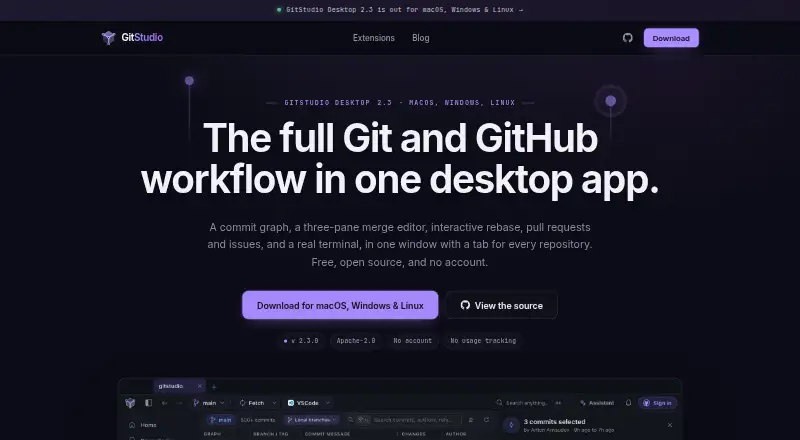
What GitStudio is
GitStudio combines Git and GitHub workflows in a desktop app, with extensions for coding environments. Its tools include a virtualized commit graph, merge editor, interactive rebase, pull requests, issues, and a terminal. The merge workflow pairs a conflict dashboard with a three-pane editor showing your changes, the result, and the other branch, and can resolve non-conflicting changes together. Git safeguards include undo for operations, a merge-or-rebase choice when pulling a diverged branch, and leased force pushes. GitHub features include reviews, inbox, Actions, releases, projects, organizations, and gists alongside issues and pull requests. Extensions run in VS Code, Cursor, VSCodium, Windsurf, and code-server. An optional assistant supports listed cloud and local providers and asks before writes. The maker says Git runs locally and GitHub calls go directly to GitHub; it also says the app has no usage tracking or analytics. GitStudio Desktop and its extensions use Apache-2.0 licensing, while Merge Studio uses MIT. It is free for public and private repositories, without an account or paid tier.
Good
- Free for public and private repositories
- Includes a commit graph and interactive rebase
- Merge editor shows both versions and the result
- GitHub features include issues, pull requests, and Actions
- Git operations run locally
Watch out
- Windows ARM64 builds are unavailable
- Linux arm64 builds are unavailable
- Linux builds require x86-64 and glibc 2.35 or later
- macOS 12 or later is required
Who it suits
GitStudio suits developers who want Git controls and GitHub workflows in a desktop app or supported editor. Its listed builds target macOS, Windows x64, and Linux x86-64 systems.
Verdict
GitStudio brings repository operations, merge tools, and a broad set of GitHub features into one desktop workspace. Its free plan has no account requirement or paid tier, but the listed platform builds exclude ARM64 for Windows and Linux.
Plans and prices
From GitStudio's own pricing page, checked 11 Oct 2026.
| Plan | Price | What it gives you |
|---|---|---|
| GitStudio Desktop and editor extensions | Free | Free on public and private repositories · no account · no paid tier |
The facts
Each one read from GitStudio's own pages, with the date it was checked.
What it does
- AI assistant
- The optional assistant works with supported cloud providers, OpenAI-compatible servers, Claude Code, Codex, Gemini CLI, Ollama, and LM Studio, and asks before writes.checked 11 Oct 2026
- API key storage
- AI keys are stored on the user's machine in an encrypted GitStudio store, rather than the operating system keychain.checked 11 Oct 2026
- Commit graph
- The virtualized commit graph is designed to stay responsive on repositories with tens of thousands of commits.checked 11 Oct 2026
- Editor support
- The extensions run in VS Code, Cursor, VSCodium, Windsurf, and code-server.checked 11 Oct 2026
- GitHub integration
- The app includes GitHub issues, pull requests, reviews, inbox, Actions, releases, projects, organizations, and gists.checked 11 Oct 2026
- Git safeguards
- GitStudio offers undo for Git operations, asks whether to merge or rebase when pulling a diverged branch, and uses leased force pushes.checked 11 Oct 2026
- Install verification
- Installers are built by CI from the public repository and distributed with SHA256SUMS.txt, which the one-line installers verify.checked 11 Oct 2026
- Merge tools
- The conflict dashboard and three-pane editor show yours, the result, and theirs, and support resolving non-conflicting changes together.checked 11 Oct 2026
- Open source
- GitStudio Desktop and the GitStudio extension use the Apache-2.0 license; Merge Studio uses MIT.checked 11 Oct 2026
- Privacy
- The maker says Git runs locally, GitHub calls go directly to GitHub, and the app has no usage tracking or analytics; it also describes version checks, avatar lookups, and optional-to-disable crash reports.checked 11 Oct 2026
- Product
- GitStudio combines Git and GitHub workflows in a desktop app, including a commit graph, merge editor, interactive rebase, pull requests, issues, and a terminal.checked 11 Oct 2026
- Support
- The maker invites users to support development through GitHub sponsorship or Buy Me a Coffee.checked 11 Oct 2026
Where it runs
- Platform limits
- The listed builds support macOS 12 or later, Windows 10 or 11 x64, and Linux x86-64 with glibc 2.35 or later; Windows ARM64 and Linux arm64 builds are not available.checked 11 Oct 2026
Alternatives to GitStudio
- 1

Unity
Free planAndroidiOSWebAPI8.4Free plan - 2

Unity Version Control
Free planWebAPILinuxmacOS8.1Free plan - 3

Perforce P4 (Helix Core)
Free planWebAPILinuxmacOS7.9From $39 a month - 4

Diversion
Free planWebAPILinuxmacOS7.8From $25 a month - 5

GitHub CodeQL
Free planWebExtensionLinuxmacOS7.5From $30 a month - 6
GitUI
Free planOpen sourceAndroidLinuxmacOSSelf-hosted7.5Free plan