frum
frum is a free Ruby version manager written in Rust and licensed under MIT.
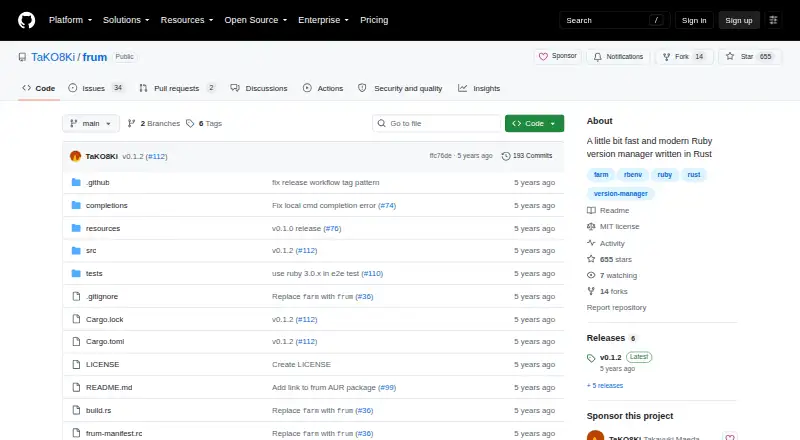
What frum is
frum is a free Ruby version manager written in Rust and licensed under MIT. It can install or uninstall Ruby versions, list available or installed versions, and set global or local versions. It also works with `.ruby-version` files, allowing project-level Ruby version settings to guide selection. The project describes its implementation as pure Rust and says it does not use ruby-build. Installation options listed include Homebrew or Linuxbrew, Arch Linux packages, Cargo, and release binaries; binaries are linked for Linux and macOS. Setup instructions cover Bash, Zsh, and Fish, and the project lists shell auto-completion. Ruby installation accepts configuration options such as an OpenSSL directory and jemalloc allocator selection. The README reports a benchmark where evaluating `frum init` ran about six times faster than evaluating `rbenv init`. The README lists macOS and Linux as supported platforms and mentions Windows in the project’s goals. The project welcomes contributions, issues, and pull requests. Its releases page lists v0.1.2 as the latest release.
Good
- Installs, uninstalls, and lists Ruby versions.
- Sets global or local Ruby versions.
- Works with `.ruby-version` files.
- Shell setup instructions cover Bash, Zsh, and Fish.
- MIT licensed and free.
Watch out
- README lists macOS and Linux as supported platforms.
- Windows is mentioned in project goals, not supported platforms.
- Latest listed release is v0.1.2.
Who it suits
frum suits Ruby developers who want to manage multiple Ruby versions and use local project version files. Its shell setup and package options may also suit developers who want to integrate version selection into their existing shell workflow.
Verdict
frum provides core Ruby version management with project-file support, shell integration, and several installation paths. Windows appears in its goals, while the README lists macOS and Linux as supported.
Plans and prices
From frum's own pricing page, checked 8 Oct 2026.
| Plan | Price | What it gives you |
|---|---|---|
| frum | Free | Ruby version manager · MIT licensed |
The facts
Each one read from frum's own pages, with the date it was checked.
What it does
- Benchmark
- The README reports that eval "$(frum init)" runs about six times faster than eval "$(rbenv init -)" in its benchmark.checked 8 Oct 2026
- Completion
- The README lists auto-completion as a feature.checked 7 Oct 2026
- Contributions
- The project welcomes contributions, issues, and pull requests.checked 8 Oct 2026
- Download
- The README links to release binaries for Linux and macOS.checked 7 Oct 2026
- Implementation
- The project describes its implementation as pure Rust and says it does not use ruby-build.checked 8 Oct 2026
- Installation
- The README lists Homebrew, Arch Linux packages, Cargo, and release binaries as installation methods.checked 7 Oct 2026
- Installation methods
- The README documents installation through Homebrew or Linuxbrew, Arch Linux packages, Cargo, or release binaries.checked 8 Oct 2026
- Install options
- Ruby installation accepts configuration options including an OpenSSL directory and jemalloc allocator selection.checked 8 Oct 2026
- License
- The repository identifies its license as MIT.checked 8 Oct 2026
- Maintainer
- GitHub identifies TaKO8Ki as Takayuki Maeda and lists Kyoto, Japan on the profile.checked 7 Oct 2026
- Performance claim
- The README reports that evaluating frum init runs about six times faster than evaluating rbenv init in its benchmark.checked 7 Oct 2026
- Purpose
- frum is a Ruby version manager written in Rust.checked 8 Oct 2026
- Release
- The releases page lists v0.1.2 as the latest release.checked 8 Oct 2026
- Ruby builds
- frum install accepts Ruby configuration options including an OpenSSL directory and jemalloc.checked 7 Oct 2026
- Ruby selection
- frum works with .ruby-version files and can set global or local Ruby versions.checked 7 Oct 2026
- Ruby version files
- frum works with .ruby-version files.checked 8 Oct 2026
- Shell completion
- The listed features include auto-completion.checked 8 Oct 2026
- Shells
- The README provides setup instructions for Bash, Zsh, and Fish.checked 7 Oct 2026
- Shell setup
- The README provides initialization instructions for Bash, Zsh, and Fish.checked 8 Oct 2026
- Version management
- Commands include installing and uninstalling Ruby versions, listing available or installed versions, and setting global or local versions.checked 8 Oct 2026
Where it runs
- Platform support
- The README lists macOS and Linux as supported platforms and mentions Windows in its goals.checked 8 Oct 2026
The full review of frum
frum is a focused Ruby version manager for developers who need different interpreters across projects and a dependable machine-wide default. It is best suited to Ruby-only workflows that value lightweight shell integration and configurable builds over a broader environment platform. Its free, MIT-licensed distribution removes purchasing friction, but Windows users should confirm that the project’s current support fits their setup.
Overview
frum handles the practical version-management cycle: installing and uninstalling Ruby versions, listing available or installed versions, and selecting either a local or global version. A .ruby-version file pins a repository to its required interpreter, while a global setting supplies the default elsewhere. Automatic switching is valuable when moving between repositories because the project choice can change with the directory rather than requiring repeated manual commands.
The implementation is pure Rust and does not use ruby-build. That gives frum a narrow, Ruby-specific remit instead of the wider package and environment responsibilities of a general development platform. The project reports that evaluating frum init runs about six times faster than evaluating rbenv init - in its benchmark. That points to potentially lighter shell initialization, not a guarantee that Ruby compilation or application execution will be six times faster.
Key features
Project and global version control
Local pinning and a separate global choice cover the two settings most Ruby developers need. Automatic switching reduces context changes between repositories, and the same command set supports installing, removing, listing, and selecting versions. This is a coherent workflow for teams that standardize on .ruby-version files; it is less compelling if you need one manager to coordinate several programming languages.
Build configuration
frum install accepts Ruby build options including an OpenSSL directory and jemalloc selection. Those controls matter when a system’s OpenSSL location or allocator choice affects a build, giving experienced users a way to adapt compilation rather than accepting one fixed configuration. They also make installations more involved for readers who simply want a default Ruby with no build decisions.
Shell integration and completion
The README provides initialization instructions for Bash, Zsh, and Fish, and lists auto-completion as a feature. Support for these common shells makes the manager practical in interactive terminals and reduces command-entry friction. The reported initialization benchmark further favors users who pay attention to shell startup overhead, although it remains a project benchmark rather than a universal performance result.
Installation and distribution
Installation paths include Homebrew or Linuxbrew, Arch Linux packages, Cargo, and release binaries. Release binaries are linked for Linux and macOS, which can be convenient when you do not want to build from source. The range of methods suits both package-managed machines and Rust-oriented users, though choosing among them adds an initial setup decision.
Pricing
| Plan | Price | Includes |
|---|---|---|
| frum | free | Ruby version manager; MIT licensed |
There is no paid tier or free trial. The single free plan is the right fit for individual developers, teams adopting an open-source utility, and anyone who needs project pinning without a subscription. It provides no separate commercial service tier or paid support option in the stated plan structure, so organizations wanting contractual service terms should look elsewhere.
Platforms
frum targets Linux, macOS, and Windows. The README documents macOS and Linux as supported platforms and mentions Windows in its goals, so the Unix-like platforms have the clearest documented path. Bash, Zsh, and Fish setup instructions make shell integration strongest for users in those environments; Windows adopters should validate the current workflow before standardizing on it.
Who it's for
Choose frum if you work primarily in Ruby, switch between repositories with different interpreter requirements, and want both automatic project selection and a global fallback. It also suits users who prefer a Rust implementation, MIT licensing, and several installation routes, or who need OpenSSL and jemalloc controls during Ruby installation.
It is not the natural choice for a multi-language toolchain, a hosted development environment, or a buyer seeking paid plans and formal service terms. Windows teams should be especially deliberate because documented support is clearer for macOS and Linux.
Pros and cons
Pros
- Clear Ruby focus: local and global selection, automatic switching, and .ruby-version support address everyday Ruby project workflows.
- Configurable installations: OpenSSL-directory and jemalloc options help accommodate non-default build environments.
- Flexible setup: Homebrew, Arch packages, Cargo, and release binaries provide multiple installation routes.
- Shell-friendly: Bash, Zsh, Fish, and auto-completion support reduce terminal setup friction.
- No licensing cost: the only plan is free and MIT licensed.
Cons
- Narrow scope: frum manages Ruby rather than serving as a general multi-language environment manager.
- Windows uncertainty: Windows appears in the project goals, while the documented supported platforms emphasize macOS and Linux.
- Build complexity for newcomers: configurable compilation is useful but can require decisions about system libraries and allocators.
- No paid service tier: organizations needing commercial support or contractual terms have no stated plan to select.
Alternatives
GHCup is the better pick for free Haskell toolchain installation and management across Linux, macOS, Windows, self-hosted, and web environments. Choose ActiveState Platform when you need a freemium platform with public projects on its free organization plan and a paid enterprise option. devenv fits users wanting MIT-licensed, multi-platform environment management who can work with Nix. Pick FVM for open-source Flutter SDK version management instead of Ruby. Flox is a broader freemium environment choice with a free CLI, catalog access, public environments, and limited private environments. Jabba is the focused alternative for Java version management. Nix suits users seeking an open-source package manager rather than a Ruby-only manager. Choose nvm when your version-management need is Node.js.
Verdict
frum is a strong choice for Ruby developers who want project-file pinning, automatic switching, shell integration, and configurable installations at no cost. Its main reason to choose it is a compact, Rust-based workflow that stays centered on Ruby. Look elsewhere if you need a multi-language environment platform, clearer documented Windows support, or paid organizational service.
Alternatives to frum
- 1

DevPod
Free planOpen sourceLinuxmacOSSelf-hostedWindows7.4Free plan - 2
nvm
Free planOpen sourceLinuxmacOSSelf-hostedWindows7.4Free plan - 3

ActiveState Platform
Free planWebAPILinuxmacOS7.2Free plan - 4

Flox
Free planWebExtensionLinuxmacOS7.1From $20 a month - 5
GHCup
Free planWebLinuxmacOSSelf-hosted7.0Free plan - 6

devenv
Free planWebLinuxmacOSWindows6.9Free plan