Freeter
Freeter is a free, open-source desktop organizer that gathers work tools into project-based workflows.
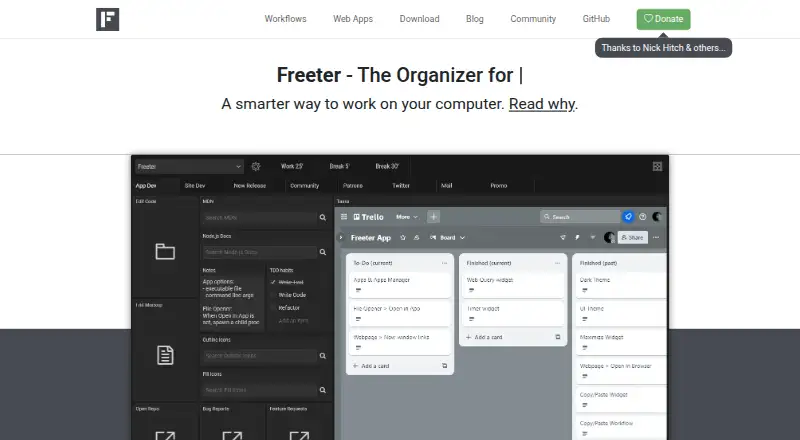
What Freeter is
Freeter is a free, open-source desktop organizer that gathers work tools into project-based workflows. Each project separates its tools and workflows, letting users focus on the selected project. Workflows can be divided across tabs, and the Shelf keeps commonly needed items accessible across projects. Widgets include a webpage, file opener, web query, to-do list, commander, timer, and notes. The webpage widget embeds web apps and supports separate sign-in sessions by project, workflow, or widget. Examples of embeddable apps include Google Docs, Gmail, Slack, Asana, Jira, Trello, Google Drive, and Google Calendar. Freeter is available for Windows 10 and 11, Linux with a graphical interface, and macOS 10.15 or later on Intel and Apple Silicon. The download page identifies version 2.8.0-beta as the current version, and the maker says Freeter v1 is obsolete and no longer supported. Freeter is released under the GNU General Public License. The maker says the app does not collect or transmit telemetry, usage tracking, or other data, and directs users to a community forum for bug reports.
Good
- Separates tools and workflows by project.
- Includes webpage, task, timer, and note widgets.
- Supports separate web-app sessions across workflows.
- Available on Linux, macOS, and Windows.
Watch out
- Current release is identified as a beta.
- Freeter v1 is obsolete and unsupported.
- Linux availability requires a graphical interface.
Who it suits
Freeter suits people who manage multiple projects and want work tools grouped into project workflows. Its described audience includes freelancers, web developers, and open-source maintainers.
Verdict
Freeter organizes project tools in a desktop app, with widgets and embedded web apps for common work services. Check its listed system requirements and beta release status before adopting it.
Plans and prices
From Freeter's own pricing page, checked 11 Oct 2026.
| Plan | Price | What it gives you |
|---|---|---|
| Freeter | Free | Free and open-source software |
The facts
Each one read from Freeter's own pages, with the date it was checked.
What it does
- Audience
- The maker presents Freeter for people managing multiple projects, including freelancers, web developers, and open-source maintainers.checked 4 Oct 2026
- Current limits
- The maker’s legacy v1 PRO page says the free edition supports up to 3 projects and 5 dashboards per project; Freeter v1 is no longer supported.checked 4 Oct 2026
- Current release
- The download page identifies the current version as 2.8.0-beta.checked 4 Oct 2026
- Current version
- The download page identifies version 2.8.0-beta as the current version.checked 11 Oct 2026
- Data collection
- The homepage states that Freeter does not collect or transmit telemetry, usage tracking, or other data.checked 11 Oct 2026
- Integrations
- Freeter lists web apps including Google Docs, Google Calendar, Slack, Dropbox, Asana, Jira, and Trello as examples for embedding.checked 11 Oct 2026
- Legacy support
- The maker says Freeter v1 is obsolete and no longer supported.checked 4 Oct 2026
- Legacy version
- The download page says Freeter v1 is obsolete and no longer supported.checked 11 Oct 2026
- License
- Freeter is free and open-source software released under the GNU General Public License.checked 11 Oct 2026
- Privacy
- The maker says the app does not collect or transmit telemetry, usage tracking, or other data.checked 4 Oct 2026
- Product
- Freeter is a free, open-source desktop organizer for gathering work tools into project-based workflows.checked 4 Oct 2026
- Project focus
- Users can switch projects and focus on the work relevant to the selected project.checked 11 Oct 2026
- Projects
- Projects let users focus on one project at a time by separating its tools and workflows from others.checked 4 Oct 2026
- Purpose
- Freeter gathers work items in one place, organized by projects and workflows, for quick access.checked 11 Oct 2026
- Shelf
- The Shelf holds items users want to access regardless of the current project or workflow.checked 11 Oct 2026
- Shortcut
- Freeter can be opened from anywhere with Ctrl or Command+Shift+F.checked 11 Oct 2026
- Sponsorship
- Users can sponsor Freeter through Patreon or make a one-time Bitcoin donation; the sponsor page does not list fixed prices.checked 4 Oct 2026
- Support
- The maker directs users to its community for help and discussion.checked 11 Oct 2026
- Supported systems
- The download page lists Windows 10 and 11, Linux with a GUI, and Mac OS X 10.15 or later.checked 11 Oct 2026
- Widgets
- Widgets include webpage, file opener, web query, to-do list, commander, timer, and note tools.checked 11 Oct 2026
- Workflow organization
- Workflow tabs let users split a project into separate activities or sub-projects.checked 11 Oct 2026
Where it runs
- Desktop platforms
- The download page lists Windows 10 and 11, Linux with a graphical interface, and macOS 10.15 or later for Intel and Apple Silicon.checked 4 Oct 2026
- Web apps
- The webpage widget embeds web apps into workflows and supports separate sign-in sessions by project, workflow, or widget.checked 11 Oct 2026
Alternatives to Freeter
- 1
EGroupware
Free planOpen sourceAndroidiOSWebAPI8.6From €21.90 a month - 2

Teamwork.com
Free planAndroidiOSWebAPI8.4From $9.99 a month - 3

Wrike
Free planAndroidiOSWebAPI8.4From $10 a month - 4

Hive
Free planAndroidiOSWebAPI8.3From $5 a month - 5

Nifty
Free planAndroidiOSWebAPI8.3Free plan - 6

Asana
Free planAndroidiOSmacOSWindows8.1From $10.99 a month