FreeKiosk
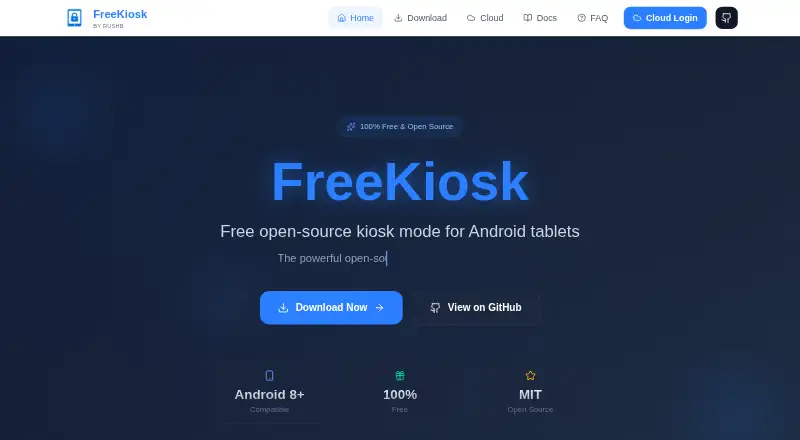
FreeKiosk converts Android tablets into fullscreen kiosks that display websites, web apps, or other Android apps.
What FreeKiosk is
FreeKiosk converts Android tablets into fullscreen kiosks that display websites, web apps, or other Android apps. Device Owner mode can conceal system controls and block users from leaving the kiosk. For signage, it plays videos and shows image slideshows. URL Rotation & Planner cycles through URLs or schedules specific pages by time and date. Automation options include more than 40 REST API endpoints for Home Assistant and native MQTT with Home Assistant auto-discovery. An optional Cloud dashboard provides live device monitoring, remote commands, groups, configuration profiles, alerts, and screenshots. The Android app keeps settings on the device unless enrolled in Cloud, and the maker says it has no analytics or crash-reporting SDK. FreeKiosk Cloud uses TOTP two-factor authentication, a device-specific SHA-256-hashed API key, and organization-level data isolation. Cloud fleet data is hosted by OVH in France. The Android app is open source under the MIT license, while the Cloud source is not published. Android 8.0 or later is required; Device Owner setup also needs ADB and a factory-reset device.
Good
- Fullscreen kiosk mode for websites, web apps, and Android apps
- Device Owner mode can prevent exiting
- Video playback and image slideshows support signage
- More than 40 REST API endpoints for Home Assistant
- Native MQTT supports Home Assistant auto-discovery
- Android app is MIT-licensed open source
Watch out
- Device Owner setup requires ADB and a factory reset
- Requires Android 8.0 or later
- Cloud platform source code is not published
- Cloud fleet rates apply beyond the first device
Who it suits
FreeKiosk suits people turning Android tablets into locked-down website, app, or signage kiosks. It also fits teams managing many devices across locations, especially when Home Assistant automation or cloud monitoring is useful.
Verdict
Pick FreeKiosk for Android kiosk deployments needing lockdown, signage, scheduling, or remote controls. It is particularly suited to multi-location fleets and Home Assistant setups. Look elsewhere if you need a platform other than Android or publicly available Cloud source code.
Plans and prices
From FreeKiosk's own pricing page, checked 7 Oct 2026.
| Plan | Price | What it gives you |
|---|---|---|
| FreeKiosk Android app | Free | Android 8.0+ |
| FreeKiosk Cloud — first device | Free | 1 device · no card required · forever |
| FreeKiosk Cloud — 100–499 devices | €0.80 a month | 100–499 devices · first device free · per device / month, whole fleet, excl. VAT |
| FreeKiosk Cloud — 1–99 devices | €1 a month | 1–99 devices · first device free · per device / month, excl. VAT |
| FreeKiosk Cloud — 500+ devices | Priced on request | 500+ devices · always below the 499-device rate |
The facts
Each one read from FreeKiosk's own pages, with the date it was checked.
What it does
- API
- FreeKiosk provides more than 40 REST API endpoints for Home Assistant control.checked 7 Oct 2026
- Cloud hosting
- The maker says Cloud fleet data is hosted by OVH in France and is not sold, rented, or shared for advertising.checked 7 Oct 2026
- Cloud management
- The optional Cloud dashboard provides live device monitoring, remote commands, groups, configuration profiles, alerts, and screenshots.checked 7 Oct 2026
- Cloud security
- FreeKiosk Cloud states that it uses TOTP two-factor authentication, a unique SHA-256 hashed API key per device, and per-organization data isolation.checked 7 Oct 2026
- Integrations
- The app supports native MQTT with Home Assistant auto-discovery.checked 7 Oct 2026
- Intended users
- The maker describes FreeKiosk Cloud as built for teams managing dozens or hundreds of kiosks across multiple locations.checked 7 Oct 2026
- License and limit
- The Android app is open source under the MIT license, while the Cloud platform source code is not published.checked 7 Oct 2026
- Lockdown
- Device Owner mode can hide system controls and prevent users from exiting the kiosk.checked 7 Oct 2026
- Media signage
- The app includes video playback and image slideshow features for digital signage.checked 7 Oct 2026
- Purpose
- FreeKiosk turns Android tablets into fullscreen kiosks for websites, web apps, or external Android apps.checked 7 Oct 2026
- Requirements
- FreeKiosk requires Android 8.0 or later; Device Owner setup requires ADB and a factory-reset device.checked 7 Oct 2026
- Scheduling
- URL Rotation & Planner can cycle through URLs or schedule them by time and date.checked 7 Oct 2026
- Support
- Product support is available at [email protected], and the documentation directs users to the FAQ or GitHub Issues for help.checked 7 Oct 2026
Where it runs
- App privacy
- The maker says the Android app has no analytics or crash-reporting SDK and keeps its settings on the device unless the user enrolls it in Cloud.checked 7 Oct 2026
The full review of FreeKiosk
Overview
FreeKiosk converts Android tablets into fullscreen kiosks for websites, web apps, and Android applications. It suits operators deploying dedicated displays, self-service stations, or managed tablets who also want signage and automation options. The strongest case is a no-cost Android app with unusually broad control interfaces; the main compromises are Android-only deployment and the preparation required for hardened lockdown.
Key features
Device Owner mode can hide system controls and block users from leaving the kiosk. That is the appropriate level of restriction for public-facing tablets and fixed operational terminals, but enabling it requires ADB and a factory-reset device. Existing tablets therefore need to be wiped and prepared before they can become locked devices.
FreeKiosk handles basic digital signage as well as kiosk browsing. Video playback and image slideshows cover straightforward media loops, while URL Rotation & Planner can rotate web pages or display them according to a time-and-date schedule. This combination is useful when one screen must alternate between web content and scheduled media, though teams seeking a wider signage ecosystem should assess whether these focused tools match their workflows.
Automation is a notable strength. More than 40 REST API endpoints expose substantial remote control, and native MQTT with Home Assistant auto-discovery gives Home Assistant users a direct integration path without building a separate connector. The optional Cloud dashboard adds live device monitoring, remote commands, device groups, configuration profiles, alerts, and screenshots. Those functions matter when staff cannot visit every screen, particularly across multiple locations.
FreeKiosk Cloud states that it protects accounts with TOTP two-factor authentication, a unique SHA-256-hashed API key for each device, and data isolation between organizations. The maker says the Android app contains no analytics or crash-reporting SDK and keeps settings on the device unless Cloud enrollment is enabled. Cloud fleet data is hosted by OVH in France and is not sold, rented, or shared for advertising.
The Android application is open source under the MIT license. Cloud's source code is not published, so organizations that require an inspectable or self-hostable management backend should account for that boundary.
Pricing
The FreeKiosk Android app costs nothing on Android 8.0 and later. A free trial is also offered. This is the right starting point for a single kiosk or a team comfortable managing devices locally, with no app subscription to budget for.
FreeKiosk Cloud's first device costs nothing, billed forever, with no card required. The 1–99 devices tier costs €1 per device per month, billed across the whole fleet excluding VAT, with the first device free. Fleets of 100–499 devices pay €0.80 per device per month on the same whole-fleet, excluding-VAT basis, again with the first device free. For 500+ devices, pricing is custom, with a rate stated as always below the 499-device rate. The free first-device allowance is practical for a pilot; recurring Cloud charges apply once centralized management extends beyond that device.
Platforms
FreeKiosk supports Android, with Android 8.0 or later required for the app. Its deployment model is hybrid: the app can operate on-device, while Cloud, API, and web access provide remote administration. It offers remote management and digital-signage support, but it is not a cross-platform kiosk product for iOS, Windows, macOS, or Linux hardware.
Who it's for
FreeKiosk is aimed at teams running dozens or hundreds of Android kiosks across multiple locations, as well as smaller operators needing a locked display, scheduled web content, or Home Assistant control. It is a particularly sensible choice when Android hardware is already standardized and a free MIT-licensed app is preferred. It is less suitable for mixed-platform estates, tablets that cannot be factory-reset, or organizations requiring published Cloud source code.
Pros and cons
Pros
- No-cost Android app: The core kiosk software is free, removing per-device app licensing from small deployments.
- Strong lockdown: Device Owner mode can conceal system controls and prevent kiosk exit, which is important for unattended public devices.
- Useful signage tools: Video, slideshows, URL rotation, and date-based planning cover mixed web-and-media displays.
- Automation depth: More than 40 REST endpoints and MQTT auto-discovery suit Home Assistant installations.
- Fleet controls: Cloud monitoring, remote commands, groups, profiles, alerts, and screenshots reduce the need for site visits.
Cons
- Demanding initial setup: Device Owner configuration needs ADB and a factory reset, adding deployment work and data-loss risk.
- Android only: Organizations with iOS, desktop, or mixed hardware need another platform or a separate product.
- Cloud is proprietary: The app is MIT-licensed, but Cloud source code is unpublished.
- Cloud costs scale with fleet size: Management beyond the free first device becomes a per-device monthly expense, excluding VAT.
Alternatives
Choose Kiosk Browsers for a broader category comparison. SureAsset is the better choice when asset lifecycle management, hardware and software license tracking, and API automation matter across Android, desktop, web, and iOS platforms.
Kiosk is a free, open-source PDF reader available on a wide range of platforms, including self-hosted deployments. OpenKiosk is a free MPL-licensed option for Linux, macOS, and Windows rather than Android tablets.
Pick KioskFrame for iOS: its free tier has no time limit, while the 4.99 USD monthly plan adds its full-screen kiosk offering after a 14-day trial. UniKiosk targets Android and web screens with unlimited screens, widgets, lockdown, an on-device admin console, and templates in its free plan.
Hexnode Kiosk Browser is a paid Android, iOS, and Windows alternative, with Pro at $2.20 a month and Enterprise at $3.20 a month, each starting with 15 devices. Kiosker offers Android and iOS subscriptions at 6.99 USD monthly or 24.99 USD yearly, each with a 7-day trial. SiteKiosk is a paid option spanning Android, Windows, web, and self-hosted environments.
Verdict
Pick FreeKiosk when you need locked Android displays with signage, scheduling, Home Assistant automation, or centralized controls and want the app itself to remain free. Its decisive advantages are lockdown capability, broad automation interfaces, and fleet-oriented Cloud management. Look elsewhere if your hardware is not Android, factory-reset deployment is impractical, or your compliance requirements demand publicly available Cloud source code.
Getting started
- Open the FreeKiosk website.
- Install the Android app on a device running Android 8.0 or later.
- Use ADB and a factory-reset device when configuring Device Owner mode.
- Configure kiosk content, signage playback, or URL scheduling.
- Connect Home Assistant through the REST API or native MQTT.
- Enroll devices in the optional Cloud dashboard for monitoring and remote management.
Limits worth knowing
The free Cloud plan covers the first device only. The Android app is free, while Cloud management for 1–99 devices costs €1 per device per month and for 100–499 devices costs €0.80 per device per month, with the first device free in each range.
Questions
What does FreeKiosk cost?
The Android app costs nothing. The first Cloud device costs nothing, billed forever with no card required; fleets of 1–499 devices use the listed per-device monthly rates, while the 500+ tier has no listed price and is stated to be below the 499-device rate.
Which platforms does it support?
FreeKiosk is available for Android, web, and API access. The supported platform is Android, and deployment is hybrid.
Can FreeKiosk run digital signage?
Yes. It includes video playback, image slideshows, and URL scheduling through URL Rotation & Planner.
Does it offer remote management?
Yes. The optional Cloud dashboard provides monitoring, remote commands, groups, profiles, alerts, and screenshots.
Is FreeKiosk open source?
The Android app is open source under the MIT license. The Cloud platform source code is not published.
What is needed for Device Owner mode?
Device Owner setup requires ADB and a factory-reset device, in addition to Android 8.0 or later.