
FocusLock
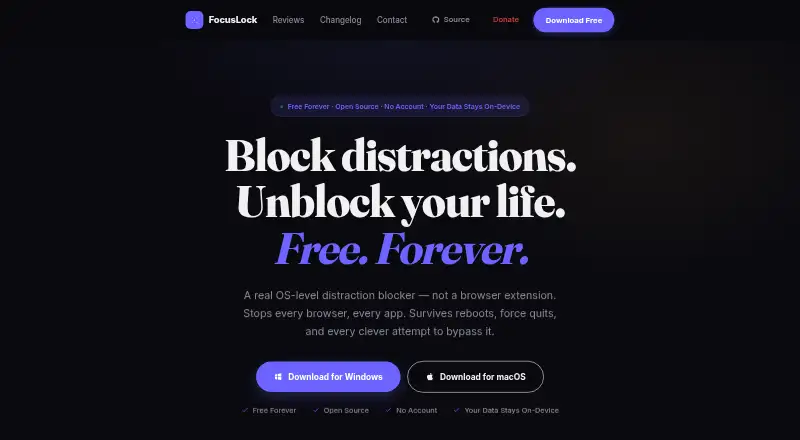
FocusLock is a free distraction blocker for macOS and Windows that blocks websites and apps at the operating-system level.
What FocusLock is
FocusLock is a free distraction blocker for macOS and Windows that blocks websites and apps at the operating-system level. It uses the OS hosts file to block sites across browsers, without extensions or separate browser setup, and blocks apps by process name with a check every two seconds. Focus sessions can use Hardcore Mode, which cannot be ended early, or Friend Lock, where a trusted person can unlock the session with a token. A configurable Pomodoro timer and recurring schedules written in cron syntax support planned sessions. Focus profiles, session history, block lists, statistics, and settings are stored locally. Optional per-app usage tracking is off by default, saves samples in a local SQLite database, and deletes those samples when disabled. The privacy policy says FocusLock has no crash reporting or day-to-day activity tracking. Update checks send the operating system, CPU architecture, and app version to the update server and GitHub API; the policy says IP addresses are not logged or stored. The source code is public under GPL-3.0. FocusLock is described as a voluntary productivity tool, not a parental control system or a sole means of restricting content.
Good
- Blocks websites across browsers
- Can block apps by process name
- Offers recurring schedules and Pomodoro timer
- Settings and history are stored locally
- Public source under GPL-3.0
Watch out
- No mobile apps
- No browser extensions
- Not a parental control system
Who it suits
FocusLock suits people who want scheduled website and app blocking on a Mac or Windows computer. It is intended for voluntary productivity use, not parental control or sole content restriction.
Verdict
FocusLock provides computer-wide website and app blocking with strict session options and recurring schedules. Its stated limits matter: it is a voluntary productivity tool, and there is no mobile app or browser extension.
Plans and prices
From FocusLock's own pricing page, checked 7 Oct 2026.
| Plan | Price | What it gives you |
|---|---|---|
| Free | Free | All features · No account · GPL-3.0 open source |
The facts
Each one read from FocusLock's own pages, with the date it was checked.
Where it runs
- App blocking
- It can block apps by process name, and its process-check loop runs every two seconds.checked 7 Oct 2026
What it does
- Focus sessions
- Sessions can use Hardcore Mode, which the site says cannot be ended early, or Friend Lock, which lets a trusted person unlock a session with a token.checked 7 Oct 2026
- Intended use limit
- The terms describe FocusLock as a voluntary productivity tool and say it is not a parental control system or a sole means of restricting content.checked 7 Oct 2026
- Privacy
- Focus profiles, session history, block lists, statistics, and settings are stored locally, and the privacy policy says FocusLock has no crash reporting or day-to-day activity tracking.checked 7 Oct 2026
- Purpose
- FocusLock is an OS-level distraction blocker that blocks websites and apps across the computer.checked 7 Oct 2026
- Scheduling and timers
- Features include a configurable Pomodoro timer and recurring sessions set with cron syntax.checked 7 Oct 2026
- Source and license
- The source code is public and FocusLock is released under the GPL-3.0 license.checked 7 Oct 2026
- Support
- The maker invites users to report issues or contribute through GitHub and offers optional donations through Ko-fi.checked 7 Oct 2026
- Updates
- Update checks contact the update server and GitHub API with the operating system, CPU architecture, and app version; the policy says the IP address is not logged or stored.checked 7 Oct 2026
- Usage analytics
- Optional per-app usage tracking is off by default, stores samples in a local SQLite database, and deletes stored samples when disabled.checked 7 Oct 2026
- Website blocking
- It blocks sites through the OS hosts file, so the blocks apply across browsers without an extension or per-browser setup.checked 7 Oct 2026
Alternatives to FocusLock
- 1

Freedom
Free planAndroidiOSWebExtension8.2From $40 a year - 2

Opal
Free planAndroidiOSExtensionmacOS8.0From $8.29 a month - 3

ScreenZen
Free planAndroidiOSmacOSWindows7.3$49 one-time - 4
Focus Bear
Free planAndroidiOSmacOSWindows7.2From $9.99 a month - 5
one sec
AndroidiOSExtensionLinux7.2From $19.99 a year - 6

FocusMe
AndroidiOSExtensionLinux7.1$249 one-time