FocalFilter
FocalFilter is a free Windows productivity tool for temporarily blocking distracting websites.
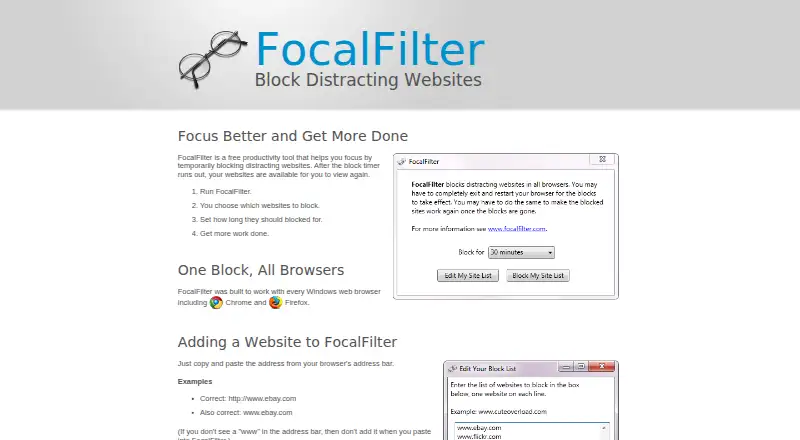
What FocalFilter is
FocalFilter is a free Windows productivity tool for temporarily blocking distracting websites. You choose the sites to restrict by copying their addresses from a browser address bar, then set how long the block should last. The program is designed to work with every Windows web browser, including Chrome and Firefox, and saves your blocked-site list for its next run. Blocks may require you to fully exit and restart the browser before they begin or end. If FocalFilter remains installed, rebooting the computer can remove active blocks early. Uninstalling during an active block leaves the sites blocked and prevents FocalFilter from clearing them when the timer expires. Security or antivirus software may stop it because it changes system settings. Windows XP users need administrator access. The site provides troubleshooting guides and a contact email link.
Good
- Free plan costs nothing
- Works with Windows browsers including Chrome and Firefox
- Saves blocked-site lists for later runs
- Reboot can remove blocks early while installed
Watch out
- Windows only; no mobile apps
- Uninstalling during a block prevents automatic clearing
- Security software may stop system changes
- Browser restart may be required
Who it suits
FocalFilter suits Windows users who want timed website blocking without a paid plan. It is intended for people limiting distracting sites in desktop browsers.
Verdict
FocalFilter offers straightforward, timed website blocking on Windows at no cost. Be careful when uninstalling during an active block and account for browser or security-software interference.
Plans and prices
From FocalFilter's own pricing page, checked 9 Oct 2026.
| Plan | Price | What it gives you |
|---|---|---|
| Free | Free | Temporarily blocks chosen websites · timer-based |
The facts
Each one read from FocalFilter's own pages, with the date it was checked.
Where it runs
- Browser coverage
- It is designed to work with every Windows web browser, including Chrome and Firefox.checked 9 Oct 2026
- Browser restart
- Users may need to fully exit and restart their browser for blocks to start or end.checked 9 Oct 2026
- Windows XP requirement
- On Windows XP, users must be an administrator or run FocalFilter as an administrator.checked 9 Oct 2026
What it does
- Early removal
- If FocalFilter remains installed, users can remove blocks early by rebooting the computer.checked 9 Oct 2026
- How it works
- Users choose websites to block and set how long to block them.checked 9 Oct 2026
- Notable limit
- Uninstalling while sites are blocked will not remove those blocks and prevents FocalFilter from clearing them when the timer ends.checked 9 Oct 2026
- Purpose
- FocalFilter is a free productivity tool that temporarily blocks distracting websites until a timer runs out.checked 9 Oct 2026
- Saved list
- The list of blocked sites is saved for the next time FocalFilter runs.checked 9 Oct 2026
- Support
- The site directs users having trouble to its desktop, laptop, and tablet guides and provides a contact email link on the main page.checked 9 Oct 2026
- System changes
- Some security or antivirus software may stop FocalFilter because it modifies system settings.checked 9 Oct 2026
- Website entry
- Users add sites by copying and pasting their address from the browser address bar.checked 9 Oct 2026
The company
- Makers
- The site says FocalFilter is brought to users by Deanna Gelbart and Shan Naziripour.checked 9 Oct 2026
Alternatives to FocalFilter
- 1

Freedom
Free planAndroidiOSWebExtension8.2From $40 a year - 2

Opal
Free planAndroidiOSExtensionmacOS8.0From $8.29 a month - 3

ScreenZen
Free planAndroidiOSmacOSWindows7.3$49 one-time - 4
Focus Bear
Free planAndroidiOSmacOSWindows7.2From $9.99 a month - 5

one sec
AndroidiOSExtensionLinux7.2From $19.99 a year - 6

FocusMe
AndroidiOSExtensionLinux7.1$249 one-time