
Flonnect Presentation Recorder
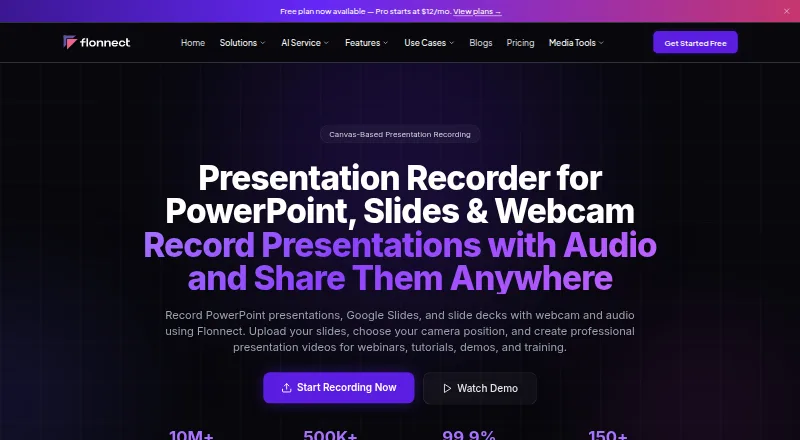
Flonnect Presentation Recorder records PowerPoint presentations, Google Slides and other slide decks with webcam and audio for webinars, tutorials, demos and…
What Flonnect Presentation Recorder is
Flonnect Presentation Recorder records PowerPoint presentations, Google Slides and other slide decks with webcam and audio for webinars, tutorials, demos and training. Presentation mode can synchronize slides, auto-advance them and display speaker notes; other options include canvas recording and video-with-slides layouts. Presenters can reposition the camera, use picture-in-picture or custom layouts, record narration with noise cancellation, and annotate live with a digital pen, pencil, text, checkmarks, shapes, arrows and a color picker. Listed inputs include PPTX, Google Slides, Keynote, PDF presentations and image formats. Presentations can be exported or shared through YouTube, LinkedIn, Instagram, TikTok, email and other social platforms. Team features include workspaces, invited members, version control, access permissions, password-protected sharing and cloud backup. The Free/Starter plan costs nothing and includes 20 videos for life and 1 GB storage. Pro costs $12 a month and includes 30 videos per month and 10 GB storage. Uploaded videos are public by default and accessible to anyone with the shared link.
Good
- Records slides with webcam and audio.
- Supports several presentation and image formats.
- Offers live annotation tools and narration noise cancellation.
- Team workspaces include version control and access permissions.
- Free plan includes 20 lifetime videos and 1 GB storage.
Watch out
- Uploaded videos are public by default via shared links.
- Free plan limits videos to 20 for life.
- Pro costs $12 a month.
Who it suits
It suits educators, students, creators, sales professionals, webinar presenters and corporate trainers who need to record slide presentations with webcam and audio. Teams can use shared workspaces and access controls, but should account for the public-by-default video setting.
Verdict
Flonnect combines slide recording, webcam layouts, annotations and sharing tools for presentation-focused videos. Review link access before sharing, and compare the free plan’s lifetime video limit with the paid options.
Plans and prices
From Flonnect Presentation Recorder's own pricing page, checked 29 Sep 2026.
| Plan | Price | What it gives you |
|---|---|---|
| Free/ Starter | Free | 20 videos (lifetime), including transcription & editing · 10 bug reports/month · 5 HTML/demo captures/month · 1 GB storage · meeting recording (bot) · $0 |
| Pro | $12 a month | 30 videos/month · 50 bug reports/month · 25 HTML/demo captures/month · 10 meeting recordings/month · 50 AI credits/month · 10 GB storage · monthly |
| Business | $20 a month | 100 videos/month · 200 bug reports/month · 100 HTML/demo captures/month · 50 meeting recordings/month · 100 AI credits/month · 50 AI generations/month · 50 GB storage · monthly |
| Team | $32 a month | 500 videos/month · 1,000 bug reports/month · 500 HTML/demo captures/month · 200 meeting recordings/month · 200 AI credits/user · 100 AI generations/user · team collaboration · shared workspace · admin controls · 200 GB shared storage · per user monthly |
| Free/Starter | Free | 20 videos lifetime · 10 bug reports/month · 5 HTML/demo captures/month · 1 GB storage · meeting recording bot · forever |
| Enterprise | Priced on request | Everything in Team · dedicated server · BYOK · custom limits · SLA guarantee · dedicated support · custom integrations · SSO/SAML · custom quotation |
The facts
Each one read from Flonnect Presentation Recorder's own pages, with the date it was checked.
What it does
- Annotations
- Users can draw and place text overlays while recording presentation content.checked 15 Oct 2026
- Audio
- Flonnect advertises noise cancellation for clearer presentation narration.checked 15 Oct 2026
- Camera and audio
- Presenters can reposition the camera, use picture-in-picture and custom layouts, and record narration with noise cancellation.checked 29 Sep 2026
- Canvas recording
- Canvas recording renders interactive presentation elements and animations in real time.checked 15 Oct 2026
- Capterra integrations
- Capterra lists 12 integrations including Google Docs, Google Drive, Slack, Jira, Asana, OneDrive, Google Meet, Microsoft Teams and Microsoft OneNote.checked 15 Oct 2026
- Chrome adoption
- The Chrome Web Store listing shows 100,000 users for the extension.checked 15 Oct 2026
- Collaboration
- The page describes team workspaces, invited members, version control, access permissions, password-protected sharing, and cloud backup.checked 29 Sep 2026
- Desktop requirements
- The download page lists macOS 10.14 or later and Windows 10 or later for its desktop applications.checked 15 Oct 2026
- Desktop versions
- The downloads page lists macOS app version 1.0.8 at 172 MB and Windows app version 1.0.9 at 227 MB.checked 15 Oct 2026
- Documentation
- The downloads page links to tutorials, documentation and a live demo through the Flonnect application.checked 15 Oct 2026
- Google and Microsoft APIs
- Flonnect describes OAuth 2.0 calendar connections and says Google user data is used only for services such as YouTube publishing, calendar scheduling and AI notes.checked 15 Oct 2026
- Input formats
- The FAQ says it supports PowerPoint (PPTX), Google Slides, Keynote, PDF presentations, and image formats.checked 29 Sep 2026
- Integrations
- The presentation page lists YouTube, Gmail, GitHub, Bitbucket, Google Drive, Slack, Notion, LinkedIn, Zoom, Microsoft Teams and Vimeo integrations; HubSpot is marked coming soon.checked 15 Oct 2026
- Intended users
- The product page identifies educators, students, content creators, sales professionals, webinar creators, and corporate trainers as intended presenters.checked 29 Sep 2026
- Layouts
- Available layouts include split screen, full screen and custom camera positioning.checked 15 Oct 2026
- Licence
- The terms page says Flonnect and its licensors retain intellectual-property rights and that all rights are reserved.checked 15 Oct 2026
- Limit: duration
- One Trustpilot reviewer said recordings longer than one hour and twenty minutes could not be made.checked 15 Oct 2026
- Limit: recording reliability
- Trustpilot complaints include missing meeting audio, failed uploads, unusable recordings and poor 1080p results.checked 15 Oct 2026
Where it runs
- Browser extensions
- Flonnect provides Chrome and Edge extensions for screen recording and separate steps-recorder extensions.checked 15 Oct 2026
The company
- Company
- The website footer identifies the company as Talky Media Private Limited.checked 29 Sep 2026
- Company size
- LinkedIn classifies Flonnect as a privately held desktop-computing software company with 11–50 employees.checked 15 Oct 2026
- Headquarters
- LinkedIn lists Flonnect headquarters in Bengaluru, Karnataka, with a primary location in HSR Sector 1.checked 15 Oct 2026
Money
- Free plan
- Yeschecked 20 Sep 2026
- Free-trial offer
- Flonnect announced a one-week trial giving new and existing users access to premium features.checked 15 Oct 2026
The full review of Flonnect Presentation Recorder
Flonnect Presentation Recorder combines slide decks, webcam video, and narration for presentation-focused videos. It is best suited to educators, trainers, creators, and sales professionals who explain material on screen. Its recording tools are flexible, but link privacy and the free plan’s lifetime cap deserve close attention.
Overview
Flonnect records PowerPoint, Google Slides, and other presentation formats with webcam and audio for webinars, tutorials, demos, and training. Presentation mode synchronizes with slides and supports auto-advance and speaker notes; canvas recording and video-with-slides layouts offer alternatives when a conventional slide show is not the right fit.
Camera repositioning, picture-in-picture, custom layouts, and noise-cancelled narration help keep the presenter visible while explaining material. Uploaded videos are public by default to anyone with the shared link. Team workspaces, permissions, password-protected sharing, version control, and cloud backup provide useful collaboration controls, but users should check access settings before sending a link to sensitive content.
Key features
Presentation recording and annotation
Flonnect supports PPTX, Google Slides, Keynote, PDF presentations, and image formats. During recording, presenters can use a digital pen, pencil, text, checkmarks, shapes, arrows, and a color picker. That range makes it suitable for walking viewers through details as they appear, rather than relying only on spoken narration.
Sharing and integrations
Videos can be exported or shared through YouTube, LinkedIn, Instagram, TikTok, email, and other social platforms. Integrations include YouTube, Gmail, GitHub, Bitbucket, Google Drive, Slack, Notion, LinkedIn, Zoom, Teams, and Vimeo; HubSpot is marked as coming soon. Transcript generation and viewer analytics are also supported. The breadth is useful for teams distributing training or promotional videos across channels, though public-by-default links make careful permission checks important.
Pricing
The Free/Starter plan costs nothing, billed $0. It includes 20 videos for a lifetime, transcription and editing, 10 bug reports per month, 5 HTML/demo captures per month, 1 GB of storage, and meeting recording with a bot. This is a sensible way to try the presentation workflow, but 20 lifetime videos make it a poor fit for ongoing production.
Pro costs $12 a month, billed $12/month. It raises the allowance to 30 videos per month, 50 bug reports, 25 HTML/demo captures, 10 meeting recordings, 50 AI credits, and 10 GB of storage. It suits an individual who has outgrown the free cap, although the monthly video quota still calls for planning.
Business costs $20 a month, billed $20/month. It includes 100 videos, 200 bug reports, 100 HTML/demo captures, 50 meeting recordings, 100 AI credits, 50 AI generations, and 50 GB of storage per month. The larger quotas suit heavier use, but its listed features do not include the Team plan’s shared workspace or admin controls.
Team costs $32 per user per month, billed $32/user/mo. It provides 500 videos, 1,000 bug reports, 500 HTML/demo captures, 200 meeting recordings, 200 AI credits per user, 100 AI generations per user, team collaboration, a shared workspace, admin controls, and 200 GB of shared storage. Per-user pricing makes the total rise with team size, so it is most compelling when those management and collaboration tools matter.
Enterprise has custom pricing and includes a dedicated server, BYOK, custom limits, an SLA guarantee, dedicated support, and SSO/SAML. It is aimed at organizations that need those controls rather than a fixed self-serve quota.
Platforms
Flonnect is available as an extension and on macOS, the web, and Windows. Android and iOS are not among its listed platforms.
Who it's for
Educators, students, content creators, sales professionals, webinar creators, and corporate trainers are the intended presenters. It is a particularly good fit when a speaker needs to annotate slides, keep a camera view alongside them, and share finished videos across several channels. For private or internal presentations, the public-by-default link behavior requires extra care.
Pros and cons
- Pros: Synchronized slide recording, speaker notes, auto-advance, and multiple layouts support more than a basic screen capture.
- Pros: Live annotation tools and supported presentation formats make it practical for lessons, demos, and detailed walkthroughs.
- Pros: Team permissions, password-protected sharing, and shared workspaces support collaborative distribution on higher plans.
- Cons: Free use is capped at 20 lifetime videos, limiting its usefulness as a continuing free workflow.
- Cons: Videos are public by default to anyone with the link, an important risk for sensitive material.
- Cons: Team is priced per user, and the enterprise price is custom, so larger deployments require budget consideration.
Alternatives
Slideator is worth considering when broad device coverage matters: it supports Android, iOS, Linux, macOS, web, and Windows. Its Basic plan is free forever, but limits files to 3 MB and 12 slides, with three presentation files and three videos per day.
Knovio is an alternative for presenters seeking a paid product with student plans: Student Annual is $5 a month when billed annually, with five hours of storage and a five-hour maximum presentation length; Student Semester is $7 a month when billed every six months.
VIDAREO may suit users who want a free trial and a simple, tightly capped free tier: its free plan allows five recordings per month, up to two minutes per video, 720p, and a watermark.
30hands is an iOS and web option for users who can work within a free limit of three projects and five-minute videos, with a watermark on exports.
Explain Everything is an alternative for Android and iOS users, though its free plan is limited to three projects, one slide per project, and three-minute videos.
Google Vids is another freemium option; its Business Starter plans include pooled storage per user, with prices of $8.40 a month for the Flexible Plan and $7 a month for the Annual/Fixed-Term Plan.
REQO Presentation Recorder is a web-only alternative with a free plan offering 1080p at 30fps, 2 GB per recording, uploads under 1 GB at a time, and one team member; it adds a REQO badge.
Airtime Recorder is a paid alternative with a free trial and macOS, web, and Windows support.
Compare other options in Presentation Recording Software and Screen Recording Software.
Verdict
Choose Flonnect if you regularly turn slide decks into narrated videos and value synchronized slides, live annotation, camera layouts, and team sharing. The main reasons to look elsewhere are its 20-video lifetime free cap and public-by-default link access; for sensitive presentations, privacy needs should take priority over its broad recording toolkit.
Getting started
- Open the Flonnect Presentation Recorder website
- Use the extension, macOS, web, or Windows version
- Choose a free plan or a paid plan from $12 a month
- Import a supported presentation or image format
- Select presentation, canvas, or video-with-slides recording
- Record with webcam, audio, and optional annotations
- Share or export the finished presentation
Limits worth knowing
The Free/Starter plan costs nothing and includes 20 videos for life, 1 GB storage, 10 bug reports per month, 5 HTML/demo captures per month, and meeting recording by bot. The cheapest paid plan, Pro at $12 a month, allows 30 videos, 50 bug reports, 25 HTML/demo captures, 10 meeting recordings, 50 AI credits, and 10 GB storage monthly.
Questions
What does Flonnect Presentation Recorder record?
It records PowerPoint presentations, Google Slides, and other slide decks with webcam and audio.
Which platforms are supported?
It is available as an extension and for macOS, web, and Windows.
Is there a free plan?
Yes. Free/Starter costs nothing and includes 20 lifetime videos and 1 GB storage.
How much does Pro cost?
Pro costs $12 a month.
Are uploaded videos private by default?
No. Flonnect says uploaded videos are public by default and accessible to anyone with the shared link.
Which integrations are listed?
Listed integrations include YouTube, Gmail, GitHub, Bitbucket, Google Drive, Slack, Notion, LinkedIn, Zoom, Teams, and Vimeo. HubSpot is marked coming soon.
Alternatives to Flonnect Presentation Recorder
- 1

Cap
Free planOpen sourceWebAPIExtensionLinux9.0From $29 a year - 2

Loom
Free planAndroidiOSWebmacOS8.9From $18 a month - 3

Vmaker
Free planiOSWebExtensionmacOS8.9From $18 a month - 4

ScreenPal
Free planAndroidiOSWebmacOS8.8From $4 a month - 5
Claap
Free planAndroidiOSWebAPI8.8From €32 a month - 6

Screencastify
Free planWebExtensionLinuxmacOS8.7From $7 a month