FilterDNS
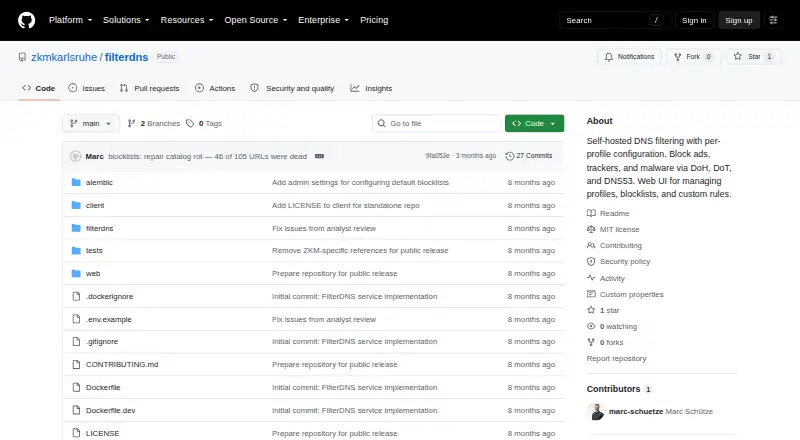
FilterDNS is a free, MIT-licensed DNS filtering service designed to be self-hosted.
What FilterDNS is
FilterDNS is a free, MIT-licensed DNS filtering service designed to be self-hosted. It can block ads, trackers, and malware using DNS over HTTPS on port 443, DNS over TLS on port 853, or legacy DNS on port 53. Users can create separate profiles for devices or use cases, then apply custom allow and deny rules or select preset rule sets such as gaming and social media. Preconfigured blocklists include Hagezi, StevenBlack, and OISD. Query logs and statistics are available for reviewing DNS requests, and logging is enabled by default in the documented configuration. Users can pause filtering for 5, 15, 30, or 60 minutes; maintenance mode permits DNS only for allowed domains. The documented setup uses Docker Compose, PostgreSQL, and a SvelteKit web interface accessed locally at http://localhost:8080. DoH and DoT require a wildcard TLS certificate for the service domain. The project documents API endpoints for profiles, logs, statistics, rules, presets, devices, and administration, and its maker is based in Karlsruhe, Germany.
Good
- Free and MIT-licensed.
- Supports DoH, DoT, and legacy DNS.
- Profiles allow separate device configurations.
- Includes custom rules and named blocklists.
- Query logs include statistics.
Watch out
- Self-hosted setup uses Docker Compose and PostgreSQL.
- DoH and DoT require a wildcard TLS certificate.
- Query logging is enabled by default in the documented configuration.
- No safe search controls or filtering schedules.
Who it suits
FilterDNS suits users who want to host DNS filtering themselves and manage separate profiles, rules, and query logs. It is aimed at a self-service setup for different devices or use cases.
Verdict
FilterDNS provides configurable DNS filtering with profiles, presets, and query review for self-hosted use. Its documented setup and TLS requirement are important considerations before deployment.
Plans and prices
From FilterDNS's own pricing page, checked 11 Oct 2026.
| Plan | Price | What it gives you |
|---|---|---|
| FilterDNS | Free | MIT-licensed software; self-hosted |
The facts
Each one read from FilterDNS's own pages, with the date it was checked.
What it does
- API
- The service documents endpoints for profile management, logs, statistics, rules, presets, devices, and administration.checked 11 Oct 2026
- Blocklists
- The project lists preconfigured Hagezi, StevenBlack, and OISD blocklists.checked 11 Oct 2026
- Custom rules
- Profiles can have custom allow and deny rules for domains.checked 11 Oct 2026
- Deployment
- The quick start uses Docker Compose, and the documented architecture uses PostgreSQL and a SvelteKit web UI.checked 11 Oct 2026
- DNS protocols
- It supports DNS over HTTPS on port 443, DNS over TLS on port 853, and legacy DNS on port 53.checked 11 Oct 2026
- Filtering controls
- Profiles can pause filtering for 5, 15, 30, or 60 minutes, and maintenance mode blocks DNS except for allowed domains.checked 11 Oct 2026
- Intended context
- ZKM describes its open source projects as tools and research, and says the institution believes publicly funded software should be publicly available.checked 11 Oct 2026
- Intended users
- The README describes a self-service model in which users create and manage profiles for different devices or use cases.checked 11 Oct 2026
- License
- The repository identifies FilterDNS as MIT licensed.checked 11 Oct 2026
- Maintenance mode
- Maintenance mode blocks all DNS except allowed domains.checked 11 Oct 2026
- Pause filtering
- Filtering can be paused temporarily for 5, 15, 30, or 60 minutes.checked 11 Oct 2026
- Presets
- It includes predefined blocking rule sets such as gaming and social media presets.checked 11 Oct 2026
- Profiles
- Users can create profiles with separate filtering configurations for different devices or use cases.checked 11 Oct 2026
- Protocols
- It supports DNS over HTTPS on port 443, DNS over TLS on port 853, and legacy DNS on port 53.checked 11 Oct 2026
- Purpose
- FilterDNS is a self-hosted DNS filtering service for blocking ads, trackers, and malware.checked 11 Oct 2026
- Query logs
- Users can view and analyze DNS queries with statistics, and query logging is enabled by default in the documented configuration.checked 11 Oct 2026
- Rules and presets
- Profiles support custom allow and deny rules and preset rule sets, including gaming and social media presets.checked 11 Oct 2026
- Setup
- The quick start uses Docker Compose, and the web UI is accessed locally at http://localhost:8080.checked 11 Oct 2026
- TLS requirement
- The README says DoH and DoT require a wildcard TLS certificate for the service domain.checked 11 Oct 2026
Where it runs
- Device support
- The README says DoH works in Firefox, Chrome, iOS, and Android; DoT works with Android Private DNS and iOS profiles.checked 11 Oct 2026
The company
- Headquarters
- Karlsruhe, Germanychecked 28 Sep 2026
- Maker
- The maker’s GitHub organization describes itself as ZKM | Center for Art and Media Karlsruhe, a public institution based in Karlsruhe, Germany.checked 11 Oct 2026
The full review of FilterDNS
Overview
FilterDNS is a self-hosted DNS filtering service for blocking ads, trackers, and malware. It suits people who want separate rules for different devices and direct visibility into DNS activity. Its flexible profiles come with the trade-off of deploying and maintaining the service yourself.
Key features
FilterDNS supports DNS over HTTPS on port 443, DNS over TLS on port 853, and legacy DNS on port 53. Profiles let users tailor filtering by device or use case, with custom domain allow and deny rules and presets for gaming and social media. Preconfigured Hagezi, StevenBlack, and OISD blocklists provide starting points; support for custom blocklists offers room to adapt them.
Query logs and statistics help users see what their profiles are doing, but logging is enabled by default in the documented configuration and activity reports are basic. Users who do not want to retain query records should account for that default. Filtering can be paused for 5, 15, 30, or 60 minutes, and maintenance mode blocks DNS except for allowed domains. These are practical manual controls, not a substitute for filtering schedules, which FilterDNS does not offer; it also has no safe-search controls.
The API documents endpoints for profiles, logs, statistics, rules, presets, devices, and administration. That breadth is useful for users who want programmatic control. The quick start uses Docker Compose, with a web interface at http://localhost:8080; the documented architecture uses PostgreSQL and a SvelteKit web UI. Encrypted DNS has an important prerequisite: DoH and DoT require a wildcard TLS certificate for the service domain.
Pricing
FilterDNS is open-source MIT-licensed software, with a free self-hosted plan at free. There are no paid tiers or trial period described. The cost advantage comes with operational responsibility: users deploy and manage the service themselves, rather than selecting a hosted plan.
Platforms
The service supports DoH, DoT, and legacy DNS. The README says DoH works in Firefox, Chrome, iOS, and Android; DoT works with Android Private DNS and iOS profiles. The broader platform support includes Linux, macOS, Windows, web, API, and self-hosted deployment.
Who it's for
FilterDNS is a strong fit for technically capable users who want self-service profiles for distinct devices or use cases, customizable domain rules, and query-level visibility. It is less suited to people seeking a managed service, scheduled filtering, safe-search controls, or encrypted DNS without handling certificate setup. The project is associated with ZKM | Center for Art and Media Karlsruhe, which describes its open-source work as tools and research and supports making publicly funded software publicly available.
Pros and cons
- Pros: Profiles combine custom rules, presets, and established preconfigured blocklists, making policies adaptable across devices and use cases.
- Pros: Logs, statistics, and a broad documented API give users visibility and multiple ways to manage the service.
- Cons: Docker Compose deployment and a required wildcard TLS certificate for DoH and DoT add setup and maintenance work.
- Cons: No safe-search controls or filtering schedules limits suitability for users who want those controls built in.
- Cons: Query logging is enabled by default in the documented configuration, so users should consider log handling before deployment.
Alternatives
Choose AdGuard DNS if you want a free plan with a trial option and open-source code. NextDNS is another freemium option; its free plan allows 300,000 queries per month, unlimited devices, and unlimited configurations. Consider OpenBLD for a free plan with about 100,000 DNS queries per day and stated private-use terms, or OpenDNS Home if you prefer a free service with a preconfigured adult-content-blocking option that requires no sign-up.
DNS for Family is a free alternative. NxFilter offers freeware for commercial and non-commercial use, as well as a paid plan. UnveilDNS has a free Community plan. Cloudflare Gateway has a free tier for 50 users with up to 24 hours of standard log retention.
Browse more options in Internet Filtering Software.
Verdict
Choose FilterDNS if you want configurable DNS filtering, device-specific profiles, and query visibility, and are prepared to self-host. Its MIT license and flexible controls make it a capable option for a self-managed setup; the deployment burden and wildcard certificate requirement are the clearest reasons to look elsewhere.
Getting started
- Open the FilterDNS GitHub project website.
- Follow the quick start using Docker Compose.
- Set up the required wildcard TLS certificate if using DoH or DoT.
- Access the web UI locally at http://localhost:8080.
- Create profiles and configure rules or presets for devices and use cases.
Questions
How much does FilterDNS cost?
The listed plan is free. The project is MIT-licensed and self-hosted.
Which DNS protocols does it support?
It supports DNS over HTTPS on port 443, DNS over TLS on port 853, and legacy DNS on port 53.
Which devices and browsers are supported?
The README says DoH works in Firefox, Chrome, iOS, and Android. DoT works with Android Private DNS and iOS profiles.
Can I customize filtering?
Yes. Profiles support custom domain allow and deny rules, as well as preset rule sets. Listed blocklists include Hagezi, StevenBlack, and OISD.
Who makes FilterDNS?
The maker’s GitHub organization describes itself as ZKM | Center for Art and Media Karlsruhe, a public institution based in Karlsruhe, Germany.
How is it deployed?
The quick start uses Docker Compose, and the documented architecture uses PostgreSQL and a SvelteKit web UI. The UI is accessed locally at http://localhost:8080.
Alternatives to FilterDNS
- 1

AdGuard DNS
Free planOpen sourceAndroidiOSWebAPI8.6From $29.88 a year - 2

NextDNS
Free planOpen sourceAndroidiOSWebAPI8.6From £1.79 a month - 3
Cloudflare Gateway
Free planAndroidiOSWebAPI8.3$7 usage-based - 4

Control D
Open sourceAndroidiOSWebAPI8.1From $2 a month - 5
OpenBLD
Free planAndroidiOSWebAPI7.9From $15 a month - 6
DNSFilter
AndroidiOSWebAPI7.8From $1 a month