
DNS for Family
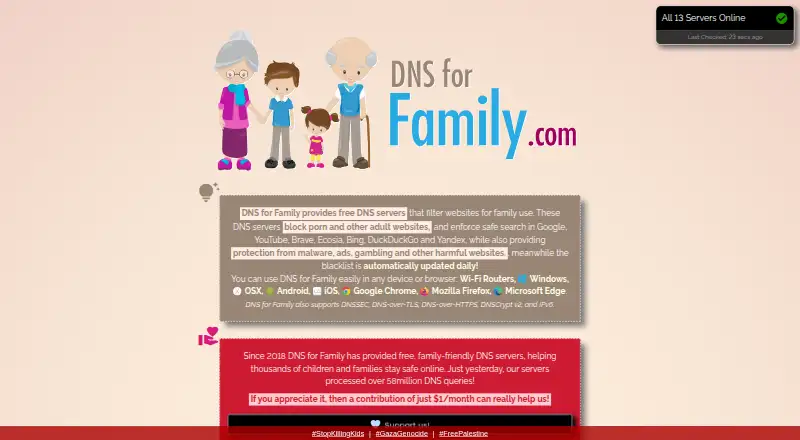
DNS for Family provides family-friendly DNS servers that block adult websites and other harmful domains.
What DNS for Family is
DNS for Family provides family-friendly DNS servers that block adult websites and other harmful domains. Its filters also cover ads, malware, ransomware, scams, phishing, gambling, drugs, proxy sites, and some dating sites. It enforces Safe Search on Google, YouTube, Brave, Ecosia, Bing, DuckDuckGo, and Yandex, while leaving social websites such as Facebook, Instagram, Reddit, and WhatsApp unblocked. The maker says its blacklist is refreshed daily. DNS for Family supports DNSSEC, DNS-over-TLS, DNS-over-HTTPS, DNSCrypt v2, and IPv6, and can be configured on computers, phones, browsers, and Wi-Fi routers. Developers can use a JSON API to check up to 100 hostnames per query. The free plan is listed as free, with no hidden fees; unusually high query volumes are subject to fair-use rate limits. Its privacy policy says DNS requests include the queried domain, visit time, and user IP, which is retained for rate limiting. Queries are forwarded to Google through DNSDist, without sending user IP addresses or personal data to Google.
Good
- Blocks a broad range of harmful domains and ads.
- Enforces Safe Search across seven named search services.
- Supports five DNS-related protocols and IPv6.
- Free plan listed as free.
- Offers an API query for up to 100 hosts.
Watch out
- Does not provide activity reports.
- Retains IP addresses for rate limiting.
- Unusually high query volumes face rate limits.
Who it suits
It suits households seeking DNS-level filtering and Safe Search across devices, browsers, and routers. Developers may also find the hostname-checking API useful.
Verdict
DNS for Family combines broad domain filtering, Safe Search, and several secure DNS protocols at no listed cost. Review its DNS-request privacy details and rate limits before configuring it for a household.
Plans and prices
From DNS for Family's own pricing page, checked 11 Oct 2026.
| Plan | Price | What it gives you |
|---|---|---|
| DNS for Family | Free | Rate limits apply to unusually high query volumes · fair-use limits are described as high enough for normal use · Free; no hidden fees |
The facts
Each one read from DNS for Family's own pages, with the date it was checked.
What it does
- Daily updates
- The maker says its blacklist is updated daily.checked 11 Oct 2026
- Developer API
- Developers can check whether hostnames are blocked through a JSON API that accepts up to 100 hosts per query.checked 11 Oct 2026
- DNS query privacy
- The privacy policy says DNS requests include the queried domain, visit time, and user IP address, and that IP addresses are retained for rate limiting.checked 11 Oct 2026
- Filtering
- The service blocks advertisements, malware, ransomware, scams, phishing, gambling, drugs, proxy sites, and some dating sites.checked 11 Oct 2026
- Protocols
- DNS for Family supports DNSSEC, DNS-over-TLS, DNS-over-HTTPS, DNSCrypt v2, and IPv6.checked 11 Oct 2026
- Purpose
- DNS for Family provides family-friendly DNS servers that block adult websites and other harmful domains.checked 11 Oct 2026
- Safe Search
- It enforces Safe Search for Google, YouTube, Brave, Ecosia, Bing, DuckDuckGo, and Yandex.checked 11 Oct 2026
- Security
- The service says its servers support DNSSEC and that its servers and software are regularly checked for security updates.checked 11 Oct 2026
- Social sites
- The service says it does not block social websites such as Facebook, Instagram, YouTube, Reddit, and WhatsApp.checked 11 Oct 2026
- Support
- Users can contact support by email or through the contact form on the site.checked 11 Oct 2026
- Upstream DNS
- The privacy policy says DNS queries are forwarded to Google through DNSDist and that user IP addresses or personal data are not sent to Google.checked 11 Oct 2026
Where it runs
- Devices and setup
- The DNS servers can be configured on Windows, macOS, Linux, iOS, Android, browsers, and Wi-Fi routers.checked 11 Oct 2026
The company
- Founded
- 2018checked 28 Sep 2026
The full review of DNS for Family
DNS for Family is a no-cost DNS filtering service for households that want protection from adult material, malicious domains and several other risky categories. It fits parents and network administrators who need coverage across many device types without installing a dedicated client. Its broad filtering and protocol support are persuasive, but the privacy trade-off and lack of reporting deserve careful consideration.
Overview
Founded in 2018, DNS for Family routes device and network lookups through family-oriented resolvers. It combines domain blocking with enforced Safe Search and can be deployed on individual devices, browsers or a household router. The service is a sensible baseline for families seeking general safeguards, rather than a complete parental-control system with per-user supervision.
Key features
Its filter covers adult websites, advertising, malware, ransomware, scams, phishing, gambling, drugs, proxy sites and some dating sites. The blacklist is updated daily, which should help it respond to newly identified threats. That breadth is useful when one DNS configuration needs to address both safety and nuisance content.
Safe Search is enforced for Google, YouTube, Brave, Ecosia, Bing, DuckDuckGo and Yandex. Search results therefore receive an additional screening layer, but DNS for Family does not block mainstream social services: Facebook, Instagram, YouTube, Reddit and WhatsApp remain accessible. Choose another approach if social-media restrictions are central to your household rules.
DNSSEC, DNS-over-TLS, DNS-over-HTTPS, DNSCrypt v2 and IPv6 support give administrators flexibility over how queries travel. The service says its servers and software are regularly checked for security updates. A JSON developer API can test up to 100 hostnames per request, a practical way to verify filtering decisions in an application or deployment workflow. There are no activity reports, so parents cannot review what was blocked or which devices generated requests.
Privacy requires scrutiny. DNS requests include the queried domain, visit time and user IP address, with IP addresses retained for rate limiting. Queries are forwarded to Google through DNSDist, although DNS for Family says user IP addresses and personal data are not sent to Google. That arrangement may be acceptable for basic filtering, but privacy-sensitive households should weigh the retained request data before switching.
Pricing
The DNS for Family plan costs free, billed Free, with no hidden fees and no free trial because the service is already free. It has no seat charge, and normal household use is covered by fair-use limits described as high enough for ordinary traffic. Unusually high query volumes are rate-limited, so it is not intended as an unrestricted high-volume resolver or API backend. The free plan includes Safe Search controls and all stated device and protocol support, but no activity reports.
Platforms
Configuration is supported on Windows, macOS, Linux, iOS, Android and Wi-Fi routers. Chrome, Firefox and Edge are also supported, allowing browser-level setup where a router change is impractical. An API is available for developers, and IPv6 support helps networks that do not rely solely on IPv4.
Who it's for
DNS for Family is a good fit for parents who want broad, network-wide blocking without subscription costs, and for households with a mix of phones, computers and routers. It also suits developers needing a straightforward blocked-hostname check. It is a weaker choice for families demanding social-platform blocking, detailed usage visibility, individualized policies or minimal retention of DNS-request metadata.
Pros and cons
Pros
- Wide category coverage: adult content, threats, scams, gambling, drugs, proxies, ads and some dating sites are addressed together.
- Strong deployment flexibility: five secure DNS protocol options, IPv6 and support for major operating systems, browsers and routers.
- Search protection: Safe Search spans seven major search and video providers.
- No-cost household access: the free plan has no hidden fees and accommodates normal use under fair-use limits.
- Developer API: up to 100 hostnames can be checked in one JSON request.
Cons
- No activity reports: caregivers cannot inspect blocked requests or usage patterns.
- Social sites remain open: Facebook, Instagram, YouTube, Reddit and WhatsApp are not blocked by the service.
- Request-data retention: queried domains, times and user IP addresses are part of DNS processing, with IP retention for rate limiting.
- Fair-use rate limits: unusually high query volumes can be limited, ruling out heavy-duty resolver use.
Alternatives
Consider AdGuard DNS instead if you want a freemium service whose provider describes the DNS product as open source, plus a free trial. FilterDNS is another free, no-trial option with broad operating-system and self-hosted coverage. Pick NextDNS when 300,000 monthly queries, unlimited devices and configurations on its free plan match your needs. OpenBLD suits private users who can work within roughly 100,000 queries per day and a 100-requests-per-second-per-IP limit. OpenDNS Home offers a preconfigured Family Shield mode with no sign-up required. NxFilter is worth considering when freeware licensing and self-hosted administration are priorities. UnveilDNS provides a community tier with unlimited devices and requests. Cloudflare Gateway is the better direction for organizations needing a free tier for up to 50 users and standard log retention.
For broader category research, browse Internet Filtering Software.
Verdict
Choose DNS for Family if you want free, broad DNS protection across a mixed household network, especially with Safe Search and multiple encrypted protocols. Look elsewhere if you need social-network blocking, audit-ready activity reports or a DNS provider that retains less request data.
Alternatives to DNS for Family
- 1

AdGuard DNS
Free planOpen sourceAndroidiOSWebAPI8.6From $29.88 a year - 2

NextDNS
Free planOpen sourceAndroidiOSWebAPI8.6From £1.79 a month - 3

Cloudflare Gateway
Free planAndroidiOSWebAPI8.3$7 usage-based - 4

Control D
Open sourceAndroidiOSWebAPI8.1From $2 a month - 5

GoodAccess
Free planAndroidiOSWebLinux8.1Free plan - 6
DNSFilter
AndroidiOSWebAPI7.8From $1 a month