
Filelight
Filelight is a free, open-source application for visualizing disk usage on Linux and Windows.
What Filelight is
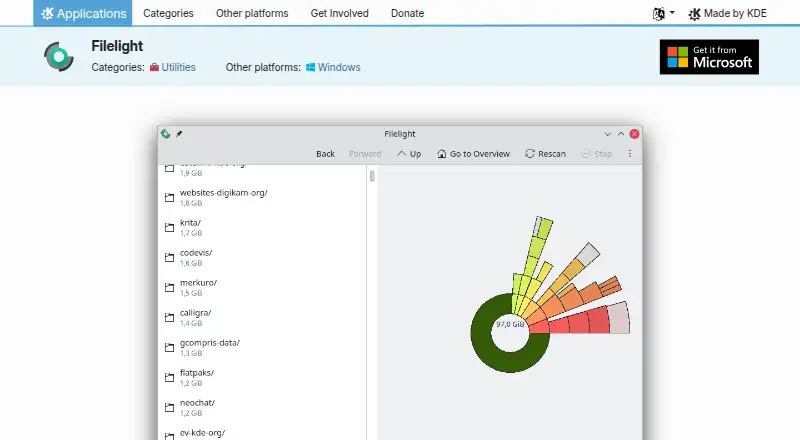
Filelight is a free, open-source application for visualizing disk usage on Linux and Windows. It scans selected files and folders and displays their space as concentric rings in a treemap-style view, helping users inspect what occupies a disk. Scans can cover local, remote, or removable disks, including external drives. Detailed information about files and folders is available, and Filelight can delete files or folders that consume too much space. The software integrates with the Dolphin, Konqueror, and Krusader file managers. Users can configure color schemes and other scanning and appearance settings, while scan exclusions can omit selected folders, remote filesystems, or removable media. Scanning NFS or Samba mounts can create high network traffic. Filelight can also be launched from a command line with a folder name to scan that location. Linux installation options include Discover or another AppStream store, a distribution package manager, or Flathub. The project is associated with KDE, founded in 1996 and headquartered in Berlin, Germany. Its listed plan is free under the GPL-2.0+ license, with no free trial.
Good
- Free and open-source under GPL-2.0+
- Concentric-ring treemap visualizes disk usage
- Scans local, remote, and removable disks
- Can delete oversized files or folders
- Excludes selected folders and filesystems
- Integrates with three KDE file managers
Watch out
- Scanning NFS or Samba mounts can generate high network traffic
- Application sizes are not shown
- No free trial is offered
Who it suits
Filelight suits Linux and Windows users who want a visual way to inspect space used by files and folders. It is useful for local, remote, removable, or external-disk scans and for users who value file-manager integration.
Verdict
Pick Filelight for a no-cost visual disk-usage scanner on Linux or Windows, especially when external or removable drives matter. Consider another tool if application-size reporting is required or remote scans could create problematic network traffic.
Plans and prices
From Filelight's own pricing page, checked 11 Oct 2026.
| Plan | Price | What it gives you |
|---|---|---|
| Filelight | Free | Free and open-source application · GPL-2.0+ |
The facts
Each one read from Filelight's own pages, with the date it was checked.
Where it runs
- Appearance
- It supports configurable color schemes and has settings for scanning and appearance.checked 11 Oct 2026
- Application sizes
- Nochecked 23 Sep 2026
- Desktop platforms
- Linux,Windowschecked 23 Sep 2026
- Platforms
- The product page offers installation on Linux and lists Windows as another platform.checked 11 Oct 2026
What it does
- Command-line use
- Filelight can be started from a command line with a folder name to scan that folder.checked 11 Oct 2026
- Disk scanning
- It can scan local, remote, or removable disks.checked 11 Oct 2026
- Distribution
- Linux users can install it through Discover or another AppStream application store, a distribution package manager, or Flathub.checked 11 Oct 2026
- External drive scans
- Yeschecked 23 Sep 2026
- File deletion
- It can delete files or folders that are taking up too much space.checked 11 Oct 2026
- File details
- It shows detailed information about files and folders.checked 11 Oct 2026
- File manager integrations
- It integrates into the Dolphin, Konqueror, and Krusader file managers.checked 11 Oct 2026
- Network impact
- The handbook warns that scanning remote filesystems such as NFS or Samba mounts can generate high network traffic.checked 11 Oct 2026
- Privacy
- KDE says its software generally does not transfer information from users’ devices except as a result of an explicit user action; third-party distributors may modify software in ways that affect this policy.checked 11 Oct 2026
- Purpose
- Filelight visualizes computer disk usage as concentric rings to help users find space to free up.checked 11 Oct 2026
- Scan exclusions
- Users can exclude selected folders, remote filesystems, or removable media from scans.checked 11 Oct 2026
- Scan scope
- files_folderschecked 23 Sep 2026
- Support
- The product page links to the Filelight Handbook, UserBase Wiki, KDE Forum, and #kde-utils on Libera.chat for help.checked 11 Oct 2026
- Treemap view
- Yeschecked 23 Sep 2026
The company
- Founded
- 1996checked 28 Sep 2026
- Headquarters
- Berlin, Germanychecked 28 Sep 2026
Money
- Free plan
- Yeschecked 23 Sep 2026
The full review of Filelight
Filelight is a free, open-source disk-usage visualizer for Linux and Windows. It suits anyone who understands storage problems better through a map than a folder list, particularly users who need to inspect removable or network disks. The main compromise is its focused scope: it does not report application sizes, and remote scans can be expensive for a busy network.
Overview
Filelight represents a selected disk, folder, or filesystem as concentric rings. Large areas stand out visually, so you can trace a storage problem through nested folders without first sorting a long table of byte counts. Detailed file and folder information adds context, and built-in deletion lets you remove an unwanted item once you have identified it.
Scanning covers local, remote, and removable disks. That range is valuable on machines with attached media or shared storage, but NFS and Samba scans can generate high network traffic. Excluding individual folders, remote filesystems, or removable media lets you keep an investigation local and focused. Privacy is also a sensible fit for a desktop utility: KDE says its software generally does not transfer device information unless the user explicitly causes an action, although a third-party distributor can alter that policy.
Key features
- Concentric-ring treemap: The visual hierarchy quickly reveals where capacity is concentrated, making it a strong choice for exploratory cleanup. It is less suitable if you want application-size reporting or a conventional size-sorted report.
- Broad scan targets: Local, remote, and removable disks can all be examined. Remote coverage expands its usefulness, while the potential traffic cost makes indiscriminate network scanning unwise.
- Details and deletion: Filelight supplies file and folder information and can delete selected files or folders, shortening the route from diagnosis to reclaimed space. Deletion therefore deserves the same care as any file-manager operation.
- Scan exclusions: Folder, remote-filesystem, and removable-media exclusions provide practical control over scan scope and network load.
- File-manager integration: Dolphin, Konqueror, and Krusader integration fits KDE-oriented workflows instead of forcing a separate navigation model.
- Configurable operation: Color schemes and scanning and appearance settings allow the display to be adapted to preference. A folder name can also be supplied on the command line to start a targeted scan.
Pricing
| Plan | Price | What it includes |
|---|---|---|
| Filelight | free | Free and open-source application under GPL-2.0+ |
There is no trial because the full application is free. The plan has no stated seat, quota, or renewal charge, making it appropriate for personal and organizational users who want a no-cost scanner rather than a tiered service. Its trade-off is scope, not a paid feature gate: application sizes are absent, and the product remains a visual disk analyzer rather than a broader storage-reporting suite.
Platforms
Filelight runs on Linux and Windows. Linux users can install it through Discover or another AppStream store, a distribution package manager, or Flathub. Windows users get the same core platform coverage without the Linux-specific installation routes. KDE documentation, the UserBase Wiki, KDE Forum, and the #kde-utils channel on Libera.chat provide support paths.
Who it's for
Choose Filelight when you want to understand a crowded disk spatially, need to inspect removable media, or occasionally examine a remote filesystem while retaining exclusions to control the scope. It is especially well matched to KDE file-manager users who want cleanup actions close to their existing workflow.
Look elsewhere if application-size visibility is central, if you need a report-first interface rather than a treemap, or if scanning network mounts would create unacceptable traffic. The ring visualization is informative for exploration, but not every storage audit benefits from it.
Pros and cons
- Pro: Free, GPL-2.0+ software with no subscription or trial conversion to manage.
- Pro: Concentric rings make hierarchical space usage apparent and lead directly to file or folder deletion.
- Pro: Local, removable, and remote scan support covers more than an internal drive.
- Pro: Exclusions, appearance controls, command-line folder scans, and KDE file-manager integration add useful control.
- Con: It does not show application sizes, limiting its value for software-footprint investigations.
- Con: NFS and Samba scans may generate high network traffic, so remote analysis needs deliberate scope.
- Con: Users who prefer a ranked list or formal report may find the ring-based presentation less direct.
Alternatives
Browse all disk space analyzers for a wider comparison. WizTree is a freemium macOS and Windows option; choose it instead if you prefer that platform mix and are willing to support development with its $25 a month Individual Supporter Code. TreeSize suits Windows users wanting a free edition and a trial-backed freemium product. WinDirStat is another free Windows choice for personal or commercial use. FolderSizes fits Windows users seeking a 30.00 USD once Personal Edition license for personal and home-network use. Disk Analyzer Pro is a freemium macOS and Windows alternative with a free personal edition for local-drive reports, unwanted-file deletion, and duplicate-file reports. SizeTrend keeps core local-analysis features free on Windows and adds cleanup, storage, file, content, and duplicate-file views. OmniDiskSweeper is a free macOS utility. Disk Usage Analyzer is a free Linux desktop scanner.
Verdict
Pick Filelight if you want a no-cost visual map of disk usage on Linux or Windows, with removable and remote scan coverage and cleanup actions in the same utility. Choose another analyzer when application-size reporting, list-oriented reporting, or low-impact remote scanning matters more than its clear concentric-ring view.
Getting started
- Open the Filelight website
- Install it on Linux or Windows
- On Linux, use Discover, an AppStream store, a distribution package manager, or Flathub
- Choose files or folders to scan
- Optionally exclude folders, remote filesystems, or removable media
- Review the concentric-ring results and manage large files
Questions
Is Filelight free?
Yes. Filelight has a free plan and is described as a free, open-source application under the GPL-2.0+ license.
Which platforms does Filelight support?
Filelight is available for Linux and Windows desktop systems.
Can it scan external or remote drives?
Yes. It scans local, remote, removable, and external disks.
Does Filelight show application sizes?
No. Application sizes are not displayed.
How can Linux users install Filelight?
Linux users can install it through Discover or another AppStream application store, a distribution package manager, or Flathub.
Can scans be limited to selected locations?
Yes. Users can scan chosen files or folders and exclude selected folders, remote filesystems, or removable media.
Alternatives to Filelight
- 1

WizTree
Free planmacOSWindows8.0Free plan - 2
LumaDisk
Free planmacOSWindows7.9$6.89 one-time - 3

Disk Usage Analyzer
Free planOpen sourceLinuxmacOS7.7Free plan - 4
FolderSizes
Free planWindows7.7$30 one-time - 5
SizeTrend
Free planWindows7.7$69.99 one-time - 6
dust
Free planOpen sourceLinuxmacOSWindows7.6Free plan