Figma
Figma is a collaborative design platform for teams working on digital products, presentations and related projects.
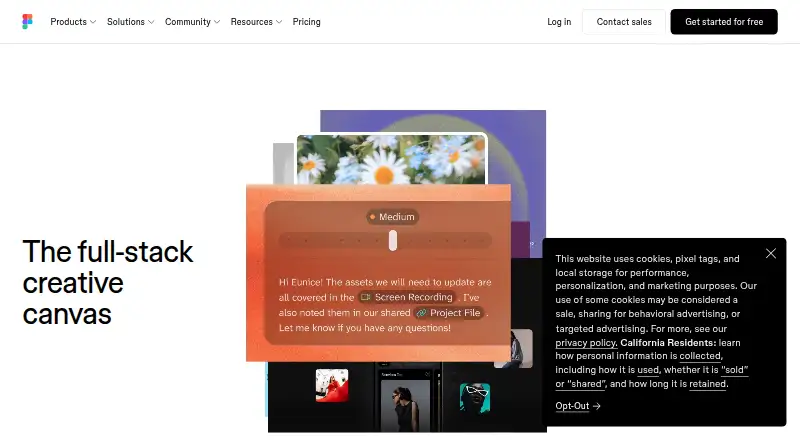
What Figma is
Figma is a collaborative design platform for teams working on digital products, presentations and related projects. Figma Design supports exploration, iteration and prototyping in a shared workspace, while Dev Mode connects design files with code. Figma Make turns written prompts or existing designs into prototypes or apps; FigJam provides an online whiteboard; and Figma Slides supports interactive presentations. Teammates can comment, provide feedback and branch work without changing the main file, and share links with viewing or editing controls. The platform imports files including Sketch, PNG and JPG and offers cloud storage with access from anywhere. It runs on the web, with desktop apps for macOS and Windows and mobile apps for iOS and Android. Starter is free with limited product access, unlimited drafts and up to 500 AI credits per month. Professional billed annually is $12 a month; other plans and seat types have different prices and billing terms. Figma lists integrations including Google Workspace, Slack, Zoom, Microsoft Teams, Notion and Jira.
Good
- Starter includes unlimited drafts.
- Supports design, prototyping, whiteboarding and presentations.
- Team collaboration includes comments, feedback and branching.
- Imports Sketch, PNG and JPG files.
- Available on web, desktop and mobile.
Watch out
- Starter co-editing is limited to three files.
- Starter files are limited to three pages each.
- Subscription payments are non-refundable.
- Governance+ is available only as an Enterprise add-on.
Who it suits
Figma suits product teams that want design, prototyping, developer handoff, whiteboarding and presentations in one workspace. It can also suit students and educators eligible for the free Figma Education access.
Verdict
Figma brings several collaborative design and presentation tools together, with a free Starter option and distinct paid plans. Check the Starter editing limits and the billing terms for the seat or plan you need.
Plans and prices
From Figma's own pricing page, checked 28 Sep 2026.
| Plan | Price | What it gives you |
|---|---|---|
| Starter | Free | Free limited access to Figma products · Unlimited drafts · UI kits and templates · 150 AI credits/day, up to 500 AI credits/mo |
| Professional | $16 a month | Unlimited files and projects · Team libraries · Advanced prototyping · Billed monthly |
| Professional (annual) | $12 a month | Unlimited files and projects · Team libraries · Advanced prototyping · Billed annually |
| Organization | $55 a month | Organization-wide design systems · Centralized administration · Billed annually |
| Enterprise | $90 a month | Enterprise administration · Advanced security and controls · Billed annually |
| Professional Collab seat | $3 a month | Professional plan; collab seat · FigJam and Figma Slides · View/comment access · 500 AI credits/mo · Monthly |
| Organization Collab seat | $5 a month | Organization plan; collab seat · FigJam and Figma Slides · View/comment access · 500 AI credits/mo · Annually |
| Enterprise Collab seat | $5 a month | Enterprise plan; collab seat · FigJam and Figma Slides · View/comment access · 500 AI credits/mo · Annually |
| Professional Dev seat | $12 a month | Professional plan; dev seat · Dev Mode, FigJam, Figma Slides and view/comment access · 500 AI credits/mo · Monthly |
| Professional Full seat | $16 a month | Professional plan; full seat · Unlimited files and projects · Team-wide design libraries · Advanced Dev Mode inspection and MCP Server · 3,000 AI credits/mo · Monthly |
| Organization Dev seat | $25 a month | Organization plan; dev seat · Dev Mode, FigJam, Figma Slides and view/comment access · 500 AI credits/mo · Annually |
| Enterprise Dev seat | $35 a month | Enterprise plan; dev seat · Dev Mode, FigJam, Figma Slides and view/comment access · 500 AI credits/mo · Annually |
| Organization Full seat | $55 a month | Organization plan; full seat · Publish resources across teams · Shared libraries and fonts · Centralized admin tools · 3,500 AI credits/mo · Annually |
| Enterprise Full seat | $90 a month | Enterprise plan; full seat · Custom team workspaces · Design system theming and APIs · SCIM seat management · 4,250 AI credits/mo · Annually |
The facts
Each one read from Figma's own pages, with the date it was checked.
What it does
- AI credit add-ons
- Teams can purchase additional AI credits with pay-as-you-go or subscriptions.checked 28 Sep 2026
- Brand kit
- Yeschecked 23 Sep 2026
- Cloud storage
- Figma provides unlimited cloud storage with access from anywhere.checked 28 Sep 2026
- Collaboration
- Figma supports comments, feedback, and branching so teammates can work without affecting the main file.checked 28 Sep 2026
- Dev Mode
- Dev Mode helps designers and developers bridge the gap between design and code in the same files.checked 28 Sep 2026
- Education
- Eligible students and educators can access the functionality of the Professional team for free through Figma Education.checked 28 Sep 2026
- Enterprise governance
- Governance+ is an optional add-on available only on Enterprise and provides advanced access, sharing, and compliance tools.checked 28 Sep 2026
- Enterprise security
- Enterprise is intended for businesses needing enterprise-level security.checked 28 Sep 2026
- External integrations
- Figma Make can connect to Supabase and external tools for product documentation.checked 28 Sep 2026
- FigJam
- FigJam is an online whiteboard for brainstorming, meetings, and collaborative work.checked 28 Sep 2026
- Figma Design
- Figma Design lets teams explore, iterate, and prototype digital products in a collaborative workspace built for the Web.checked 28 Sep 2026
- Figma Make
- Figma Make is an AI-powered prompt-to-code tool that turns written descriptions or existing designs into working prototypes or apps.checked 28 Sep 2026
- Figma Slides
- Figma Slides lets professional designers and collaborators co-create and deliver interactive presentations.checked 28 Sep 2026
- File imports
- Figma supports imports including Sketch and PNG or JPG files.checked 28 Sep 2026
- Fortune 500 usage
- Figma says 95% of the Fortune 500 uses Figma, based on March 2025 data.checked 28 Sep 2026
- Governance add-on
- Governance+ provides advanced access, sharing, and compliance tools on Enterprise.checked 28 Sep 2026
- Illustration tools
- Yeschecked 23 Sep 2026
- Integrations
- Official integrations include Google Workspace, Slack, Zoom, Microsoft Teams, Notion, Jira, Confluence, Zapier, Asana, Linear, Dropbox, Trello, and Productboard.checked 28 Sep 2026
- ISO certifications
- Figma says its product and services are certified against ISO/IEC 27001:2022 and ISO/IEC 27018:2019, and its AI management system against ISO/IEC 42001:2023.checked 28 Sep 2026
Where it runs
- Desktop app
- Yeschecked 23 Sep 2026
The company
- Founded
- 2012checked 19 Oct 2026
- Headquarters
- San Francisco, California, United Stateschecked 19 Oct 2026
Money
- Free plan
- Yeschecked 23 Sep 2026
- Free Starter tier
- Starter is free with limited access to Figma products.checked 28 Sep 2026
The full review of Figma
Figma is a collaborative workspace for digital product design, prototyping, development handoff, whiteboarding, and presentations. It suits teams that need designers, developers, and stakeholders to work around shared files. Its breadth is a strength, but Starter’s co-editing caps and the paid plans’ seat distinctions make it important to match the plan to the people doing the work.
Overview
Figma brings product design and adjacent team work into one cloud-based platform. Figma Design is built for exploring, iterating on, and prototyping digital products; Dev Mode connects those files to development work; FigJam supports brainstorming and meetings; and Figma Slides is for interactive presentations. Unlimited cloud storage and shareable links with viewing or editing controls make it practical to keep files accessible across a distributed team.
That shared-workspace approach is most compelling when several roles need to contribute to the same product effort. It is less compelling for someone who only needs a standalone illustration or slide tool: Figma’s main advantage is the connection between collaborative design and the rest of the workflow, not a narrow single-purpose use.
Key features
Collaborative product design
Figma Design supports team exploration, iteration, and prototyping, with comments, feedback, and branching so contributors can develop changes without altering the main file. Team libraries and advanced prototyping appear on Professional plans, making those plans a clearer fit for teams managing repeated work than Starter’s limited shared editing. Imports include Sketch, PNG, and JPG, which helps bring existing assets into the workspace.
Development, AI, and presentations
Dev Mode helps designers and developers bridge design and code in the same files, and can run directly in VS Code through an extension. Figma Make turns written prompts or existing designs into working prototypes or apps, and can be used on mobile; it also connects with Supabase and external tools for product documentation. That reach is useful for teams exploring prototypes, though the Starter AI allowance is capped at 150 credits per day and 500 per month. Teams can buy more credits through pay-as-you-go or subscriptions.
FigJam provides an online whiteboard for brainstorming and collaborative work. Figma Slides adds live prototypes, polls, transitions, and PowerPoint import and export, making it more suited to interactive team presentations than a basic static deck. Integrations include Google Workspace, Slack, Zoom, Microsoft Teams, Notion, Jira, Confluence, Zapier, Asana, Linear, Dropbox, Trello, and Productboard.
Security and governance
Figma maintains SOC 2 Type 2 and SOC 3 reports and says its product and services are certified to ISO/IEC 27001:2022 and ISO/IEC 27018:2019; its AI management system is certified to ISO/IEC 42001:2023. Enterprise is aimed at businesses needing advanced security, while Governance+ is an optional Enterprise-only add-on for advanced access, sharing, and compliance controls. Those options suit organizations with formal governance needs, but they place the more specialized controls above the smaller-team tiers.
Pricing
Figma is freemium. Starter is free and includes unlimited drafts, UI kits and templates, and 150 AI credits per day up to 500 per month. Its key constraint is collaboration: unlimited viewers can access files, but co-editing is limited to three files with three pages per file. That makes it a useful way to explore the platform or share work broadly, but restrictive for an actively editing team.
Professional costs $16 a month when billed monthly, or $12 a month billed annually. Both options include unlimited files and projects, team libraries, and advanced prototyping; the annual term lowers the monthly rate but commits the buyer to annual billing. Professional is the natural step up for teams that need sustained shared design work.
Organization costs $55 a month billed annually and adds organization-wide design systems and centralized administration. Enterprise costs $90 a month billed annually, with enterprise administration, advanced security, and controls. These tiers are aimed at broader administrative and security requirements rather than teams simply seeking more room to edit.
Seat choice also affects cost. Professional Collab is $3 a month billed monthly; Organization Collab is $5 a month billed annually; Enterprise Collab is $5 a month billed annually. These seats provide FigJam and Figma Slides, view/comment access, and 500 AI credits per month, rather than full design editing. Professional Dev is $12 a month billed monthly, while Organization Dev is $25 a month and Enterprise Dev is $35 a month, each billed annually; Dev seats include Dev Mode, FigJam, Slides, view/comment access, and 500 AI credits monthly. A Professional Full seat is $16 a month billed monthly and includes unlimited files and projects, team-wide design libraries, advanced Dev Mode inspection and MCP Server, and 3,000 AI credits monthly. These distinctions let teams avoid buying full editing access for every collaborator, but buyers should account for both the role and billing term of each seat. Eligible students and educators can get Professional team functionality free through Figma Education. Subscription payments are non-refundable.
Platforms
Figma supports web, macOS, Windows, iOS, and Android, with desktop apps for macOS and Windows and mobile apps for iOS and Android. The range supports teams working across devices, while Figma Design itself is described as a collaborative workspace built for the Web. Figma Make can be used on mobile, and Dev Mode’s VS Code extension brings that development workflow into the editor developers may already use.
Who it's for
Figma is best for product teams that need a shared place for design, prototyping, feedback, development handoff, and presentations. It also fits organizations that need centralized administration or enterprise controls, provided they are prepared for annual billing on those tiers. A solo designer or small group can start free, but the three-file, three-page co-editing limit means Starter is better for trying the collaboration model than for running an expansive active project.
Teams that mainly need a dedicated vector, pixel-art, or presentation application may prefer a more focused option. Figma’s value rises when the work benefits from its linked design and team tools.
Pros and cons
- Pros: Design, prototyping, whiteboarding, presentations, and developer handoff share a collaborative workspace, reducing the need to split those activities across unrelated tools.
- Pros: Starter offers unlimited drafts and viewers at no cost, so teams can share work and explore Figma before paying.
- Pros: Collab and Dev seats provide narrower access at lower prices than full seats, useful when stakeholders need to comment or developers need Dev Mode rather than full design editing.
- Cons: Starter co-editing is limited to three files and three pages per file, a substantial ceiling for teams actively building several products or flows.
- Cons: Organization and Enterprise are billed annually, and the higher-tier security and governance options make Figma a more involved purchase for teams without administrative needs.
- Cons: Starter’s AI credits top out at 500 per month, so frequent Make use may require a paid add-on or a paid plan allocation.
Alternatives
Adobe Creative Cloud is worth considering for someone seeking a freemium creative suite with a free trial and a single-app option; its Single App plan includes 25 monthly generative credits and 100GB of cloud storage.
Canva is an alternative for readers drawn to a freemium design tool with a free plan and free trial. Krita is a free, open-source option for those who want a dedicated creative application without subscriptions or trials. ibisPaint offers a free version with unlimited usage time, though it includes ads and 64MB of cloud storage.
Visme may suit readers comparing presentation-oriented plans: its Basic tier provides 500MB of storage and 50 slides or pages per project, while Starter costs $12.25 a month billed annually. Affinity is a free option for individuals who want vector design, pixel photo editing, page layout, and export tools across macOS and Windows. Inkscape is a free, open-source vector graphics editor for Linux, macOS, and Windows.
WPS Presentation is another freemium presentation option, with support for Android, iOS, Linux, macOS, web, and Windows.
Verdict
Choose Figma if your team needs product design and prototyping connected to feedback, developer handoff, whiteboarding, and interactive presentations. Its free Starter tier is a sensible entry point for sharing and limited co-editing, while Professional is the better fit for sustained team design. Look elsewhere if you need a specialized standalone creative tool or if Starter’s editing caps and the paid plans’ seat and annual-billing structure do not fit your team.
Getting started
- Open https://www.figma.com/ to access the platform.
- Choose the free Starter plan or review paid plans and seat types.
- Use the web app or download the desktop app for macOS or Windows.
- For mobile access, use the iOS or Android app.
- Import supported Sketch, PNG or JPG files, or start with a draft.
- Share a file or prototype link and set viewing or editing access.
Limits worth knowing
Starter provides limited access to Figma products and allows co-editing on up to three files, with no more than three pages per file. It includes 150 AI credits per day, capped at 500 per month.
Questions
Is Figma free?
Yes. Starter is free and offers limited access to Figma products, unlimited drafts and up to 500 AI credits per month.
How much does Professional cost?
Professional costs $16 a month when billed monthly, or $12 a month when billed annually.
Which platforms does Figma support?
Figma supports web, Windows, macOS, iOS and Android, with desktop apps for Windows and macOS and mobile apps for iOS and Android.
Can Figma import existing design files or images?
Yes. Supported imports include Sketch, PNG and JPG files.
What presentation features does Figma Slides include?
Figma Slides supports live prototypes, polls, transitions and PowerPoint import and export.
Who makes Figma?
Figma is made by Figma, which was founded in 2012 and is headquartered in San Francisco, California, United States.
Alternatives to Figma
- 1

Visme
Free planAndroidiOSWebAPI9.2From $12.25 a month - 2
LibreOffice Impress
Free planOpen sourceAndroidiOSWebAPI9.1$8.99 one-time - 3

Picsart
Free planAndroidiOSWebAPI9.0From $10.50 a month - 4

Desygner
Free planAndroidiOSWebAPI9.0From $19 a month - 5

Recraft
Free planAndroidiOSWebAPI8.9Free plan - 6

Simplified
Free planAndroidiOSWebAPI8.9From $19 a month