
Expensent
Expensent finds invoices, receipts and bills in connected inboxes and helps users forward them to an accountant or accounting destination.
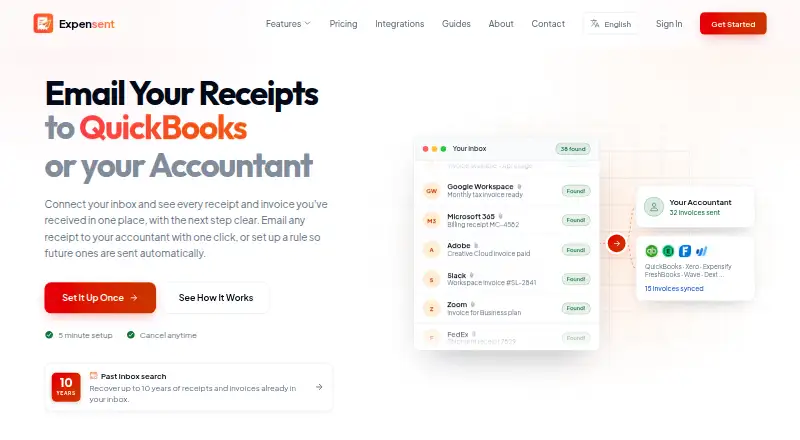
What Expensent is
Expensent finds invoices, receipts and bills in connected inboxes and helps users forward them to an accountant or accounting destination. Its AI checks email metadata first to find likely matches, then analyzes bodies and attachments for likely invoice candidates. The company says it does not retain email body text after processing. Users can review documents and forward them with one click, or approve rules to automatically forward matching future messages. Expensent can search up to 10 years of inbox history, and also supports uploads and phone scans. It connects to Gmail, Outlook, iCloud and IMAP inboxes. Listed accounting destinations include QuickBooks Online, Xero, Expensify, FreshBooks, Ramp, Brex, BILL, Dext, SAP Concur, Wave, Zoho Expense and Hubdoc. The service runs on web, Android and iOS. Solo costs $19/month and includes two email accounts and 100 invoices per month; Pro costs $59/month and includes 10 accounts and unlimited invoices. Expensent says it is not a bookkeeping, reconciliation, reimbursement-approval or tax-decision product.
Good
- Searches inbox history up to 10 years.
- Supports email, uploads and phone scans.
- Connects to Gmail, Outlook, iCloud and IMAP.
- Offers automatic forwarding rules for future emails.
- Available on web, Android and iOS.
Watch out
- No free plan or free trial.
- Solo costs $19/month.
- Pro costs $59/month.
- Does not handle bookkeeping or tax decisions.
Who it suits
Expensent is aimed at freelancers, small business owners and self-employed professionals who need to route invoices and receipts to accounting destinations. It is not intended to handle bookkeeping or tax decisions.
Verdict
Expensent focuses on collecting financial documents from email and forwarding them to accounting destinations, with manual review or automatic rules. Consider the account and invoice limits on Solo, or the higher Pro price, when choosing a plan.
Plans and prices
From Expensent's own pricing page, checked 7 Oct 2026.
| Plan | Price | What it gives you |
|---|---|---|
| Solo | $19 a month | 2 email accounts · 100 invoices per month · 1 CC recipient · 1 forwarding destination · email and chat support · $19/month |
| Pro | $59 a month | 10 email accounts · unlimited invoices per month · 5 CC recipients per account · 20 forwarding destinations · priority email and chat support · one-to-one support session · $59/month |
The facts
Each one read from Expensent's own pages, with the date it was checked.
What it does
- Accounting integrations
- Expensent lists QuickBooks Online, Xero, Expensify, FreshBooks, Ramp, Brex, BILL, Dext, SAP Concur, Wave, Zoho Expense, Hubdoc, and other destinations.checked 7 Oct 2026
- Detection
- AI detects invoices, receipts, and bills across inboxes, using metadata first to filter likely matches.checked 7 Oct 2026
- Document capture
- The product supports email, uploads, and phone scans in the same workflow.checked 7 Oct 2026
- Email providers
- The features page lists Gmail, Outlook, iCloud, and IMAP inbox connections.checked 7 Oct 2026
- Forwarding
- Users can review and forward documents with one click or approve rules that automatically forward matching future emails.checked 7 Oct 2026
- Historical search
- Expensent can search up to 10 years of inbox history to find past invoices.checked 7 Oct 2026
- Intended users
- The company describes its intended users as freelancers, small business owners, and self-employed professionals who need to send receipts and invoices to accounting destinations.checked 7 Oct 2026
- Limits
- Expensent says it is not a bookkeeping, reconciliation, reimbursement-approval, or tax-decision product.checked 7 Oct 2026
- Privacy
- Expensent says it checks email metadata first and only analyzes bodies and attachments for likely invoice candidates; it says email body text is not retained after processing.checked 7 Oct 2026
- Purpose
- Expensent finds invoice and receipt emails in connected inboxes and helps users forward them to an accountant or accounting destination.checked 7 Oct 2026
- Security
- The privacy policy says connections use OAuth 2.0, data is encrypted in transit with TLS 1.3 and at rest with AES-256, and internal access uses audit logging.checked 7 Oct 2026
- Support
- Expensent offers email and chat support on Solo, priority email and chat plus a one-to-one session on Pro, and says it typically responds within 24 hours on business days.checked 7 Oct 2026
The company
- Company
- The about page names Ilios Galil as Expensent's founder.checked 7 Oct 2026
- Headquarters
- Portugalchecked 28 Sep 2026
Alternatives to Expensent
- 1

Veryfi Invoices OCR API
Free planAndroidiOSWebAPI8.2From $500 a month - 2

Receipt Reader AI
Free planAndroidiOSWebAPI8.0From $5.99 a month - 3

ExpenseBot
Free planAndroidiOSWebAPI7.9From $100 a year - 4
OpenReceipts
Free planOpen sourceWebLinuxmacOSSelf-hosted7.6Free plan - 5

Hubdoc
AndroidiOSWeb7.5From $12 a month - 6

OCR Receipt
Free planAPILinuxmacOSWindows7.5$149 one-time