
EventRota
EventRota is rota and volunteer management software for coordinating staff and volunteers at events.
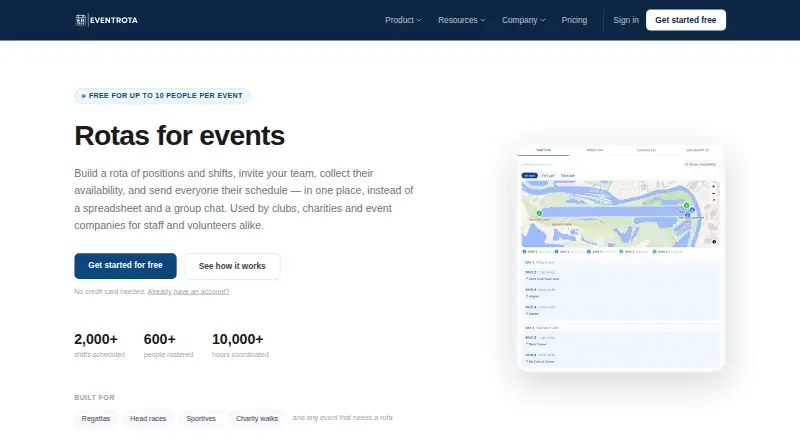
What EventRota is
EventRota is rota and volunteer management software for coordinating staff and volunteers at events. Organisers can assign people to positions and shifts through a rota grid, using auto-fill, shuffle, drag-and-drop reassignment, or rotation sequences. Volunteers can set availability by shift, and the service can send reminder emails. Organisers can share documents, announcements, key contacts, venue maps, and position maps. Volunteers can view their rota, respond to invitations, check maps and updates, and use the service through a mobile browser or app. EventRota works on Android, iOS, and the web. Email support is included on every plan, with replies within one working day. If an event reaches its included email limit, sending pauses until an email top-up is added. The product is designed for one-off event workflows and is not intended for recurring schedules or timesheets.
Good
- Build rotas with auto-fill and drag-and-drop.
- Volunteers can set shift availability.
- Share maps, announcements, and documents.
- Available on Android, iOS, and the web.
- Email support is included on every plan.
Watch out
- Free plan is limited to 10 people and 200 emails.
- Email sending pauses when an event reaches its limit.
- Not intended for recurring schedules or timesheets.
Who it suits
EventRota suits organisers coordinating shifts and volunteers for one-off events. It is not intended for recurring schedules or timesheets.
Verdict
EventRota brings rota building, volunteer availability, and event information together for one-off workflows. Check the people and email limits, especially if an event may need an email top-up.
Plans and prices
From EventRota's own pricing page, checked 2 Oct 2026.
| Plan | Price | What it gives you |
|---|---|---|
| Free | Free | Up to 10 people · 200 emails · every feature included |
| Small | $30, paid once | Up to 30 people · 600 emails · every feature included · per event |
| Medium | $50, paid once | Up to 75 people · 1,500 emails · every feature included · per event |
| Large | $100, paid once | Unlimited people · 4,000 emails · every feature included · per event |
The facts
Each one read from EventRota's own pages, with the date it was checked.
What it does
- Availability
- Volunteers can set their availability by shift, and the service can send availability reminder emails.checked 2 Oct 2026
- Email allowance
- If an event reaches its included email limit, sending pauses for that event until an email top-up is added.checked 2 Oct 2026
- Event information
- Organisers can share documents, announcements, key contacts, venue maps, and position maps with volunteers.checked 2 Oct 2026
- Integrations
- The privacy policy names Supabase for database and authentication infrastructure and Resend for transactional email delivery.checked 2 Oct 2026
- Intended users
- The product is designed for one-off event workflows and says it is not intended for recurring schedules or timesheets.checked 2 Oct 2026
- Privacy
- The privacy policy says EventRota does not sell personal data or use it for advertising.checked 2 Oct 2026
- Purpose
- EventRota is rota and volunteer management software for coordinating staff and volunteers at events.checked 2 Oct 2026
- Rota building
- Organisers can assign people to positions and shifts using a rota grid, auto-fill, shuffle, drag-and-drop reassignment, and rotation sequences.checked 2 Oct 2026
- Security
- The privacy policy says EventRota uses TLS encrypted connections, hashed passwords, and role-based access controls.checked 2 Oct 2026
- Service status
- The terms state that EventRota does not guarantee uptime or continuous availability and that features may change.checked 2 Oct 2026
- Support
- Email support is included on every plan, with replies within one working day; users can also report problems from the in-app Help page.checked 2 Oct 2026
- Volunteer tools
- Volunteers can view their rota, respond to invitations, set availability, see maps and updates, and access the service in a mobile browser or app.checked 2 Oct 2026
The full review of EventRota
Overview
EventRota is event rota and volunteer management software for organisers coordinating people around a one-off event. It suits teams that need shift assignments, volunteer availability and event information in one workflow. Its strongest fit is a bounded event with a manageable email quota, rather than recurring staff schedules or timesheets.
Key features
The rota grid supports assigning people to shifts and positions, with auto-fill, shuffle, drag-and-drop reassignment and rotation sequences. That range gives organisers several ways to build or adjust a rota; volunteers can also set availability by shift, helping teams account for who can serve before finalising assignments. Availability reminder emails can prompt volunteers who have not responded.
EventRota also gives volunteers access to their rota, invitations, maps and updates through a mobile browser or app. Organisers can share documents, announcements, key contacts, venue maps and position maps, keeping practical event information alongside the schedule. Shift scheduling, check-in and attendance, and custom signup forms are included in the feature set.
All plans include every feature, so the meaningful differences are capacity and email volume rather than tool access. Email support is included on every plan, with replies within one working day; users can also report problems through the in-app Help page. The privacy policy describes TLS-encrypted connections, hashed passwords and role-based access controls, and says personal data is not sold or used for advertising. Supabase is named for database and authentication infrastructure, and Resend for transactional email delivery.
There are practical caveats for event organisers: once an event reaches its included email limit, sending pauses until an email top-up is added. The terms do not guarantee uptime or continuous availability and allow features to change, so EventRota is not a fit for workflows that depend on a guaranteed service level.
Pricing
EventRota is freemium, with a free plan and one-time paid event plans. The free tier costs nothing and supports up to 10 people and 200 emails, with every feature included. It is a useful way to run a small event without giving up scheduling tools, but the people and email caps make it unsuitable for larger events or high-volume messaging.
Small costs $30, paid once, billed per event, and covers up to 30 people and 600 emails. Medium is $50, paid once, billed per event, for up to 75 people and 1,500 emails. These tiers suit organisers who can estimate their event's staffing and communications needs in advance; neither adds features over Free.
Large costs $100, paid once, billed per event, and allows unlimited people with 4,000 emails. It removes the people cap but not the email ceiling, so an event with substantial communications may still need an email top-up. The one-time, per-event pricing fits one-off workflows better than a recurring subscription would; no plan is designed for recurring schedules or timesheets.
Platforms
EventRota is available on Android, iOS and the web. Volunteers can use a mobile browser or app to view their rota, respond to invitations, set availability, and access maps and updates.
Who it's for
EventRota is best for organisers staffing a one-off event who want rota building, availability collection and event information together, and whose people and email needs fit one of the plan limits. The per-event structure and included features make it straightforward to match a plan to an individual event.
Look elsewhere if you need recurring schedules or timesheets, or if email delivery cannot tolerate a pause when a quota runs out. The stated volunteer capacity is 30 volunteers, so teams should also confirm that constraint against their needs even though the Large plan advertises unlimited people.
Pros and cons
- Pros: Every plan includes every feature, so the free and lower-cost tiers still include rota tools, availability reminders and event information sharing.
- Pros: One-time per-event pricing suits organisers who do not need an ongoing scheduling subscription.
- Pros: Volunteers can access schedules and event updates on mobile, while organisers have several rota-building and reassignment methods.
- Cons: The free tier caps events at 10 people and 200 emails, limiting its usefulness for larger volunteer groups or frequent communications.
- Cons: Email sending pauses at the event limit until a top-up is added, creating a potential disruption during event preparation.
- Cons: It is not intended for recurring schedules or timesheets, and uptime is not guaranteed.
Alternatives
Event Volunteer Management Software is the broader category to compare when deciding among event volunteer tools.
Choose SignUpGenius if unlimited free sign-ups matter more than EventRota's event rota and volunteer information workflow; its free plan includes unlimited sign-ups.
POINT is worth comparing for organisations that want unlimited volunteers and admins on its free plan, alongside signups, scheduling, messaging and reminders.
Consider Serve.Love if a forever-free Starter plan with all features included is the priority; its Professional plan costs $63 a month.
TeamKinetic offers a free Community plan with unlimited volunteers, one admin account and three live opportunities, making it an alternative for teams whose needs fit those limits.
WhenToHelp offers qualifying charities extended free use with up to 250 volunteers and 100 shifts per week on its Lite plan.
GivePulse may suit teams comparing a volunteer-management option with a free plan limited to one admin, zero subgroups and five custom fields, or a Give Joy plan at $20 a month when billed annually.
Vome is an alternative if a forever-free Recruit plan with unlimited volunteers and admin seats is a better match.
Eventication is another event-focused option, with a free plan for one event, unlimited moderators and unlimited users.
Verdict
Choose EventRota for a one-off event where organisers need to build shifts, collect availability and share practical event information without restricting features by plan. Its per-event pricing is easy to align with a single event, but the email ceiling, stated volunteer capacity and lack of recurring-schedule support are meaningful constraints. If those limits threaten the event workflow, compare alternatives before committing.
Getting started
- Open EventRota on the web, Android, or iOS
- Choose the free plan or a paid event plan
- Set up your event and add staff or volunteers
- Assign positions and shifts in the rota grid
- Share event documents, announcements, contacts, and maps
- Invite volunteers to view rotas and submit availability
Limits worth knowing
The Free plan supports up to 10 people and 200 emails. Small, Medium, and Large plans raise capacity to 30 people and 600 emails, 75 people and 1,500 emails, or unlimited people and 4,000 emails respectively; sending pauses for an event when its included email allowance is reached until an email top-up is added.
Questions
How much does EventRota cost?
A Free plan costs nothing. Paid plans are billed once per event: Small is $30, paid once, Medium is $50, paid once, and Large is $100, paid once.
Which platforms support EventRota?
EventRota is available on Android, iOS, and the web. Volunteers can also use it through a mobile browser.
Is there a free plan?
Yes. The Free plan supports up to 10 people and 200 emails, with every feature included.
Can it handle recurring schedules or timesheets?
EventRota is designed for one-off event workflows and is not intended for recurring schedules or timesheets.
What support is included?
Email support is included on every plan, with replies within one working day. Problems can also be reported from the in-app Help page.
How does EventRota handle privacy and security?
The service uses TLS encrypted connections, hashed passwords, and role-based access controls. It says it does not sell personal data or use it for advertising.
Alternatives to EventRota
- 1
ephios
Free planOpen sourceAndroidiOSWebAPI8.3From €9.99 a month - 2
GivePulse
Free planAndroidiOSWebAPI8.1From $1.75 a year - 3
Mobilize
Free planAndroidiOSWebAPI8.1From $100 a month - 4

POINT
Free planAndroidiOSWebAPI8.1Free plan - 5

Vome
Free planAndroidiOSWebAPI8.1From $35 a month - 6
WhenToHelp
Free planAndroidiOSWeb7.9From $110 a year