Esup-Signature
Esup-Signature is open-source software for building document-signing workflows, sending documents to signers, and tracking signatures with proof.
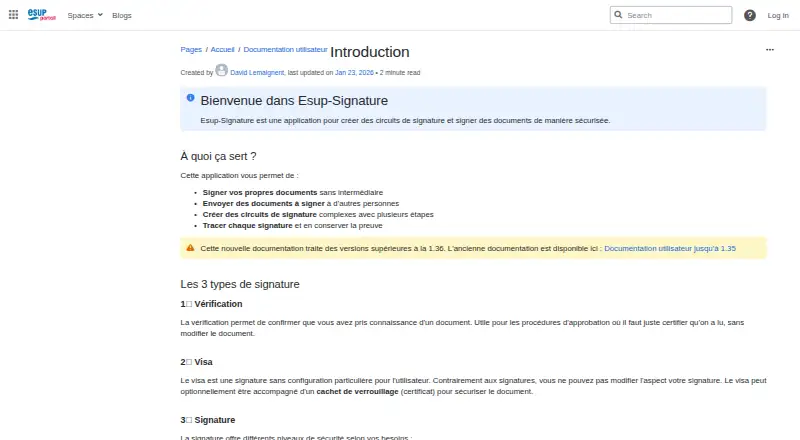
What Esup-Signature is
Esup-Signature is open-source software for building document-signing workflows, sending documents to signers, and tracking signatures with proof. A workflow can specify signers, signature types, and whether everyone at a step must sign. Supported signature types include verification, visa, and simple, advanced, and qualified electronic signatures. In mixed-level workflows, simple signatures must come before advanced or qualified ones. The software can sign any document format, but only PDFs display a visual signature; other formats use XAdES signatures. For hardware-backed signing, Esup-DSS-Client uses certificates on physical keys or cards without removing them from the device. It can also verify signed documents and show proof files. PDF forms can become web forms and be prefilled with institutional LDAP or other custom data. Esup-Signature is free at no cost under the Apache 2.0 license, but it is not offered as a hosted service: an institution must install it on its own server. The listed platforms include API, Linux, macOS, self-hosted, web, and Windows.
Good
- Supports simple, advanced, and qualified signatures.
- Can verify signatures and display proof files.
- Hardware certificates remain on physical keys or cards.
- PDF forms can be converted into web forms.
- Free and open source under Apache 2.0.
Watch out
- Must be installed on an institution’s own server.
- Only PDFs support visual signatures.
- Simple signatures must precede advanced or qualified signatures.
Who it suits
It suits institutions managing signatures for internal agents, staff, and students, as well as external partners, citizens, and consultants. Implementation requires technical knowledge including Java, Maven, Git, and PostgreSQL.
Verdict
Esup-Signature covers document workflows from preparation and routing to signature verification. It is a fit to consider for institutions prepared to install and operate the software locally.
Plans and prices
From Esup-Signature's own pricing page, checked 12 Oct 2026.
| Plan | Price | What it gives you |
|---|---|---|
| Esup-Signature (open source) | Free | Apache 2.0 license · must be installed on the institution’s own server |
The facts
Each one read from Esup-Signature's own pages, with the date it was checked.
What it does
- API access
- Yeschecked 23 Sep 2026
- Audience
- The documentation addresses internal agents, staff, and students, as well as external partners, citizens, and consultants.checked 11 Oct 2026
- Audit trail
- Yeschecked 23 Sep 2026
- Authentication
- Internal users can authenticate through CAS or Shibboleth, while external users can use ProConnect, FranceConnect, or SMS codes.checked 12 Oct 2026
- Bulk sending
- Yeschecked 23 Sep 2026
- Delegation
- Users can delegate signing or data entry, and transfer pending and future requests to another person.checked 11 Oct 2026
- Deployment
- The FAQ says Esup-Signature is not offered as a hosted service and must be installed on an institution’s local server.checked 12 Oct 2026
- Document formats
- It supports signatures on all document types; visual signatures are available on PDFs, while other formats use XAdES signatures.checked 12 Oct 2026
- Document templates
- Yeschecked 23 Sep 2026
- Document verification
- The application can check the integrity of simply signed documents and display their proof file, and it can verify certificate-signed documents with the DSS Signature engine.checked 12 Oct 2026
- Document workflows
- Users can send documents for signature, start predefined processes, fill documents online, and manage signature workflows.checked 12 Oct 2026
- Forms
- PDF forms can be turned into web forms and prefilled using institutional LDAP data or custom data sources.checked 11 Oct 2026
- Hardware keys
- With Esup-DSS-Client, users can sign using certificates on physical keys or cards, keeping the certificate on the device.checked 11 Oct 2026
- Hosting limit
- The FAQ says Esup-Signature is not offered as a hosted service and must be installed on an institution's local server.checked 11 Oct 2026
- Integrations
- Documents can be integrated manually, retrieved from a folder, or injected through a web service; document stores such as Nuxeo and Alfresco can connect through CMIS.checked 12 Oct 2026
- Intended users
- The documentation identifies internal agents, staff, and students, as well as external partners, citizens, and consultants, as users.checked 12 Oct 2026
- Purpose
- Esup-Signature is a web application for signing documents and creating multi-step signature workflows.checked 12 Oct 2026
- Security
- For hardware-backed signing, Esup-DSS-Client can use a certificate stored on a physical key so the certificate does not leave that key.checked 12 Oct 2026
- Security and verification
- The product integrates the European Commission's DSS solution for eIDAS signatures and can verify certificate-based signatures with DSS Signature.checked 11 Oct 2026
- Signature order
- bothchecked 23 Sep 2026
- Signature order limit
- A simple signature cannot follow an advanced or qualified signature in the same workflow.checked 11 Oct 2026
- Signature types
- The application supports verification, visa, simple image-based signatures on PDFs, advanced eIDAS signatures, and qualified eIDAS signatures.checked 12 Oct 2026
The company
- Founded
- 2019checked 4 Oct 2026
Money
- Price and licensing
- The FAQ describes Esup-Signature as free and open-source software.checked 11 Oct 2026
The full review of Esup-Signature
Overview
Esup-Signature is open-source software for creating signature workflows, sending documents, and tracking their completion and proof. It is best suited to institutions that need several kinds of signatures and can run the service on their own infrastructure. Its workflow and verification capabilities are substantial, but local installation makes it a poor fit for teams seeking a hosted service.
Key features
Workflows can specify signers, signature types, and whether everyone assigned to a step must sign. Teams can launch predefined processes, fill documents online, and delegate signing or data entry; pending and future requests can also be transferred to another person. This flexibility suits institutional approval paths, although mixed-level workflows have a firm constraint: simple signatures must come before advanced or qualified signatures.
The supported signature types include verification, visa, and simple, advanced, and qualified electronic signatures. For hardware-backed signing, Esup-DSS-Client uses certificates stored on physical keys or cards, so the certificate remains on the device. Esup-Signature can sign documents in any format, but only PDFs support a visual signature; other formats use XAdES signatures.
Verification covers both simply signed documents and certificate-based signatures: the application can check a simple signature’s integrity and display its proof file, while DSS Signature verifies certificate-based signatures. Integration with the European Commission’s DSS solution supports eIDAS signatures. For institutions managing documents elsewhere, exchange is supported through CMIS with systems such as Nuxeo or Alfresco, as well as network shares, local storage, and web services. PDF forms can also become web forms prefilled from institutional LDAP or custom data sources.
Pricing
Esup-Signature (open source): free. The plan uses an Apache 2.0 license and must be installed on the institution’s own server. There is no paid hosted tier described; the cost advantage comes with responsibility for local deployment and operation.
Platforms
Esup-Signature supports API, Linux, macOS, self-hosted, web, and Windows. The self-hosting requirement is central: the FAQ says the service is not offered as a hosted product and must be installed on an institution’s local server.
Who it's for
The intended users include internal agents, staff, and students, along with external partners, citizens, and consultants. Institutions should have technical capacity for implementation: the FAQ identifies Java, Maven, Git, and PostgreSQL as minimum technical knowledge, with Spring, CAS, Shibboleth, Apache, Tomcat, and LDAP useful for full operation. Consortium project support includes identifying project actors and applying security patches and fixes for defects that prevent normal operation.
Pros and cons
- Pros: A free, Apache 2.0-licensed plan avoids a software subscription and permits institutions to host the service themselves.
- Pros: Multiple signature levels, hardware-key support, workflow delegation, and signature verification cover demanding institutional processes.
- Pros: CMIS, network-share, local-storage, and web-service options can connect document flows to existing systems.
- Cons: Institutions must install and operate it locally; there is no hosted service for teams that want a vendor-managed deployment.
- Cons: Implementation requires technical knowledge, and mixed-level workflows cannot place a simple signature after an advanced or qualified one.
- Cons: Only PDFs receive visual signatures, so signing other document formats means using XAdES instead.
Alternatives
OpenSign is worth considering for organizations that prefer a free plan advertising unlimited digital signatures and templates, completion certificates, sequential signing, and OpenSign Drive.
Sign.Plus is an alternative for readers who need Android or iOS support and a free plan capped at three total signature requests and one template.
Certinal may suit readers looking for a consent and compliance enterprise plan with clinical and data-processing consent, multi-channel capture, and EMR-native integration; its price is custom pricing.
Dropbox Sign is an option for readers who want a free plan capped at three signature requests per month or an Essentials plan at $15 a month, billed monthly.
Jotform is a broader forms option, with a free Starter plan that includes five forms and 100 monthly submissions.
Signaturely offers a free plan limited to one document or signature request per month, with an audit trail and history.
BoldSign is another free-plan alternative, with Essential providing 25 envelopes per month, two templates, and one user.
eSignly may fit individuals who need a free plan for five signing requests per month and PDF files up to 5 MB.
Browse the E-Signature Software category for more options.
Verdict
Institutions with technical staff and a need for configurable signing, verification, and local control should consider Esup-Signature. Its strongest case is the breadth of workflow and signature capabilities without a software charge; its decisive drawback is the requirement to install and operate it on an institutional server. Choose another service if avoiding local deployment matters more than that control.
Getting started
- Visit the Esup-Signature website.
- Install the software on the institution’s local server.
- Prepare implementation expertise in Java, Maven, Git, and PostgreSQL.
- Configure workflows, signers, and authentication options for internal or invited users.
Limits worth knowing
There is no hosted service; an institution must install Esup-Signature on its own server. In a workflow mixing signature levels, simple signatures must precede advanced or qualified signatures.
Questions
How much does Esup-Signature cost?
The listed plan is free at no cost. The software is open source under the Apache 2.0 license.
Can an institution use it as a hosted service?
No. Esup-Signature must be installed on the institution’s own server.
What signature types does it support?
It supports verification, visa, and simple, advanced, and qualified electronic signatures. In mixed-level workflows, simple signatures must come before advanced or qualified ones.
Which platforms are listed?
The listed platforms are API, Linux, macOS, self-hosted, web, and Windows.
Can it connect to document-management systems?
Documents can be exchanged with systems such as Nuxeo or Alfresco through CMIS, as well as through network shares, local storage, or web services.
Who makes Esup-Signature?
The maker is Esup-Signature. Its headquarters are at La Maison des Universités, 103 Boulevard Saint-Michel, 75005 Paris, France.
Alternatives to Esup-Signature
- 1

OpenSign
Free planOpen sourceWebAPILinuxmacOS8.4From $9.99 a month - 2

Zoho Sign
Free planAndroidiOSWebAPI8.3From $10 a month - 3
Dropbox Sign
Free planAndroidiOSWebAPI8.2Free plan - 4

Jotform
Free planAndroidiOSWeb8.2From $39 a month - 5
Sertifi by Flywire
Free planAndroidiOSWebAPI8.1Free plan - 6
SigniFlow
Free planAndroidiOSWebAPI8.0From $15 a month