Epic Games Launcher
Epic Games Launcher is a free app for installing and launching games in an Epic Games Store library.
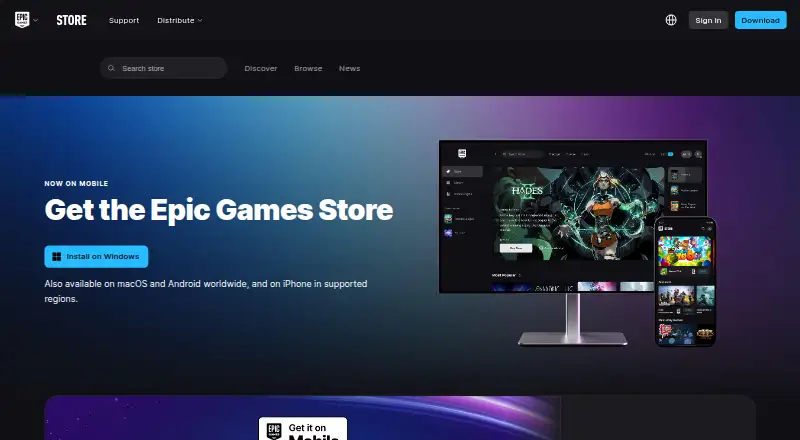
What Epic Games Launcher is
Epic Games Launcher is a free app for installing and launching games in an Epic Games Store library. Epic offers a new free game every Thursday on mobile and PC. The store is available globally on PC and Mac and worldwide on Android; iPhone and iPad availability is limited to specified supported regions. Desktop requirements include Windows 10 64-bit or Windows 11, macOS 13.5 or higher, an Intel Core i3 or AMD FX processor, 4GB memory, compatible DirectX 9 graphics, and 3GB storage. Many games support online cloud saves, and supported games can carry progress between devices and platforms when users sign in. Offline Mode works for eligible installed single-player games, but online multiplayer, cloud saves, achievements, and other online services may not be available. The launcher supports controllers, automatic updates, parental controls, and authenticator-app, SMS, or email two-factor authentication. An account can have up to 1,000 friends. Epic's free plan is listed as free, with optional in-app purchases and weekly free games or content.
Good
- Free plan with weekly free games and content.
- Supports controllers and automatic updates.
- Two-factor authentication has three listed methods.
- Up to 1,000 friends per account.
- Eligible games can run in Offline Mode.
Watch out
- iPhone and iPad access is region-limited.
- Offline Mode excludes online services.
- Not every game supports cloud saves.
- Desktop requirements include 3GB storage.
Who it suits
It suits players who want one place to install and launch Epic Games Store titles, including eligible offline single-player games. Check regional availability and desktop requirements before choosing it.
Verdict
Epic Games Launcher combines library access with weekly free games and several account and parental controls. Its offline use and cloud saves depend on game eligibility, and mobile access varies by platform and region.
Plans and prices
From Epic Games Launcher's own pricing page, checked 30 Sep 2026.
| Plan | Price | What it gives you |
|---|---|---|
| Epic Games Launcher / Epic Games Store | Free | Free to install · optional in-app purchases · weekly free games/content |
The facts
Each one read from Epic Games Launcher's own pages, with the date it was checked.
What it does
- Account security
- Epic supports authenticator-app, SMS, and email two-factor authentication.checked 30 Sep 2026
- Availability
- The Epic Games Store is available globally on PC and Mac, worldwide on Android, and on iPhone or iPad in specified supported regions.checked 30 Sep 2026
- Cloud saves
- Many Epic Games Store games support Cloud Saves, which automatically store save files online for use across devices.checked 30 Sep 2026
- Friends limit
- An Epic Games account can have up to 1,000 friends through the Launcher or Epic Games Mobile App.checked 30 Sep 2026
- Not every game supports cloud saves
- If a game does not support Cloud Saves, uninstalling it might delete save files in the installation location.checked 30 Sep 2026
- Offline mode
- Offline Mode supports eligible installed single-player games without an internet connection, but online multiplayer, cloud saves, achievements, and other online services may be unavailable.checked 30 Sep 2026
- Parental controls
- Epic provides tools to manage a child’s access across Epic products.checked 30 Sep 2026
- Purpose
- The Epic Games Launcher provides access to install and launch games from the Epic Games Store Library.checked 30 Sep 2026
- Social integrations
- Epic supports Facebook and Google login integrations for Epic accounts.checked 30 Sep 2026
- Support
- Epic provides a Player Support portal with self-service account recovery, password help, and two-factor-authentication tools.checked 30 Sep 2026
- System requirements
- The listed launcher requirements are Windows 10 64-bit or Windows 11, macOS 13.5 or higher, an Intel Core i3 or AMD FX processor, 4GB memory, compatible DirectX 9 graphics, and 3GB storage.checked 30 Sep 2026
- Third-party access
- Products or services using Epic account sign-in can verify identity, but other account information requires explicit consent, and Epic says it never shares passwords or payment details with third-party products.checked 30 Sep 2026
Where it runs
- Cross-device progression
- When logged in with an Epic Games account, users can progress in supported games across devices and platforms.checked 30 Sep 2026
The company
- Founded
- 1991checked 28 Sep 2026
- Headquarters
- Cary, North Carolina, USAchecked 28 Sep 2026
Money
- Free games
- Epic offers a new free game every Thursday on mobile and PC.checked 30 Sep 2026
The full review of Epic Games Launcher
Overview
Epic Games Launcher is the client for installing and launching games from an Epic Games Store library. It is best suited to players who want Epic’s weekly free games and play titles that support Epic account features. Its main trade-off is that offline play and cloud saves are not universal, so game-by-game support matters.
Key features
Library, free games and progression
The launcher provides access to install and launch games in an Epic Games Store library. Epic offers a new free game every Thursday on PC and mobile, giving players a recurring way to add games without an upfront purchase. The launcher is free, but optional in-app purchases and other game or content costs remain.
In supported games, an Epic account can carry progression across devices and platforms. Many Store games also support Cloud Saves, which store saves online for use across devices. Coverage varies: if a game lacks Cloud Saves, uninstalling it might delete save files in its installation location. Offline Mode works with eligible installed single-player games, but multiplayer, cloud saves, achievements and other online services may be unavailable. Players who need reliable saves or offline access should check support for each game before uninstalling or disconnecting.
Accounts and controls
Epic supports two-factor authentication through authenticator apps, SMS or email, and account sign-in through Facebook and Google. Epic accounts can have up to 1,000 friends through the Launcher or Epic Games Mobile App. Products using Epic account sign-in can verify identity; access to other account information requires explicit consent, and Epic says it does not share passwords or payment details with third-party products.
Parental controls let adults manage a child’s access across Epic products. The Player Support portal includes self-service account recovery, password help and two-factor-authentication tools. These options make the launcher more manageable for families and account holders, though they do not change which individual games support offline play or saves.
Pricing
Epic Games Launcher / Epic Games Store: free. The free plan includes free installation, optional in-app purchases and weekly free games or content. It suits players who want access to Epic’s library and recurring free offers without paying for the launcher; it does not mean every game or purchase is free.
Platforms
The desktop launcher supports Windows and macOS, with automatic updates and controller support. Listed requirements are Windows 10 64-bit or Windows 11, or macOS 13.5 or higher; an Intel Core i3 or AMD FX processor; 4GB memory; compatible DirectX 9 graphics; and 3GB storage.
The Epic Games Store is available globally on PC and Mac and worldwide on Android. On iPhone or iPad, access is limited to specified supported regions. The wider platform reach is useful to players with supported devices, but mobile availability is not uniform by platform and region. Mod support is not available through the launcher.
Who it's for
Choose Epic Games Launcher if you want to install Epic Store games, collect its weekly free games, and use Epic account features in supported titles. It is also a reasonable fit for households that want account security and parental controls in the same ecosystem. Look elsewhere if mod support is essential or if you need every game to provide cloud saves and offline play.
Pros and cons
- Pro: Weekly free games and content on PC and mobile provide a recurring no-cost option.
- Pro: Two-factor authentication, parental controls and self-service account tools cover useful account and family needs.
- Pro: Supported games can carry progress across devices and platforms.
- Con: Cloud Saves and Offline Mode work only for supported games, and offline use can lose online services.
- Con: No mod support limits its fit for players who want to manage mods through their launcher.
- Con: iPhone and iPad access is region-limited.
Alternatives
Minecraft Launcher is another free launcher, with access to games requiring ownership or a time-limited demo; choose it for Minecraft rather than Epic Store access.
Prism Launcher is a free, open-source option for Linux, macOS and Windows. Steam is also free and spans desktop and mobile platforms, with game and content prices varying. itch app is free for Linux, macOS and Windows, and its app project is open source.
GDLauncher is free to use, with no premium tier or overlay. Heroic Games Launcher is free and GPLv3 licensed. LaunchBox has a free Windows Starter plan for importing and playing games, alongside paid options. GOG Galaxy is free for macOS and Windows and requires a free GOG account; some platform-specific features require the relevant gaming client.
Browse Game Launcher Software for more options.
Verdict
Epic Games Launcher is a strong fit for players who want Epic Store access and weekly free games without paying for the launcher. Its account and parental tools add practical value, but limited mod support and title-dependent offline play and cloud saves are good reasons to choose another launcher if those features are priorities.
Getting started
- Open https://store.epicgames.com/en-US/download
- Install the launcher on Windows or macOS meeting the listed requirements
- Use the Epic Games Store on supported PC, Mac, Android, or regional iPhone and iPad devices
- Sign in with an Epic Games account or use Facebook or Google login integration
- Install games from the Epic Games Store Library
- Enable an authenticator app, SMS, or email two-factor authentication if desired
Limits worth knowing
Offline Mode is limited to eligible installed single-player games, and online multiplayer, cloud saves, achievements, and other online services may be unavailable. Games without Cloud Saves may lose save files stored in the installation location when uninstalled. iPhone and iPad access is restricted to specified supported regions.
Questions
Does Epic Games Launcher cost anything?
The launcher and store plan cost nothing. Optional in-app purchases are available, and Epic offers weekly free games and content.
Which platforms are supported?
The listed platforms are Android, iOS, macOS, and Windows. Store availability differs by platform and region.
Can games work without internet?
Offline Mode supports eligible installed single-player games, but online multiplayer, cloud saves, achievements, and other online services may be unavailable.
Are cloud saves available for every game?
No. Many games support Cloud Saves, but not every game does.
How many friends can an Epic account have?
An Epic Games account can have up to 1,000 friends through the Launcher or Epic Games Mobile App.
What security options are available?
Epic supports authenticator-app, SMS, and email two-factor authentication, plus parental controls and account-recovery support.
Alternatives to Epic Games Launcher
- 1

RomM
Free planOpen sourceAndroidiOSWebAPI9.2From $6.49 a month - 2
Albion Online Launcher
Free planAndroidiOSAPILinux9.0Free plan - 3

ES-DE Frontend
Free planOpen sourceAndroidLinuxmacOSWindows9.0$6.50 one-time - 4

Steam
Free planAndroidiOSWebAPI8.5Free plan - 5
RetroArch
Free planAndroidiOSWebLinux8.5Free plan - 6

GameEx
Free planAndroidLinuxmacOSWindows8.5$17 one-time