
GDLauncher
GDLauncher is a free Minecraft launcher for installing and managing separate game instances on Windows, macOS, and Linux.
What GDLauncher is
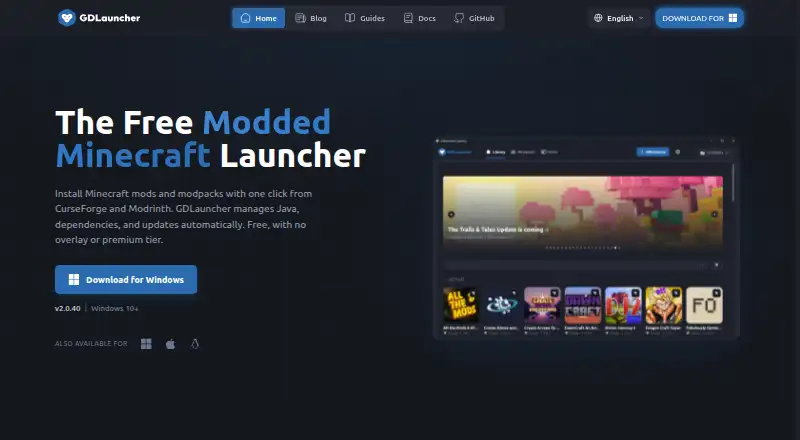
GDLauncher is a free Minecraft launcher for installing and managing separate game instances on Windows, macOS, and Linux. Each instance can have its own mods and resource packs, and users can arrange instances in groups, duplicate them, or share a setup—including custom configurations and mod changes—by code. The launcher installs CurseForge and Modrinth modpacks and sets up the mod loader and Java. Supported loaders include Forge, Fabric, NeoForge, and Quilt. Users can also create and manage Minecraft servers with a live console, CPU and memory monitoring, player controls, and server mod installation. Instance import and export for several other launchers is listed as a work in progress. A valid, fully paid Minecraft Java Edition account is required. GDLauncher’s privacy statement says it shares account email in hashed form with Overwolf for personalized advertising; users can opt out in the app’s Privacy settings. The launcher has no premium tier or overlay.
Good
- Free to use with no premium tier or overlay.
- Installs CurseForge and Modrinth modpacks.
- Supports Forge, Fabric, NeoForge, and Quilt.
- Includes server management tools.
- Instance setups can be shared by code.
Watch out
- Requires a valid, fully paid Minecraft Java Edition account.
- Other-launcher import and export is work in progress.
- Hashed account email is shared with Overwolf for advertising.
Who it suits
GDLauncher suits Minecraft Java Edition players who want separate modded instances or need tools to manage modpacks and servers. It may also suit users who want to share instance setups by code.
Verdict
GDLauncher brings instance, modpack, and server management together in a free launcher. Check the account requirement and advertising opt-out setting before using it.
Plans and prices
From GDLauncher's own pricing page, checked 29 Sep 2026.
| Plan | Price | What it gives you |
|---|---|---|
| Free | Free | Free to use · no premium tier · no overlay |
The facts
Each one read from GDLauncher's own pages, with the date it was checked.
What it does
- Account requirement
- The terms say users must have a valid, fully paid Minecraft Java Edition account to access and use the service.checked 29 Sep 2026
- Automatic updates
- Yeschecked 19 Sep 2026
- Built-in modpack catalog
- Yeschecked 19 Sep 2026
- Instance management
- Users can create separate instances, organize them in groups, duplicate them, and import instances from other launchers.checked 29 Sep 2026
- Instance sharing
- Users can share an instance setup, including custom configs and mod tweaks, with a code.checked 29 Sep 2026
- Java runtime management
- Yeschecked 19 Sep 2026
- Mod loaders
- It supports Forge, Fabric, NeoForge, and Quilt.checked 29 Sep 2026
- Mod loader support
- multiplechecked 19 Sep 2026
- Modpack import
- bothchecked 19 Sep 2026
- Modpack installs
- It installs CurseForge and Modrinth modpacks with one click and automatically sets up the mod loader and Java.checked 29 Sep 2026
- Other launcher imports
- The documentation lists instance import and export support for CurseForge, MultiMC, ATLauncher, Technic, Prism, Modrinth, and FTB, and marks the feature as work in progress.checked 29 Sep 2026
- Privacy and advertising
- The privacy statement says GDLauncher shares account email in hashed form with Overwolf for personalized advertising, and users can opt out in the app's Privacy settings.checked 29 Sep 2026
- Security
- The privacy statement says GorillaDevs uses physical, technical, and administrative controls, including encryption and other enhanced measures where appropriate or required.checked 29 Sep 2026
- Separate instances
- Yeschecked 19 Sep 2026
- Server management
- It can create and manage Minecraft servers, with a live console, CPU and memory monitoring, player controls, and server mod installation.checked 29 Sep 2026
- Support
- The maker directs users to its Discord community and provides documentation and troubleshooting guides.checked 29 Sep 2026
- What it does
- GDLauncher is a custom Minecraft launcher for installing and managing multiple game instances, each with its own mods and resource packs.checked 29 Sep 2026
The company
- Company
- The site identifies GorillaDevs Inc. as the company behind GDLauncher.checked 29 Sep 2026
- Founded
- 2016checked 28 Sep 2026
Money
- Free plan
- Yeschecked 19 Sep 2026
The full review of GDLauncher
Overview
GDLauncher is a free launcher for managing Minecraft Java instances, modpacks, and servers. It suits players who move between customized setups or want server controls alongside their launcher; its strongest case is bringing those jobs together without a subscription.
Separate instances keep mods and resource packs from one setup apart from another, and grouping, duplication, import, and code-based sharing make those setups easier to maintain and pass along. For someone who plays one unchanged installation, that breadth may be more machinery than needed. GDLauncher also requires a valid, fully paid Minecraft Java Edition account, so free access to the launcher does not include the game.
Key features
Modpacks and instance management
A built-in catalog installs CurseForge and Modrinth modpacks in one click, with Java and the mod loader set up automatically. Support for Forge, Fabric, NeoForge, and Quilt makes it practical to switch among packs that use different loaders without handling that setup manually. Automatic updates help reduce upkeep.
Instances can be grouped, duplicated, imported, and shared by code with custom configurations and mod tweaks intact. Import and export documentation covers CurseForge, MultiMC, ATLauncher, Technic, Prism, Modrinth, and FTB, but the feature is marked as work in progress. That caveat matters for anyone choosing GDLauncher specifically to migrate an existing library: the range is broad, but the transfer workflow is not presented as finished.
Server management
GDLauncher can create and manage Minecraft servers, with a live console, CPU and memory monitoring, player controls, and server mod installation. Those tools make it a more capable choice for players who also administer a server; someone only seeking a modpack launcher may not need this extra scope.
Privacy and support
GDLauncher’s privacy statement says account email is shared with Overwolf in hashed form for personalized advertising. Users can opt out in the app’s Privacy settings, an important step for anyone who does not want that advertising use. GorillaDevs says it uses physical, technical, and administrative security controls, including encryption and other enhanced measures where appropriate or required. Support is directed through the Discord community, documentation, and troubleshooting guides.
Pricing
The Free plan costs nothing and is free to use, with no premium tier and no overlay. It runs on Windows, macOS, and Linux and includes CurseForge and Modrinth sources, server tools, and code-based sharing. Export formats are CurseForge .zip, Modrinth .mrpack, and GDLauncher .gdlpack; built-in publishing is not included. There is no paid tier to upgrade to, so this plan is the fit for players who want the listed launcher and server features without a recurring software charge. The required fully paid Minecraft Java Edition account remains a separate prerequisite.
Platforms
GDLauncher runs on Windows, macOS, and Linux. That cross-platform coverage helps households or groups using different desktop systems keep to the same launcher, while its stated scope is desktop rather than web-based.
Who it's for
Choose GDLauncher if you maintain several modded Minecraft Java setups, want to share customized instances by code, or need server management and modpack handling in one free application. It is less suitable if you do not own a paid Java Edition account, want built-in publishing, or would rather avoid the hashed-email advertising use even with an opt-out setting. Players with a single simple setup may prefer a narrower launcher.
Pros and cons
Pros
- Modpack setup spans two major sources: one-click CurseForge and Modrinth installs handle Java and loader configuration too.
- Useful instance controls: grouping, duplication, and code sharing help preserve and distribute customized environments.
- Server tools are built in: console, resource monitoring, player controls, and server mod installation suit users managing a server as well as a game setup.
- No paid software tier: the free plan has no premium tier or overlay and runs on all three supported desktop platforms.
Cons
- A paid game account is mandatory: the launcher cannot be used as a free route into Minecraft Java Edition.
- Migration remains work in progress: documented import and export coverage is wide, but the feature’s stated status makes it a less certain choice for launcher transfers.
- Advertising-related email sharing requires attention: hashed account email is shared with Overwolf for personalized advertising, though an in-app opt-out is available.
- No built-in publishing: creators looking to publish from the launcher will need another tool.
Alternatives
Prism Launcher is also free on Windows, macOS, and Linux, and is open source; pick it if open-source licensing and redistributability are priorities over GDLauncher’s stated server-management offering.
ATLauncher is a free, open-source option for Windows, macOS, and Linux that also requires a paid Minecraft account. It is worth considering if you want an open-source launcher and do not need GDLauncher’s specific server tools or code sharing.
FTB App is a free, ad-supported option for Windows, macOS, and Linux, with source code available through its project repository. Choose it if that app is a better fit for your needs and you accept ads.
CurseForge offers a free web catalog for Minecraft mods and modpacks. Pick it when browser-based catalog access is enough and you do not need a desktop launcher’s instance and server management.
Technic Launcher is a free, open-source launcher for Windows, macOS, and Linux; consider it as another desktop launcher option.
Modrinth App is a free-plan desktop alternative on Windows, macOS, and Linux, and is fully open source; choose it if open source is a priority.
MultiMC is a free launcher for Windows, macOS, and Linux, with an optional from $5 (priced on request) Patreon support tier that gives supporters an app credit mention and Discord role. Consider it if you want a free launcher with that optional support route.
packwiz is a free, open-source option for Windows; consider it if you want a Windows-focused alternative.
For more choices, browse Minecraft Modpack Builders, Minecraft Launchers, or Game Launcher Software.
Verdict
GDLauncher is the right pick for Minecraft Java players who juggle modded instances and want server management in the same free launcher. Its instance sharing and automatic modpack setup are the clearest reasons to choose it; the paid-account requirement, advertising opt-out decision, and work-in-progress migration support are good reasons to look elsewhere.
Getting started
- Open the GDLauncher website
- Install the Windows, macOS or Linux application
- Sign in with a valid, fully paid Minecraft Java Edition account
- Choose CurseForge or Modrinth modpacks from the built-in catalog
- Create or import an instance and select its mod loader
- Create or manage a server when needed
Limits worth knowing
The free plan costs nothing and has no premium tier or overlay. Access still requires a valid, fully paid Minecraft Java Edition account, and several other launcher import and export paths are marked work in progress.
Questions
Is GDLauncher free?
Yes. The Free plan is free, and the launcher has no premium tier or overlay.
Which systems does it support?
GDLauncher runs on Windows, macOS and Linux.
Which modpacks and loaders are supported?
It installs CurseForge and Modrinth modpacks. Supported loaders are Forge, Fabric, NeoForge and Quilt.
Can instances be shared?
Yes. An instance setup, including custom configurations and mod tweaks, can be shared with a code.
Does it manage servers?
Yes. It can create and manage Minecraft servers with a live console, CPU and memory monitoring, player controls and server mod installation.
Is an account required?
Users must have a valid, fully paid Minecraft Java Edition account to access and use GDLauncher.
Alternatives to GDLauncher
- 1
 9.7Free plan
 - 2
Modrinth
Free planOpen sourceWebAPILinuxmacOS8.7From $4.99 a month - 3

LabyMod
Free planAndroidiOSLinuxmacOS7.8Free plan - 4

Thendrask Launcher
Free planLinuxmacOSWindows7.8From $3 a month - 5

Minecraft Launcher
Free planAndroidiOSLinuxmacOS7.8Free plan - 6

Prism Launcher
Free planLinuxmacOSWindows7.7Free plan