
GOG Galaxy
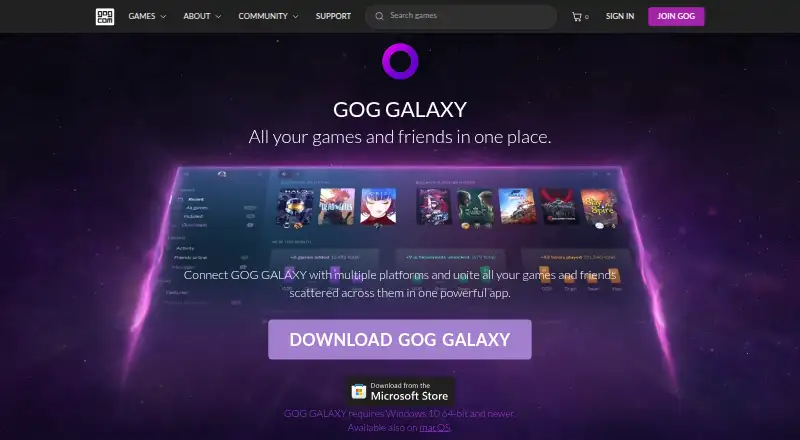
GOG GALAXY brings game libraries and friends from multiple gaming platforms together in one app for Windows and macOS.
What GOG Galaxy is
GOG GALAXY brings game libraries and friends from multiple gaming platforms together in one app for Windows and macOS. It can import PC and console games, including titles that are not installed, into a master collection, then track achievements, play time, and owned games across connected platforms. For PC games owned through different platforms, it can install and launch titles. Users can filter, sort, tag, change game visuals, save library views, and edit game details. GALAXY also combines friends lists, online status, activity, and cross-platform chat. Games can be imported through official or community-created integrations, or added manually; community integrations are open source, with documentation for creating them. Library changes sync between devices, and offline mode is supported. For GOG games, the client includes auto-updates, cloud saves, multiplayer and matchmaking, and rollbacks to earlier versions. Other gaming clients need to be installed for platform-specific features such as installing or auto-updating games and cloud saves. GOG says imported platform data is removed from its servers when a platform is disconnected and is not shared with third parties. GALAXY is free and requires a free GOG account.
Good
- Imports installed and uninstalled PC and console games.
- Combines friends lists and cross-platform chat.
- Library customizations sync between devices.
- Community-created integrations are open source.
Watch out
- A free GOG account is required.
- Other gaming clients are needed for their platform-specific features.
Who it suits
It suits people whose game libraries and gaming friends are spread across different launchers and platforms. A free GOG account is required.
Verdict
GOG GALAXY provides one place to organize connected game libraries and friends, with customization and cross-platform chat. Some features for other platforms still depend on having their gaming clients installed.
Plans and prices
From GOG Galaxy's own pricing page, checked 15 Oct 2026.
| Plan | Price | What it gives you |
|---|---|---|
| GOG GALAXY | Free | requires a free GOG account · Windows and macOS desktop client |
The facts
Each one read from GOG Galaxy's own pages, with the date it was checked.
What it does
- Activity feed
- The activity feed displays friends’ achievements, playtime milestones and recently played games.checked 15 Oct 2026
- Auto-updates
- The GOG client automatically keeps GOG.COM games updated.checked 15 Oct 2026
- Changelog system
- Developers publish game changelogs independently, immediately or on a schedule, and users can read them on GOG.com or in Galaxy.checked 15 Oct 2026
- Chat
- Galaxy provides chat for its users independently of in-game chat.checked 15 Oct 2026
- Cloud saves
- Supported game saves are backed up to cloud storage and synchronized between computers.checked 15 Oct 2026
- Community integrations
- GOG publishes open-source integration tooling so community developers can add gaming platforms.checked 15 Oct 2026
- Documentation depth
- Developer documentation covers release workflows, a developer portal, builds, pipeline tools, SDK integration, client features, FAQs and changelog management.checked 15 Oct 2026
- Engine support
- GOG documents C++ libraries, a C# wrapper, a Unity package and an Unreal Engine 4 plugin, with additional community wrappers for other engines.checked 15 Oct 2026
- Friends and chat
- It brings together friends lists, shows online status and activity, and supports cross-platform chat.checked 30 Sep 2026
- Friends list
- Galaxy aggregates friends from connected platforms and shows their online status.checked 15 Oct 2026
- Game discovery
- The client shows upcoming releases and games popular with friends and the wider community.checked 15 Oct 2026
- Game launcher
- Users can install and launch PC games they own through connected platforms.checked 15 Oct 2026
- Game-server API
- The SDK includes a game-server API for lightweight dedicated servers that do not require the Galaxy client.checked 15 Oct 2026
- Game statistics
- The client combines achievements, playtime and owned-game information across connected platforms.checked 15 Oct 2026
- Game stats
- It tracks achievements, play time, and games owned across connected platforms.checked 30 Sep 2026
- GOG client features
- For GOG games, the client includes auto-updates, cloud saves, multiplayer and matchmaking, and rollbacks to prior versions.checked 30 Sep 2026
- Integration API
- The public Python integration API runs each platform integration as a separate process and supports game import, installation, launching, achievements, playtime, friends, chat and caching.checked 15 Oct 2026
- Integration licence
- The GOG community integrations Python repository is public on GitHub and marked MIT licensed.checked 15 Oct 2026
- Integrations
- Games can be imported through official and community-created integrations, and individual games can also be added manually.checked 30 Sep 2026
- Launcher
- It can install and launch PC games owned on different platforms.checked 30 Sep 2026
- Leaderboards
- Users can compare collection, completion and playtime achievements with friends.checked 15 Oct 2026
Where it runs
- Cross-device sync
- Library customizations and changes are stored in the cloud and synchronized between devices.checked 15 Oct 2026
The company
- Founded
- 2008checked 23 Sep 2026
- Headquarters
- Warsaw, Polandchecked 23 Sep 2026
The full review of GOG Galaxy
Overview
GOG Galaxy is a free library manager and game launcher for macOS and Windows. It suits players whose collections and friends are spread across different gaming platforms, especially those who want to organize games they have not installed as well as games they play regularly. Its appeal is a flexible shared library; its main limitation is that some functions for other platforms still rely on their gaming clients.
Key features
One library, arranged your way
Galaxy can import games from PC and console platforms, including titles that are not installed, and track owned games, achievements and play time across connected platforms. It can also install and launch PC games owned elsewhere, making it a useful front door to a mixed collection rather than just a catalog of GOG purchases.
Filtering, sorting, tags, custom visuals, editable metadata and saved views give players several ways to organize a large or unusual collection. Those changes sync between devices through the cloud. Games can be added through official or community-created integrations, or entered manually. Community integrations are open source, and GOG provides documentation for creating them. That flexibility helps when a collection needs more than a standard catalog, but does not guarantee that every platform or game will connect.
Friends, chat and GOG-specific tools
Galaxy brings together friends lists, online status and activity from connected platforms, with cross-platform chat. For players whose social circles are split between services, this can reduce the need to check each network separately.
For GOG games, the client also provides auto-updates, cloud saves, multiplayer and matchmaking, and rollbacks to earlier versions. Other platforms are less self-contained: their gaming clients must be installed for platform-specific functions such as installing or auto-updating games and cloud saves. Galaxy can organize a broader collection, but it does not remove the need to keep companion clients for those tasks.
Privacy and support
GOG says Galaxy imports information from connected platforms, does not share personal data with third parties, and removes imported data from its servers when a platform is disconnected. Users can report bugs or send feedback through the app’s settings. Those assurances and an in-app feedback route are useful, though players should still consider which accounts they choose to connect.
Pricing
GOG GALAXY costs free and requires a free GOG account. The free plan includes library import from third parties, cloud saves and offline mode, with no subscription catalog. It is the straightforward fit for players who want organization and launcher functions without paying for Galaxy itself; the trade-off is that features tied to other platforms depend on having the relevant gaming client installed. There is no free trial because the plan is free.
Platforms
Galaxy is available for macOS and Windows. Its cloud-synced library customizations support use across devices, while offline mode is also included. Other-platform functions such as cloud saves or game installation still require the corresponding gaming client.
Who it's for
Choose Galaxy if you have games or gaming friends spread across several launchers and want a single place to browse, organize and chat. Its manual additions, metadata editing and custom views also suit players who want more control over how a collection is presented. It is a weaker fit if you expect one app to fully replace every store or client connected to your games.
Pros and cons
- Pros: Imports installed and uninstalled games from PC and console platforms, so the library can serve as a broad collection index.
- Pros: Tags, saved views, editable metadata and visual customization make a large collection easier to shape around personal preferences.
- Pros: Combined friends, activity and cross-platform chat bring gaming social circles into the same app.
- Pros: Free access includes offline mode, cloud saves and third-party game import.
- Cons: Platform-specific tasks such as installing or auto-updating other-platform games and using their cloud saves require the relevant clients.
- Cons: The catalog depends on integrations or manual additions, so Galaxy does not ensure every service or title will be covered.
- Cons: Galaxy is limited to macOS and Windows, which rules it out for Linux users looking for this library manager.
Alternatives
Steam is another free option for players who want a gaming platform spanning Android, iOS, Linux, macOS and Windows; game and content prices vary, and some subscriptions may be free.
LaunchBox fits players who want a freemium option on Windows or Android: its free Windows Starter plan includes the core experience and importing and playing all games, while its Regular plan is $30, paid once.
itch app is a free alternative for Linux, macOS and Windows users, and its app project is open source on GitHub.
Epic Games Store is a freemium alternative available on Android, iOS, macOS, web and Windows.
Lutris is a free, Linux-only alternative built using open source technology.
Battle.net offers a free desktop app for Windows and Mac alongside mobile apps for iOS and Android; games and some in-game purchases may cost extra.
EA app is a freemium choice for macOS and Windows players who want EA Play subscriptions, starting at $5.99 a month; EA Play Pro costs 16.99 per month.
Google Play Games on PC is a free option for Android games on Windows, though games or in-game items may cost extra.
For more options, browse PC Game Launchers, Game Distribution Platforms, Game Launcher Software, Game Library Managers and Game Leaderboard Software.
Verdict
GOG Galaxy is a strong choice for players who want one customizable library and social hub across scattered gaming platforms, without paying for the organizer. Choose it for broad collection management and convenient cross-platform chat; look elsewhere if you need a single client to handle every platform’s installs, updates and saves.
Alternatives to GOG Galaxy
- 1
Steam
Free planAndroidiOSWebAPI7.7Free plan - 2

itch app
Free planLinuxmacOSWindows7.0Free plan - 3

Fennec F-Droid
Free planOpen sourceAndroid6.8Free plan - 4
Google Play Games on PC
Free planAndroidWindows6.3Free plan - 5
Aptoide
AndroidiOSWeb5.3 - 6
Uptodown
AndroidWeb5.1