Ember Software
Ember Software connects office staff, field technicians, and customers for fire inspection workflows.
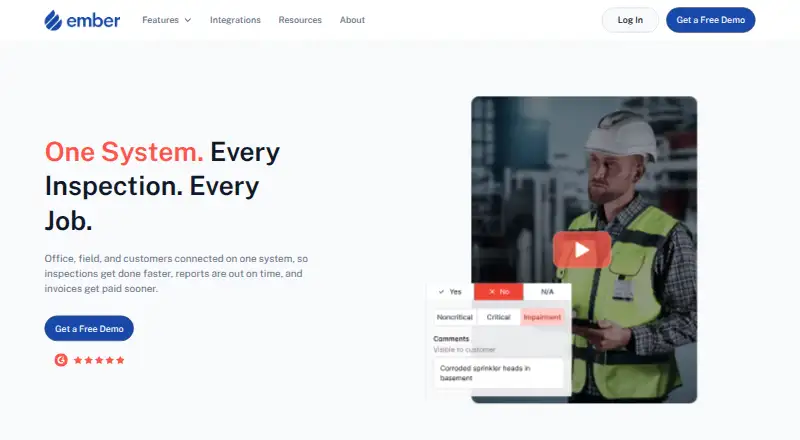
What Ember Software is
Ember Software connects office staff, field technicians, and customers for fire inspection workflows. Its digital forms are designed for local compliance and work on phones, tablets, and laptops. Technicians can complete inspections offline, with work syncing when service returns. Office teams can use a shared calendar to schedule, dispatch, and track technicians. Inspection deficiencies can be turned into proposals with branded templates and digital customer approval. Billing generates invoices from job data, proposals, labor, and parts, then tracks invoice statuses. Ember says it can send inspection reports directly to the AHJ. Its integrations page lists The Compliance Engine, QuickBooks Online and Desktop, Salesforce, Outlook, Sage, IROL, and LivSafe as coming soon. The product is presented for fire protection businesses, including owners, service managers, and technicians. Pricing is specified in an applicable subscription order rather than listed publicly. Unless an order says otherwise, subscriptions run for 12 months and renew annually unless canceled. Online customer support is provided from 9 am to 6 pm PT.
Good
- Inspection forms work offline and sync when service returns.
- Shared calendar supports technician scheduling and dispatch.
- Deficiencies can become proposals with digital customer approval.
- Invoices draw on job data, proposals, labor, and parts.
- Reports can be sent directly to the AHJ.
Watch out
- Pricing is not publicly listed.
- Several listed integrations are marked coming soon.
- Subscriptions typically renew annually unless canceled.
- Support hours are 9 am to 6 pm PT.
Who it suits
Ember suits fire protection businesses coordinating inspection work between office staff and field technicians. It may be useful to teams that need offline forms, dispatch, proposals, and invoicing in their workflow.
Verdict
Ember brings inspection forms, technician coordination, proposals, and billing into one workflow. Check the subscription order for pricing and terms, and note that several integrations are not yet available.
Plans and prices
From Ember Software's own pricing page, checked 4 Oct 2026.
| Plan | Price | What it gives you |
|---|---|---|
| Ember Software | Priced on request | Pricing is specified in an applicable Subscription Order; no public price listed |
The facts
Each one read from Ember Software's own pages, with the date it was checked.
What it does
- AHJ submissions
- Ember says it sends inspection reports directly to the AHJ.checked 4 Oct 2026
- Data practices
- The privacy policy says the company does not sell personal information and may share it with service providers, where legally required, or in a business transfer.checked 3 Oct 2026
- Digital forms
- It offers digital fire inspection forms designed for speed and local compliance.checked 3 Oct 2026
- Inspection forms
- It provides digital fire inspection forms designed for speed and local compliance.checked 4 Oct 2026
- Integrations
- The integrations page lists The Compliance Engine, QuickBooks Online and Desktop, Salesforce, Outlook, Sage, IROL, and LivSafe as coming soon.checked 4 Oct 2026
- Intended customers
- The product is presented for fire protection companies and their owners, service managers, and technicians.checked 4 Oct 2026
- Mobile and offline use
- Inspection forms work on phones, tablets, and laptops, and technicians can complete inspections offline with work syncing when service returns.checked 3 Oct 2026
- Offline use
- The homepage says teams can work online or offline from any device.checked 4 Oct 2026
- Privacy and security
- The privacy policy says Ember uses commercially reasonable efforts to protect information but cannot guarantee absolute security.checked 4 Oct 2026
- Product
- Ember connects office staff, field technicians, and customers in one system for fire inspection workflows.checked 3 Oct 2026
- Proposals
- Ember can turn inspection deficiencies into proposals and supports branded templates and digital customer approval.checked 3 Oct 2026
- Purpose
- Ember connects office, field, and customers in one system for fire inspection and job workflows.checked 4 Oct 2026
- Scheduling
- Office teams can schedule, dispatch, and track technicians using one calendar.checked 4 Oct 2026
- Security
- The privacy policy says Ember uses commercially reasonable efforts to protect information and does not guarantee absolute security.checked 3 Oct 2026
- Subscription term
- Unless an order specifies otherwise, the subscription period is 12 months and renews annually unless canceled.checked 4 Oct 2026
- Support
- The terms say online support is provided from 9 am to 6 pm PT, with possible additional support specified in a subscription order.checked 4 Oct 2026
- Target users
- The features page organizes the product for technicians and office teams at fire protection businesses.checked 3 Oct 2026
- Training
- The terms provide basic live training and say additional training or support may carry mutually agreed fees.checked 4 Oct 2026
Money
- Billing
- The billing feature generates invoices from job data, proposals, labor, and parts, and tracks invoice statuses.checked 3 Oct 2026
- Proposals and billing
- Ember turns inspection deficiencies into proposals and supports billing and invoicing.checked 4 Oct 2026
The company
- Headquarters
- San Francisco, California, United Stateschecked 28 Sep 2026
Where it runs
- Supported devices
- The terms list current iOS and Android major versions, plus recent versions of Chrome, Firefox, Safari, and Edge.checked 4 Oct 2026
The full review of Ember Software
Overview
Ember Software is a fire-inspection and job-workflow platform for fire protection companies coordinating office staff, technicians, and customers. It suits service managers who want inspection findings to feed into proposals and billing. The connected workflow is its clearest advantage, but custom pricing and an annual subscription default make it harder to assess and commit to.
Key features
Digital fire inspection forms are designed for speed and local compliance, and technicians can use them on phones, tablets, or laptops. Offline completion with syncing when service returns is valuable for field work in areas with unreliable connectivity. Ember also supports direct inspection-report submission to the AHJ, avoiding a separate print, scan, or portal step.
A shared calendar gives office teams tools to schedule, dispatch, and track technicians. Estimate building, recurring inspections, and an equipment catalog broaden the workflow beyond form completion. When inspections uncover deficiencies, teams can turn them into proposals with branded templates and digital customer approval. Invoices draw on job data, proposals, labor, and parts, while invoice-status tracking helps offices follow billing through the workflow.
The connected path from inspection to proposal and invoice is a good fit for businesses that want those jobs managed together. It may be more than a company needs if its priority is only digital inspection forms. The integrations page marks The Compliance Engine, QuickBooks Online and Desktop, Salesforce, Outlook, Sage, IROL, and LivSafe as coming soon, so firms relying on those connections should not assume they are currently usable.
Pricing
Ember Software has custom pricing, specified in an applicable Subscription Order rather than a public price. That means companies need an order to judge its cost against their team size and workflow needs. Unless an order says otherwise, subscriptions run for 12 months and renew annually unless canceled; confirm the order's price and terms before committing.
The terms provide basic live training. Additional training or support may carry mutually agreed fees, and online customer support is provided from 9 am to 6 pm PT. Those terms matter for teams that expect extended support or substantial onboarding.
Platforms
Ember supports Android, iOS, and web. Its terms identify current major iOS and Android versions and recent Chrome, Firefox, Safari, and Edge versions as supported. That cross-device range suits offices and field teams using different devices, while the stated browser and operating-system versions are worth checking against older equipment.
Who it's for
Ember is aimed at fire protection businesses, particularly owners, service managers, and technicians who need inspection, dispatch, proposal, and billing workflows connected. It is strongest for teams whose field inspections generate follow-on work and invoices. A business seeking only a narrow form tool, or one that depends on an integration marked as coming soon, should compare other options.
Pros and cons
- Pro: Offline inspections sync when service returns, helping technicians keep work moving without a reliable connection.
- Pro: Deficiencies can lead into branded proposals, digital approvals, and invoices based on job data, labor, and parts.
- Pro: Direct AHJ report submission and recurring-inspection support address fire-inspection workflows specifically.
- Con: Custom pricing makes costs difficult to compare before receiving a subscription order.
- Con: The default 12-month term renews annually unless canceled, limiting flexibility for teams that prefer short commitments.
- Con: Several named integrations are marked coming soon, a drawback for companies that need those connections now.
Alternatives
SedonaOffice is another paid option with Android, iOS, web, Windows, API, and self-hosted platform support. HiveSuite is worth comparing for teams seeking published per-month and yearly options, including a Solo plan for one admin and two crew. Uptick offers monthly invoicing and cancellation at any time, which may suit buyers prioritizing a flexible subscription term.
AlarmOps may fit smaller teams looking for a published Starter price of £59 a month and capacity for up to three engineers. Ascora offers published per-user monthly plans, including an Essentials option for trade startups. SecurityTrax is another paid option for buyers to compare.
Tradescraft offers a published Core plan at A$29 a month per user, billed monthly, for teams comparing per-user pricing. Uleadz is another paid option to consider.
For a broader category comparison, see Security System Installer Software.
Verdict
Fire protection companies that want offline inspections, technician coordination, customer approvals, and billing in a connected workflow should put Ember on their shortlist. Its direct AHJ submissions and progression from deficiencies to invoices are compelling reasons to choose it. Look elsewhere if public pricing, shorter subscription commitments, or integrations marked coming soon are essential.
Getting started
- Open the Ember Software website
- Review the subscription order for applicable pricing and terms
- Use Ember on Android, iOS, or a supported desktop browser
- Set up digital inspection forms and equipment records
- Create schedules for technicians in the shared calendar
- Connect inspection deficiencies to proposals and billing workflows
Limits worth knowing
Unless an order specifies otherwise, the subscription lasts 12 months and renews annually unless canceled. Additional training or support beyond the basic live training may carry mutually agreed fees.
Questions
Who is Ember designed for?
It is presented for fire protection companies, including owners, service managers, office teams, and technicians.
Which devices and browsers work with Ember?
The terms list current iOS and Android major versions, plus recent Chrome, Firefox, Safari, and Edge versions.
How is pricing handled?
Pricing is specified in an applicable Subscription Order rather than posted as a public amount.
Does Ember work offline?
Yes. Technicians can complete inspection forms offline, with work syncing when service returns.
Which integrations are listed?
The Compliance Engine, QuickBooks Online and Desktop, Salesforce, Outlook, Sage, IROL, and LivSafe are listed as coming soon.