SedonaOffice
SedonaOffice is financial management software built for security companies, including dealers and integrators.
What SedonaOffice is
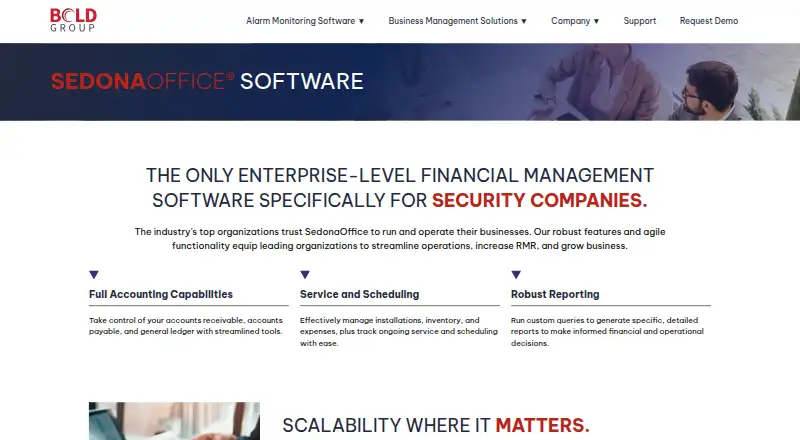
SedonaOffice is financial management software built for security companies, including dealers and integrators. Its accounting tools cover accounts payable, accounts receivable, and the general ledger. Real-time job data helps users assess profitability during or after installation. Service operations include requests, inspections, scheduling, dispatch, inventory management, and support for unlimited warehouses and vehicles. Reporting includes dashboards, analytics, a report manager, and a custom query builder. Customers can run the software on premises or choose its hosted cloud service, which includes core modules. Sedona-X Mobile for iOS and Android supports work orders, appointments, customer accounts, and field payments. Add-ons include eForms, Time & Attendance, and Sales Automation; SedonaAPI provides a REST interface for integrations and is required for those three modules. The documented on-premises client uses a Windows client-server setup. Direct operation over VPN is not supported; remote access is supported through Terminal Services or Remote Desktop Services on the SQL Server network. Pricing is available on request.
Good
- Covers accounts payable, receivable, and general ledger
- Job data supports profitability assessment
- Inventory supports unlimited warehouses and vehicles
- Mobile app supports work orders and field payments
- Offers on-premises and hosted cloud options
Watch out
- Pricing is available only on request
- Direct operation over VPN is not supported
- SedonaAPI is required for three named add-on modules
Who it suits
It suits security businesses that need accounting, job and service management, inventory, and reporting in one system. Dealers and integrators are named audiences.
Verdict
SedonaOffice brings accounting, service operations, inventory, and reporting together for security companies. Buyers should review the on-premises remote-access requirements and request pricing and a demo.
Plans and prices
From SedonaOffice's own pricing page, checked 3 Oct 2026.
| Plan | Price | What it gives you |
|---|---|---|
| SedonaOffice | Priced on request | Price not listed; demo by request |
The facts
Each one read from SedonaOffice's own pages, with the date it was checked.
What it does
- Accounting
- It provides accounts receivable, accounts payable, and general ledger capabilities.checked 3 Oct 2026
- Add-ons and API
- Add-ons include eForms, Time & Attendance, Sales Automation, SedonaSync, SedonaDocs, SedonaWeb, SedonaBackup, and SedonaAPI; the API provides a REST interface for integrating with other databases and modules.checked 2 Oct 2026
- API and add-ons
- SedonaAPI provides a REST API interface for integrating with other databases and modules, and is required for the Time & Attendance, eForms, and Sales Automation modules.checked 3 Oct 2026
- Backup
- SedonaBackup transfers database backups over a secured SSL connection to a tier-one access-controlled data center and verifies backups monthly.checked 3 Oct 2026
- Hosting
- Customers can use SedonaOffice on premises or choose a hosted cloud version with reduced upfront costs and less IT maintenance.checked 3 Oct 2026
- Integration examples
- The maker's knowledge base lists integrations or integration documentation for Sebis, WeSuite, FireNspec, Stages, Manitou, and QuoteWerks.checked 2 Oct 2026
- Intended customers
- Bold Group describes SedonaOffice as designed for security organizations, including security dealers and integrators.checked 3 Oct 2026
- Inventory limit
- Inventory Management supports unlimited warehouses and vehicles.checked 3 Oct 2026
- Job management
- Real-time job data lets users assess profitability during or after installation.checked 2 Oct 2026
- Mobile
- Sedona-X Mobile integrates with SedonaOffice and is available on iOS and Android devices.checked 3 Oct 2026
- Portal security
- SedonaWeb states that data is encrypted with SSL and that it is PCI compliant with ACH Direct.checked 2 Oct 2026
- Purpose
- SedonaOffice is enterprise-level financial management software designed specifically for security companies.checked 3 Oct 2026
- Reporting
- Its Report Manager, dashboards, analytics, and Custom Query Builder provide financial and operational reporting tools.checked 3 Oct 2026
- Security
- The SedonaWeb add-on states that its data is encrypted with SSL and that it is PCI compliant with ACH Direct.checked 3 Oct 2026
- Service and inventory
- The software supports service requests, inspections, scheduling, dispatch, inventory management, and unlimited warehouses and vehicles.checked 2 Oct 2026
- Service operations
- It supports managing installations, inventory, expenses, service requests, inspections, scheduling, and dispatch.checked 3 Oct 2026
- Support
- Business management phone support, including SedonaOffice, is available Monday through Friday from 8:00 AM to 6:00 PM ET; after-hours support is by appointment.checked 3 Oct 2026
- Support and training
- Bold Group describes its portfolio as supported by technical support and ongoing training programs.checked 2 Oct 2026
The company
- Company
- Bold Group says it was established in March 2019 through the operational merger of Perennial Software, Bold Technologies, SIMS, and Secure Global Solutions.checked 2 Oct 2026
- Founded
- 2019checked 28 Sep 2026
- Headquarters
- Bold Group lists its address as 3601 Walnut St., Suite 400, Denver, Colorado 80205.checked 2 Oct 2026
- Maker
- Bold Group says it was established in March 2019 through the operational merger of Perennial Software, Bold Technologies, SIMS, and Secure Global Solutions.checked 3 Oct 2026
Where it runs
- Platform requirement
- The documented on-premises client uses a Windows client-server setup, and direct operation over VPN is not supported; remote access is supported through Terminal Services or Remote Desktop Services on the SQL Server network.checked 2 Oct 2026
Money
- Support plan
- The support and maintenance plan includes technical issue resolution, product updates and upgrades, guided upgrade support, portal access, and unlimited support requests.checked 3 Oct 2026
The full review of SedonaOffice
Overview
SedonaOffice is a broad operations and accounting platform aimed at security dealers and integrators. Its strongest case is for organizations that need financial management tied closely to installation, service, and inventory workflows; the trade-off is a Windows-based on-premises setup with specific requirements for remote access.
Bold Group was formed in March 2019 through the operational merger of Perennial Software, Bold Technologies, SIMS, and Secure Global Solutions. Customers can run SedonaOffice on premises or use its hosted cloud service, which includes the core modules. Its mobile companion, Sedona-X Mobile, supports work orders, appointments, customer accounts, and field payments on iOS and Android.
Compare it with other options in our Security System Installer Software category.
Key features
Accounting and job economics
Accounts payable, accounts receivable, and general ledger form the accounting core. Real-time job data lets managers review installation profitability while work is underway as well as after completion, which is useful when operational and financial oversight need to stay connected. Estimate building, contract management, billing, and invoicing add support for the commercial lifecycle around that work.
Service operations and inventory
SedonaOffice covers installations, expenses, service requests, inspections, scheduling, and technician dispatch. Inventory management supports unlimited warehouses and vehicles, a meaningful fit for security businesses managing equipment across multiple locations or fleets. These capabilities make the platform broader than a ledger or dispatch tool alone, though buyers should confirm which add-ons their workflows require.
Reporting, mobile, and extensions
A custom query builder, report manager, dashboards, and analytics give teams several ways to examine operations and financial performance. Sedona-X Mobile brings work orders, appointments, customer accounts, and field payments to iOS and Android, making field access part of the product rather than a separate platform choice.
Optional modules include eForms, Time & Attendance, Sales Automation, SedonaSync, SedonaDocs, SedonaWeb, SedonaBackup, and SedonaAPI. SedonaAPI provides a REST interface for connecting other databases and modules, but it is required for eForms, Time & Attendance, and Sales Automation, so those add-ons may entail an additional dependency. SedonaWeb says its data is SSL-encrypted and PCI compliant with ACH Direct. SedonaBackup sends database backups over a secured SSL connection to an access-controlled tier-1 data center and verifies backups monthly. Bold Group's knowledge base documents integrations or integration documentation for Sebis, WeSuite, FireNspec, Stages, Manitou, and QuoteWerks.
Deployment and access
The documented on-premises client uses a Windows client-server setup and does not support direct operation over VPN. Remote access instead runs through Terminal Services or Remote Desktop Services on the SQL Server network. That is a material deployment constraint for organizations expecting staff to connect directly over VPN; the hosted cloud option may be a better fit, but buyers should establish the appropriate access arrangement before committing.
Pricing
SedonaOffice is paid software with custom pricing, and a demo is available by request. There is no public tier structure to compare, so organizations should request a quote that clarifies the core modules, any required add-ons, and the support and maintenance arrangement that applies to them.
The support and maintenance plan includes technical issue resolution, product updates and upgrades, guided upgrade support, portal access, and unlimited support requests. Business management phone support, including SedonaOffice, runs Monday through Friday from 8:00 AM to 6:00 PM ET; after-hours support is by appointment. This offers ongoing product and issue support, but companies needing routine after-hours help should account for the appointment requirement.
Platforms
SedonaOffice is listed for Android, iOS, API, self-hosted, web, and Windows. Mobile support is specifically provided through Sedona-X Mobile on iOS and Android. For an on-premises Windows deployment, remote use depends on Terminal Services or Remote Desktop Services rather than direct VPN operation.
Who it's for
SedonaOffice is best suited to security organizations—particularly dealers and integrators—that want accounting, installation profitability, service workflows, dispatch, and inventory in one system. Unlimited warehouses and vehicles may suit operations with dispersed stock and fleets, while the reporting tools and API offer ways to analyze data and connect modules or databases.
It is a less natural fit for businesses that require simple VPN access to an on-premises client, or for buyers who need a clear public price comparison before arranging a sales discussion. The hosted option can avoid the documented on-premises access pattern, but pricing remains a custom-quote decision.
Pros and cons
- Pro: Accounting is linked to real-time job data, so security firms can evaluate installation profitability during work as well as afterward.
- Pro: Service operations span requests, inspections, scheduling, dispatch, and inventory, with no stated cap on warehouses or vehicles.
- Pro: Mobile tools cover work orders, appointments, customer accounts, and field payments on both major mobile platforms.
- Pro: Reporting tools, a REST API, and documented integration examples give teams options for analysis and connecting systems.
- Con: Direct VPN operation is unsupported for the on-premises client, making remote access more infrastructure-dependent.
- Con: Pricing is custom, and add-ons such as eForms, Time & Attendance, and Sales Automation require SedonaAPI.
- Con: Phone support has weekday hours, with after-hours assistance by appointment rather than routine availability.
Alternatives
Uptick is worth considering for teams that want a paid service platform with Android, iOS, Linux, macOS, web, and Windows support; its pricing is also based on a monthly platform fee and billed monthly, with cancellation at any time.
Ascora is a stronger candidate for trade teams seeking published per-user pricing and a free trial: Essentials is $45 a month for trade startups, while Elite is $59 a month for teams up to 30 technicians.
SecurityTrax may suit buyers who prefer a customer-record-based charge: active customer storage is $0.15 a month per active customer record and counts toward a $250 monthly minimum.
Tradescraft offers a lower published entry price for teams comfortable with its currency and user-based model: Core plan is A$29 a month per user, billed monthly, with GST included where applicable in Australia and New Zealand.
Uleadz is an alternative for teams that value included communications capacity, with Standard at $89 a month for two users, unlimited technicians, 1,000 SMS, 750 minutes, two dedicated lines, and 24/7 chat support.
Optsy is another option for buyers seeking self-hosted and web platforms with custom pricing tailored to company size, users, and requirements.
Servgrow is worth comparing if a low annual entry point and a free trial matter: PRO is $19 a year for one user, while PLUS is $32 a year for one to three users.
Service Storm may appeal to a solo operator who wants a monthly plan that can be canceled any time: Solo is $79 a month for one user and includes unlimited customers, jobs, quotes, and invoices.
Verdict
Choose SedonaOffice if you run a security dealership or integration business and need accounting, job profitability, service operations, and inventory tied together, with a hosted option and mobile field tools. Its breadth is the central reason to consider it; its custom pricing and the on-premises remote-access requirements are the reasons to compare alternatives or confirm deployment details before moving forward.
Getting started
- Visit the SedonaOffice website.
- Request pricing or a demo from Bold Group.
- Choose an on-premises installation or the hosted cloud service.
- For on-premises use, prepare for the documented Windows client-server setup.
- Install Sedona-X Mobile on iOS or Android for supported field tasks.
- Request the required SedonaAPI if using eForms, Time & Attendance, or Sales Automation.
Limits worth knowing
Pricing is on request, and the plan information gives no listed price. For the documented on-premises client, direct VPN operation is unsupported; remote access uses Terminal Services or Remote Desktop Services on the SQL Server network.
Questions
How much does SedonaOffice cost?
Pricing is on request. The SedonaOffice plan has no listed price, and a demo is available by request.
Which platforms does it support?
Listed platforms include Android, iOS, API, self-hosted, web, and Windows. The documented on-premises client uses a Windows client-server setup.
Can it be hosted in the cloud?
Yes. Customers can use the hosted cloud service, which includes the core modules, or run SedonaOffice on premises.
What does Sedona-X Mobile do?
On iOS and Android, it supports work orders, appointments, customer accounts, and field payments.
What does SedonaAPI provide?
SedonaAPI provides a REST interface for integrating with other databases and modules. It is required for eForms, Time & Attendance, and Sales Automation.
What remote access is supported for on-premises use?
Remote access is supported through Terminal Services or Remote Desktop Services on the SQL Server network. Direct operation over VPN is not supported.