Draw Attention
Draw Attention is a WordPress plugin for making interactive image maps with hotspots that visitors can click, tap, or hover over.
What Draw Attention is
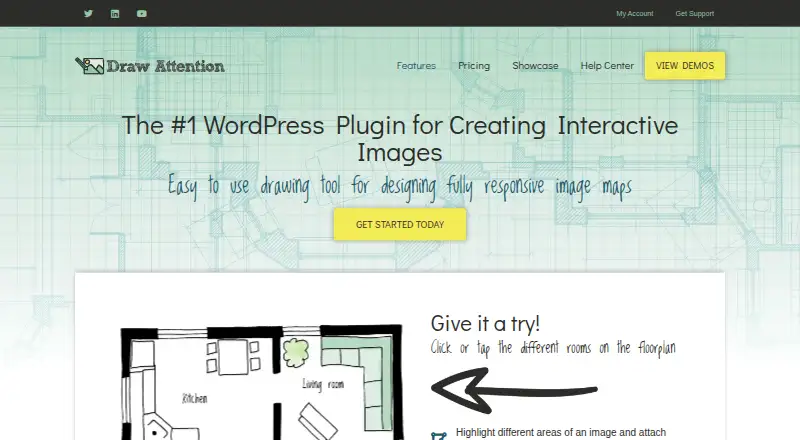
Draw Attention is a WordPress plugin for making interactive image maps with hotspots that visitors can click, tap, or hover over. Its editor lets site owners add polygon, rectangle, and circle hotspots to images. Each hotspot can show text, images, shortcodes, galleries, video, or audio, or send visitors to another URL. The free edition is limited to one interactive image. Pro adds six ways to display hotspot information: tooltip, lightbox, top, bottom, left, and right. Site owners can place the plugin in posts or pages with a shortcode, Beaver Builder module, or WordPress Editor Block; the maker also names WPML as a translation plugin it works with. The maker says image content can be accessed by screen readers and hotspots by keyboard commands. When JavaScript is disabled, an image map fallback keeps content accessible. Plugin data stays in the site owner’s WordPress database, while a Pro license key is periodically sent to the maker’s servers for a license check. Pro costs $99 a year for one website or $199 a year for unlimited websites; both include one year of updates and support.
Good
- Hotspots can contain text, media, or links.
- Supports keyboard commands and screen readers.
- Content has an image map fallback without JavaScript.
- Can be added through several WordPress editing options.
Watch out
- Free edition supports only one interactive image.
- Pro license key is periodically sent for checks.
Who it suits
Draw Attention suits WordPress site owners who want to add interactive hotspots to images, such as floor plans, maps, product tours, or infographics. The free edition may suit a single-image use case; Pro is for sites needing more images or layouts.
Verdict
Draw Attention offers multiple hotspot shapes and content types, with accessibility features described by its maker. The free edition is limited to one image; Pro costs $99 a year for one site or $199 a year for unlimited sites.
Plans and prices
From Draw Attention's own pricing page, checked 9 Oct 2026.
| Plan | Price | What it gives you |
|---|---|---|
| Free | Free | 1 interactive image · free edition |
| Pro - Single Site | $99 a year | 1 website · unlimited interactive images and clickable areas · 20 preset color schemes · 6 layouts · 1 year of updates and support · One Year License |
| Pro - Unlimited Sites | $199 a year | Unlimited websites · unlimited interactive images and clickable areas · 20 preset color schemes · 6 layouts · 1 year of updates and priority support · One Year License |
The facts
Each one read from Draw Attention's own pages, with the date it was checked.
What it does
- Accessibility
- The maker says image content is accessible to screen readers and hotspots can be accessed with keyboard commands.checked 9 Oct 2026
- Hotspot content
- Hotspots can reveal text, images, shortcodes, galleries, video, and audio, or direct visitors to another URL.checked 9 Oct 2026
- Hotspot drawing
- The drawing tool creates polygon, rectangle, and circle hotspots on images.checked 9 Oct 2026
- Integrations
- The plugin can be placed in posts or pages using a shortcode, a Beaver Builder module, or a WordPress Editor Block; the maker also names WPML as a translation plugin it works with.checked 9 Oct 2026
- Intended use
- The maker suggests uses including real-estate floor plans, trade-show maps, product tours, infographics, blog content, and affiliate links.checked 9 Oct 2026
- Layouts
- Pro offers six layouts for hotspot information: tooltip, lightbox, top, bottom, left, and right.checked 9 Oct 2026
- Purpose
- Draw Attention creates interactive image maps for WordPress websites, with hotspots visitors can click, tap, or hover over.checked 9 Oct 2026
- Refund
- The maker offers a full refund within 30 days of purchase if the product does not meet the customer’s needs.checked 9 Oct 2026
- Security and data
- The maker says plugin data stays in the site owner’s WordPress database, while the Pro license key is periodically sent to its servers to check license status.checked 9 Oct 2026
- SEO and JavaScript
- The plugin says content remains accessible when JavaScript is disabled and uses an image map fallback in that case.checked 9 Oct 2026
- Support
- The pricing page says licenses include one year of updates and support, with priority support on the unlimited-sites plan.checked 9 Oct 2026
- Support limits
- The support policy excludes help integrating third-party plugins, themes, or services.checked 9 Oct 2026
- Support response
- The maker says its support team aims to respond within one business day.checked 9 Oct 2026
Money
- Free edition limit
- The maker’s guide says the free edition supports only one interactive image.checked 9 Oct 2026
Alternatives to Draw Attention
- 1

Roboflow
Free planAndroidiOSWebAPI8.3From $39 a month - 2

Label Studio
Free planOpen sourceWebAPILinuxmacOS8.2From $99 a month - 3
VGG Image Annotator
Free planOpen sourceWebLinuxmacOSSelf-hosted7.7Free plan - 4
MakeSense.ai
Free planOpen sourceWebLinuxmacOSSelf-hosted7.6Free plan - 5
Segments.ai
Free planWebAPI7.0Free plan - 6
CVAT
Free planWebAPISelf-hosted6.9Free plan