
Docling
Docling converts documents into structured data for AI workflows.
What Docling is
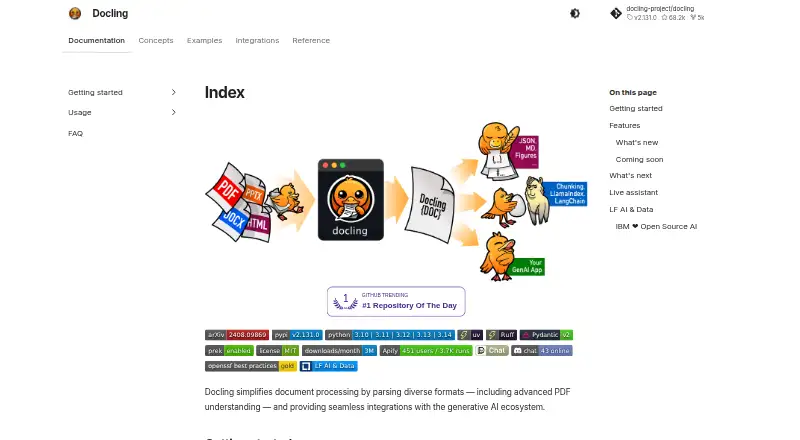
Docling converts documents into structured data for AI workflows. It accepts files such as PDFs, DOCX, spreadsheets, presentations, HTML, EPUB, images, audio, video, email, and Apple iWork documents. For PDFs, it handles page layout, reading order, tables, code, formulas, and image classification. Outputs include Markdown, HTML, WebVTT, DocLang, DocTags, JSON, text, LaTeX, and JSONL chunks. Multiple OCR engines are supported, including EasyOCR, Tesseract, OcrMac, and RapidOCR, and documented integrations include LangChain, LlamaIndex, Haystack, and Crew AI. Docling is available as a local Python library, a self-operated HTTP service, or through managed and private deployment options. The project says local processing can work offline after models are downloaded and cached, without uploading documents. The open-source library is free and MIT licensed. A separate IBM watsonx offer is free for a 30-day trial covering 5,000 pages. Managed service requests have size, rate, and concurrency limits, and provider terms set retention and processing boundaries.
Good
- Handles many document, image, audio, and video formats
- PDF processing covers layout, reading order, and tables
- Supports several OCR engines and AI frameworks
- Local use can work offline after model download
Watch out
- Managed requests have size, rate, and concurrency limits
- Managed provider terms determine retention and processing boundaries
Who it suits
Docling suits developers and teams turning varied documents into structured inputs for AI applications. Local offline use may fit workflows where documents should not be uploaded.
Verdict
Docling combines broad document conversion with OCR and AI framework integrations. Its local option offers offline processing, while managed deployments have request limits and provider-specific data boundaries.
Plans and prices
From Docling's own pricing page, checked 5 Oct 2026.
| Plan | Price | What it gives you |
|---|---|---|
| Docling for IBM watsonx trial | Free | 30-day trial · free for 5,000 pages |
| Docling open-source library | Free | MIT licensed · local install · offline after model download |
The facts
Each one read from Docling's own pages, with the date it was checked.
What it does
- AI integrations
- Documented integrations include LangChain, LlamaIndex, Haystack, Crew AI, and other AI frameworks and agent tools.checked 5 Oct 2026
- Deployment options
- Docling can run as a local Python library, as a self-operated HTTP service, or through managed and private deployment offerings.checked 5 Oct 2026
- Exports
- Docling can export to formats including Markdown, HTML, WebVTT, DocLang, DocTags, and lossless JSON.checked 5 Oct 2026
- Local privacy
- The project says it can run locally, including offline after its models are downloaded and cached, without uploading documents.checked 5 Oct 2026
- Managed service limits
- The deployment page says managed service requests have size, rate, and concurrency limits, and provider terms determine retention and processing boundaries.checked 5 Oct 2026
- OCR
- The project supports multiple OCR engines, including EasyOCR, Tesseract, OcrMac, and RapidOCR.checked 5 Oct 2026
- PDF understanding
- Its PDF processing handles page layout, reading order, table structure, code, formulas, and image classification.checked 5 Oct 2026
- Project home
- Docling is hosted as a project in the LF AI & Data Foundation and was started by IBM Research Zurich's AI for knowledge team.checked 5 Oct 2026
- Purpose
- Docling converts documents such as PDFs, Office files, HTML, images, and audio into structured data for AI workflows.checked 5 Oct 2026
- Support
- The documentation links to a Docling community Discord and a live assistant for support.checked 5 Oct 2026
- Supported inputs
- The documentation lists formats including PDF, DOCX, PPTX, XLSX, HTML, EPUB, audio, video, images, email, and Apple iWork files.checked 5 Oct 2026
Where it runs
- Platforms
- The installation documentation says Docling works on macOS, Linux, and Windows on x86_64 and arm64 architectures.checked 5 Oct 2026
The full review of Docling
Docling is an open-source converter that turns complex documents and media into structured data for AI pipelines. It is aimed at developers, data teams, and organizations that need controllable document processing, especially on their own infrastructure. Its free local library is the standout choice for privacy-conscious automation, while hosted use demands attention to operational limits and provider terms.
Overview
Docling is designed for more than plain-text extraction. Its PDF understanding covers page layout, reading order, table structure, code, formulas, and image classification, preserving relationships that downstream retrieval and language-model workflows often lose. The project sits within the LF AI & Data Foundation and originated with IBM Research Zurich's AI for knowledge team.
You can use it as a local Python library, operate it behind your own HTTP service, or select managed and private deployment options. After its models are downloaded and cached, local processing can continue offline without uploading documents. That is a meaningful advantage for confidential material. Managed deployments instead apply request-size, rate, and concurrency limits, and the provider's terms determine retention and processing boundaries.
Key features
- Broad input coverage: Docling documents support for PDF, DOCX, PPTX, XLSX, HTML, EPUB, images, audio, video, email, and Apple iWork files. That breadth suits mixed archives and ingestion services better than a PDF-only utility.
- Structured exports: Conversion targets include Markdown, HTML, WebVTT, DocLang, DocTags, lossless JSON, plain text, LaTeX, DocLang archives, and JSONL chunks. Teams can choose readable output or machine-oriented representations for indexing and transformation.
- OCR choices: EasyOCR, Tesseract, OcrMac, and RapidOCR are supported. Multiple engines give implementers room to match OCR behavior to their environment, although selecting and operating an engine remains a technical responsibility.
- Pipeline operation: API access and batch conversion support make Docling suitable for repeatable ingestion rather than one-off uploads. Conversion paths include PDF to HTML, Markdown, JSON, DocLang XML, text, DocTags, WebVTT, DocLang archive, JSONL chunks, and LaTeX.
- AI ecosystem: Documented integrations include LangChain, LlamaIndex, Haystack, Crew AI, and other framework and agent tools, reducing the work needed to place structured output into an existing AI stack.
- Deployment control: Local, self-operated HTTP, managed, and private deployment models cover both developers who want a library and organizations that need a service boundary. Support is available through the Docling community Discord and a live assistant.
Pricing
Docling's open-source library costs free. It is MIT licensed, installed locally, and can run offline after model download, making it the natural fit for developers and teams willing to manage their own runtime. There is no recurring software charge, but infrastructure and maintenance remain your responsibility.
Docling for IBM watsonx trial costs free for a 30-day trial and includes 5,000 pages. This is useful for evaluating a managed IBM path or running a bounded pilot; the page allowance and trial window make it less suitable as an uncapped production entitlement. Managed and private offerings otherwise use custom pricing, with request limits and provider-specific data boundaries to evaluate before commitment.
Platforms
Docling supports Windows, macOS, and Linux, as well as API and self-hosted deployments. That combination favors teams able to run Python or services in their chosen environment, while the API route supports integration into broader applications.
Who it's for
Choose Docling for engineering-led document pipelines, multimodal archives, OCR-heavy ingestion, and AI applications that need layout, tables, formulas, or reading order preserved. Its local and offline capability is particularly appropriate for sensitive files. It is less compelling for someone who simply wants a consumer web chat over a few PDFs without configuring a conversion workflow or managing deployment choices.
Pros and cons
Pros
- Free MIT-licensed core: Local use avoids per-page software pricing and supports customization.
- Unusually wide format and export range: It can connect office files, web content, media, email, and iWork documents to varied AI pipelines.
- Detailed PDF structure: Layout, tables, code, formulas, and image classification are more useful than undifferentiated text for retrieval and analysis.
- Privacy option: Cached local models permit offline processing without document upload.
Cons
- Operational burden: Self-hosting means your team handles installation, models, service reliability, and OCR-engine choices.
- Hosted constraints: Managed requests are subject to size, rate, and concurrency limits, with retention and processing governed by the provider.
- Developer orientation: Its strongest value appears in programmable pipelines, not instant, consumer-facing document chat.
Alternatives
For a broader directory of choices, see AI PDF Tools and PDF Converter Software.
LightPDF is the better pick for a cross-platform web and mobile service with a free web tier, though that tier limits files to 10MB, five cloud files for one year, and three AI-agent questions per day.
ChatPDF suits users who want straightforward document analysis, with its free plan allowing two documents per day and a paid tier promising unlimited analysis.
AskYourPDF is aimed at hosted document questioning, with a yearly-billed Premium plan priced at $11.99 a year and stated per-document, upload, daily-document, and question allowances.
Veryfi API is an alternative for API-based document processing with a free allowance of up to 100 documents per month and paid business pricing.
docAnalyzer, PDF.chat, SciSpace, and Unstract offer different hosted analysis or self-hosted workflow approaches; choose among them when their particular interface, credit model, or deployment emphasis matches your use case.
Verdict
Docling is a strong recommendation for developers and organizations building serious, repeatable document-to-AI pipelines. Its combination of structural PDF understanding, broad formats, OCR, integrations, and a genuinely free local/offline library is the main reason to choose it. Look elsewhere if you want a ready-made consumer chat experience or prefer hosted simplicity without managing limits, infrastructure, and data-processing terms.
Alternatives to Docling
- 1
Convertio
Free planAndroidiOSWebAPI8.3From $6.99 a month - 2

HiPDF
Free planAndroidiOSWebAPI8.2Free plan - 3

MinerU
Free planOpen sourceWebAPILinuxmacOS8.2From $59.90 a year - 4
PDF Agile
Free planWebmacOSWindows7.8$39 one-time - 5
HTML2PDF Rocket
Free planAndroidWebAPILinux7.5From $5 a month - 6
FoxyUtils Online PDF Tools
Free planWeb7.0Free plan