PDF Agile
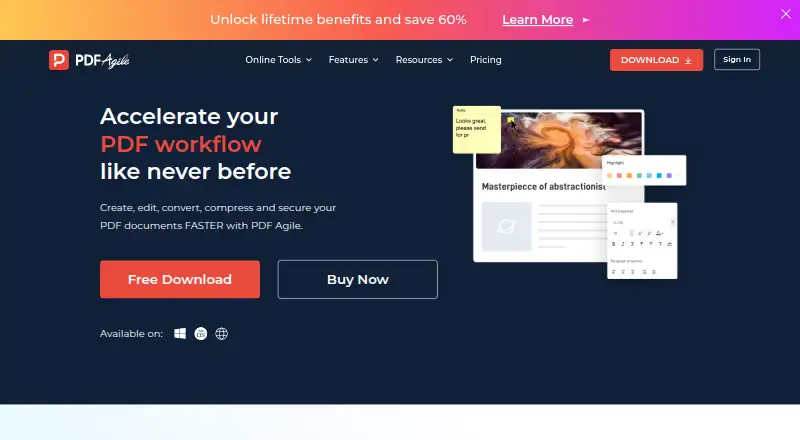
PDF Agile is a PDF reader and editor for Windows, macOS and the web.
What PDF Agile is
PDF Agile is a PDF reader and editor for Windows, macOS and the web. It can edit PDF documents, including scans, without the source files, and convert PDFs to and from Microsoft Word, Excel and PowerPoint while preserving fonts and formatting. Annotation options include highlighters, underlines, strikethroughs, text, shapes and freehand drawings. Security tools include password protection, permanent redaction and electronic signatures in three ways. Other document features include compression, merging, splitting, OCR, cropping, page rearrangement, rotation, page numbering, links, presentations, screenshots, search, printing, bookmarks and backgrounds. Its browser tools handle conversion, organization, compression, protection, unlocking and page rearrangement. The free plan lists 2 Page* and 5 Tasks for conversion. Paid plans are described as one-time payments: the Semi-Annual Plan is $39 a month, the Annual Plan is $59 a month and the Lifetime Plan is $119 a month. A purchased license can be used on up to two computers through a PDF Agile account.
Good
- Edits scanned PDFs without source files.
- Converts to and from Word, Excel and PowerPoint.
- Includes OCR and permanent redaction.
- Browser tools include protection and page rearrangement.
- Paid plans are one-time payments.
Watch out
- The free plan lists 2 Page* and 5 conversion tasks.
- A license covers up to two computers.
- The Semi-Annual Plan is listed at $39 a month.
Who it suits
PDF Agile suits people who need to edit, convert or mark up PDFs on Windows, macOS or the web. Its OCR, redaction and signature tools may suit users working with scanned or sensitive documents.
Verdict
PDF Agile covers PDF editing, conversion, annotations and document security across desktop and browser use. Check the free plan limits and the two-computer license limit when choosing a plan.
Plans and prices
From PDF Agile's own pricing page, checked 15 Oct 2026.
| Plan | Price | What it gives you |
|---|---|---|
| Free | Free | 2-page conversions · 5 conversion tasks |
| Semi-Annual Plan | $39, paid once | Unlimited conversions · 6-month upgrades · priority support · editing · conversion · merging/rearranging · signing/protection · annotations/comments · batch conversion · OCR · compression · One-time payment |
| Annual Plan | $59, paid once | Unlimited conversions · 1-year upgrades · priority support · editing · conversion · merging/rearranging · signing/protection · annotations/comments · batch conversion · OCR · compression · One-time payment |
| Lifetime Plan | — | Unlimited conversions · lifetime upgrades · priority support · editing · conversion · merging/rearranging · signing/protection · annotations/comments · batch conversion · OCR · compression · One-time payment |
The facts
Each one read from PDF Agile's own pages, with the date it was checked.
What it does
- Annotations
- Feature pages list comments, highlights, underlines, strikethroughs, text boxes, shapes and freehand drawings.checked 15 Oct 2026
- API availability
- GetApp's FAQ states that PDF Agile does not have an API available.checked 15 Oct 2026
- Conversion
- It converts between PDF and Word, Excel, PowerPoint, TXT, image and CAD formats while aiming to retain formatting.checked 15 Oct 2026
- Documentation
- The official support center provides FAQs, a user guide and a contact ticket channel.checked 15 Oct 2026
- Document tools
- Additional tools include compression, merging, splitting, OCR, cropping, page rearrangement, rotation, page numbering, links, presentations, screenshots, search, printing, bookmarks, and backgrounds.checked 1 Oct 2026
- Editing
- The editor can reflow text across paragraphs, columns and pages, change fonts and spacing, alter layouts, and add multimedia.checked 15 Oct 2026
- Guide coverage
- The user guide documents Read, Comment, Edit, Convert, Page and Protect areas and includes a two-minute tutorial video.checked 15 Oct 2026
- Integrations
- GetApp lists Google Drive, Dropbox and OneDrive connectivity and describes file sharing through cloud storage.checked 15 Oct 2026
- Licence terms
- The EULA grants use of proprietary software and prohibits modification, reverse engineering, decompilation and derivative works except where mandatory law permits.checked 15 Oct 2026
- License limit
- A purchased license can be used on up to two computers through the PDF Agile account system.checked 1 Oct 2026
- Limit: collaboration
- A G2 reviewer says PDF Agile is mainly Windows-focused and lacks Adobe-style cloud collaboration.checked 15 Oct 2026
- Limit: crashes and scale
- Software Advice reports crashes when many documents are open and slower performance with large files.checked 15 Oct 2026
- Limit: missing symbols and form controls
- Software Advice reviewers mention missing mathematical symbols and the inability to insert instant check marks or cross boxes in forms.checked 15 Oct 2026
- Limit: support and reliability complaints
- Trustpilot reviewers report crashes, broken OCR or conversion, glitches and unanswered support requests.checked 15 Oct 2026
- Notable news
- A LinkedIn article dated November 20, 2025 announced a PDF Agile global partnership program seeking integration and collaboration partners.checked 15 Oct 2026
- OCR
- Its full-text OCR extracts text from images and scanned PDFs.checked 15 Oct 2026
- Office conversion
- It converts PDFs to and from Microsoft Word, Excel, and PowerPoint while preserving fonts and formatting.checked 1 Oct 2026
- Online protection
- The online protection tool uses stated 256-bit SSL encryption and automatically deletes uploaded files within 24 hours.checked 15 Oct 2026
- Online protection limit
- The online protection tool only applies an open password; granular print, copy and edit restrictions require the desktop product.checked 15 Oct 2026
Money
- Free plan
- Yeschecked 20 Sep 2026
The company
- Headquarters
- Singaporechecked 28 Sep 2026
- Maker address
- The official postal address is 10 Anson Road, #26-03, International Plaza, Singapore 079903.checked 15 Oct 2026
- Maker legal name
- The company identifies itself as DOCUAGILE PTE. LTD., a Singapore-registered limited company.checked 15 Oct 2026
Where it runs
- Mac requirements
- macOS requires Catalina 10.15 or later, a 1GHz-or-faster Intel or Apple Silicon processor, 2GB RAM and 1GB disk space.checked 15 Oct 2026
The full review of PDF Agile
PDF Agile combines a desktop PDF editor with browser-based tools, making it a fit for people who need more than basic viewing or conversion. Its broad editing and document-security toolkit is the main draw; the two-page, five-conversion-task free plan is too restrictive for regular work.
Overview
PDF Agile edits PDFs, including scans, without requiring the original files. It brings conversion, annotation, page management and security tools together, so it can cover varied document jobs without a separate utility for each. The trade-off is that a purchased license covers no more than two computers, which may not suit people who switch among several devices.
Key features
Conversion runs to and from Word, Excel and PowerPoint, with fonts and formatting preserved. The supported targets also include TXT, images and CAD formats, and PDF Agile supports OCR and batch conversion. That range suits office-document workflows and larger conversion jobs, though unlimited conversion requires a paid plan.
Annotations include highlighting, underlining, strikethrough, text, shapes and freehand drawing. For document control, users can password-protect files, permanently redact text and illustrations, and add electronic signatures in three ways. Other tools cover compression, merging, splitting, cropping, page rearrangement and rotation, as well as page numbering, links, presentations, screenshots, search, printing, bookmarks and backgrounds.
The browser tools handle conversion, organization, compression, protection, unlocking and page rearrangement. PDF Agile says its online Protect PDF tool uses 256-bit SSL encryption and automatically deletes uploaded files within 24 hours. That offers a stated safeguard for this tool, but it does not remove the need to consider whether uploading a sensitive document fits your requirements.
Pricing
The Free plan costs nothing and allows 2 pages and 5 conversion tasks. Those caps make it suitable for brief or occasional jobs, not steady document work.
The Semi-Annual Plan costs $39 a month, the Annual Plan $59 a month, and the Lifetime Plan $119 a month; each is described as a one-time payment with unlimited conversion. PDF Agile says plans purchased since 2023 have no recurring charges. The published plan labels and per-month prices are worth checking carefully before purchase: the payment terms say one-time payment, not a recurring monthly charge. Paid licenses work on up to two computers, a meaningful limit for anyone needing broader device coverage.
Platforms
PDF Agile supports Windows, macOS and the web. Browser tools provide conversion and file-organization options without requiring the desktop workflow, while the desktop apps are the relevant choice for editing PDFs, including scans. Customer support is available by email, with user guides and FAQs as additional help.
Who it's for
PDF Agile is best suited to individuals who regularly edit, convert, annotate or protect PDFs and want those capabilities alongside browser-based utilities. Its OCR, batch conversion and broad page tools help with more involved document work. It is less compelling for occasional users who can stay within the free caps, or for people who need a license across more than two computers.
Pros and cons
- Pro: Editing scans without source files, office-format conversion, OCR and batch conversion cover a broad document workflow.
- Pro: Permanent redaction, password protection and three electronic-signature methods add useful document-control options.
- Pro: One-time payment terms avoid recurring charges on plans purchased since 2023.
- Con: The free plan's two-page and five-task caps sharply limit ongoing use.
- Con: A license covers only two computers, which can constrain users with several work devices.
Alternatives
For a broader directory comparison, see PDF Converter Software and PDF editors.
HiPDF is worth considering for readers who want a freemium option with a free trial and support across mobile, desktop, browser and extension platforms; its Basic plan is $39.95 a year and includes web access, OCR and batch processing. Choose Convertio instead if its Lite plan's 1 GB maximum file size and 1,000 monthly conversion credits fit your needs; it costs $11.99 a month and supports a broad range of platforms.
FoxyUtils Online PDF Tools is a browser-only option, with a freemium plan and a paid Monthly plan at $5.99 a month that includes unlimited access, OCR and cloud connect. Online2PDF is a free web service with limits of 250 MB per file, 250 MB total per conversion and 30 files, making it an alternative for users whose jobs stay within those bounds.
Adobe PDF Services API is another web-based option; its free tier allows 500 document transactions per month, and its paid plans use custom pricing. PDFxlsx is a paid alternative with API, self-hosted and platform options; its Starter plan costs $40.83 a year and allows up to 50 conversions per month and 50 MB per file. Wondershare PDFelement is a paid alternative for Android, iOS, macOS, web and Windows. ScanLex offers a 14-day full-app trial without sign-up, limited to one computer.
Verdict
Choose PDF Agile if you want a broad PDF editor and toolkit with OCR, batch conversion, document security and browser utilities, and its two-computer license suits your setup. Look elsewhere if you need a useful free plan for regular work or must use one license across more than two computers.
Getting started
- Open the PDF Agile website
- Choose Windows, macOS, or browser tools
- Use the Free plan or select a paid plan
- Create or use a PDF Agile account for a purchased license
- Use the online tools for browser-based PDF tasks
Limits worth knowing
The Free plan is free and lists 2 Page* plus 5 Tasks for conversion. Paid plans list unlimited conversion, while a purchased license can be used on up to two computers.
Questions
Is PDF Agile free?
Yes. The Free plan is listed as free, with 2 Page* and 5 Tasks for conversion.
What do paid plans cost?
The Semi-Annual Plan is $39 a month, the Annual Plan is $59 a month, and the Lifetime Plan is $119 a month. Each is described as a one-time payment.
Which platforms are supported?
PDF Agile supports web, Windows, and macOS.
Does it include OCR?
Yes. OCR is supported, including OCR conversion.
Can one license cover multiple computers?
A purchased license can be used on up to two computers through the PDF Agile account system.
Does PDF Agile provide an API?
No API access is listed.
Alternatives to PDF Agile
- 1
Convertio
Free planAndroidiOSWebAPI8.3From $6.99 a month - 2

HiPDF
Free planAndroidiOSWebAPI8.2Free plan - 3

MinerU
Free planOpen sourceWebAPILinuxmacOS8.2From $59.90 a year - 4
HTML2PDF Rocket
Free planAndroidWebAPILinux7.5From $5 a month - 5
FoxyUtils Online PDF Tools
Free planWeb7.0Free plan - 6
PDFxlsx
iOSWebAPImacOS7.0From $490 a year