
Online2PDF
Online2PDF is a web service for converting and managing PDF files.
What Online2PDF is
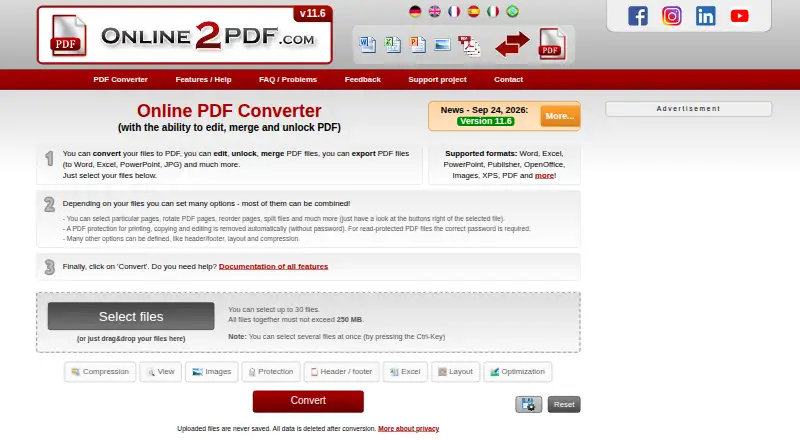
Online2PDF is a web service for converting and managing PDF files. Its tools cover conversion, merging, page extraction and rearrangement, compression, OCR, protection, and layout options. It works with PDF and formats including Word, Excel, PowerPoint, Publisher, OpenOffice, images, and XPS; PDF exports also include OpenDocument, text, and ebook formats. The free service allows up to 250 MB per file and 250 MB total for selected files, with as many as 30 files per conversion. Conversions without OCR can handle up to 500 pages at once. The site says uploaded files are deleted after conversion, though converted files may remain downloadable for up to 90 seconds. Transfers use HTTPS and are encrypted. Online2PDF has no local version or web API, and automatic scripts and bulk conversions are not allowed. Password-protected PDFs need the correct password to unlock. Private and commercial use is permitted when the commercial activity is not primarily based on using the service.
Good
- Free service allows up to 30 files per conversion.
- Converts among PDF, office, image, and ebook formats.
- Includes OCR, compression, merging, and page tools.
- Non-OCR conversions can handle up to 500 pages.
- HTTPS transfers are encrypted.
Watch out
- No local converter version is offered.
- There is no web API.
- Automated scripts and bulk conversions are not allowed.
- Read-protected PDFs require the correct password.
Who it suits
It suits people who need browser-based PDF conversion or page and file operations, including OCR. It can also serve private or commercial use that is not primarily based on the service.
Verdict
Online2PDF brings a wide range of PDF tasks to a web interface, with generous listed file and page limits. It is not a fit for users who need local processing, API access, or automated bulk conversion.
Plans and prices
From Online2PDF's own pricing page, checked 2 Oct 2026.
| Plan | Price | What it gives you |
|---|---|---|
| Online2PDF | Free | Free service · up to 250 MB per file and 250 MB total per conversion · up to 30 files |
The facts
Each one read from Online2PDF's own pages, with the date it was checked.
What it does
- Commercial use
- The site permits private and commercial use, provided the commercial activity is not primarily based on using the service.checked 2 Oct 2026
- File formats
- It converts among PDF and formats including Word, Excel, PowerPoint, Publisher, OpenOffice, images, and XPS.checked 2 Oct 2026
- No API or automation
- The FAQ says there is no web API and that automatic scripts or bulk conversions are not allowed.checked 2 Oct 2026
- No local version
- The contact page says there is no local converter version and only the online service is offered.checked 2 Oct 2026
- Page limits
- The feature page says conversions without OCR can handle up to 500 pages at once.checked 2 Oct 2026
- Password-protected PDFs
- The site says read-protected PDFs require the correct password to unlock.checked 2 Oct 2026
- PDF exports
- PDF can be exported to Word, Excel, PowerPoint, OpenDocument, text, images, and ebook formats.checked 2 Oct 2026
- PDF tools
- The online converter combines 16 main features, including PDF conversion, merging, page extraction and rearrangement, compression, OCR, protection, and layout options.checked 2 Oct 2026
- Privacy
- The site says uploaded files are deleted after conversion and converted files may remain available for download for up to 90 seconds.checked 2 Oct 2026
- Support
- The contact page accepts questions and support requests in English or German.checked 2 Oct 2026
- Transfer security
- The site says it is available only over HTTPS and that file transfers are encrypted.checked 2 Oct 2026
- Usage limits
- The changelog says the current maximum is 250 MB per file and 250 MB total for selected files; up to 30 files can be selected.checked 2 Oct 2026
Alternatives to Online2PDF
- 1

BentoPDF Hyper Compress
Free planOpen sourceWebAPIExtensionLinux8.3From $99 a year - 2
PDF2Go
Free planAndroidiOSWebAPI8.2$6.42 usage-based - 3

Smallpdf
Free planAndroidiOSWebWindows8.1From $10 a month - 4

Xodo Compress PDF
Free planAndroidiOSWebAPI8.1From $7.99 a month - 5

PDF Candy
Free planAndroidiOSWebLinux7.9From $4 a year - 6

Compresto
iOSWebAPIExtension7.5$49 one-time