
ChatPDF
ChatPDF lets users summarize documents and ask questions about their contents through conversational AI.
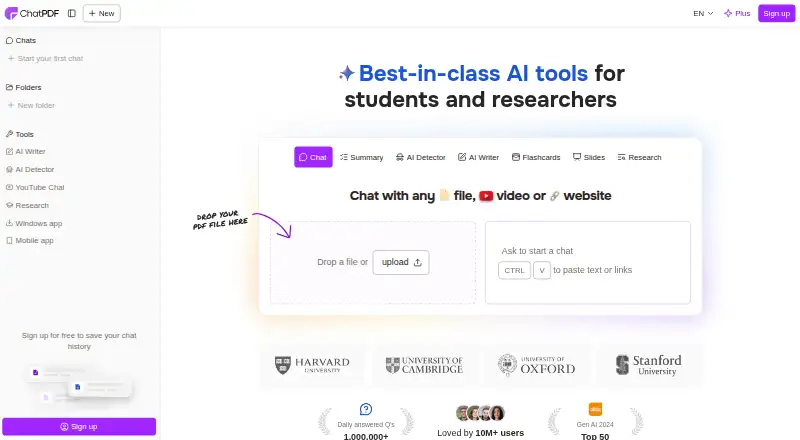
What ChatPDF is
ChatPDF lets users summarize documents and ask questions about their contents through conversational AI. Answers include citations that link back to references in the PDF, and users can organize documents in folders or discuss multiple PDFs in one conversation. The service accepts PDFs in any language and supports chatting in any language. Its listed file formats also include Word, PowerPoint, Markdown, and text. Users can create sharing links and manage or revoke access permissions. ChatPDF says files are encrypted in transit and at rest and can be deleted by the user. Queries are routed between GPT-4o and GPT-4o-mini. It works through a web browser on any device and is listed for Android, iOS, Linux, macOS, and Windows. The backend API can accept uploaded PDFs or public URLs and query them for custom PDF chatbots; its documentation sets a maximum of 2,000 pages or 32 MB per file and describes the chat API as stateless. The Free plan costs nothing and permits two documents per day. ChatPDF presents the tool for researchers, students, and professionals working with papers, contracts, and reports.
Good
- Answers link to PDF references with built-in citations.
- Multiple PDFs can be discussed in one conversation.
- Accepts files in any language and chats in any language.
- Sharing access can be managed or revoked.
- Free plan includes two documents per day.
Watch out
- Free plan is limited to two documents per day.
- API files are limited to 2,000 pages or 32 MB.
- Chat API is stateless.
Who it suits
ChatPDF suits students, researchers, and professionals who need to ask questions about or summarize document collections. Its citations, file-sharing controls, and API may also suit people building document-based workflows.
Verdict
ChatPDF combines document summaries, cited answers, and support for several file formats. The free plan is capped at two documents daily, and API users should account for file-size and page limits.
Plans and prices
From ChatPDF's own pricing page, checked 15 Oct 2026.
| Plan | Price | What it gives you |
|---|---|---|
| Free | Free | 2 documents per day · no account required to start · saved history and multi-document chats require free account |
| ChatPDF Plus monthly | $14.99 a month | Unlimited document analysis (plan description) · Monthly Plus Subscription |
| ChatPDF Plus yearly | $89.99 a year | Unlimited document analysis (plan description) · ChatPDF Yearly Plus Plan |
| ChatPDF Plus | Priced on request | Unlimited document analysis · advanced features |
The facts
Each one read from ChatPDF's own pages, with the date it was checked.
What it does
- AI model routing
- The website says queries are dynamically routed between GPT-4o and GPT-4o-mini.checked 15 Oct 2026
- AI models
- The site says queries are dynamically routed between GPT-4o and GPT-4o-mini.checked 5 Oct 2026
- AI Writer
- AI Writer can draft cite-ready text from uploaded PDFs or public sources and export to Word or Markdown.checked 15 Oct 2026
- API
- The backend API supports uploading PDFs or adding them from public URLs, then querying them to build custom PDF chatbots.checked 5 Oct 2026
- API conversation behavior
- API chat requests are stateless, allow up to six messages, and older messages are dropped above 2,500 OpenAI tokens.checked 15 Oct 2026
- API features
- The API supports streaming responses, page references, and deletion of one or more sources.checked 15 Oct 2026
- API ingestion
- The API accepts a public PDF URL or a file upload and also supports PDFs uploaded through the website.checked 15 Oct 2026
- API limits
- API documentation limits each PDF to 2,000 pages or 32 MB.checked 15 Oct 2026
- API purpose
- The backend API supports programmatic PDF ingestion, extraction, and custom chatbot creation.checked 15 Oct 2026
- Chrome extension privacy claim
- The Chrome listing says documents stay in the user’s Google account and are not saved in the add-on owner’s database or shared with others.checked 15 Oct 2026
- Citations
- Built-in citations link answers to PDF references.checked 5 Oct 2026
- Cited answers
- Responses can include citations linked to source pages in the uploaded document.checked 15 Oct 2026
- Contact
- The site lists [email protected] as its contact email.checked 5 Oct 2026
- Funding disclosure
- Crunchbase shows no readable funding amount and displays obfuscated funding-event entries.checked 15 Oct 2026
- Intended users
- The site presents ChatPDF for researchers, students, and professionals working with documents such as papers, contracts, and reports.checked 5 Oct 2026
- Languages
- ChatPDF accepts PDFs in any language and can chat in any language.checked 5 Oct 2026
- Limit: Capterra scope
- Capterra reviewers cited file-size and file-type limits, limited features, and occasional misunderstanding of document information.checked 15 Oct 2026
- Limit: G2 accuracy and scans
- G2 reviewers reported inaccurate information and difficulty with poorly scanned documents.checked 15 Oct 2026
- Limit: Google Play glitches
- A September 2026 Google Play reviewer reported recurring app glitches requiring force-closing and reopening.checked 15 Oct 2026
The company
- Company founding
- LinkedIn lists ChatPDF as founded in 2023.checked 15 Oct 2026
- Company headquarters and size
- LinkedIn lists Berlin headquarters and 2–10 employees.checked 15 Oct 2026
- Company legal name
- Crunchbase identifies the legal name as ChatPDF GmbH and the founder as Mathis Lichtenberger.checked 15 Oct 2026
Where it runs
- Desktop app
- The homepage includes a link labeled Desktop app to download.chatpdf.com.checked 15 Oct 2026
- Device access
- The website says the service works on desktop, tablet, and phone browsers.checked 15 Oct 2026
The full review of ChatPDF
ChatPDF turns PDFs and other supported documents into conversational AI sessions, with summaries and answers linked back to source passages. It suits students, researchers, and professionals who need to question documents rather than read them line by line. Its broad format and language support stand out, but the free plan’s two-document daily cap can be restrictive for regular work.
Overview
ChatPDF’s central appeal is a direct way to explore papers, contracts, and reports through questions, with citations that connect answers to PDF references. That grounding makes it more useful for document work than an answer stream without visible source pointers, though citations do not replace checking the underlying passage.
Users can group files into folders and chat with multiple PDFs in one conversation, which is useful for comparing related material. ChatPDF accepts PDFs in any language and can chat in any language. The service also supports Word, PowerPoint, Markdown, and text files, so it reaches beyond PDF-only workflows.
Key features
Sharing links and managing or revoking access permissions makes it possible to share documents without giving up control indefinitely. ChatPDF says documents are encrypted during transfer and storage and can be deleted by the user; those protections are relevant for sensitive work, though users should still consider their own confidentiality requirements.
Queries are dynamically routed between GPT-4o and GPT-4o-mini. The API supports uploading PDFs or adding them from public URLs, then querying them to build custom PDF chatbots. Its documentation sets a ceiling of 2,000 pages or 32 MB per PDF, and the chat API is stateless, so developers should account for those boundaries when planning an integration.
Pricing
The Free plan costs nothing and allows two documents per day. It is a sensible way to try document chat or handle occasional reading, but the daily quota is a clear constraint for students or professionals processing a steady stream of files.
ChatPDF Plus offers unlimited document analysis and advanced features, but has custom pricing. It is the more relevant tier for sustained use, although buyers should confirm its terms before committing; the available plan details do not establish specific seat counts, renewal terms, or a trial period.
Platforms
ChatPDF is available on the web and lists support for Android, iOS, Linux, macOS, and Windows. It also offers API access. The service says it works on any device with a web browser, making browser access the common option across devices.
Who it's for
Researchers and students can use citations and multi-file conversations to navigate papers, while professionals can question reports and contracts across supported formats. It is a stronger fit for readers who benefit from conversational document lookup than for anyone who needs unlimited free processing or an API that retains conversation state automatically.
Pros and cons
- Pros: Cited answers point back to PDF references, helping readers verify responses against the source.
- Pros: Multi-file conversations, folders, and support for several document formats suit research and work involving mixed materials.
- Pros: Any-language PDFs and multilingual chat extend its usefulness beyond English-language documents.
- Cons: The free tier’s two documents per day may be too little for frequent use.
- Cons: API file limits of 2,000 pages or 32 MB and a stateless chat API require developers to design around upload and conversation constraints.
- Cons: ChatPDF Plus has custom pricing, so its cost cannot be weighed against the free tier from a stated monthly price.
Alternatives
For an alternative PDF assistant, compare Anara, which has a free plan and a Pro plan at $20 a year with 4x more AI usage than Plus, uploads up to 300MB or 10,000 pages, and Google Drive, Notion, and OneDrive connectors. AskYourPDF is another freemium option, with a Premium plan at $11.99 a year and stated per-document page, upload-size, daily document, and question limits. Audeus is an alternative to consider for its listed free voice and document-upload features.
docAnalyzer offers a free Community plan for document analysis, chat, and notes with monthly credits and upload limits, but no API access on that plan; it may suit readers who do not need API access. Paperpal has a free plan and paid Prime and Pro options for readers considering another research and writing tool. PDF.chat has a free plan and a Starter plan at $5 a month with 750 pages per month, an option for readers comparing page-based allowances. Explainpaper offers a free plan with unlimited highlight explanations, follow-up questions, and Zotero import. pdfAssistant.ai has a free Starter plan with monthly credits and caps on AI messages, document processes, and workflow edits.
Browse more options in AI PDF Assistants, Text Summarization Software, and AI PDF Tools.
Verdict
ChatPDF is a strong choice for readers who want cited, multilingual answers across PDFs and several other document formats, especially when comparing multiple files. The free plan is useful for occasional work, but its two-document daily cap makes the paid tier the practical route for heavier use. Look elsewhere if you need a clearly priced upgrade or an API without the stated file and stateless-chat constraints.
Getting started
- Visit https://www.chatpdf.com/.
- Use the web service in a browser or access a listed Android, iOS, Linux, macOS, or Windows platform.
- Upload a supported document to begin, or use the API to upload a PDF or add one from a public URL.
- Use the Free plan for up to two documents per day.
Limits worth knowing
The Free plan allows two documents per day. API documentation limits each PDF to 2,000 pages or 32 MB and describes the chat API as stateless.
Questions
Is ChatPDF free?
Yes. Its Free plan costs nothing and allows two documents per day.
What file types does ChatPDF support?
The listed formats are PDF, Word, PowerPoint, Markdown, and text files.
Which platforms can I use?
ChatPDF is listed for Android, iOS, Linux, macOS, web, and Windows. It also says it works on any device with a web browser.
Does ChatPDF have an API?
Yes. The API supports PDF uploads or PDFs added from public URLs, then querying them to build custom PDF chatbots.
Alternatives to ChatPDF
- 1

LightPDF
Free planAndroidiOSWebAPI8.2From $15.99 a year - 2
Unstract
Free planOpen sourceWebAPILinuxmacOS8.2From $416 a month - 3

AskYourPDF
Free planAndroidiOSWebAPI8.1From $11.99 a month - 4

SciSpace
Free planAndroidiOSWebAPI8.1From $96 a year - 5

Amazon Textract AnalyzeExpense
Free planWebAPISelf-hosted7.6From $0.01 a month - 6
Scholarcy
Free planWebAPIExtension7.5From $90 a year