Scholarcy
Scholarcy turns research material into interactive summary flashcards that highlight key information and provide context.
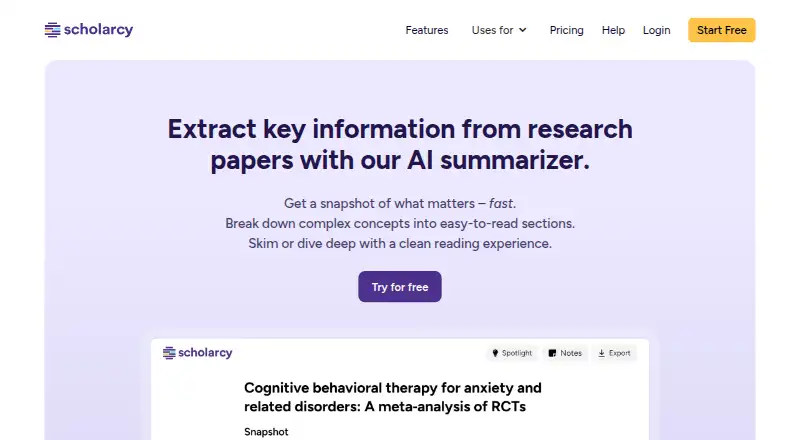
What Scholarcy is
Scholarcy turns research material into interactive summary flashcards that highlight key information and provide context. It accepts papers, PDFs, book chapters, online articles, plain text, and YouTube videos; users can upload or drop a file, enter a page URL, paste text, or use a browser extension. Enhanced summaries offer reading styles such as School level, General reader, Bulleted list, Undergrad level, One liner, and Researcher. Research tools include cited-work findings, article prompts and questions, a Research Quality Indicator, and comparisons with related research. Users can import directly from Zotero and export referenced summaries to Markdown for tools including Roam, Obsidian, and Notion. Extensions are available for Chrome, Edge, and Firefox, while Safari is listed as coming soon. The free plan allows 10 summaries and exports flashcards one at a time. Scanned PDFs without extractable text are unsupported unless OCR is run first, and URLs behind paywalls may not import. Scholarcy says customer data is encrypted at rest and in transit, and account data, summaries, and settings can be deleted on request; invoice records are retained for seven years.
Good
- Accepts files, URLs, pasted text, and YouTube videos.
- Offers multiple summary reading styles.
- Supports Zotero import and Markdown exports.
- Browser extensions are available for Chrome, Edge, and Firefox.
Watch out
- Free plan limits users to 10 summaries.
- Free flashcard exports are one at a time.
- Scanned PDFs without extractable text are unsupported.
- Paywalled URLs may not import.
Who it suits
It is aimed at students and researchers processing papers, chapters, and collections of research articles. It may suit readers who want adjustable summaries and flashcards, provided their source text can be extracted.
Verdict
Scholarcy combines document summaries with flashcards and research-oriented analysis features. The free plan is limited, and scanned documents or paywalled links can require another route.
Plans and prices
From Scholarcy's own pricing page, checked 15 Oct 2026.
| Plan | Price | What it gives you |
|---|---|---|
| Free Article Summarizer | Free | 10 summaries · one-at-a-time flashcard export · range of file formats |
| Scholarcy Plus Monthly | $9.99 a month | unlimited summaries · enhanced summaries · saved flashcards · notes/highlights/editing · collections · 100-flashcard export · literature matrix · one-click bibliographies · monthly |
| Scholarcy Plus Yearly | $90 a year | Plus features · 25% discount versus monthly · yearly |
| Scholarcy Plus (monthly plan) | — | Unlimited summarization · enhanced summaries · save flashcards · notes, highlighting and text editing · collections · export up to 100 flashcards at once · Literature Matrix · one-click bibliographies · 1 week free trial, then billed each month; cancel at any time |
| Scholarcy Plus (yearly) | — | Unlimited summarization · enhanced summaries · save flashcards · notes, highlighting and text editing · collections · export up to 100 flashcards at once · Literature Matrix · one-click bibliographies · 25% discount; billed yearly |
The facts
Each one read from Scholarcy's own pages, with the date it was checked.
What it does
- Access limitation
- A URL behind a paywall may not import, and Scholarcy suggests downloading and uploading the PDF instead if the user has access.checked 4 Oct 2026
- API
- The public API documentation describes separate metadata-extraction and synopsis APIs using bearer API keys.checked 15 Oct 2026
- API examples
- Documentation supplies Shell, Ruby and Python examples and endpoints for posters, highlights, structured content, key terms and synopses.checked 15 Oct 2026
- API hosting
- The API is cloud-hosted SaaS and pricing is agreed in a contract rather than published as a self-serve rate.checked 15 Oct 2026
- Bibliographies
- It can generate formatted bibliographies and export references for citation managers.checked 15 Oct 2026
- Chrome extension reach
- The Chrome listing shows 80,000 users and version 5.4.0 updated March 14, 2026.checked 15 Oct 2026
- Current status
- The status page reported all services online on October 12, 2026, with 99.812% Library and 99.989% Engine uptime over the preceding 30 days.checked 15 Oct 2026
- Data security
- Scholarcy says it encrypts customer data at rest and in transit.checked 4 Oct 2026
- Document limitation
- Scanned PDFs without extractable text are not supported; the maker recommends running OCR first.checked 4 Oct 2026
- Document-size guidance
- The maker recommends splitting long textbooks into individual chapters because the models are tuned for articles and chapters.checked 15 Oct 2026
- Enhance summaries
- Users can change summary depth and reading style from a short overview to a researcher-level version.checked 15 Oct 2026
- Export formats
- Exports include Word, Excel, PowerPoint, Markdown, RIS and BibTeX.checked 15 Oct 2026
- File-size limits
- Free accounts can import files up to 11 MB, while premium accounts can import up to 50 MB.checked 15 Oct 2026
- Founder
- The maker’s About page identifies Phil Gooch as founder and CEO and Emma Warren-Jones as co-founder and COO.checked 15 Oct 2026
- Highlights and notes
- The product supports smart highlighting, user annotations, notes and editable flashcard text.checked 15 Oct 2026
- Hosting
- Scholarcy says its services are hosted on Amazon Web Services and use security protocols provided within the AWS ecosystem.checked 4 Oct 2026
- Import methods
- Users can drag and drop files, enter a page URL, paste text, or use a browser extension.checked 4 Oct 2026
- Import sources
- Supported inputs include PDFs, Word files, plain text, URLs, YouTube, RSS feeds, Google Drive and Zotero.checked 15 Oct 2026
Where it runs
- Browser extensions
- Official extensions are offered for Chrome, Edge and Firefox; Safari is listed as coming soon.checked 15 Oct 2026
- Browser support
- Browser extensions are offered for Chrome, Edge, and Firefox; Safari is listed as coming soon.checked 4 Oct 2026
The company
- Company facts
- LinkedIn lists Scholarcy as privately held, founded in 2019, headquartered in Covent Garden, London, with 2–10 employees.checked 15 Oct 2026
- Company legal identity
- The service is operated by Scholarcy Limited, registered in England and Wales under company number 11779938.checked 15 Oct 2026
- Founded
- 2018checked 28 Sep 2026
- Headquarters
- Antrim, Northern Ireland, United Kingdomchecked 28 Sep 2026
The full review of Scholarcy
Overview
Scholarcy turns research documents into interactive summary flashcards, with tools to examine a paper’s arguments and surrounding literature. It is best suited to students and researchers who regularly work through papers, chapters, and article collections. Its research-oriented features make it more than a basic summarizer, though the free plan’s cap and document-access restrictions narrow its appeal.
Key features
Scholarcy accepts research papers, PDFs, book chapters, online articles, plain text, and YouTube videos. Readers can upload a file, paste text, enter a URL, or use a browser extension, giving it flexibility across reading workflows. That breadth has practical limits: scanned PDFs need OCR before import, and a paywalled URL may fail, in which case users who have access can download and upload the PDF.
Enhanced summaries can be shaped for a School level, General reader, Bulleted list, Undergrad level, One liner, or Researcher. This range helps adapt a summary to its purpose, from a quick scan to a more research-focused view. Cited-work findings, article prompts and questions, a Research Quality Indicator, and comparisons with related research add ways to assess context; these tools are most useful to readers evaluating papers, rather than someone who only wants a short digest.
Direct Zotero import and Markdown export of referenced summaries support a research-to-notes workflow, with output suited to knowledge managers such as Roam, Obsidian, and Notion. Browser extensions are offered for Chrome, Edge, and Firefox, while Safari is coming soon.
Scholarcy says it encrypts customer data at rest and in transit, and hosts its services on Amazon Web Services using security protocols within that ecosystem. Users can request deletion of account data, summaries, and settings, while invoice records are retained for seven years for compliance.
Pricing
The Free Article Summarizer costs nothing and allows 10 summaries, with flashcards exportable only one at a time. That is enough for occasional use, but the cap and export restriction make it a poor fit for sustained reading or organizing larger collections.
Scholarcy Plus Monthly and Scholarcy Plus Yearly both include unlimited summarization, enhanced summaries, saved flashcards, notes, highlighting and text editing, collections, and bulk flashcard export. Their prices are custom pricing. The separate monthly plan offers a 1-week free trial, then bills each month, with cancellation at any time; it adds the Literature Matrix and one-click bibliographies, and allows export of up to 100 flashcards at once. The yearly plan is billed yearly at a 25% discount and includes those same additional features and export allowance. The yearly option favors readers prepared to pay annually, while the monthly trial offers a way to begin without that commitment.
Help is available through Scholarcy’s contact page or [email protected].
Platforms
Scholarcy is available on the web and through browser extensions for Chrome, Edge, and Firefox. Safari support is coming soon. It supports both webpage summaries and file uploads, but does not offer API access.
Who it's for
Scholarcy is a strong fit for students and researchers who need to process papers, chapters, and collections, especially those who want summaries connected to cited work and a reusable flashcard or note workflow. Readers handling scanned documents without OCR, relying on paywalled links they cannot download, or summarizing only occasionally may find its limitations more consequential than its research tools.
Pros and cons
- Pro: Multiple import routes and support for papers, chapters, web articles, text, and videos suit varied research material.
- Pro: Adjustable summary styles and research-analysis features help readers move beyond a single short recap.
- Pro: Zotero import and Markdown export make summaries easier to carry into established research-note workflows.
- Con: The free tier stops at 10 summaries and exports flashcards one at a time, limiting regular use.
- Con: Scanned PDFs require OCR, while paywalled URLs may require an accessible PDF upload instead.
- Con: Plus plan prices are custom pricing, so readers cannot compare their cost from the stated plan terms alone.
Alternatives
For a wider selection of tools, browse Text Summarization Software, AI Literature Review Software, AI Summarizers, or AI PDF Tools.
- AskYourPDF is worth considering if mobile apps matter: it supports Android and iOS as well as web, API, and extension access, and its Premium plan is $11.99 a year, billed monthly.
- Summify may suit readers who prefer an iOS or web tool with a defined free allowance: its free plan includes 5 analyses per day, 12 Learn cards per run, a quiz, four core lenses, and up to 10 saved analyses.
- Aginsi is another option for articles and PDFs, with a free Margin plan allowing 10 summaries per month and keeping citations.
- genei offers a free Chrome extension for one-click webpage summaries, making it a narrower option for readers focused on browser articles.
- SMMRY has a free web and API plan with 10 summaries for readers seeking a more limited summarizing option.
- TLDR This offers unlimited basic key-sentence summaries on its free plan, alongside a one-time allowance of 10 advanced AI summaries and browser extensions.
- Kagi Summarize is a paid service with no free plan, though it offers a trial with 100 total searches and 100 AI interactions using standard models.
- Podwise is an alternative for readers focused on podcasts, with podcast Q&A, clips, translation, RSS and audio uploads, and content exports in its Standard plan.
Verdict
Choose Scholarcy if you regularly read research material and want adjustable summaries, research-context tools, and flashcards that can feed into a note-taking workflow. Its free cap, custom-priced Plus plans, and need for OCR or an accessible PDF in some cases are solid reasons to look elsewhere if you summarize occasionally or depend on scanned and paywalled sources.
Alternatives to Scholarcy
- 1
QuillBot
Free planAndroidiOSWebExtension8.3Free plan - 2
Eightify
AndroidiOSWebExtension7.7From $59.99 a year - 3
Podwise
AndroidiOSWebAPI7.6From $70.80 a year - 4
SciSummary
Free planWebAPIExtension7.4From $48 a year - 5
TLDR This
Free planWebAPIExtension7.4From $4 a month - 6
SummarizeBot
Free planWebAPI7.2From $179 a month