QuillBot
QuillBot is a collection of AI tools for writing, communication, design, coding, and collaboration.
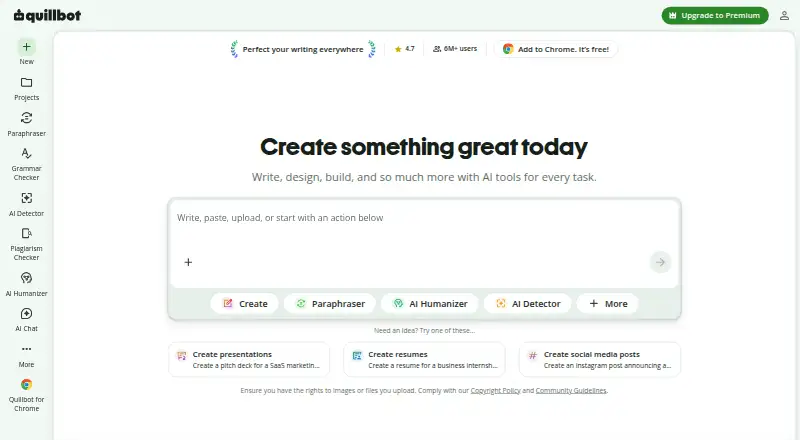
What QuillBot is
QuillBot is a collection of AI tools for writing, communication, design, coding, and collaboration. Its writing features include paraphrasing, grammar checking, plagiarism checking, AI detection, AI humanizing, summarizing, and citation generation. The Free plan supports paraphrasing up to 100 words in two modes, basic grammar, basic summaries, and limited access to humanizing and the AI Detector. Premium’s listed allowances include 25,000 plagiarism-checker words per month, 6,000 words in Summarizer, 300 AI images per month, and 100 MB of Flow storage. Its Premium comparison lists paraphrasing in 23 languages and translation into 40+ languages.
QuillBot is available on the web, macOS, Windows, Android, and iOS, with Chrome, Edge, and Safari browser extensions. The desktop app can appear as a widget in apps such as Slack, Notes, and Messages; Premium also lists a Word add-in. One subscription works across QuillBot’s apps and platforms, and Premium can be used on up to 10 devices at a time. Team plans include Premium features, writer-management dashboards, and centralized billing. QuillBot began in 2017 as a paraphrasing tool intended to help English-language learners with writing.
Good
- Free plan includes paraphrasing in two modes up to 100 words.
- Writing tools include grammar, plagiarism, AI detection, and citation features.
- Available across web, desktop, mobile, and browser extensions.
- Premium comparison lists paraphrasing in 23 languages and translation into 40+.
- Team plans include dashboards and centralized billing.
Watch out
- Free paraphrasing is limited to 100 words and two modes.
- Free access to humanizing and AI Detector is limited.
- Premium can be used on up to 10 devices at a time.
Who it suits
QuillBot suits people who want writing support across web, desktop, mobile, or browser-extension workflows. Its Team Plan features also suit groups that need writer-management dashboards and centralized billing.
Verdict
Choose QuillBot if you want a broad set of writing tools available across multiple platforms, with a free plan for short paraphrasing tasks. Teams may value the management and billing features, while the Free plan’s 100-word paraphrasing allowance may not suit longer passages.
Plans and prices
From QuillBot's own pricing page, checked 14 Oct 2026.
| Plan | Price | What it gives you |
|---|---|---|
| Free | Free | Paraphrase up to 100 words · 2 modes · basic grammar · limited humanizer · basic summaries · limited AI Detector |
| Premium | $8.33 a month | Unlimited paraphrasing · 9 modes · advanced grammar · plagiarism checking up to 25,000 words/month · summaries up to 6,000 words · full AI Detector · billed annually |
| Team Plan (51+ seats) | $69.95 | All Premium features · writer-management dashboards · centralized billing · €69,95 billed every 12 months |
| Team Plan (11–50 seats) | $79.95 | All Premium features · writer-management dashboards · centralized billing · €79,95 billed every 12 months |
| Team Plan (2–10 seats) | $89.95 | All Premium features · writer-management dashboards · centralized billing · €89,95 billed every 12 months |
| Team | Priced on request | Team usage metrics · user management dashboard · centralized billing · data control · priority assistance |
The facts
Each one read from QuillBot's own pages, with the date it was checked.
What it does
- Account portability
- Quillbot says one subscription works across its apps and platforms, and Premium can be used on up to 10 devices at a time.checked 7 Oct 2026
- Acquisition news
- Course Hero announced its acquisition of QuillBot alongside CliffsNotes on August 19, 2021.checked 14 Oct 2026
- AI Chat
- AI Chat is free up to 20 queries per day for new users and unlimited for Premium users.checked 14 Oct 2026
- AI Detector
- The AI Detector analyzes text for signals that it may have been generated by AI, including sentence-level analysis.checked 14 Oct 2026
- API
- QuillBot states that it currently offers no B2B or B2C API.checked 14 Oct 2026
- Chrome extension
- The Chrome extension provides paraphrasing, grammar checking, humanizing, AI detection, chat and image tools in the browser.checked 14 Oct 2026
- Citation Generator
- QuillBot includes a citation generator among its writing and originality tools.checked 14 Oct 2026
- Data controls
- Extension users can opt out of stored text inputs and, for account holders, model training on those inputs; storage is enabled by default.checked 14 Oct 2026
- Data handling
- QuillBot says connections are encrypted, it does not sell user data, and Team Plan text inputs are not used for training.checked 14 Oct 2026
- Data privacy
- Quillbot says it does not sell user content or data, encrypts connections, and restricts access to customer data.checked 7 Oct 2026
- Documentation and support
- The Help Center contains product guides, billing, extensions and apps, troubleshooting, privacy, safety and business-plan documentation.checked 14 Oct 2026
- Google Docs integration
- The Chrome extension can show a QuillBot widget inside Google Docs for paraphrasing and grammar checking, provided the user is signed in.checked 14 Oct 2026
- Grammar Checker
- Its Grammar Checker identifies grammar, spelling and punctuation problems and offers corrections.checked 14 Oct 2026
- Image generation
- The platform includes text-prompt image generation, with usage limits varying by plan.checked 14 Oct 2026
- Input use
- Quillbot says user inputs and usage data may be used to provide and personalize its service and train improvements, while it does not train on Team Plan users’ text inputs.checked 7 Oct 2026
- Integrations
- Its desktop app can appear as a widget in apps including Slack, Notes, and Messages, and its Premium page lists a Word add-in.checked 7 Oct 2026
- Language support
- multilingualchecked 20 Sep 2026
The company
- Company founding
- QuillBot says it began in 2017 in a college dorm when Anil Jason, Rohan Gupta and David Silin built the first Paraphraser.checked 14 Oct 2026
- Company history
- Quillbot’s About page says it began in 2017 as a paraphrasing tool created to help English-language learners with writing.checked 7 Oct 2026
- Company scale
- QuillBot's About page reports 35+ million monthly active writers, 225 employees and 5.3 billion annual Paraphraser inputs.checked 14 Oct 2026
- Founded
- 2017checked 23 Sep 2026
- Headquarters and size
- LinkedIn lists QuillBot as privately held, headquartered in Chicago and employing 201–500 people.checked 14 Oct 2026
Money
- Free limits
- The Free plan allows paraphrasing up to 100 words in two modes, with limited humanizing and AI Detector access.checked 7 Oct 2026
- Free plan
- Yeschecked 20 Sep 2026
The full review of QuillBot
QuillBot combines paraphrasing with tools for checking, summarizing, and supporting other writing tasks. It is a strong fit for writers who want a broad toolkit across devices, but the Free plan’s 100-word paraphrasing cap makes it better for brief edits than sustained drafting.
Overview
QuillBot started in 2017 as a paraphrasing tool for people learning to write in English and has since expanded into a suite spanning writing, communication, design, coding, and collaboration. That range can consolidate several writing tasks in one service, though users looking only for paraphrasing may find the broader product unnecessary.
The multilingual offering is a useful differentiator: Premium supports paraphrasing in 23 languages and translation into more than 40. QuillBot reports more than 35 million monthly active writers and 225 employees. Those figures suggest a substantial product, but the practical choice still turns on its limits and plan costs.
Key features
- Writing support: The toolset includes paraphrasing, grammar and plagiarism checking, AI detection and humanizing, summarizing, and citation generation. This breadth suits people who regularly move between drafting, revising, and checking work; it is less compelling if only one of those jobs matters.
- Free access: Free includes paraphrasing up to 100 words in two modes, basic grammar, basic summaries, and limited humanizing and AI Detector access. It is a useful way to handle short passages, but the word ceiling is restrictive for longer paragraphs or regular editing.
- Work across apps: QuillBot offers apps for macOS, Windows, Android, and iOS, plus Chrome, Edge, and Safari extensions. Its desktop app can appear as a widget in apps such as Slack, Notes, and Messages, and Premium includes a Word add-in. One subscription works across its apps, with Premium usable on up to 10 devices at a time.
- Team controls: The Team Plan adds writer-management dashboards and centralized billing to Premium features. QuillBot also says it does not train on Team Plan users’ text inputs, a meaningful distinction for organizations concerned about how work inputs are used.
Pricing
QuillBot uses a freemium model. Free is listed as free, billed per month. Its 100-word, two-mode paraphrasing cap and limited access to humanizing and AI detection make it a starter option, not a realistic substitute for paid use on longer work.
Premium is billed annually, but its price is not published. It includes 25,000 plagiarism-checker words per month, 6,000 words in Summarizer, 300 AI images per month, and 100 MB of Flow storage, alongside the Premium feature set. The monthly quotas help frequent users gauge capacity, but without a price it is difficult to assess the upgrade’s value before choosing it.
Team pricing is annual and includes all Premium features, dashboards for managing writers, and centralized billing:
- 2–10 seats: $750 a year, billed €89,95 every 12 months.
- 11–50 seats: $666 a year, billed €79,95 every 12 months.
- 51+ seats: $583 a year, billed €69,95 every 12 months.
The listed annual amount decreases as the seat band grows, making the larger tiers more attractive for bigger writing groups. Smaller teams get the same stated feature bundle but pay the highest listed annual amount. Priority assistance and account-management support are Team Plan benefits. QuillBot says user inputs and usage data may be used to provide and personalize the service and improve it through training; it says it does not sell user content or data, encrypts connections, and restricts access to customer data.
Platforms
QuillBot covers web, macOS, Windows, Android, and iOS, along with Chrome, Edge, and Safari extensions. That broad reach is useful for people who write on both computers and phones. It says it works toward GDPR compliance, abides by the CCPA, complies with PCI DSS, and is verified through CASA Tier 2.
Who it's for
QuillBot suits multilingual writers, students, and professionals who want paraphrasing alongside grammar, summaries, citations, and checking tools. Its cross-device access can help people who shift between desktop apps and mobile devices. Teams that need billing and writer management may benefit from the Team Plan, while occasional users may be well served by Free if their passages stay short. Writers routinely handling longer text should consider the paid plans, weighing the unpublished Premium price or the stated team tiers before committing.
Pros and cons
- Pro: Broad writing toolkit. Paraphrasing, grammar, plagiarism checks, AI tools, summaries, and citations cover more than rewriting alone.
- Pro: Wide platform coverage. Desktop and mobile apps, browser extensions, a desktop widget, and a Word add-in put the service in several writing contexts.
- Pro: Useful team administration. Dashboards and centralized billing address management needs beyond individual writing assistance.
- Con: Free paraphrasing is tightly capped. A 100-word limit in two modes is inadequate for many full-paragraph or longer edits.
- Con: Premium price is not published. Annual billing is stated, but users cannot compare the cost with its monthly quotas from the plan price alone.
- Con: Individual users may not need the breadth. Those seeking only a focused paraphraser may be paying attention to tools they will not use.
Alternatives
For a different fit, consider Trinka, Paraphrasing.io, RewriteGuru, Paperpal, Wordtune, Paraphrase Online, Clever AI Humanizer, and ParaFree.
Paraphrasing.io is worth considering if its free plan’s 8,000 credits and mix of paraphrasing, rewriting, summarizing, plagiarism checking, AI detection, and humanizing better match the work at hand. RewriteGuru offers a free 800-word rewriting limit, with spell and plagiarism checks also capped at 800 words, so it may suit users who want clearly stated free word limits. Wordtune’s Basic plan allows 10 rewrites and AI suggestions daily, three AI summaries monthly, and unlimited spelling corrections and grammar checks; it is a plausible choice for readers whose usage fits those allowances. Paraphrase Online has a free one-year Basic Plan and a yearly plan at $5.75 a year, billed $69 annually, with 120,000 submissions, five modes, 365 days, and 24/7 support; those terms may appeal to someone prioritizing its stated submission allowance.
Paperpal, Clever AI Humanizer, ParaFree, and Trinka are other options to compare.
QuillBot also sits within broader categories: browse Paraphrasing Tools, AI Paraphrasing Tools, AI Writing Tools, AI Summarizers, Translation Software, and AI Grammar Checkers.
Verdict
Choose QuillBot if you want paraphrasing plus a broad set of writing tools available across desktop, mobile, and browser contexts, or if your team needs writer management and centralized billing. Its principal drawback is the Free plan’s small paraphrasing allowance, compounded by an unpublished Premium price. If you need substantial free paraphrasing or want a paid option whose cost is clear upfront, compare alternatives before committing.
Getting started
- Visit https://quillbot.com/.
- Choose the Free plan or a listed Team Plan.
- Use QuillBot on the web or install its macOS, Windows, Android, or iOS app.
- Alternatively, add the Chrome, Edge, or Safari browser extension.
- For Premium workflows, use its Word add-in or desktop widget integrations.
Limits worth knowing
The Free plan allows paraphrasing up to 100 words in two modes, with basic grammar and summaries and limited humanizing and AI Detector access. Premium’s listed monthly allowances include 25,000 plagiarism-checker words, 6,000 Summarizer words, 300 AI images, and 100 MB of Flow storage.
Questions
Is there a free plan?
Yes. The Free plan costs nothing, billed per month.
What does the Free plan include?
It includes paraphrasing up to 100 words in two modes, basic grammar, basic summaries, and limited humanizing and AI Detector access.
Which platforms does QuillBot support?
It lists web, macOS, Windows, Android, and iOS, plus Chrome, Edge, and Safari browser extensions.
What languages does it support?
QuillBot lists multilingual support. Its Premium comparison specifies paraphrasing in 23 languages and translation into 40+ languages.
Who makes QuillBot?
QuillBot is made by QuillBot, which began in 2017 as a paraphrasing tool for English-language learners.
What do the Team Plans add?
They include all Premium features, writer-management dashboards, and centralized billing.
Alternatives to QuillBot
- 1

TextCortex
Free planAndroidiOSWebAPI9.0From $29.99 a month - 2

Regie.ai
Free planAndroidiOSWebExtension9.0From $41 a month - 3

HIX.AI
Free planiOSWebExtensionmacOS8.9Free plan - 4

Writecream
Free planAndroidiOSWebAPI8.9From $29 a month - 5
Typefully
Free planAndroidiOSWebAPI8.9From $99 a year - 6

Simplified
Free planAndroidiOSWebAPI8.9From $19 a month