
Divvy
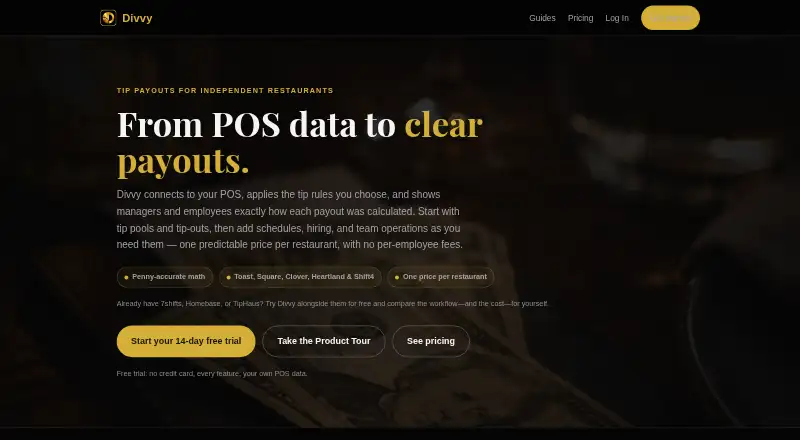
Divvy helps restaurants calculate and distribute tips using POS data and configurable pool rules.
What Divvy is
Divvy helps restaurants calculate and distribute tips using POS data and configurable pool rules. It connects to Toast, Square, Clover, Heartland and Shift4 (SkyTab), and accepts CSV imports for other data. Pools can use even splits, hours, points, per-role rules or keep-your-own methods. Automatic tip-outs can route shares to support roles according to tips or sales, with caps to prevent negative balances. Employees can check tips, hours, pay-period totals and real-time earnings in the portal and Tip Bank. Managers have date-ranged reports, payroll export, IRS Form 8027 gross-receipts tracking and an audit log showing payout breakdowns and history. The Hiring Hub covers job postings, applicant tracking, careers pages and onboarding. Divvy runs in a browser on desktop and mobile; its native iOS app is still in development. Core costs $39 a month per restaurant, and Payouts costs $69 a month per restaurant and adds direct deposits via Stripe. A 14-day trial is available, with no contract or lock-in.
Good
- Supports several POS systems and CSV imports.
- Offers multiple tip-pooling methods.
- Employees can view real-time earnings.
- Payouts plan sends tips via Stripe.
- Includes payroll exports and payout history.
Watch out
- Native iOS app is still in development.
- No employee app is listed.
Who it suits
Divvy suits restaurants that need to manage tip pools, tip-outs and payout records alongside POS data. It may also suit teams that want employee earnings visibility or hiring and onboarding tools in the same service.
Verdict
Divvy combines configurable tip allocation with employee earnings views and payout records. Consider whether its browser-based access and paid plans fit your restaurant's workflow.
Plans and prices
From Divvy's own pricing page, checked 30 Sep 2026.
| Plan | Price | What it gives you |
|---|---|---|
| Core | $39 a month | per restaurant · no card to start · unlimited staff and pay periods · billed monthly |
| Payouts | $69 a month | per restaurant · no card to start · includes Core · direct-deposit payouts via Stripe · billed monthly |
The facts
Each one read from Divvy's own pages, with the date it was checked.
What it does
- Audit trail
- Every payout has a visible breakdown and history in Divvy's audit log.checked 30 Sep 2026
- Automatic tip-outs
- Divvy routes shares to support roles by tips or sales and caps them so no one goes negative.checked 30 Sep 2026
- Cancellation
- Subscriptions have no contract or lock-in and can be canceled inside the app at any time.checked 30 Sep 2026
- Data deletion
- Verified account and data deletion requests are completed within 30 days, with backups purged on the normal rotation afterward.checked 30 Sep 2026
- Direct deposits
- The Payouts plan sends employee tips to bank accounts via Stripe.checked 30 Sep 2026
- Employee portal
- Employees can view tips, hours, pay-period totals, and real-time earnings in the employee portal and Tip Bank.checked 30 Sep 2026
- Hiring and onboarding
- The Hiring Hub supports job postings, applicant tracking, careers pages, and onboarding into the team roster.checked 30 Sep 2026
- Pooling methods
- Tip pools can use even splits, hours, points, per-role rules, or keep-your-own methods.checked 30 Sep 2026
- Purpose
- Divvy connects restaurant POS data, applies tip rules, and shows managers and employees how each payout was calculated.checked 30 Sep 2026
- Reports and compliance
- Divvy provides date-ranged earnings reports, payroll export, and IRS Form 8027 gross-receipts tracking.checked 30 Sep 2026
- Scheduling integrations
- Scheduling integrations include 7shifts, Sling, Deputy, WhenIWork, and Homebase.checked 30 Sep 2026
- Support
- Divvy says customers can email support and get a direct line to the developer for feature requests.checked 30 Sep 2026
Where it runs
- Device access
- Divvy runs in a browser on desktop, iPhone, iPad, and Android; a native iOS app is still in development.checked 30 Sep 2026
- POS integrations
- Divvy lists Toast, Square, Clover, Heartland, and Shift4 (SkyTab), with CSV import for other data.checked 30 Sep 2026
The full review of Divvy
Overview
Divvy is tip-management software for restaurants that need to turn POS data into consistent allocations and explainable payouts. It suits operators with multiple roles or pool rules to manage; its strongest case is the combination of configurable allocation and employee-visible earnings, while its paid, per-restaurant plans rule out a no-cost start.
It connects with Toast, Square, Clover, Heartland, and Shift4 (SkyTab), and accepts CSV imports for other data. That gives restaurants several established POS routes into the workflow without limiting them to those systems.
Key features
Flexible tip allocation
Managers can configure even splits, allocations by hours or points, per-role rules, or keep-your-own tips. Automatic tip-outs route shares to support roles based on tips or sales, with caps to prevent a negative balance. This range makes Divvy a better fit for restaurants whose policies vary by role or shift than a simpler system built around one allocation method.
Employee visibility and records
The employee portal and Tip Bank show tips, hours, pay-period totals, and real-time earnings. Managers get date-ranged earnings reports, payroll export, and IRS Form 8027 gross-receipts tracking. Each payout includes a visible breakdown and history in the audit log, which helps employees and managers follow how a final amount was reached.
Connected operations
Scheduling integrations include 7shifts, Sling, Deputy, WhenIWork, and Homebase. The Hiring Hub adds job postings, applicant tracking, careers pages, and onboarding into the team roster, extending Divvy beyond tip calculations into staffing administration.
Pricing
Divvy has no free plan, but both plans are billed monthly per restaurant, require no card to start, and include unlimited staff and pay periods. The 14-day trial gives a restaurant a short window to assess the workflow before paying.
- Core — $39 a month: Includes the core tip-management plan. It is the sensible starting point for restaurants that need allocation, earnings visibility, and payroll export but will handle tip payments outside Divvy.
- Payouts — $69 a month: Includes Core and sends employee tips to bank accounts via Stripe. The higher price is justified for operators who want direct deposits in the same workflow; restaurants that do not need that option can stay with Core.
Subscriptions have no contract or lock-in and can be canceled inside the app at any time. That flexibility reduces the commitment, though the lack of a free plan means ongoing use requires a paid subscription.
Platforms
Divvy runs in a browser on desktop, iPhone, iPad, and Android. Although iOS is among its supported platforms, a native iOS app is still in development, so iPhone and iPad access is browser-based rather than through a finished native app.
Who it's for
Divvy is best suited to restaurants that need several tip-pooling methods, automatic support-role tip-outs, and a clear record employees can inspect. It is especially relevant where managers want payroll exports and gross-receipts tracking alongside employee earnings views. A smaller operation with a single, simple allocation rule—or one seeking free software—may find the paid plans and broader staffing features unnecessary.
Pros and cons
- Pros: Multiple pooling methods and capped tip-outs accommodate different role structures without forcing one distribution rule.
- Pros: Employee earnings views and payout histories make calculations visible to staff, while dated reports and payroll export support managers.
- Pros: Unlimited staff and pay periods on both monthly plans avoid per-employee and pay-period caps.
- Cons: There is no free plan, so a restaurant cannot keep using Divvy without a subscription after the 14-day trial.
- Cons: Direct deposits require the $69 a month Payouts plan; Core does not include them.
- Cons: iPhone and iPad use is browser-based while the native iOS app remains in development.
Alternatives
Compare restaurant tip-management software if you want to weigh Divvy against the broader category.
- Grateful is worth considering if automatic savings from tips or tronc payments are the priority: its STASH plan is included at no additional cost with every Grateful customer, and it supports Android and web.
- TabPref may suit small teams seeking a free starter plan with scheduling, time clock, team chat, and basic labor analytics; its paid plans are priced per location monthly.
- GratShare is another paid, web-based tip-management option with a free trial. Its You Drive plan is $49 a month on annual prepay per location; the We Drive plan is $89 a month on annual prepay.
- eTip offers custom pricing for each property, with unlimited team members, storage, and team training, for operators considering a property-priced service.
- TipHaus is a paid option with a free trial and custom pricing.
- Rocket Tronc offers a free plan and a free trial, making it an option for readers prioritizing a no-cost entry point.
- Fourth Tip Management is a paid, web-based alternative.
- Kickfin is a paid, web-based alternative.
Verdict
Choose Divvy if your restaurant needs flexible tip rules, transparent payout records, and employee earnings access, with direct deposits available on its higher plan. Look elsewhere if a free plan, a native iOS app, or a lower-cost route to tip payouts matters more than that combination.
Alternatives to Divvy
- 1

7shifts
Free planAndroidiOSWebAPI8.4From $39.99 a month - 2

Homebase
Free planAndroidiOSWebAPI8.2From $30 a month - 3

GratShare
Free planAndroidiOSWeb7.9From $49 a month - 4
Troncbox
Free planAndroidiOSWeb7.9From £20 a month - 5
Agendrix
AndroidiOSWebAPI7.7From $2.93 a month - 6
Toast
Free planAndroidiOSWebAPI7.6From $69 a month