Digital.ai TeamForge
Digital.ai TeamForge ALM is application lifecycle management software for secure, collaborative, and compliant software development.
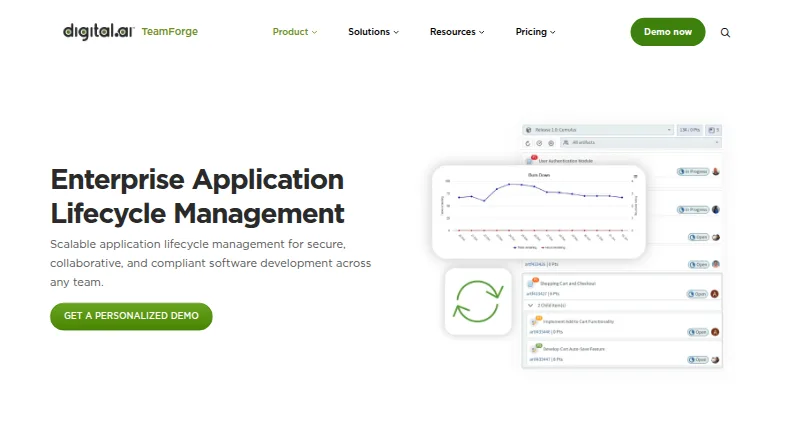
What Digital.ai TeamForge is
Digital.ai TeamForge ALM is application lifecycle management software for secure, collaborative, and compliant software development. It supports waterfall, hybrid, and custom processes through configurable workflows and process reuse. Trackers let teams define and follow tasks using flexible fields, workflows, and relationships. Documents can be centrally managed with version control, access controls, and collaboration; baselines can be compared to review changes or create projects from approved configurations. TeamForge supports Git and Subversion, including replication, code reviews, pull requests, commit associations, and inline editing. Fine-grained role-based controls manage permissions for internal and external teams. Listed integrations include Nexus, Jenkins, Micro Focus ALM, Jira, TestLink, Gerrit, and Review Board. The available editions are SCM, ALM Essentials, and ALM Pro; trackers and documents are listed in Essentials and Pro, while wiki and baselines are listed in Pro. On-premises installation is available on RHEL or AlmaLinux servers; cloud deployment options require contacting Digital.ai. Pricing is on request, and there is no free plan. Product versions are supported for 18 months from their official release date.
Good
- Supports Git and Subversion
- Configurable workflows for multiple development processes
- Fine-grained role-based access controls
- On-premises installation is available
Watch out
- No free plan
- Pricing is on request
- Cloud deployment options require contacting Digital.ai
Who it suits
TeamForge suits software teams that need configurable lifecycle workflows, source control, and shared project documentation. It may fit organizations managing permissions across internal and external teams or installing on premises.
Verdict
TeamForge brings workflow, tracker, document, baseline, and source-control capabilities together for software teams. Consider its on-request pricing, edition differences, and deployment requirements when evaluating it.
Plans and prices
From Digital.ai TeamForge's own pricing page, checked 29 Sep 2026.
| Plan | Price | What it gives you |
|---|---|---|
| Digital.ai TeamForge ALM | Priced on request | Pricing and licensing details are not stated on the opened pages; contact sales |
The facts
Each one read from Digital.ai TeamForge's own pages, with the date it was checked.
What it does
- Access controls
- Fine-grained role-based access controls let organizations manage project roles and permissions for internal and external teams.checked 29 Sep 2026
- Authentication
- The feature matrix lists LDAP/SAML single sign-on for managing user access across its listed editions.checked 29 Sep 2026
- Baselines
- Baselines can be compared to identify changes, review packaged content, and create projects from approved configurations.checked 29 Sep 2026
- Deployment
- The support matrix says TeamForge can be downloaded and installed manually on premises, while cloud deployment options require contacting Digital.ai.checked 29 Sep 2026
- Documents
- The Documents capability centralizes documentation and supports version control, access management, and collaboration.checked 29 Sep 2026
- Editions
- The feature matrix lists SCM, ALM Essentials, and ALM Pro editions, with trackers and documents in Essentials and Pro, and wiki and baselines in Pro.checked 29 Sep 2026
- Integrations
- The maker lists integrations including Nexus, Jenkins, Micro Focus ALM, Jira, TestLink, Gerrit, and Review Board.checked 29 Sep 2026
- Purpose
- TeamForge ALM is described as scalable application lifecycle management for secure, collaborative, and compliant software development.checked 29 Sep 2026
- Support
- The feature matrix lists bundled support tiers as local business hours for Essentials, 24/7 Pro support, and 24/7 Premium support.checked 29 Sep 2026
- Trackers
- Trackers let teams define, organize, and monitor tasks using flexible fields, workflows, and relationships.checked 29 Sep 2026
- Version control
- TeamForge supports Git and Subversion, including replication, code reviews, pull requests, commit associations, and inline editing.checked 29 Sep 2026
- Version support
- The product support matrix says product versions are supported for 18 months from their official release date.checked 29 Sep 2026
- Workflows
- It supports waterfall, hybrid, or custom development processes, with configurable workflows and process reuse.checked 29 Sep 2026
The company
- Company address
- Digital.ai lists its address as 555 Fayetteville St., Raleigh, NC 27601.checked 29 Sep 2026
- Founded
- 2020checked 28 Sep 2026
- Headquarters
- Raleigh, North Carolina, United Stateschecked 28 Sep 2026
Where it runs
- Platform requirements
- The installation guide describes deploying TeamForge on RHEL or AlmaLinux servers, including versions 8.10 and 9.6.checked 29 Sep 2026
The full review of Digital.ai TeamForge
Digital.ai TeamForge is an application lifecycle management suite for organizations coordinating requirements, code, documentation, and controlled delivery across multiple teams. It is strongest for enterprises that need reusable processes, granular permissions, and deployment choice rather than a lightweight project tracker. The main decision is whether its broad governance and source-control scope justify a sales-led purchase and edition-dependent capabilities.
Overview
TeamForge brings configurable workflows, trackers, documents, baselines, and source control into one environment. Teams can support waterfall, hybrid, or custom methods and reuse process configurations, making it suitable when several projects need a common operating model without identical procedures.
Its paid pricing is available on request. Organizations can install it on premises, while cloud deployment requires contacting Digital.ai. That hybrid route accommodates infrastructure and compliance requirements, but it is less convenient for buyers seeking an immediate cloud subscription and published rates.
Key features
Work, requirements, and documentation
Trackers combine custom fields, relationships, and workflow rules for modeling tasks and requirements around an organization’s process. Requirements management, release management, roadmaps, time tracking, custom workflows, workflow automation, and approval gates extend it beyond basic issue tracking.
The Documents capability centralizes project material with version control, access management, and collaboration. Baselines let teams compare changes, review packaged content, and create projects from approved configurations. Those controls are valuable for governed releases, although teams needing baselines and wiki functionality must choose the Pro edition.
Code and delivery governance
TeamForge hosts Git and Subversion repositories and supports replication, code reviews, pull requests, commit associations, and inline editing. Source-code hosting, pipeline as code, infrastructure as code, artifact registry, automated testing, progressive delivery, automated rollback, deployment rollback, and deployment audit logs cover a broad delivery chain.
Deployment targets include containers, private and public clouds, middleware, and mainframes. Application observability and incident management add operational scope, while value stream mapping supports portfolio-level flow analysis. Fine-grained role-based access controls cover internal and external participants, and LDAP/SAML single sign-on is listed across the editions. Integrations include Nexus, Jenkins, Micro Focus ALM, Jira, TestLink, Gerrit, and Review Board.
Pricing
Digital.ai TeamForge ALM uses custom pricing; no free plan is offered, and licensing details require contacting sales.
| Edition | What it includes | Support |
|---|---|---|
| SCM | Source-code management capabilities | Not stated |
| ALM Essentials | SCM plus trackers and documents | Local business hours |
| ALM Pro | Essentials plus wiki and baselines | 24/7 Pro support |
Essentials suits teams that need governed work items and documentation without Pro-only wiki and baseline controls. Pro is the better fit for configuration-controlled projects and round-the-clock support. The SCM edition is narrower and appropriate when repository management is the priority. A separate 24/7 Premium support tier is listed, but its pricing and edition terms are custom. Product versions are supported for 18 months after official release, which makes upgrade scheduling important for self-managed installations.
Platforms
TeamForge is available through web and API interfaces and supports Linux and self-hosted deployment. Installation guidance covers RHEL and AlmaLinux servers, including versions 8.10 and 9.6. The deployment model is hybrid, with on-premises installation and cloud options arranged through Digital.ai.
Who it's for
TeamForge fits large or regulated software organizations that need traceability, reusable delivery workflows, strict role separation, source control, and support for mixed deployment targets. It also suits teams consolidating ALM and DevOps governance across internal and external contributors. Smaller groups wanting a low-cost, self-service tool, transparent pricing, or a simple issue tracker are better served elsewhere.
Pros and cons
Pros
- Broad ALM coverage: Requirements, releases, documents, baselines, repositories, testing, observability, and incident management can share one governed environment.
- Process flexibility: Waterfall, hybrid, and custom workflows with reusable configurations accommodate varied teams.
- Deployment and access control: Self-hosting, cloud options, LDAP/SAML, and fine-grained roles support demanding security and infrastructure policies.
- Enterprise source control: Git and Subversion support includes reviews, pull requests, replication, and commit linkage.
Cons
- Custom pricing: Buyers cannot compare public rates or start with a free tier.
- Edition gating: Wiki and baselines require Pro, while Essentials has local-business-hours support.
- Operational overhead: Self-hosting requires supported RHEL or AlmaLinux servers and ongoing version upgrades.
- Cloud sales process: Cloud deployment requires direct contact with Digital.ai rather than self-service provisioning.
Alternatives
- ValueStream by MapVS is a better starting point for value-stream mapping when a forever-free plan with two maps, five stages per map, and 50 MB storage is sufficient.
- HCL DevOps Velocity suits teams wanting a free Community Edition for two to three licenses with forum support.
- Swarmia is preferable for organizations with fewer than 10 developers seeking a free plan, while its AI adoption and cost plan is $5.00 per month.
- Allstacks offers a Starter plan currently free with unlimited usage and sessions, making it worth considering before usage-based pricing begins.
- Planview AdaptiveWork is another sales-led work-management option with pricing supplied by an account executive.
- CloudBees CI is a paid, self-hosted and web-oriented alternative with pricing handled by Sales.
- Cora Value Stream Management is a paid option with pricing by request.
- Kovair Value Stream Management Platform is worth considering when a demo-led, paid evaluation fits your buying process.
For broader comparisons, see Value Stream Management Software, Application Lifecycle Management Software, DevOps Platforms, IT Release Management Software, Release Orchestration Software, and Device Farm Software.
Verdict
Choose Digital.ai TeamForge when your organization needs a governed, configurable ALM backbone spanning requirements, documentation, code, and complex delivery targets, especially with self-hosting or strict access controls. Look elsewhere if public pricing, a free tier, rapid cloud sign-up, or a simpler team tool matters more than its enterprise breadth.
Alternatives to Digital.ai TeamForge
- 1

Azure Test Plans
Free planWebAPIExtensionLinux8.1From $6 a month - 2

GitLab Package Registry
Free planWebAPILinuxSelf-hosted7.1Free plan - 3
TechExcel ProjectOne ALM
AndroidiOSWebSelf-hosted7.0From $10 a month - 4
IBM Targetprocess
Free planWebAPI6.8Free plan - 5
ONES
Free planWebAPISelf-hosted6.6From $80.50 a year - 6

Innoslate
Free planWebAPISelf-hostedWindows6.4Free plan