ValueStream by MapVS
ValueStream by MapVS supports value stream mapping from process capture through analysis and improvement tracking.
What ValueStream by MapVS is
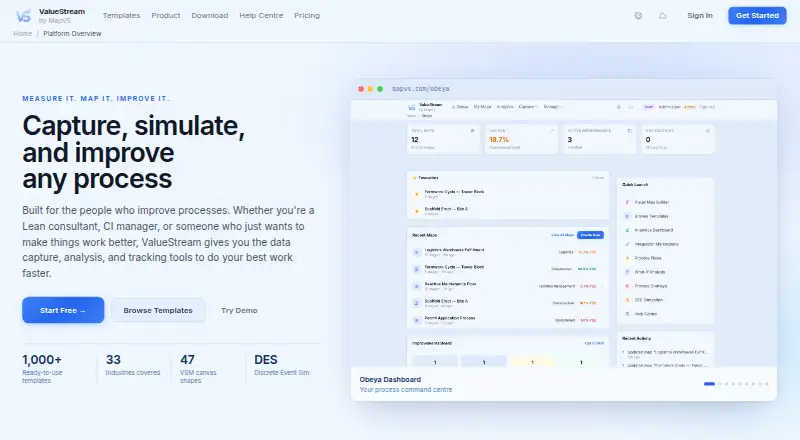
ValueStream by MapVS supports value stream mapping from process capture through analysis and improvement tracking. Teams can gather process information through web or guided recording, Gemba walks, video, photo digitization, or CSV, Excel, and ERP imports. The platform calculates Lean metrics and provides bottleneck detection, waste classification, AI suggestions, and Monte Carlo simulation. Its drag-and-drop canvas includes 47 shapes, 12 connection types, and live Lean calculations, alongside more than 1,000 templates across 33 industries. Integrations include Jira, Slack, Teams, Zapier, SAP, and ServiceNow, but the marketplace is available on Pro and above. The iPhone and iPad app supports offline recording, photos, NFC scanning, GPS tracking, and analytics; it is offered through TestFlight for iOS 16 and later. A REST API, OpenAPI documentation, and webhooks are available. The free plan includes two maps with five stages each and excludes simulation and What-If. ValueStream has a freemium model, with paid plans listed from $9/mo.
Good
- Multiple process capture methods, including video and imports
- Live Lean calculations on a configurable mapping canvas
- More than 1,000 templates across 33 industries
- REST API, OpenAPI documentation, and webhooks
Watch out
- Free plan is limited to two maps
- Free plan excludes simulation and What-If
- Integrations marketplace requires Pro or above
- Desktop recorder is marked Coming Soon
Who it suits
It suits Lean practitioners, process engineers, consultants, and improvement teams that need to capture and analyze workflows. The iOS app may also suit people recording process details on iPhone or iPad.
Verdict
ValueStream brings process capture, Lean analysis, and improvement tracking into one value stream mapping platform. Check the free plan's map limits and the plan level required for integrations before choosing it.
Plans and prices
From ValueStream by MapVS's own pricing page, checked 15 Oct 2026.
| Plan | Price | What it gives you |
|---|---|---|
| Free | Free | 2 maps · 5 stages each · 3 basic templates · limited web recorder · basic recording runs · 50 MB storage · no simulation or What-If · no AI video analysis · Forever free |
| Enterprise | Priced on request | Everything in Team · SSO/SAML · data-region selection · dedicated support · custom integrations · unlimited AI analysis beta · white-label option · 100 GB+ storage · Custom annual; minimum 10 seats |
| Pro | — | Unlimited maps and imports · DES simulation · What-If analysis · OEE · shift calendars · Monte Carlo · AI suggestions · NFC/GPS recording · desktop recorder · 20 video analyses/month beta · PDF export · BYO LLM · REST API · 10 GB storage · Billed monthly |
| Starter | — | 10 maps · unlimited stages · 1,000+ templates · recording comparison · mobile and Apple Watch recording · 5 video analyses/month beta · CSV export · 1 GB storage · Billed monthly |
| Team | — | Everything in Pro · cross-map overlays · process merge · live recording banners · team workspaces and roles · process chains · multi-product flows · industry benchmarking · 50 video analyses/month beta · 35 GB storage · Billed monthly; 5 seats included, +$6.99/month per additional seat |
The facts
Each one read from ValueStream by MapVS's own pages, with the date it was checked.
What it does
- Analysis
- The platform calculates Lean metrics and offers bottleneck detection, waste classification, AI suggestions, and Monte Carlo simulation.checked 30 Sep 2026
- API
- The REST API offers CRUD operations for maps, stages, recordings, runs, improvements and webhooks, with OpenAPI and Swagger documentation.checked 15 Oct 2026
- API access limits
- API keys require Pro or higher; published limits are 60 requests/minute and 5,000/day for Pro, 120/minute and 20,000/day for Team, with Enterprise custom limits.checked 15 Oct 2026
- Barcode scanning
- The platform can scan one-dimensional, two-dimensional and QR barcodes to attach asset or inventory data to stages.checked 15 Oct 2026
- Canvas
- The interactive canvas provides 47 shapes, 12 connection types, automated Lean calculations, dark mode and simulation playback.checked 15 Oct 2026
- Capture methods
- Capture options include web and guided recording, Gemba walks, video analysis, photo digitization, and CSV, Excel, or ERP data imports.checked 30 Sep 2026
- Collaboration
- Real-time collaboration provides live cursors, presence indicators, instant synchronisation, comments, roles and shared workspaces.checked 15 Oct 2026
- Compliance status
- The company says it is Australian Privacy Act compliant and GDPR ready; application SOC 2 Type II and ISO 27001 certification are planned for 2027.checked 15 Oct 2026
- Data handling
- The security questionnaire says data is stored on DigitalOcean infrastructure in Sydney and deleted account data is permanently purged within 30 days.checked 30 Sep 2026
- Data import
- CSV, Excel and ERP data can be imported with column mapping and batch map generation.checked 15 Oct 2026
- Data residency
- Sydney is the default data region; US East and Frankfurt are available on Team or higher plans, while London and Singapore are roadmap regions.checked 15 Oct 2026
- Desktop availability
- The Windows, Mac, and Linux desktop recorder is marked Coming Soon on the Apps page.checked 30 Sep 2026
- Desktop requirements
- The planned Electron recorder lists macOS 11+, Windows 10+ and Ubuntu 20.04+ or equivalent, with an approximately 150 MB download.checked 15 Oct 2026
- Documentation
- The help centre lists 80 articles across getting started, features, methodology, troubleshooting, API and FAQ categories.checked 15 Oct 2026
- Exports
- Maps can be exported as CSV, JSON or PDF, and bulk account export provides a JSON archive containing maps, runs, recordings, photos and audio notes.checked 15 Oct 2026
- External feature evidence
- The developer portfolio independently lists video time-motion extraction, handwritten-map digitisation, ERP/CSV import, TIMWOODS classification, bottleneck detection, workflow automation and audit logging.checked 15 Oct 2026
- External technology evidence
- An independent developer portfolio describes ValueStream as a 2024-present platform using Python/Flask, PostgreSQL, D3.js, computer vision, LLM analysis, REST API and Stripe billing.checked 15 Oct 2026
- Gemba walks
- Gemba-walk capture supports photos, checklists, voice notes and GPS tagging.checked 15 Oct 2026
- Google Play data practices
- Google Play says no data is shared with third parties, while the app may collect location and personal information, encrypts data in transit and supports deletion requests.checked 15 Oct 2026
- Google Play developer
- Google Play lists ASSET ARC SERVICES as the developer, with an address in Pennington, South Australia, Australia.checked 15 Oct 2026
The company
- Company facts
- The security questionnaire lists Brisbane, Queensland, Australia as headquarters, 2025 as the founding year and 1–5 employees.checked 15 Oct 2026
- Company legal name
- The security questionnaire identifies the vendor as MapVS Pty Ltd, with ABN registration pending.checked 15 Oct 2026
- Founded
- 2025checked 28 Sep 2026
Where it runs
- Google Play app
- The Android listing describes offline recording, GPS tagging, NFC scanning, photo evidence, run comparison, bottleneck detection and Monte Carlo analysis.checked 15 Oct 2026
The full review of ValueStream by MapVS
Overview
ValueStream by MapVS is a value stream mapping platform for teams that need to capture processes, assess Lean performance, and follow improvement work. Its range of capture methods and analysis tools makes it a strong fit for structured improvement programs; the plan limits and unclear paid pricing warrant a closer look before committing.
It supports up to 10 value streams and is aimed at Lean practitioners, process engineers, consultants, and improvement teams. MapVS was founded in 2025 and is headquartered in Brisbane, Queensland, Australia.
Key features
Capture and mapping
Process information can come from web or guided recording, Gemba walks, video analysis, photo digitization, or CSV, Excel, and ERP imports. That breadth suits teams combining observation with existing operational data, though video analysis is quota-limited on paid tiers. The drag-and-drop canvas has 47 shapes and 12 connection types, with live Lean calculations as maps are built.
Lean analysis and improvement
ValueStream calculates Lean metrics and includes bottleneck detection, waste classification, AI suggestions, and Monte Carlo simulation. The Free plan excludes simulation and What-If, so teams that need to model possible changes will need a paid tier.
Templates, integrations, and API
More than 1,000 templates span 33 industries, giving teams a starting point for common process contexts. The integration marketplace lists 23 connectors, including Jira, Slack, Teams, Zapier, SAP, and ServiceNow, but integrations require Pro or above. A REST API with OpenAPI documentation and webhook support offers another route for connecting the platform to existing systems.
Mobile, desktop, and security
The iPhone and iPad app supports offline recording, photos, NFC scanning, GPS tracking, and analytics. It is available through iOS TestFlight for iOS 16 and later. A Windows, Mac, and Linux desktop recorder is marked Coming Soon on the Apps page, although Pro includes a desktop recorder; that difference is worth clarifying before choosing Pro for desktop capture.
MapVS describes encryption at rest and in transit, Australian Privacy Act compliance, and GDPR readiness. Data is stored on DigitalOcean infrastructure in Sydney, and deleted account data is permanently purged within 30 days. Formal SOC 2 Type II certification is on the 2027 roadmap, so organizations requiring that certification now should look elsewhere. Email support comes with every plan; Enterprise adds dedicated support.
Pricing
The pricing model is freemium, with a 14-day trial and paid plans described as starting from $9/mo. Starter, Team, Pro, and Enterprise each show custom pricing rather than a published price, so confirm the applicable monthly or annual cost before budgeting.
- Free: free, billed forever. It allows 2 maps with 5 stages each, 3 basic templates, a limited web recorder, and 50 MB of storage, but excludes simulation and What-If. It is useful for a small evaluation, not a larger mapping program.
- Starter: Custom pricing, billed monthly. It raises the allowance to 10 maps with unlimited stages and adds 1,000+ templates, five video analyses per month (Beta), and 1 GB of storage. This suits an individual or small operation that needs more maps and templates, but the storage and video quota remain modest.
- Pro: Custom pricing, billed monthly. It includes unlimited maps and imports, DES simulation, a desktop recorder for Windows, Mac, and Linux, 20 video analyses per month (Beta), and 10 GB of storage. It is the relevant tier for teams needing integrations or simulation, though connector access starts here and its price is not public.
- Team: Custom pricing, with 5 seats included and each additional seat at +$6.99/mo. It includes everything in Pro, team workspaces and roles, 50 video analyses per month (Beta), and 35 GB of storage. The named seat allowance and extra-seat charge make it a clearer fit for a shared improvement team than Starter.
- Enterprise: Custom annual pricing with a minimum of 10 seats. It includes everything in Team, SSO/SAML, data region selection, dedicated support, custom integrations, and 100 GB+ of storage. It targets larger organizations that need those controls and support, but the annual commitment and seat minimum are substantial.
All plans include email support. The platform supports value stream mapping and flow metrics, with a stated limit of 10 streams.
Platforms
ValueStream lists iOS, Linux, macOS, web, and Windows. The iPhone and iPad app is available on TestFlight for iOS 16 and later. The Windows, Mac, and Linux desktop recorder is marked Coming Soon on the Apps page, so the listed desktop platforms should not be taken as confirmation that the recorder is currently available.
Who it's for
ValueStream is best suited to Lean practitioners, process engineers, consultants, and improvement teams that need to combine process capture, mapping, analysis, and follow-up in one platform. The free tier can support a limited trial with two small maps; teams needing integrations, simulation, expanded storage, or collaboration features should compare the paid tiers and confirm their pricing. It is less suitable for organizations that require formal SOC 2 Type II certification today or an already-available desktop recorder.
Pros and cons
- Pro: Multiple capture methods, imports, and a detailed mapping canvas help teams bring observations and existing data into process maps.
- Pro: Lean metrics, bottleneck detection, waste classification, and simulation support analysis beyond drawing a process.
- Pro: The iOS app supports offline recording and field-oriented tools such as photos, NFC scanning, and GPS tracking.
- Con: The Free plan is capped at two maps, five stages per map, three basic templates, and 50 MB, and has no simulation or What-If.
- Con: Integrations require Pro or above, while most paid plan prices are custom pricing rather than public figures.
- Con: The desktop recorder is marked Coming Soon on the Apps page, and SOC 2 Type II is on the 2027 roadmap.
Alternatives
Value Stream Management Software is a useful category page for comparing options across the field.
- HCL DevOps Velocity is worth considering if a free edition with 2–3 licenses and online forum support better fits a small team; its platforms include self-hosted deployment.
- Planview AdaptiveWork may suit readers looking for a paid product available on Android, iOS, web, and API; pricing is available by contacting an account executive.
- Digital.ai TeamForge is a paid alternative with Linux, web, API, and self-hosted platforms, but no free plan.
- CloudBees CI is another paid option for Linux, Windows, web, and self-hosted environments; customers are directed to Sales or their account team for pricing and additional services.
- SENTRIO is a paid web option for readers comparing a web-only platform; price and plan limits are not published.
- OpenText Core Performance Engineering offers a free trial and usage-based pricing, making it an alternative for readers who prefer paying according to use.
- Keypup Value Stream Management Dashboard is a paid API and web option with an annual MCP & API Only plan at $49 a month, billed annually in advance, for readers focused on that access model.
- Swarmia is a freemium web alternative for readers comparing another option with a free plan.
Verdict
Choose ValueStream if your improvement work depends on capturing processes in varied ways, applying Lean analysis, and tracking maps in one place. The Free tier provides a narrow starting point, while Pro and Team add the simulation, integrations, storage, and collaboration capabilities many teams will need. Look elsewhere if you need public, predictable paid pricing, a currently available desktop recorder, or formal SOC 2 Type II certification now.
Getting started
- Visit https://www.mapvs.com/.
- Choose the Free plan or review the paid plans, listed from $9/mo, and the 14-day trial.
- Use the web platform or the iPhone and iPad app through TestFlight for iOS 16 and later.
- Capture process information using a supported recording method or CSV, Excel, or ERP imports.
- Use the mapping canvas to arrange process stages and analyze Lean metrics.
Limits worth knowing
The Free plan allows two maps with five stages each, three basic templates, limited web recording, and 50 MB storage; it excludes simulation and What-If. Starter includes five video analyses per month and 1 GB storage; Pro includes 20 video analyses per month and 10 GB storage. Team includes 50 video analyses per month and 35 GB storage; Enterprise includes 100 GB or more storage.
Questions
Is there a free plan?
Yes. The Free plan is free and includes two maps with five stages each, three basic templates, limited web recording, and 50 MB storage.
Is there a free trial?
The pricing note includes a 14-day trial.
Which platforms are available?
Platforms listed are iOS, Linux, macOS, web, and Windows. The desktop recorder for Windows, Mac, and Linux is marked Coming Soon; the iPhone and iPad app is available through TestFlight for iOS 16 and later.
What integrations does it offer?
The integration marketplace lists 23 connectors, including Jira, Slack, Teams, Zapier, SAP, and ServiceNow. It is available on Pro and above.
What does the Free plan exclude?
It excludes simulation and What-If, and limits users to two maps with five stages each, three basic templates, limited web recording, and 50 MB storage.
What support is included?
All plans include email support. Enterprise includes dedicated support.
Alternatives to ValueStream by MapVS
- 1

Allstacks
Free planWebAPI7.5From $200 a year - 2

Plandek
Free planWebAPISelf-hosted7.5From $2,555 a month - 3
Planview AdaptiveWork
AndroidiOSWebAPI6.9 - 4

Swarmia
Free planWebAPI6.9From $5 a month - 5
HCL DevOps Velocity
Free planWebLinuxmacOSSelf-hosted6.6Free plan - 6

Automic Continuous Delivery Automation
WebAPILinuxSelf-hosted6.5