
Déjà Vu X3
Déjà Vu X3 is a Windows desktop computer-assisted translation environment from the maker Déjà Vu X3, headquartered in Lille, France and founded in 1993.
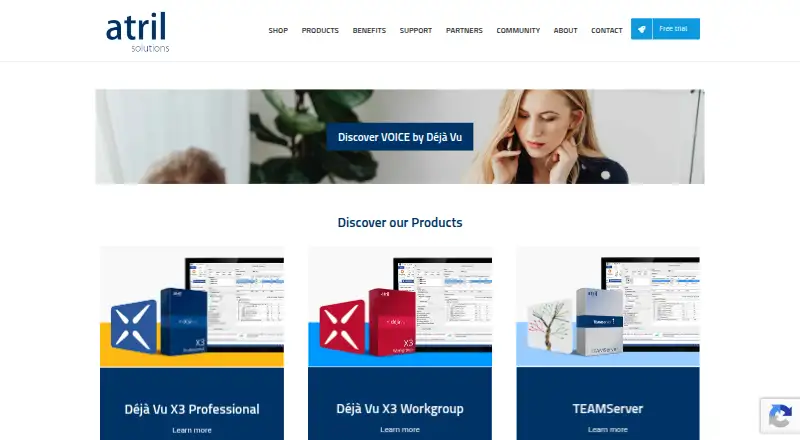
What Déjà Vu X3 is
Déjà Vu X3 is a Windows desktop computer-assisted translation environment from the maker Déjà Vu X3, headquartered in Lille, France and founded in 1993. It reuses earlier translations through translation memory while combining terminology management, alignment, and quality assurance in one workspace. DeepMiner mines translation memories and terminology databases to build phrases and repair fuzzy matches. AutoWrite suggests terms, phrases, and sentences from a translator’s own databases during work. Quality checks cover terminology consistency, formatting, numbers, and tags, with rules that can be customized. Live Preview shows ongoing translations in Word, Excel, PowerPoint, and PDF files. Supported formats include Office documents, PDF, XLIFF, SDLXLIFF, TMX, XML, YAML, InDesign, and HTML. Interoperability covers TMX, Studio packages, SDLXLIFF, MemoQ XLIFF, Wordfast TXML, RTF external view, TTX, and Trados Workbench. Integrations include Google Translate, Microsoft Translate, ITranslate4, MyMemory Translate, Systran, Promt Translation, and Asia Online Language Studio. Dragon NaturallySpeaking supplies speech recognition and voice commands. Workgroup enables real-time sharing, multilingual projects, and workload splitting. The freemium offering includes a 30-day Professional trial, then Free mode, with paid access from €420.
Good
- DeepMiner reuses memories and repairs fuzzy matches
- AutoWrite suggests database-based terms and sentences
- QA checks cover terminology, formatting, numbers, and tags
- Live Preview updates Office and PDF translations
- Workgroup shares memories and splits multilingual workloads
- Broad CAT-tool and machine-translation interoperability
Watch out
- Windows desktop deployment only
- Free mode supports standalone and satellite projects after evaluation
- Paid access starts from €420
Who it suits
It suits translators who need translation memory, terminology tools, predictive suggestions, and detailed quality checks on Windows. Workgroup is aimed at teams sharing memories and termbases across multilingual projects, while the Free edition supports standalone or satellite projects prepared with Workgroup.
Verdict
Choose Déjà Vu X3 for a Windows translation workflow centered on reusable memories, terminology control, predictive writing, and configurable QA. Teams needing shared multilingual resources can use Workgroup. Look elsewhere if you require another platform or Free-mode use beyond standalone and satellite projects.
Plans and prices
From Déjà Vu X3's own pricing page, checked 7 Oct 2026.
| Plan | Price | What it gives you |
|---|---|---|
| Déjà Vu X3 Free | Free | Free edition for standalone and satellite projects prepared with Déjà Vu X3 Workgroup |
| Déjà Vu X3 Workgroup 5 licenses | — | 5 licenses |
| Déjà Vu X3 Workgroup 10 licenses | — | 10 licenses |
| Déjà Vu X3 Workgroup 20 licences | — | 20 licenses |
| Déjà Vu X3 Workgroup 50 licences | — | 50 licenses |
| Déjà Vu X3 Workgroup | — | Workgroup license; listed at 1490,00€ |
| Déjà Vu X3 Professional | — | Professional license; listed at 420,00€ |
The facts
Each one read from Déjà Vu X3's own pages, with the date it was checked.
What it does
- CAT tool interoperability
- For working with other CAT tools, Atril lists TMX, Studio packages, SDLXLIFF, MemoQ XLIFF, Wordfast TXML, RTF external view, TTX and Trados Workbench formats.checked 7 Oct 2026
- File formats
- Supported formats include Office files, PDF, XLIFF, SDLXLIFF, TMX, XML, YAML, InDesign, HTML, and many others.checked 7 Oct 2026
- Live preview
- Live Preview shows translation progress in Word, Excel, PowerPoint and PDF files in real time.checked 7 Oct 2026
- Predictive writing
- AutoWrite proposes terms, phrases and sentences drawn from a user's databases for selection while translating.checked 7 Oct 2026
- Product type
- Déjà Vu X3 is a computer-assisted translation tool that reuses previous translations in an integrated translation work environment.checked 7 Oct 2026
- Quality assurance
- The quality assurance module checks terminology consistency, formatting, numbers and tags, and supports customizable rules.checked 7 Oct 2026
- Security and privacy
- Atril says it uses reasonable commercial efforts to protect personal data and says it does not sell or otherwise market personal data to third parties except Atril partners.checked 7 Oct 2026
- Speech integration
- Déjà Vu X3 integrates with Dragon NaturallySpeaking for voice commands and speech recognition.checked 7 Oct 2026
- Support
- Atril directs product questions to [email protected] and provides a resource center and request-submission support pages.checked 7 Oct 2026
- Translation assistance
- DeepMiner mines translation memories and terminology databases to assemble phrases and repair fuzzy matches.checked 7 Oct 2026
- Translation memory
- Yeschecked 21 Sep 2026
The company
- Founded
- 1993checked 28 Sep 2026
- Team collaboration
- Workgroup supports real-time sharing of translation memories and termbases, multilingual projects and workload splitting.checked 7 Oct 2026
Money
- Free edition limit
- After the 30-day Professional evaluation, the free edition can view and work on satellite projects sent by translation firms; Atril also says it supports standalone and Workgroup-prepared satellite projects.checked 7 Oct 2026
- Free plan
- Yeschecked 21 Sep 2026
- Trial
- Installing the trial provides the Professional version for 30 days, after which the software switches to FREE mode.checked 7 Oct 2026
Where it runs
- Machine translation integrations
- The integrations page lists Google Translate, Microsoft Translate, ITranslate4, MyMemory Translate, Systran, Promt Translation and Asia Online Language Studio.checked 7 Oct 2026
- Platform support
- Atril lists Windows XP through Windows 10 and older Windows Server releases as supported; its support article says ARM-based Macs cannot run DVX3, even in a Windows virtual machine.checked 7 Oct 2026
The full review of Déjà Vu X3
Déjà Vu X3 is a Windows desktop computer-assisted translation environment for translators who maintain translation memories and terminology databases. It is most suitable for freelancers with established language assets and teams that need shared multilingual resources. Its strongest case is a controlled, database-led workflow; its main drawback is that the free edition is tightly restricted after the trial.
Overview
Déjà Vu X3 combines translation memory, terminology management, alignment and quality assurance in one desktop application. DeepMiner searches translation memories and termbases to construct phrases and repair fuzzy matches, while AutoWrite proposes stored terms, phrases and complete sentences for selection during translation. These features reward users who repeatedly work in the same domains and language pairs; they offer less benefit to occasional translators with no reusable database.
Live Preview displays progress in Word, Excel, PowerPoint and PDF files, helping translators see how text fits its source document while they work. File support covers Office documents, PDF, XLIFF, SDLXLIFF, TMX, XML, YAML, InDesign, HTML and many other formats. Exchange with other CAT environments is practical through TMX, Studio packages, SDLXLIFF, MemoQ XLIFF, Wordfast TXML, RTF external view, TTX and Trados Workbench formats.
Key features
Database-driven assistance
Translation memories and termbases provide the foundation for DeepMiner and AutoWrite. The combination can reduce repeated typing and keep preferred terminology visible, but its value depends on the quality and breadth of the databases you supply. An alignment tool helps turn existing bilingual material into reusable resources.
Quality and document control
Quality assurance checks terminology consistency, formatting, numbers and tags. Customizable rules let organizations reflect their own checking standards rather than relying only on fixed tests. Live Preview and broad format coverage add useful safeguards when the deliverable must preserve the structure of office, publishing or localization files.
Integrations and collaboration
Machine-translation integrations include Google Translate, Microsoft Translate, ITranslate4, MyMemory Translate, Systran, Promt Translation and Asia Online Language Studio. Dragon NaturallySpeaking support adds voice commands and speech recognition for users who prefer spoken input. Workgroup enables real-time sharing of translation memories and termbases, multilingual projects and workload splitting, making it the meaningful upgrade for coordinated teams.
Pricing
Déjà Vu X3 uses a freemium model. The Déjà Vu X3 Free plan costs free and is intended for standalone projects and satellite projects prepared with Déjà Vu X3 Workgroup. After the 30-day Professional evaluation, the installation switches to FREE mode. In practice, that makes the free edition a useful way to handle qualifying projects, not a full unrestricted solo workstation.
The Professional trial lasts 30 days; the Professional plan has custom pricing and allows two target languages per project, with five translation memories and termbases per target language. It is the sensible fit for an individual translator whose projects stay within those limits. Workgroup also has custom pricing and expands projects to 24 target languages with unlimited translation memories and termbases per target language. License packs are offered for 5, 10, 20 and 50 licenses, suiting teams that need shared resources and divided workloads. Atril does not publish prices for these paid plans, so buyers must request a quote.
Platforms
Déjà Vu X3 is desktop software for Windows. Atril lists support from Windows XP through Windows 10 and older Windows Server releases. ARM-based Macs cannot run DVX3, including through a Windows virtual machine, so Mac users should choose another platform. Atril says it uses reasonable commercial efforts to protect personal data and does not sell or otherwise market it to third parties except Atril partners. Product support is provided through [email protected], a resource center and request-submission pages.
Who it's for
Choose Déjà Vu X3 if your work depends on accumulated translation memories, controlled terminology, repeatable QA and exchange with other CAT tools. Professional fits a solo translator with moderate language and database needs. Workgroup fits agencies or distributed teams that must share multilingual assets in real time. The free edition fits standalone or firm-supplied satellite projects after evaluation, but not users expecting unrestricted free operation.
Pros and cons
Pros
- DeepMiner and AutoWrite make existing memories and termbases actively useful during translation.
- Customizable checks cover terminology, formatting, numbers and tags.
- Broad document and CAT-tool format support reduces conversion friction.
- Workgroup provides shared memories, termbases, multilingual projects and workload splitting.
Cons
- Windows-only support excludes native Mac workflows, and ARM-based Macs cannot use a virtual-machine workaround.
- The free edition is limited to standalone and eligible satellite projects after the 30-day Professional period.
- Professional and Workgroup prices are custom, making budgeting less transparent.
- Professional caps projects at two target languages and five memories or termbases per target language.
Alternatives
Computer-Assisted Translation Software and Translation Software provide broader category comparisons.
Pick CafeTran Espresso instead if you need Linux or macOS support and a free tier capped at 1,000 translation units and 500 glossary terms. locAGI is the alternative for web, API or Linux/macOS deployment with unlimited seats on its free platform plan. Choose BasicCAT, Lokalize or Supervertaler Workbench when a free CAT tool is the priority. Matecat offers unlimited free features, users and projects through web, API or self-hosted deployment. TextUnited suits web-based users who prefer a free allowance of 15,000 words and 15 PDF pages per month for one user. Verto is a web alternative with a free plan limited to five active projects, one user, 10,000 TM segments, 500 termbase entries and 25,000 processed words per month.
Verdict
Déjà Vu X3 is a strong choice for Windows translators and teams that want translation memories, terminology, predictive suggestions and configurable QA working together. Choose Professional for bounded individual projects and Workgroup for shared multilingual production. Look elsewhere if you need Mac support or a genuinely unrestricted free solo CAT environment.
Getting started
- Open the Atril website
- Install the Windows trial
- Use Professional features during the 30-day evaluation
- Continue in FREE mode after the trial or choose a paid plan
- Connect translation memories, termbases, and supported file formats
Limits worth knowing
The Professional evaluation runs for 30 days before switching to FREE mode. The Free edition is for standalone and satellite projects prepared with Déjà Vu X3 Workgroup and can view and work on satellite projects sent by translation firms.
Questions
What does Déjà Vu X3 cost?
The Free edition is listed as free. The pricing note says paid access starts from €420, and a 30-day trial is available.
Which platforms are supported?
Déjà Vu X3 is a Windows desktop application. Atril lists support from Windows XP through Windows 10 and older Windows Server releases.
What does the Free edition do?
After the Professional evaluation, the software switches to FREE mode for standalone and Workgroup-prepared satellite projects.
Does it support machine translation?
Listed integrations include Google Translate, Microsoft Translate, ITranslate4, MyMemory Translate, Systran, Promt Translation, and Asia Online Language Studio.
Can teams collaborate?
Workgroup supports real-time translation-memory and termbase sharing, multilingual projects, and workload splitting.
What file formats can it handle?
Formats include Office files, PDF, XLIFF, SDLXLIFF, TMX, XML, YAML, InDesign, HTML, and others.
Alternatives to Déjà Vu X3
- 1

XTM Cloud
AndroidiOSWebAPI7.9From $16,500 a year - 2

Trados
WebAPImacOSSelf-hosted7.5 - 3

TextUnited
Free planWebAPI7.2From €150 a month - 4

CafeTran Espresso
Free planLinuxmacOSWindows7.1From €80 a year - 5

Centus
WebAPI7.1From $145 a month - 6

Wordbee Translator
WebAPI6.8