Crinkler
Crinkler is a free, open-source compressing linker for small 32-bit Windows executables, particularly demoscene productions such as 1k, 4k, and 8k intros.
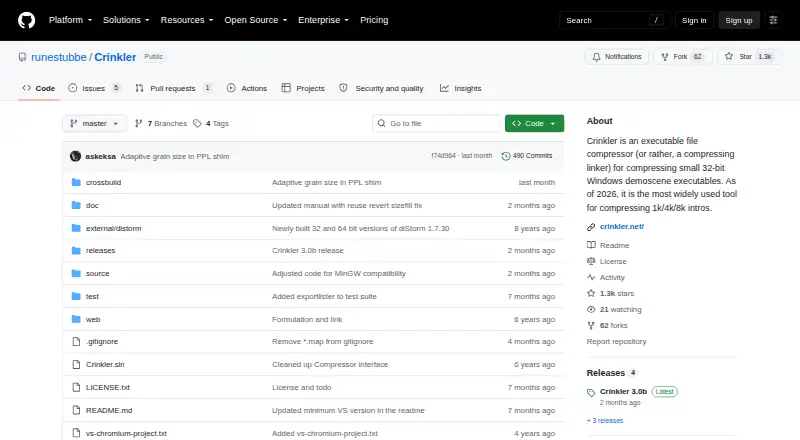
What Crinkler is
Crinkler is a free, open-source compressing linker for small 32-bit Windows executables, particularly demoscene productions such as 1k, 4k, and 8k intros. It combines linking and compression, producing an executable that decompresses into memory when run. By default, its context-modelling process handles code, optional text data, and general data as separate parts. Crinkler can replace the Visual Studio linker and supports its basic options, with configuration through Visual Studio project settings. Its data compressor is also available separately as a library for tools estimating compressed data size. Crinkler is distributed under the zlib license, which permits use for any purpose, including commercial applications, subject to its conditions. The project directs users to GitHub Releases for downloads and links to a manual covering usage and version history. Crinkler 3.0 requires Windows 10 or later and SSE4.2, and the executables it produces also require SSE4.2. The uncompressed size limit is 64k per part. Tiny-header mode can make decompression prohibitively slow for files significantly larger than 1 KB.
Good
- Combines linking and compression for small executables.
- Can replace the Visual Studio linker.
- Compressor library is available separately.
- Zlib license permits commercial use subject to its conditions.
Watch out
- Crinkler 3.0 requires Windows 10 or later and SSE4.2.
- Produced executables also require SSE4.2.
- Uncompressed size is limited to 64k per part.
- Tiny-header mode can slow decompression for larger files.
Who it suits
Crinkler suits developers creating very small 32-bit Windows demoscene executables, including 1k, 4k, and 8k intros. It may also fit tool authors who want to use its compressor library to estimate compressed data size.
Verdict
Crinkler is a focused option for compact 32-bit Windows demoscene builds, with Visual Studio support and a separate compressor library. Check the SSE4.2 requirement and per-part size limit before adopting it.
Plans and prices
From Crinkler's own pricing page, checked 9 Oct 2026.
| Plan | Price | What it gives you |
|---|---|---|
| Crinkler | Free | compressing linker for small 32-bit Windows executables · distributed under the Zlib license |
The facts
Each one read from Crinkler's own pages, with the date it was checked.
What it does
- Audience
- The project describes Crinkler as widely used for compressing 1k, 4k, and 8k intros.checked 9 Oct 2026
- Build requirements
- Building requires Visual Studio 2022 or later, and nasm.exe on the executable path for custom assembly build rules.checked 9 Oct 2026
- Community support
- The README directs general discussion, questions, and comments to the Pouët.net forum.checked 9 Oct 2026
- Compression method
- The manual says Crinkler uses context modelling and compresses code, optional text data and general data as separate parts by default.checked 8 Oct 2026
- Compressor library
- Its data compressor is available as a separate library that can help tools estimate compressed data size.checked 9 Oct 2026
- CPU requirement
- Crinkler 3.0 and the executable files it produces require SSE4.2.checked 9 Oct 2026
- Current release
- The Releases page lists Crinkler 3.0b as the latest release.checked 9 Oct 2026
- Documentation
- The project links to a manual for usage information and version history.checked 9 Oct 2026
- Download
- The README directs users to the GitHub Releases page for the latest version.checked 9 Oct 2026
- Downloads
- The README directs users to the GitHub Releases page to download the latest version.checked 8 Oct 2026
- How it works
- Crinkler combines linking and compression, producing an executable that decompresses into memory when run.checked 8 Oct 2026
- Input size limit
- Crinkler 3.0 limits uncompressed size to 64k per part.checked 9 Oct 2026
- Integration
- The project welcomes integrating Crinkler into other tools or toolchains and recommends using the master branch.checked 9 Oct 2026
- License
- Crinkler is distributed under the Zlib license.checked 9 Oct 2026
- Notable limit
- The manual says the tiny-header mode can make decompression prohibitively slow for files significantly larger than 1 KB.checked 8 Oct 2026
- Purpose
- Crinkler is a compressing linker for Windows executables that are only a few kilobytes in size, mainly for small demoscene productions.checked 9 Oct 2026
- Support
- The README directs users to the Pouët.net forum for general discussion, questions and comments.checked 8 Oct 2026
- Target audience
- The project describes Crinkler as a tool for compressing small 32-bit Windows demoscene executables, including 1k, 4k and 8k intros.checked 8 Oct 2026
- Visual Studio
- Crinkler can replace the Visual Studio linker and supports its basic options, with configuration through Visual Studio’s project settings.checked 8 Oct 2026
Where it runs
- OS requirement
- Crinkler 3.0 requires Windows 10 or later, though it can target older Windows versions.checked 9 Oct 2026
The full review of Crinkler
Crinkler is a Windows linker and compressor for creators building tiny 32-bit demoscene productions. It is most compelling for 1k, 4k and 8k intros, where compact output matters more than broad compatibility. Its focused workflow is a poor match for larger executables or machines without SSE4.2.
Overview
Crinkler combines linking and compression, producing an executable that decompresses into memory when run. That puts size reduction directly into the build process rather than leaving it as a separate packaging step. The trade-off is specialization: this is a tool for small demoscene binaries, not a general-purpose solution for every Windows application.
The project’s latest release is Crinkler 3.0b. It is distributed under the zlib license, which allows commercial use subject to its conditions. A separate compressor library is available for tools that need to estimate compressed data size.
Key features
Compression built into linking
Crinkler uses context modelling and, by default, compresses code, optional text data and general data as separate parts. That approach fits productions where each byte counts, but the 64k uncompressed-size ceiling applies to each part. Projects that exceed it are outside the tool’s intended range.
Visual Studio workflow
Crinkler can replace the Visual Studio linker, supports its basic options and is configured through project settings. For developers already building in Visual Studio, that provides a direct way to incorporate it into the project; users of other toolchains may need to build their own integration. The project welcomes integrations and recommends using its master branch as a basis.
Build and size constraints
Building Crinkler requires Visual Studio 2022 or later. Custom assembly build rules also require nasm.exe on the executable path. Tiny-header mode can make decompression prohibitively slow for files significantly larger than 1 KB, so its size-saving approach is not a sensible default for larger inputs.
Pricing
Crinkler is free: the Crinkler plan costs nothing and covers the compressing linker for small 32-bit Windows executables. There is no paid tier or trial to weigh against it. The perpetual license model and zlib terms allow commercial use subject to the license conditions.
Platforms
Crinkler runs on Windows 10 or later, supports 32-bit executables in EXE format and requires SSE4.2. It can target older Windows versions, but both Crinkler 3.0 and the executables it produces still require SSE4.2. That hardware requirement is a material compatibility constraint for older CPUs.
Who it's for
Crinkler is for demoscene creators compressing small Windows productions, particularly 1k, 4k and 8k intros. It also suits developers who want to integrate its compressor library into another tool for size estimates. It is not the right choice for projects with parts above 64k uncompressed, or for teams that need a cross-platform linker.
The README points users to GitHub Releases for downloads and to the manual for usage guidance and version history. General questions and discussion go to the Pouët.net forum.
Pros and cons
- Purpose-built for tiny productions: linking and compression in one step suit strict demoscene size budgets.
- Visual Studio support: project-settings configuration makes it a natural fit for developers already using that environment.
- Commercial use permitted: the zlib license allows it subject to its conditions.
- Strict hardware and data limits: SSE4.2 is required, and each part is capped at 64k uncompressed.
- Narrow workflow: broader toolchain use depends on integration work, while tiny-header mode can slow decompression substantially beyond 1 KB.
Alternatives
For a wider comparison, browse Executable Packers.
Choose Obsidian if you want a freemium option spanning Windows, mobile, desktop and browser-extension platforms, with a free plan described as unlimited and requiring no sign-up. StarForce Reader is another free option for readers seeking a cross-platform alternative. Consider UPX for a free packer available on Linux, macOS and Windows, or MPRESS if its free offering and support for PE32, PE32+, .NET and Mac-Darwin executable formats better match the target.
Windows PE Packer is a free Windows alternative; papaw is free software for Linux and self-hosted use. AlushPacker is another free Windows option, while Enigma Virtual Box is free Windows application virtualization software.
Verdict
Choose Crinkler if you are making a tiny 32-bit Windows demoscene executable and want linking and compression in one focused workflow, especially within Visual Studio. Its free commercial-use license and separate compressor library add flexibility, but the SSE4.2 requirement and 64k-per-part cap are decisive constraints. For broader platform coverage, larger inputs or a different packaging approach, look elsewhere.
Getting started
- Open the Crinkler GitHub repository
- Download the latest version from GitHub Releases
- Configure Crinkler through Visual Studio project settings when replacing the Visual Studio linker
- Build 32-bit Windows EXE output with SSE4.2 support
- Consult the linked manual for usage and version history
Limits worth knowing
Crinkler 3.0 limits uncompressed data to 64k per part. Tiny-header mode may make decompression prohibitively slow for files significantly larger than 1 KB.
Questions
Is Crinkler free?
Yes. The Crinkler plan is free, and the project is open source.
Which platforms and formats does it support?
It supports Windows and produces EXE files. Crinkler 3.0 requires Windows 10 or later and SSE4.2.
Can it replace the Visual Studio linker?
Yes. It supports the Visual Studio linker's basic options and is configured through Visual Studio project settings.
What license does Crinkler use?
Crinkler uses the zlib license, which permits use for any purpose, including commercial applications, subject to its conditions.
Where can I download it and get discussion support?
The latest version is on GitHub Releases. General questions and comments are directed to the Pouët.net forum.
Alternatives to Crinkler
- 1
Obsidian
Free planOpen sourceAndroidiOSExtensionLinux8.4From $48 a year - 2
Enigma Protector
WebAPILinuxSelf-hosted7.4 - 3

Virbox Protector
AndroidiOSLinuxmacOS7.1CN¥2,499 one-time - 4
VMProtect
LinuxmacOSWindows6.6 - 5

Themida
Windows6.3From €79 a year - 6
Windows PE Packer
Free planWindows6.3Free plan