Obsidian
Obsidian is a note-taking app for arranging ideas and linking related notes.
What Obsidian is
Obsidian is a note-taking app for arranging ideas and linking related notes. It saves notes on your device as plain-text Markdown files, which remain available offline. Its Graph view maps connections made through internal links, while Canvas gives you an open workspace to arrange notes with attachments and web pages. Customization includes built-in core plugins, community plugins, themes, and an open API. The Web Clipper is available for Chrome, Safari, Firefox, Edge, Brave, Arc, Orion, and Vivaldi. Obsidian has a free plan with no sign-up required. Optional Sync plans add syncing: Sync Standard includes 1 GB of storage and a 5 MB maximum file size; Sync Plus includes 10 GB and a 200 MB maximum file size. Obsidian says Sync uses AES-256 end-to-end encryption, and its security page lists third-party audits. Publish hosts wikis, knowledge bases, documentation, or digital gardens, with hosting for a site up to 4GB. Listed platforms include Android, iOS, Linux, macOS, and Windows.
Good
- Notes are local Markdown files and available offline.
- Graph view visualizes connections between notes.
- Canvas arranges notes, attachments, and web pages.
- Free plan requires no sign-up.
- Available on Android, iOS, Linux, macOS, and Windows.
Watch out
- Sync storage and file-size limits vary by plan.
- Publish hosting is limited to a site up to 4GB.
- Sync, Publish, and other optional plans have listed charges.
Who it suits
Obsidian suits people who want locally stored notes they can access offline, and who benefit from linking ideas or arranging material visually. Its plugins and API also suit users who want to customize their note-taking setup.
Verdict
Obsidian combines offline Markdown notes with linking, visual canvases, and customization options. Its free plan covers note-taking, while Sync and Publish are separate options with stated limits and charges.
Plans and prices
From Obsidian's own pricing page, checked 15 Oct 2026.
| Plan | Price | What it gives you |
|---|---|---|
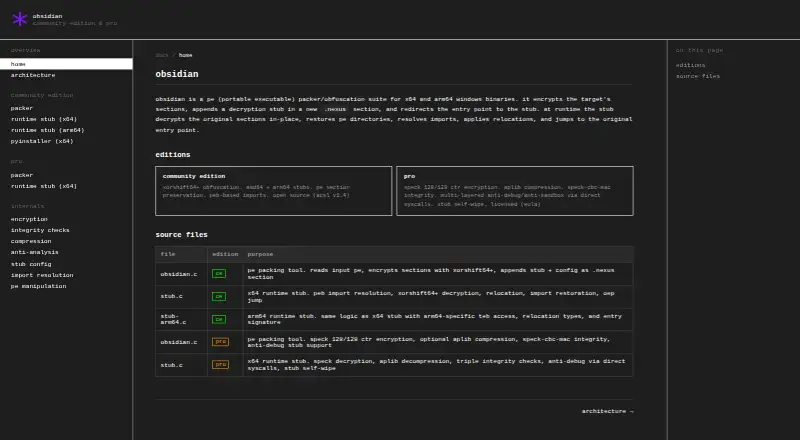
| Community Edition | Free | x64 and ARM64 PE binaries · xorshift64+ obfuscation · no compression · no anti-debugging |
| Obsidian | Free | No strings attached · Free without limits; no sign-up required |
| Sync Standard | $5 a month | 1 synced vault · 1 GB total storage · 5 MB maximum file size · 1 month version history · Per user, per month, billed monthly |
| Publish | $10 a month | Hosting for your site up to 4GB · Customizable theme and domain · Priority email support · Per site, per month, billed monthly |
| Sync Plus | $10 a month | 10 synced vaults · 10 GB total storage · 200 MB maximum file size · 12 month version history · Upgradable to 100 GB storage · Per user, per month, billed monthly |
| Catalyst | $25, paid once | Early access to beta versions · Community badges · Exclusive channels · One-time payment |
| Sync Standard | $48 a year | 1 synced vault · 1 GB total storage · 5 MB maximum file size · 1 month version history · $48.00 per user per year (= $4.00 per user/month, billed annually) |
| Commercial | $50 a year | Support development · Become a featured organization · Per user, per year |
| Publish | $96 a year | Hosting for your site up to 4GB · Customizable theme and domain · Priority email support · $96.00 per site per year (= $8.00 per site/month, billed annually) |
| Sync Plus | $96 a year | 10 synced vaults · 10 GB total storage · 200 MB maximum file size · 12 month version history · Upgradable to 100 GB storage · $96.00 per user per year (= $8.00 per user/month, billed annually) |
| Pro | Priced on request | SPECK 128/128 CTR · optional aPlib compression · integrity checks · anti-debugging and anti-sandbox · x64 only |
The facts
Each one read from Obsidian's own pages, with the date it was checked.
What it does
- Anti-analysis
- Pro's --ultra option adds direct-syscall anti-debugging, anti-sandbox checks, and stub-integrity enforcement.checked 15 Oct 2026
- Architecture support
- Community Edition supplies native AMD64 and ARM64 stubs, while the documentation marks ARM64 support for Pro as unfinished.checked 15 Oct 2026
- Bring-your-own-stub
- The project documents a BYOS approach in which users can modify or replace the runtime stub to avoid signature-based detection.checked 15 Oct 2026
- Build requirements
- The repository build instructions require a MinGW-w64 or LLVM/Clang Windows toolchain, with separate ARM64 tooling for ARM64 stubs.checked 15 Oct 2026
- Canvas
- Canvas provides an infinite space for laying out notes and connecting them to notes, attachments, and web pages.checked 4 Oct 2026
- CLI usage
- The documented command accepts an input executable and output executable, with debug and presentation flags available.checked 15 Oct 2026
- Commercial use
- Obsidian is free for commercial use, while its pricing page encourages organizations using it for work to purchase an optional Commercial license.checked 4 Oct 2026
- Community encryption
- Community Edition uses a custom xorshift64+ obfuscation scheme with a 64-bit key.checked 15 Oct 2026
- Compression
- Pro can optionally compress payloads with aPlib before encryption.checked 15 Oct 2026
- Custom section
- Packed files receive a new .nexus PE section containing the stub, configuration, and protected payload data.checked 15 Oct 2026
- Documentation depth
- DeepWiki maps the packer lifecycle, runtime stubs, PE manipulation, cryptography, build system, and configuration structures to source files.checked 15 Oct 2026
- Extensions
- Obsidian includes team-built core plugins and supports community plugins, themes, and an open API for customization.checked 4 Oct 2026
- Import handling
- The runtime stub has no normal import table and resolves Windows APIs by walking the PEB and matching CRC32 hashes.checked 15 Oct 2026
- Independent architecture summary
- DeepWiki describes a two-phase packer-stub model in which build-time encryption is followed by position-independent runtime decryption.checked 15 Oct 2026
- Independent cryptography detail
- DeepWiki explains that each payload byte receives an index-derived subkey mixed with Golden Ratio constants and multiple shifts.checked 15 Oct 2026
- Independent feature summary
- DeepWiki identifies multi-architecture support, PyInstaller handling, rolling-XOR cryptography, API-hash resolution, and PE metadata sanitization as core features.checked 15 Oct 2026
- Independent implementation detail
- DeepWiki reports that the packer validates PE32+ inputs, selects an architecture-specific stub, generates keys with BCryptGenRandom, adds .nexus, and recalculates the checksum.checked 15 Oct 2026
- Independent PE detail
- DeepWiki states that the packer may shift existing section data to make room for a new section header.checked 15 Oct 2026
- Independent terminology
- DeepWiki defines PE32+ targeting as 64-bit AMD64 and ARM64 and identifies the IAT as manually resolved to reduce static detection.checked 15 Oct 2026
- Integrity protection
- Pro applies SPECK-CBC-MAC integrity verification, including repeated checks during execution.checked 15 Oct 2026
- Licence
- The repository uses an Anti-Capitalist Software License that permits use by individuals, nonprofits, educational institutions, cooperatives, carbon-neutral organizations, and specified charitable or justice-focused groups.checked 15 Oct 2026
- Limit: Community security
- Community Edition provides obfuscation but no built-in anti-debugging or anti-sandbox defenses.checked 15 Oct 2026
- Limit: experimental feature
- The repository calls PyInstaller spec-file support experimental and asks users to report problems.checked 15 Oct 2026
The company
- Company identity
- The Gartner page separately identifies Obsidian Security as a private SaaS security company founded in 2017 in Newport Beach with 51–200 employees.checked 15 Oct 2026
The full review of Obsidian
Obsidian is a note-taking app that organizes thoughts in locally stored Markdown files and connects them with internal links. It suits people who want their notes available offline and value control over how they arrange and customize a personal knowledge base. Its free plan makes the core app accessible without sign-up, while syncing across devices and publishing a site are separate paid options.
Overview
Obsidian keeps notes as plain text Markdown files on the device, where they remain available without an internet connection. That local-first approach is a strong fit for readers who want dependable access to their notes and a file format that is not tied to an online-only workspace. It also means that built-in syncing is not part of the free plan: people who want the same vault synchronized across devices need a separate Sync plan.
Key features
Links, graph, and Canvas
Internal links connect notes, and Graph view turns those connections into a visual map. This can help readers spot relationships across a growing collection, though a graph is most useful when the notes have meaningful links to explore. Canvas offers an infinite layout for arranging notes alongside attachments and web pages, giving users a more spatial way to work than a sequence of documents.
Customization and capture
Core plugins, community plugins, themes, and an open API give users room to adapt the app to their own workflow. That flexibility is an advantage for people willing to shape their setup, but it makes Obsidian less compelling for anyone who wants a fixed, ready-made workspace. The Web Clipper works with Chrome, Safari, Firefox, Edge, Brave, Arc, Orion, and Vivaldi.
Sync, publishing, and support
Obsidian says Sync uses AES-256 end-to-end encryption, and its security page lists third-party audits of the clients and Sync service. Publish is for hosting a wiki, knowledge base, documentation, or digital garden, with hosting for a site up to 4GB. Obsidian directs questions and help requests to Discord; its forum is for feature requests, bug reports, and discussions.
Pricing
Free app and optional license
Obsidian: free. The free plan has no limits, requires no sign-up, and has no strings attached. Obsidian is free for commercial use, though the pricing page encourages organizations using it for work to buy an optional license.
Commercial: $50 a year, per user, billed yearly. It supports development and makes the organization a featured organization; it is optional for commercial use, not a prerequisite.
Catalyst: $25, paid once. This one-time payment includes early access to beta versions, community badges, and exclusive channels. It is suited to people who want those benefits, not users looking for sync or website hosting.
Paid services
Sync Standard: $4 a year, per user, per month, billed annually. It includes one synced vault, 1 GB total storage, a 5 MB maximum file size, and one month of version history. It is the lower-capacity choice for a single vault and smaller files.
Sync Plus: $8 a year, per user, per month, billed annually. It includes 10 synced vaults, 10 GB total storage, a 200 MB maximum file size, and 12 months of version history, with storage upgradable to 100 GB. The higher limits suit users with larger files, multiple vaults, or a need for longer version history.
Publish: $8 a year, per site, per month, billed annually. It includes hosting for a site up to 4GB, a customizable theme and domain, and priority email support. Because pricing is per site, readers planning to publish multiple sites should account for each one separately.
Platforms
Obsidian supports Android, iOS, Linux, macOS, and Windows. The Web Clipper is available in Chrome, Safari, Firefox, Edge, Brave, Arc, Orion, and Vivaldi.
Who it's for
Obsidian is a strong choice for people who want offline notes in plain text, with linking and flexible layouts for building a connected collection. It is less suited to anyone who expects included multi-device syncing or wants a managed public site at no additional cost: Sync and Publish are separately priced.
Pros and cons
- Pro: Local Markdown files stay accessible offline, which suits users who want their notes on-device without relying on an internet connection.
- Pro: Graph view and Canvas offer distinct ways to explore links and lay out notes, attachments, and web pages.
- Pro: The free plan has no limits or sign-up requirement, and commercial use is free.
- Con: Sync is a separate purchase, and Standard's 1 GB storage and 5 MB file cap may be restrictive for users with larger files.
- Con: Sync Plus costs more than Standard; its added storage, vaults, file-size allowance, and version history matter mainly to users who need those higher limits.
Alternatives
For a category-wide comparison, see Executable Packers.
- StarForce Reader is a free alternative for readers considering a tool in this category.
- UPX is a free alternative for readers considering a tool in this category.
- MPRESS is a free alternative for readers considering a tool in this category.
- AlushPacker is a free alternative for Windows users considering a tool in this category.
- Enigma Virtual Box is a free Windows alternative for readers considering a tool in this category.
- Sentinel EMS is a paid alternative with a free trial.
- Virbox Protector is a paid alternative with a free trial.
- VMProtect is a paid alternative with a free trial.
Verdict
Choose Obsidian if you want an offline-first collection of linked Markdown notes that you can shape with plugins, themes, and visual layouts. Its free plan is generous for note-taking, but readers who need synchronized vaults or a hosted site should expect separate charges; those who want an all-in-one online workspace should look elsewhere.
Getting started
- Open the Obsidian website.
- Choose the free Obsidian plan, which requires no sign-up.
- Install Obsidian on Android, iOS, Linux, macOS, or Windows.
- Use the Web Clipper with a supported browser to clip web content.
- Choose Sync or Publish if you need those paid services.
Limits worth knowing
The free Obsidian plan is described as having no limits. Sync Standard includes 1 GB of storage and a 5 MB maximum file size; Publish includes hosting for a site up to 4GB.
Questions
Is Obsidian free?
Yes. The Obsidian plan costs nothing and requires no sign-up.
Which platforms support Obsidian?
Obsidian is available on Android, iOS, Linux, macOS, and Windows.
What does Sync cost?
Sync Standard costs $5 a month per user. Sync Plus costs $10 a month per user.
What are the Sync storage limits?
Standard includes 1 GB of storage and a 5 MB maximum file size. Plus includes 10 GB and a 200 MB maximum file size.
What does Publish cost?
Publish costs $10 a month per site and includes hosting for a site up to 4GB.
Can organizations use Obsidian for work?
Obsidian is free for commercial use, and its pricing page encourages organizations using it for work to purchase an optional Commercial license. The license costs $50 a year per user.
Alternatives to Obsidian
- 1
Enigma Protector
WebAPILinuxSelf-hosted7.4 - 2

Virbox Protector
AndroidiOSLinuxmacOS7.1CN¥2,499 one-time - 3
VMProtect
LinuxmacOSWindows6.6 - 4
Crinkler
Free planWindows6.3Free plan - 5

Themida
Windows6.3From €79 a year - 6
Windows PE Packer
Free planWindows6.3Free plan