
CourtDrive
CourtDrive is a cloud-based court management system for legal teams handling eNotices, court dates, filings and records.
What CourtDrive is
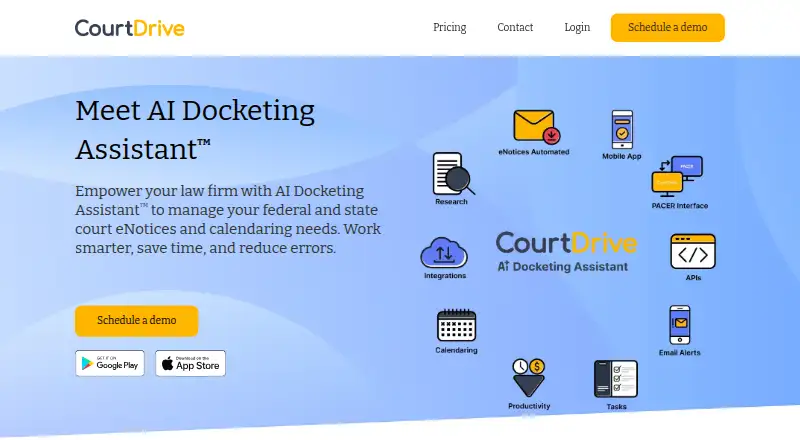
CourtDrive is a cloud-based court management system for legal teams handling eNotices, court dates, filings and records. It automatically shares eNotices with case teams, saves them to designated systems or drives, and makes them available through CourtAPI. Its AI Docketing Assistant uses a human-in-the-loop process to track court dates and legal deadlines. Calendar Rules and Clio Court Rules integrations calculate deadlines from court rules, and events can be added to Outlook or Google Calendar. CourtDrive connects directly with PACER and local courts through one interface, supporting all PACER queries. It converts PDFs into searchable text for Boolean keyword research without per-search charges. No-code integrations cover document storage, practice management and calendar tools; APIs and webhooks provide access to dockets, claims and PDFs. Android and iOS apps offer full functionality. Published pricing is for firms with 16 or fewer attorneys; larger firms need an enterprise license.
Good
- Automates sharing and saving court eNotices
- Calculates deadlines from court rules
- Searches PDF text with Boolean keywords
- No per-search charges for PDF research
- Mobile apps offer full functionality
Watch out
- No free plan
- Trial requires a demo and card
- Published pricing excludes firms over 16 attorneys
- 15 cents per upload beyond included amount
Who it suits
CourtDrive suits law firms that need to coordinate court notices, docket deadlines, filings and records. Its published pricing is for firms with 16 or fewer attorneys; larger firms need an enterprise license.
Verdict
CourtDrive brings court notices, deadline tracking, PACER access and searchable PDF research together. Check firm eligibility and included upload limits before choosing a paid plan.
Plans and prices
From CourtDrive's own pricing page, checked 1 Oct 2026.
| Plan | Price | What it gives you |
|---|---|---|
| Basic | $35 a month | firm license · includes up to 3 users · 250 uploads for Apps included · 15 cents per upload over included amount · billed at $468 $420/yr |
| Pro | $70 a month | firm license · includes up to 3 users · 250 uploads for Apps included · 15 cents per upload over included amount · billed at $948 $840/yr |
| Elite | $140 a month | firm license · includes up to 3 users · 250 uploads for Apps included · 15 cents per upload over included amount · billed at $1908 $1680/yr |
| Enterprise | Priced on request | firms with 16 or more attorneys · license based on highest level plan at signup |
The facts
Each one read from CourtDrive's own pages, with the date it was checked.
What it does
- AI calendaring
- Its AI Docketing Assistant uses a human-in-the-loop process to track court dates, filing deadlines and other legal deadlines.checked 1 Oct 2026
- API capabilities
- Its APIs provide programmatic access to CourtDrive and PACER data such as dockets, claims and PDFs, with webhooks available.checked 1 Oct 2026
- Court deadlines
- CourtDrive calculates deadlines from court rules through Calendar Rules and Clio Court Rules integrations and can add events to Outlook and Google Calendar.checked 1 Oct 2026
- Customer eligibility
- Published pricing is for new law-firm customers with 16 or fewer attorneys, while larger firms need an enterprise license.checked 1 Oct 2026
- eNotice automation
- It automatically shares eNotices with case teams, saves them to designated systems or drives, and exposes them through CourtAPI.checked 1 Oct 2026
- Integrations
- No-code integrations include NetDocuments, iManage, Dropbox, Google Drive, OneDrive, Box, Clio, SharePoint, Rocket Matter, Outlook and Google Calendar.checked 1 Oct 2026
- PACER access
- The product connects directly with PACER and local courts and supports all PACER queries through one interface.checked 1 Oct 2026
- PDF research
- Every PDF is transformed into searchable text, with Boolean keyword searching and no per-search charges.checked 1 Oct 2026
- Product purpose
- CourtDrive is a cloud-based court management system for federal and state eNotices, calendaring, integrations and filing-records workflows.checked 1 Oct 2026
- Security control
- Single sign-on supports Azure Active Directory.checked 1 Oct 2026
- State courts
- The service covers a majority of states, adds jurisdictions regularly and says new courts are added at no cost.checked 1 Oct 2026
- Support
- Support includes a help center, articles, videos, FAQs, email, phone and Zoom training; phone support is listed for Elite users.checked 1 Oct 2026
Money
- Free trial terms
- New attorney or law-firm customers can receive a 30-day trial after a demo, with a card required but not charged until the trial ends unless canceled.checked 1 Oct 2026
The company
- Headquarters
- Calabasas, California, United Stateschecked 23 Sep 2026
Where it runs
- Mobile apps
- CourtDrive offers iOS and Android mobile apps with full functionality.checked 1 Oct 2026
The full review of CourtDrive
CourtDrive is a cloud-based system for managing court notices, deadlines, filing records and legal research across federal and state courts. It best suits law firms that need PACER access and shared case workflows alongside deadline tracking. Its breadth is compelling, but firm eligibility, user counts and upload overages deserve close attention before subscribing.
Overview
CourtDrive brings court notices, docket monitoring, calendar rules, court access and searchable PDFs into one connected workflow. It can share eNotices with case teams, save them to designated systems or drives, and expose them through CourtAPI. That combination can reduce handoffs between docket monitoring, research and document storage for firms already working across those systems.
Coverage includes federal courts and a majority of state courts, with new jurisdictions added regularly at no cost. That breadth is useful for multi-state practices, though a firm should confirm that its courts are covered before relying on it for deadlines. CourtDrive also connects directly to PACER and local courts, supporting PACER queries through one interface.
Key features
Notices and deadlines
eNotices are automatically shared with case teams and can be routed to designated storage. The AI Docketing Assistant uses human review to track court dates, filing deadlines and other legal deadlines. Calendar Rules and Clio Court Rules integrations calculate dates from court rules, and events can be added to Outlook or Google Calendar. This mix of automation and human oversight is a practical fit for teams that want deadline support without treating automated dates as an unchecked final authority.
Research and integrations
CourtDrive converts PDFs into searchable text and supports Boolean keyword searches without per-search charges. That removes a metered research cost, though it does not remove the plan's separate upload allowance. No-code integrations include NetDocuments, iManage, Dropbox, Google Drive, OneDrive, Box, Clio, SharePoint, Rocket Matter, Outlook and Google Calendar. APIs provide access to CourtDrive and PACER data, including dockets, claims and PDFs, with webhooks for programmatic workflows.
Mobile, security and support
Its iOS and Android apps offer full functionality, which gives users a mobile route to the same product rather than a reduced companion. Single sign-on supports Azure Active Directory. Support includes a help center, articles, videos, FAQs, email, phone and Zoom training; phone support is for Elite users, making that distinction relevant to firms that expect to need it.
Pricing
Published prices apply to new law-firm customers with 16 or fewer attorneys. Each named plan is a firm license for up to three users and includes 250 uploads for Apps; additional uploads cost 15 cents each. The shared seat and upload limits mean firms should estimate both team size and filing volume, not just compare the monthly price.
- Basic: $35 a month; billed billed at $468 $420/yr. It is the lowest-cost entry point, but still has the same stated three-user and 250-upload limits as the higher plans.
- Pro: $70 a month; billed billed at $948 $840/yr. The supplied plan terms show the same user and upload allowances as Basic, so the price alone does not establish what additional inclusions it brings.
- Elite: $140 a month; billed billed at $1908 $1680/yr. It carries the same stated allowances, with phone support specifically available to Elite users.
- Enterprise: custom pricing for firms with 16 or more attorneys. The license is based on the highest-level plan at signup.
New attorney or law-firm customers can get a 30-day trial after a demo. A card is required, but is not charged until the trial ends unless the customer cancels. There is no free plan. Larger firms need an enterprise license rather than the published small-firm plans.
Platforms
CourtDrive supports web, iOS and Android, as well as API access. The API and webhooks make it relevant to firms that want to connect docket and PACER data to their own workflows; mobile apps extend the product to users away from a desktop.
Who it's for
CourtDrive is a strong candidate for small and midsize law firms that want eNotice routing, court-rule deadline calculations, PACER queries and PDF research within connected workflows. It is less suitable for a firm that needs more than three users on the listed plans, regularly exceeds 250 included app uploads, or cannot verify coverage for its courts. Larger practices should assess Enterprise pricing.
Pros and cons
- Pro: Notices can be routed to teams and document systems, reducing manual movement between docket alerts and firm storage.
- Pro: PACER access, local-court connections and Boolean-searchable PDFs bring court retrieval and research together, with no per-search fee.
- Pro: Court-rule integrations, calendar sync and human-in-the-loop calendaring offer multiple checks and destinations for deadline work.
- Con: The listed plans include only up to three users, a narrow allowance for larger teams even before the enterprise threshold.
- Con: Uploads are capped at 250 for Apps, then charged at 15 cents each, so high-volume firms can face extra costs.
- Con: Only Elite includes phone support, while firms with 16 or more attorneys need custom-priced Enterprise licensing.
Alternatives
For a broader comparison, see Legal Docketing Software.
- DocketBird is worth considering when a free library-access option or individual daily tracking of one case at $9.99 a month better matches the need.
- LawToolBox may fit teams looking for a user-count-based option; its plans require a minimum one-year commitment, billed annually or monthly.
- CourtAlert Case Management is another paid, web-based option to compare.
- DockItFlo may suit firms with 2–50 attorneys seeking per-attorney monthly pricing and AI calendaring; contact the vendor for current pricing.
- Deadlines.com is an alternative for firms seeking iOS, macOS, web and Windows support, with a 30+ cases plan at $20 a month and unlimited users.
- CaseDesk is worth a look for readers who want a free beta or a $290 a year Pro plan.
- LitDocket offers a free tier and trial, with a $49 a month Solo plan for up to 25 active cases.
- AnchorLex provides a free plan with five court orders per month, one synced calendar and no credit card requirement.
Verdict
CourtDrive is best for firms that want court notices, docket and rule-based deadline workflows, PACER and searchable PDFs to work together. Its broad integrations and full-function mobile apps make it a substantial option, but the three-user cap, upload overages and paid-plan structure can change the economics quickly. Choose it if your firm fits the licensing limits and its court coverage; look elsewhere if you need a free tier, more seats at the entry level or predictable high-volume upload costs.
Alternatives to CourtDrive
- 1
CaseDesk
Free planAndroidiOSAPILinux8.1From $290 a year - 2

Docket Alarm
Free planAndroidiOSWebAPI8.1Free plan - 3

DocketBird
Free planWebAPI7.3From $9.99 a month - 4
LitDocket
Free planWebAPISelf-hosted7.3From $470 a year - 5

Filevine
Free planWebAPI6.8Free plan - 6

AnchorLex
Free planWeb6.6From $49 a month