
AnchorLex
AnchorLex is a web-based deadline docketing tool for legal staff who process court-order PDFs and manage required dates in Outlook or Google Calendar.
What AnchorLex is
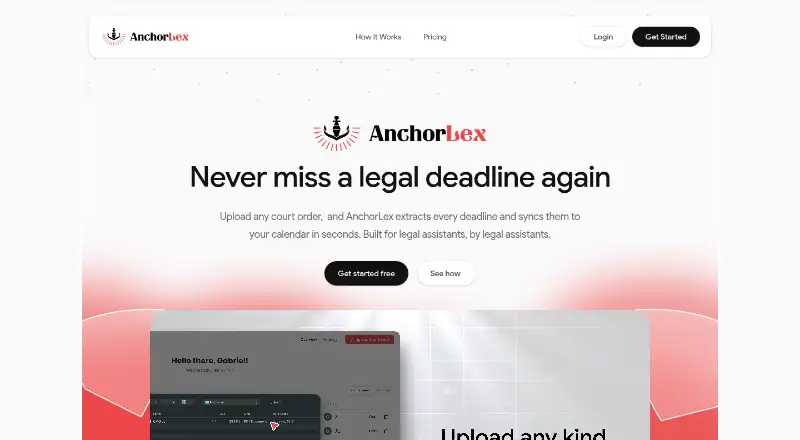
AnchorLex is a web-based deadline docketing tool for legal staff who process court-order PDFs and manage required dates in Outlook or Google Calendar. It accepts scanned PDFs and typed orders, including case management, trial, and scheduling orders. Its AI identifies anchor dates, calculates related deadlines, and flags conflicts. Users can review and confirm dates before calendar sync, compare documents side by side, and edit dates with one click. The homepage lists integrations with Google Calendar and Microsoft Outlook, which can be connected separately or together. AnchorLex is intended for legal administrators, assistants, paralegals, associates, attorneys, and other legal support staff. Its terms limit intended processing to orders from U.S. local, county, state, and federal courts, excluding specialty, administrative, and non-U.S. courts. The terms also say its training scope is Florida court order documents and warn that substantially different formats may be less accurate. The free plan allows five court orders per month and one sync calendar; paid monthly plans begin with Boutique at $49 a month.
Good
- Accepts scanned PDFs and typed court orders.
- Flags conflicts and calculates related deadlines.
- Users can review dates before calendar sync.
- Connects with Google Calendar, Outlook, or both.
Watch out
- The free plan allows five court orders per month.
- The free plan supports one sync calendar.
- Intended processing excludes specialty, administrative, and non-U.S. courts.
- Substantially different court-order formats may be less accurate.
Who it suits
AnchorLex suits legal administrators, assistants, paralegals, associates, attorneys, and other legal support staff docketing court-order deadlines. Its stated scope is U.S. local, county, state, and federal court orders, with Florida documents as its training scope.
Verdict
AnchorLex combines deadline extraction with review controls and calendar syncing for legal support workflows. Its stated court scope and Florida-focused training are important limits to consider, as is the free plan’s monthly order cap.
Plans and prices
From AnchorLex's own pricing page, checked 3 Oct 2026.
| Plan | Price | What it gives you |
|---|---|---|
| Free Plan | Free | 5 court orders per month · 1 sync calendar · no credit card required · Free forever |
| Boutique | $49 a month | 30 court orders per month · 1 sync calendar · email support · Monthly; yearly option shown as “Yearly (-20%)” |
| Mid-Sized | $99 a month | 100 court orders per month · up to 10 synced calendars · priority support · Monthly; yearly option shown as “Yearly (-20%)” |
| Big Law | $299 a month | 500 court orders per month · up to 50 synced calendars · personal account manager · Monthly; yearly option shown as “Yearly (-20%)” |
The facts
Each one read from AnchorLex's own pages, with the date it was checked.
What it does
- Calendar integrations
- The homepage lists Google Calendar and Microsoft Outlook integrations, with the option to connect either or both.checked 3 Oct 2026
- Deadline extraction
- Its AI identifies anchor dates, calculates relative deadlines, and flags conflicts in uploaded orders.checked 3 Oct 2026
- Document input
- The homepage says it accepts scanned PDFs and typed court orders, including case management, trial, and scheduling orders.checked 3 Oct 2026
- Extra calendars
- The homepage says additional calendars beyond plan allowances can be added for $10/month each.checked 3 Oct 2026
- Geographic scope
- The terms limit intended processing to court orders from United States local, county, state, and federal courts, and exclude specialty, administrative, and non-U.S. courts.checked 3 Oct 2026
- Purpose
- AnchorLex is a SaaS deadline docketing tool for Outlook and Google Calendar that processes court-order PDFs listing required deadlines.checked 3 Oct 2026
- Review controls
- Users can review and confirm extracted dates before calendar sync, compare documents side by side, and edit dates with one click.checked 3 Oct 2026
- Security
- The terms state that AnchorLex employs typical encryption systems and relies on third-party services including Cloudflare, Google Cloud, and Stripe.checked 3 Oct 2026
- Sensitive information
- The terms say AnchorLex is not intended to handle sensitive client information or legal work product and does not guarantee the security of uploaded sensitive information.checked 3 Oct 2026
- Support and demo
- The homepage lists email contact and offers a free 15-minute demo showing a court order docketed into Outlook or Google Calendar.checked 3 Oct 2026
- Training scope
- The terms say deadline output is trained through state and county court order documents from Florida and may be less accurate for substantially different formats.checked 3 Oct 2026
- Users
- The maker says the application is intended for legal administrators, legal assistants, paralegals, associates, attorneys, and other legal support staff.checked 3 Oct 2026
The company
- Headquarters
- Miami, Florida, United Stateschecked 28 Sep 2026
The full review of AnchorLex
AnchorLex is a web-based docketing service for legal teams that turn court-order PDFs into calendar deadlines. It suits legal administrators, assistants, paralegals, associates, attorneys, and other support staff working with covered U.S. orders. The strongest case for it is assisted extraction with a deliberate review step; jurisdiction, document-handling, and volume limits should shape the buying decision.
Overview
Upload scanned or typed case-management, trial, and scheduling orders, and AnchorLex identifies anchor dates, calculates related deadlines, and flags conflicts. Before anything reaches a calendar, users can confirm the proposed dates, compare source documents side by side, and make one-click edits. That workflow is more defensible than an automatic import, although every deadline still merits professional verification.
Intended coverage is limited to local, county, state, and federal courts in the United States. Specialty and administrative courts and non-U.S. courts fall outside that scope. Training uses Florida state and county court-order documents, so substantially different formats may be less accurate. AnchorLex also says it is not intended for sensitive client information or legal work product and does not guarantee the security of sensitive uploads. It uses typical encryption and third-party services including Cloudflare, Google Cloud, and Stripe.
Key features
PDF-to-deadline extraction
Processing both scans and typed orders broadens the documents a support team can submit. Anchor-date recognition and rules-based calculation can reduce manual date arithmetic, while conflict flags direct attention to possible inconsistencies. The Florida-centered training and stated court exclusions make this a focused tool rather than a universal court-order reader.
Review before synchronization
Confirmation, side-by-side comparison, and one-click editing give staff control over the final docket. These are meaningful safeguards for teams that want an audit point before publication, but they do not eliminate the risk of an incorrect interpretation.
Calendar connections
Google Calendar and Microsoft Outlook can be connected individually or together. Plan allowances determine how many calendars can sync; calendars beyond an allowance cost $10 per month each. A free 15-minute demonstration shows a court order docketed into either supported calendar, and email contact is offered for support.
Pricing
AnchorLex has a permanent free tier and paid plans starting at $49 per month. The free plan costs $0.00 per month forever, requires no credit card, processes five court orders monthly, and permits one sync calendar. It is a sensible way to validate the workflow or handle very light volume, but the five-order ceiling is restrictive for an active practice.
Boutique costs $49.00 per month, with a yearly option shown as “Yearly (-20%).” It raises capacity to 30 court orders per month, keeps one synced calendar, and adds email support. This fits a small practice with modest intake; teams needing several calendars or more than 30 orders will outgrow it quickly.
Mid-Sized is $99.00 per month, also with a “Yearly (-20%)” option. Its 100-order allowance, up to 10 synced calendars, and priority support suit a larger support group coordinating multiple matters and users.
Big Law costs $299.00 per month, with the same displayed yearly discount option. It permits 500 court orders monthly, up to 50 synced calendars, and includes a personal account manager. That capacity is aimed at high-volume organizations; smaller teams would be paying for headroom they may not use. Additional calendars are $10 per month each.
Platforms
AnchorLex is delivered on the web. Calendar output targets Google Calendar and Microsoft Outlook.
Who it's for
Choose AnchorLex when a U.S. legal team regularly receives supported court orders and wants AI-assisted calculations without surrendering human approval before sync. It is especially practical for Florida-oriented workflows and organizations whose volume matches one of the monthly quotas. Look elsewhere for non-U.S., specialty, or administrative court work, substantially different order formats, or workflows involving sensitive client information or legal work product.
Pros and cons
- Pro: Scanned and typed orders are both accepted, covering common court-order formats.
- Pro: Anchor-date extraction, relative calculations, and conflict flags reduce repetitive docketing work.
- Pro: Confirmation, comparison, and editing controls provide a review checkpoint before calendar sync.
- Con: Intended court coverage excludes specialty, administrative, and non-U.S. courts.
- Con: Florida-focused training may reduce accuracy on substantially different document formats.
- Con: The free plan allows only five orders and one calendar per month.
- Con: The terms caution against sensitive uploads and do not guarantee their security.
Alternatives
For a broader device footprint and a paid annual professional plan, consider CaseDesk; it supports Android, iOS, Linux, macOS, and Windows, with a 90-day free beta and a $290-per-year Pro plan.
DocketBird is a web alternative with library access and an individual plan at $9.99 per month for daily tracking of one case, making it better for single-case monitoring than AnchorLex's order-processing workflow.
Filevine is the better direction when you need custom matter, document, billing, or optional intake, deposition, signature, and AI packages rather than a focused docketing tool.
LitDocket offers a 14-day trial, a limited read-only tier afterward, and a $49-per-month Solo plan for up to 25 active cases.
Docket Alarm is oriented to docket searches, views, and documents, with a five-actions-per-week free allowance and pay-as-you-go access.
AcclaimIP uses annual, prepaid, per-seat licensing with renewal, suited to teams seeking a quoted seat-based service.
Docket Enterprise is an on-premise option sold by inquiry.
CourtAlert Case Management offers cloud or on-premise deployment with inquiry-based pricing and an additional cloud hosting fee.
For a category-wide comparison, see Legal Docketing Software.
Verdict
AnchorLex is a strong fit for U.S. legal support teams that want extracted deadlines reviewed before syncing to Google Calendar or Outlook, particularly at volumes covered by its Mid-Sized and Big Law tiers. Choose it for that controlled PDF-to-calendar workflow; choose another system when your courts fall outside its scope, your documents differ markedly from Florida training material, or sensitive legal content cannot be kept out of the service.
Alternatives to AnchorLex
- 1
CaseDesk
Free planAndroidiOSAPILinux8.1From $290 a year - 2

Docket Alarm
Free planAndroidiOSWebAPI8.1Free plan - 3

DocketBird
Free planWebAPI7.3From $9.99 a month - 4
LitDocket
Free planWebAPISelf-hosted7.3From $470 a year - 5

CourtDrive
AndroidiOSWebAPI6.9From $35 a month - 6

Filevine
Free planWebAPI6.8Free plan