
Docket Alarm
Docket Alarm is a litigation intelligence platform for searching, tracking, and analyzing court dockets and documents.
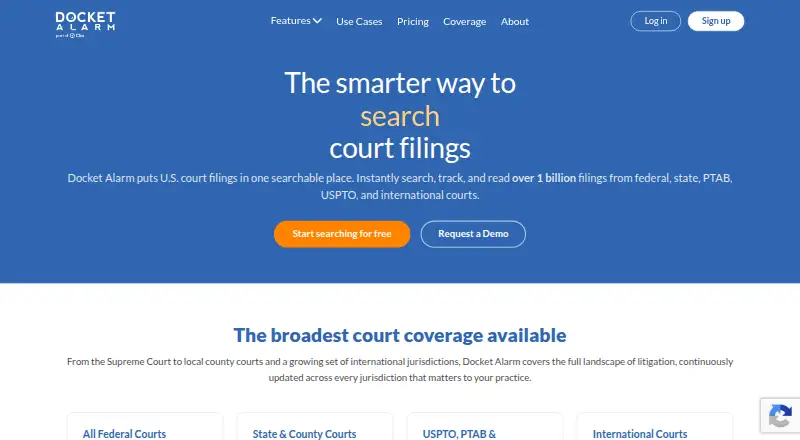
What Docket Alarm is
Docket Alarm is a litigation intelligence platform for searching, tracking, and analyzing court dockets and documents. Its maker says the collection includes over 1 billion dockets and documents from courts in the United States and beyond. Search supports full text, Boolean queries, and phrase matching, with filters for court, date range, judge, party, attorney, and case type. Users can follow cases, parties, attorneys, firms, keyword searches, and Nature of Suit categories, receiving email updates up to 16 times a day. The platform offers indexed filings, direct PACER connections, and bulk downloads of case documents. Talk to Docket answers natural-language questions about a docket and cites entries and documents for verification. Analytics cover motion grant and denial rates, time to decision, and outcome trends by court and judge; Timeline turns docket entries into a visual chronology. The REST API supports case search, document retrieval, tracking, and natural-language questions. An ECF integration can deliver filings from a connected court filing account inside Docket Alarm at no cost. The free tier allows five weekly actions and excludes government-purchased documents such as PACER filings.
Good
- Search includes Boolean queries, phrases, and detailed filters.
- Case and party alerts can arrive up to 16 times daily.
- Talk to Docket cites docket entries and documents.
- Analytics cover motion outcomes and decision timing.
- ECF integration delivers tracked filings at no cost.
Watch out
- Free plan allows five actions per week.
- Free plan excludes government-purchased documents such as PACER filings.
- PACER and state court fees are billed separately on Flat-Fee.
Who it suits
Docket Alarm is aimed at legal professionals, including litigators, IP counsel, and business development teams. Its search, monitoring, analytics, and API tools may suit people who need to follow cases or court activity.
Verdict
Docket Alarm combines docket search and alerts with document access, analytics, and an API. Its free tier has a strict weekly action limit, and some government document fees remain separate from the Flat-Fee plan.
Plans and prices
From Docket Alarm's own pricing page, checked 14 Oct 2026.
| Plan | Price | What it gives you |
|---|---|---|
| Free | Free | 5 actions per week · no credit card · excludes government-purchased documents |
| Pay-As-You-Go | $39.99 a month | unlimited search · $4/document · $3/day case alerts · $3/case update · PACER fees may apply · per month + per-use fees |
| Flat-Fee | $99 a month | unlimited search · unlimited document access · unlimited alerts and tracking · PTAB and TTAB analytics · PACER and state document fees separate · per user / month |
| Enterprise | Priced on request | teams of 5+ attorneys · litigation analytics · motion analytics · SSO · dedicated account manager · volume-based per-seat pricing |
The facts
Each one read from Docket Alarm's own pages, with the date it was checked.
What it does
- AI assistant
- Talk to Docket answers docket questions in plain English and cites the docket entries and documents supporting its answers.checked 14 Oct 2026
- Alerts
- Users can track cases, parties, attorneys, firms, keyword searches and Nature of Suit categories, with updates by email up to 16 times a day.checked 7 Oct 2026
- Alerts and tracking
- Users can track cases, parties, attorneys, courts or keywords and receive notifications when filings arrive.checked 14 Oct 2026
- Analytics
- Litigation and motion analytics show motion grant and denial rates, average time to decision, and outcome trends by court and judge.checked 7 Oct 2026
- API
- The REST API can search cases, retrieve dockets and documents, track cases or saved searches, and answer natural-language questions about cases.checked 7 Oct 2026
- API capabilities
- Documented API workflows include login, full-text search, direct PACER search, docket retrieval, document retrieval, tracking and push notifications.checked 14 Oct 2026
- API client
- Docket Alarm documents a Python client library and sample test program for API development.checked 14 Oct 2026
- API documentation depth
- The API documentation describes version 1.14, released in 2013 and last updated in July 2024, with endpoint examples and authentication guidance.checked 14 Oct 2026
- Bulk downloads
- Users can download an entire case docket as one bundle instead of retrieving filings individually.checked 14 Oct 2026
- Court coverage
- The service says it covers all federal courts, 45-plus states, USPTO, PTAB, TTAB, ITC and expanding international jurisdictions.checked 14 Oct 2026
- Court data
- The maker says the platform provides access to over 1 billion dockets and documents from courts in the United States and beyond.checked 7 Oct 2026
- Document access
- The platform stores filings such as complaints, motions, orders and expert reports, indexes them for full-text search and provides downloads.checked 14 Oct 2026
- Documents
- Users can read indexed court filings, connect directly to PACER, and bulk download a case’s documents.checked 7 Oct 2026
- Extra court fees
- PACER and state court document fees are billed separately on the Flat-Fee plan, and the free plan excludes government-purchased documents.checked 7 Oct 2026
- Founder transition
- LawNext reported on November 30, 2023 that founder Michael Sander left after the vLex acquisition; the article said the product was collecting more than 350,000 U.S. dockets and documents daily.checked 14 Oct 2026
- Integration
- The ECF integration lets users connect a court filing account so tracked case filings can be delivered inside Docket Alarm at no cost.checked 7 Oct 2026
- Integrations
- GetApp lists Zapier, Clio and Google Calendar integrations.checked 14 Oct 2026
- Intended users
- The maker says Research & Monitoring is built for legal professionals and specifically describes uses for litigators, IP counsel and business development teams.checked 7 Oct 2026
- Limit: coverage and speed
- Reviewers report slower alerts than some competitors, limited county/state coverage including New York and Massachusetts, and occasional PDF loading delays.checked 14 Oct 2026
- Litigation analytics
- Analytics profile judges, parties, attorneys and firms, including grant rates, denial rates, decision times and outcome trends.checked 14 Oct 2026
- Mobile support
- GetApp lists web, Android and iPhone/iPad support; no native Docket Alarm app listing was identified in the researched app stores.checked 14 Oct 2026
The company
- Company
- Docket Alarm says it is part of Clio and that Clio acquired vLex in 2025, bringing Docket Alarm into Clio.checked 7 Oct 2026
- Company identity
- Crunchbase identifies the legal name as Docket Alarm, Inc., founded in 2012, headquartered in New York and employing 1–10 people.checked 14 Oct 2026
Money
- Limit: billing complaints
- BBB records complaints alleging unexpected $99 charges, duplicate document fees and charges continuing after cancellation; one 2026 complaint records a refund resolution.checked 14 Oct 2026
The full review of Docket Alarm
Docket Alarm is a web and API platform for searching, monitoring and analyzing court dockets and filings. It is best suited to legal professionals who need continuing case intelligence, with litigators, IP counsel and business development teams among its stated users. Its research and monitoring breadth is compelling, but the right plan depends on how often you retrieve documents and whether separate court fees fit your budget.
Overview
The platform brings case and document search, alerts, analytics and docket tools into one service. Its maker says it covers more than 1 billion dockets and documents from courts in the United States and beyond, including U.S. federal courts, 43 or more states, USPTO, PTAB, TTAB, ITC and international courts. Case law and docket search are both supported.
Search combines full text, Boolean queries and exact-phrase search with filters for court, date range, judge, parties, attorneys and case type. That range helps narrow research across varied jurisdictions; the value is strongest for professionals who need to follow cases or patterns over time, rather than occasional one-off lookups.
Key features
Monitoring and documents
Users can track cases, parties, attorneys, firms, keyword searches and Nature of Suit categories, with email updates as often as 16 times a day. That cadence suits active matters where developments need prompt attention, though the Pay-As-You-Go plan charges separately for case alerts and updates. Users can read indexed filings, connect directly to PACER and bulk-download a case’s documents. Government-purchased documents are excluded from the free plan, and PACER and state court document fees remain separate on Flat-Fee.
Analysis and workflow
Talk to Docket answers natural-language questions about a docket and cites entries and documents so readers can verify its responses. Litigation and motion analytics surface grant and denial rates, average decision times and outcome trends by court and judge, a useful layer for teams comparing judicial patterns. Timeline turns docket entries into a visual case chronology. The ECF integration can deliver tracked case filings inside Docket Alarm at no cost when users connect a court filing account.
API and security
The REST API supports case search, docket and document retrieval, tracking cases or saved searches, and natural-language case questions. It is a practical fit for teams building docket intelligence into other workflows. The privacy policy says payment details are encrypted with AES-256 and handled by a PCI-certified processor; Docket Alarm employees cannot access them.
Pricing
Docket Alarm uses a freemium model, but its free tier is a limited sampler: free, with five actions per week across searches, docket views and document views. It excludes government-purchased documents such as PACER filings, so it is unlikely to sustain regular legal research.
Pay-As-You-Go costs $39.99 a month, billed monthly, plus per-use fees. It includes unlimited search, while documents cost $4 each, case alerts cost $3 per day and each case update costs $3. This keeps the base commitment below Flat-Fee, but frequent document retrieval or monitoring can make usage costs add up.
Flat-Fee costs $99 a month, billed per user per month. It provides unlimited search, document access, alerts and tracking, making it the clearer choice for an individual with steady research or monitoring needs. PACER and state court document fees are still billed separately, so “unlimited” does not remove those government charges.
Enterprise has custom pricing, billed by volume with favorable per-seat pricing, and is for teams of five or more. It adds litigation and motion analytics, SSO and a dedicated account manager. The pricing page’s support team can help compare plans; smaller teams or solo users should weigh whether the individual plans cover their needs.
Platforms
Docket Alarm is available on the web and through its REST API. Those options suit browser-based research and software integrations, rather than a native mobile-app workflow.
Who it's for
Litigators can use the search and alerts to follow active cases; IP counsel can draw on coverage that includes patent and trademark venues; and business development teams can monitor firms, parties and attorneys. Analytics and enterprise controls make the product more relevant to teams with recurring research needs. It is less persuasive for casual users who need only occasional documents, particularly if those documents carry separate court fees.
Pros and cons
- Pro: Broad docket and document coverage combines with detailed search filters, supporting research across many courts and case types.
- Pro: Alerts cover cases, people, firms, queries and Nature of Suit categories, with email updates up to 16 times daily.
- Pro: Docket-cited AI answers, visual timelines and court- and judge-level analytics add context beyond a basic docket lookup.
- Con: The free plan allows only five actions per week and excludes government-purchased documents, limiting its usefulness for active matters.
- Con: Pay-As-You-Go adds document, alert and update charges to its monthly price; Flat-Fee still leaves PACER and state court document fees separate.
- Con: Enterprise is aimed at teams of five or more, leaving smaller groups to choose among individual plans.
Alternatives
For broader category browsing, see Legal Case Analytics Software, Legal Research Software and Legal Docketing Software.
LegalLink is worth considering for web-based legal research centered on Australian cases, with a free tier and a Standard plan that includes 50 AI consultations and 20 case summaries monthly for A$219.90 a year. UpLaw offers a free public legal corpus and a larger daily research quota with a free account, making it an alternative for readers focused on corpus research and saved work. Ex Parte is a paid web alternative with a free trial. Premonition is a paid option available on web and through an API. TheProfesseer offers a one-time dataset purchase billed per court or tribunal, which may suit buyers seeking a delivered dataset rather than ongoing docket monitoring. CaseParity offers one-time public-records consumer reports, so it serves a different, report-oriented need. Docket Navigator is a paid web and API alternative with a free trial. Lexis+ is a paid research alternative with a free trial and Android, iOS and web access.
Verdict
Docket Alarm is a strong fit for legal professionals who need ongoing docket monitoring, document access and litigation analytics across multiple courts. Its combination of detailed search, configurable alerts and docket-focused analysis is the central reason to choose it. Look elsewhere if your use is infrequent, if per-use charges would be difficult to predict, or if you need government court documents without separate fees.
Getting started
- Visit the Docket Alarm website.
- Create an account and choose the free plan or a paid plan.
- Use web access or connect through the REST API for supported case searches and retrieval.
- Connect a court filing account through ECF to receive tracked case filings inside Docket Alarm at no cost.
- If using PACER or state court documents on Flat-Fee, account for their separately billed document fees.
Limits worth knowing
The free plan allows five actions per week across searches, docket views, and document views, and excludes government-purchased documents such as PACER filings. Pay-As-You-Go charges $39.99 a month plus per-use fees, including $4 per document, $3 per day for case alerts, and $3 per case update. Flat-Fee costs $99 per user per month, with PACER and state court document fees billed separately.
Questions
Is Docket Alarm free?
Yes. Its Free plan costs 0.00 USD and allows five actions per week across searches, docket views, and document views. It excludes government-purchased documents such as PACER filings.
What does Pay-As-You-Go cost?
It costs $39.99 a month plus per-use fees. Listed charges include $4 per document, $3 per day for case alerts, and $3 per case update.
What does the Flat-Fee plan cost?
Flat-Fee costs $99 per user per month and includes unlimited search, document access, alerts, and tracking. PACER and state court document fees are billed separately.
Which courts and sources does it cover?
Coverage includes U.S. federal courts, 43 or more U.S. states, the USPTO, PTAB, TTAB, ITC, and international courts. The maker says the platform provides access to over 1 billion dockets and documents from courts in the United States and beyond.
Does Docket Alarm have an API?
Yes. Its REST API can search cases, retrieve dockets and documents, track cases or saved searches, and answer natural-language questions about cases.
Who makes Docket Alarm?
Docket Alarm says it is part of Clio. It also says Clio acquired vLex in 2025, bringing Docket Alarm into Clio.
Alternatives to Docket Alarm
- 1

Indian Kanoon
Free planAndroidWebAPI7.6From ₹500 a month - 2

HeinOnline
Free planAndroidiOSWeb7.5Free plan - 3
CanLII
Free planWebAPI7.2From C$100 a year - 4

Fastcase
AndroidiOSWebWindows7.0From $695 a year - 5
Manupatra AI Search
AndroidiOSWebWindows6.9From ₹5,000 a year - 6

Bloomberg Law
AndroidiOSWebAPI6.7