UpLaw
UpLaw is a web-based legal research engine centered on primary law.
What UpLaw is
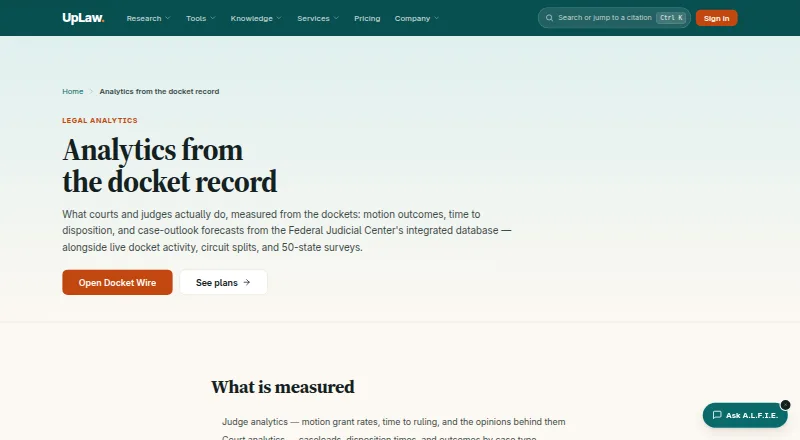
UpLaw is a web-based legal research engine centered on primary law. Its library spans federal and state opinions, the U.S. Code, regulations, Federal Register materials, public laws, court rules, and bills, with citations cross-linked to source documents. Ask UpLaw answers research questions with citations, while argument-building tools and deep-research memos provide verified citations. The citator, docket intelligence, and analytics extend research into litigation activity and outcomes. Analytics cover judge motion-grant rates and ruling times, court caseloads and outcomes, attorney and firm dockets, and case-outlook forecasts built from more than ten million Federal Judicial Center docket rows. Docket Wire shows live federal district, bankruptcy, and appellate filings, filterable by court and filing type. Browsing Docket Wire, authority splits, and 50-state surveys is free. Judge, court, and attorney analytics and forecasts are in Professional. Plans include Free at no cost, Economy at $43.19 a month, Business at $61.11 a month, and Professional at $75.51 a month, with yearly billing totals shown for paid plans. A.L.F.I.E. and UpCite share the corpus and document identifiers through one login. UpLaw provides legal information and tools rather than legal advice.
Good
- Broad federal and state primary-law library
- Citations link directly to source documents
- Live federal filing feed with court filters
- Forecasts use over ten million docket rows
- Free access to Docket Wire and surveys
Watch out
- Judge, court, and attorney analytics require Professional
- Economy costs $43.19 a month
- Access is provided through the web platform
Who it suits
UpLaw suits lawyers, researchers, firms, and in-house teams working across multiple jurisdictions. It is useful when primary-law searching, docket monitoring, cited AI answers, or litigation analytics are central needs.
Verdict
Choose UpLaw for primary-law research that also needs docket intelligence, cited AI assistance, or litigation analytics. Look elsewhere if you need judge, court, and attorney analytics without the Professional plan, or if a non-web platform is essential.
Plans and prices
From UpLaw's own pricing page, checked 15 Oct 2026.
| Plan | Price | What it gives you |
|---|---|---|
| Free | Free | Search and read public legal corpus · free account adds larger daily quota, saving, comments, cross-device sync |
| Business | — | Everything in Economy · practical-law library · guides · checklists · toolkits · forms · IP filings · citation-graph analysis · Monthly or annually; annual billing discounted 15% |
| Economy | — | Unlimited primary-law research · citation tools · docket tracking · summaries · Monthly or annually; annual billing discounted 10% |
| Professional | — | Full platform · ALFIE · Ask UpLaw · Brief Check · judge and court analytics · expert Q&A · complete corpus · Monthly or annually; annual billing discounted 20% |
| Team or enterprise | Priced on request | Invoicing · onboarding · firms and in-house teams · Seat-based pricing |
The facts
Each one read from UpLaw's own pages, with the date it was checked.
What it does
- 50-state surveys
- UpLaw offers surveys that compare the law across all U.S. jurisdictions on a question.checked 15 Oct 2026
- AI tools
- Ask UpLaw answers research questions with citations to source documents, and the product also offers argument building and deep-research memos with verified citations.checked 29 Sep 2026
- Analytics
- Its analytics cover judge motion grant rates and ruling times, court caseloads and outcomes, attorney and firm dockets, and case-outlook forecasts.checked 29 Sep 2026
- Analytics data sources
- Analytics are built from federal court docket feeds, RECAP, and the Federal Judicial Center Integrated Database, with figures linked to the source rows.checked 15 Oct 2026
- API documentation availability
- The official site navigation includes an 'API for developers' entry, but the linked API page was inaccessible when checked.checked 15 Oct 2026
- Ask UpLaw
- Ask UpLaw accepts a research question and returns an answer with citations to the documents used.checked 15 Oct 2026
- Attorney and firm analytics
- UpLaw tracks the dockets on which attorneys and firms appear and how those cases ended.checked 15 Oct 2026
- Audience and limits
- UpLaw offers seat-based team or enterprise pricing for firms and in-house teams, and states that it provides legal information and tools rather than legal advice.checked 29 Sep 2026
- Authority splits
- The service detects splits of authority from opinions that describe them and presents links to the relevant material.checked 15 Oct 2026
- Brief Check
- Brief Check extracts citations from a brief, resolves them against UpLaw's index, and flags treatment; CiteCheck verifies that citations exist and what they are cited for.checked 15 Oct 2026
- Case Outlook
- Case Outlook uses survival curves and outcome forecasts for case cohorts derived from more than ten million Federal Judicial Center docket rows.checked 15 Oct 2026
- Citator
- The citator reports treatment such as overruling, reversal, questioning, distinguishing, and following, with passages from citing opinions.checked 15 Oct 2026
- Court analytics
- Court analytics cover caseloads, disposition times, and outcomes by case type.checked 15 Oct 2026
- Data sources
- Analytics use federal court docket feeds, RECAP, and the Federal Judicial Center Integrated Database, and every figure links to the rows used to compute it.checked 29 Sep 2026
- Docket Wire
- Docket Wire provides live federal district, bankruptcy, and appellate filings filterable by court and filing type.checked 15 Oct 2026
- Documentation and support
- The official site navigation lists a knowledge base, practice guides, forms and templates, articles, glossary, blog, and services.checked 15 Oct 2026
- Forecast scale
- Case Outlook forecasts use more than ten million Federal Judicial Center docket rows.checked 29 Sep 2026
- Independent integrations listing
- TrustRadius lists DocuSign, BambooHR, Lucca, and Personio integrations and describes an open API for workflow automation.checked 15 Oct 2026
- Independent listed pricing
- Software Advice lists Uplaw plans at €1,200 per feature per year, €5,900 flat per year, and €10,000 flat per year.checked 15 Oct 2026
Where it runs
- Apple app capability
- The iOS app lets employees view and simulate option gains, follow vesting, inspect key figures and documents, and manage profile information.checked 15 Oct 2026
- Apple app system requirement
- The listed app requires iOS or iPadOS 12.0 or later and is 47.7 MB.checked 15 Oct 2026
The company
- Company listing
- LinkedIn describes Uplaw Equity Management Solution as privately held, founded in 2018, headquartered in Paris, with 2–10 employees.checked 15 Oct 2026
Money
- Free analytics
- Browsing Docket Wire, splits of authority, and 50-state surveys is free; judge, court, and attorney analytics and forecasts are included in Professional.checked 29 Sep 2026
- Free analytics access
- Docket Wire, authority splits, and 50-state surveys can be browsed without a subscription, while judge, court, attorney analytics, and forecasts require Professional.checked 15 Oct 2026
The full review of UpLaw
UpLaw is a web-based legal research and litigation-intelligence service built around a broad primary-law corpus. It suits lawyers, researchers, and teams that want dockets, cited AI assistance, and outcome analytics alongside ordinary authority searching. Its strongest value appears at Professional level; lower tiers are more focused research subscriptions.
Overview
UpLaw brings federal and state opinions, the U.S. Code, regulations, Federal Register material, public laws, court rules, and bills into one cross-linked library. Citations connect related documents, making it practical to move from an authority to the material it cites. The service also offers fixed-price legal services, while clearly positioning its software as legal information and tools rather than legal advice.
Its litigation side covers judge motion-grant rates and ruling times, court caseloads and outcomes, attorney and firm dockets, and case-outlook forecasts. Docket Wire supplies live federal district, bankruptcy, and appellate filings, filterable by court and filing type. Analytics draw on federal court docket feeds, RECAP, and the Federal Judicial Center Integrated Database, and each figure links to the rows used to calculate it. Case Outlook uses more than ten million Federal Judicial Center docket rows, giving the forecasts a substantial underlying dataset.
Key features
Primary-law research and AI
Ask UpLaw answers research questions with citations to source documents, while argument-building tools and deep-research memos provide verified-citation workflows for more structured work. That combination is useful when a researcher needs a draftable explanation but still wants a direct path back to authority. A.L.F.I.E. and UpCite use the same corpus and document identifiers under one login, reducing friction between research and citation tasks.
Dockets and analytics
Docket Wire is a useful free entry point for monitoring federal filings and narrowing them by court or type. Free access also includes splits of authority and 50-state surveys. The more distinctive decision-support tools—judge, court, and attorney analytics plus forecasts—are Professional-only, so users who need litigation profiling must budget for the top individual tier.
Pricing
| Plan | Price | Best fit |
|---|---|---|
| Free | free | Search and read the public corpus; a free account adds a larger daily research quota, saving, comments, and cross-device sync. |
| Economy | $43.19 a month, billed $518.29 billed yearly; save 10% | Researchers needing unlimited primary-law research, citation tools, docket tracking, and summaries. |
| Business | $61.11 a month, billed $733.28 billed yearly; save 15% | Users who also need the practical-law library, standard documents and drafting templates, secondary sources, and CLE-style presentations. |
| Professional | $75.51 a month, billed $906.14 billed yearly; save 20% | Litigators and analysts requiring ALFIE, Ask UpLaw, Brief Check, judge and court analytics, expert Q&A, and the complete corpus. |
| Team or enterprise | Custom pricing | Firms and in-house teams needing seat-based pricing, invoicing, and onboarding. |
The free tier is suitable for occasional authority checking, but its value is constrained by a daily quota. Economy adds breadth and unlimited primary-law work without the practical-law and analytics layers. Business is the sensible middle tier for drafting and secondary-source needs; Professional is the only plan that unlocks the core judge, court, attorney, and forecast analytics.
Platforms
UpLaw is delivered on the web. Stripe processes payments, with card details sent directly to Stripe rather than stored on UpLaw's servers.
Who it's for
Choose it for multi-jurisdiction legal research that must connect primary authority with docket monitoring and litigation data. It is particularly suited to litigators, legal operations teams, and firms that can justify Professional pricing for analytics and cited AI workflows. Occasional researchers may find Free or Economy sufficient, while organizations needing seats, invoicing, and onboarding should request team or enterprise pricing.
Pros and cons
Pros
- Broad, cross-linked federal and state primary-law coverage supports research across multiple jurisdictions.
- Docket Wire provides live federal district, bankruptcy, and appellate filing monitoring with useful court and type filters.
- Analytics expose judge, court, attorney, and case-outlook measures, with links to the underlying calculation rows.
- Ask UpLaw, argument building, and deep-research memos keep citations attached to AI-assisted work.
- Free access to Docket Wire, authority splits, and 50-state surveys makes the service useful before subscribing.
Cons
- Judge, court, attorney analytics and forecasts require Professional, raising the cost for users who want only selected intelligence features.
- The free plan has a daily research quota, so regular researchers will need a paid tier.
- It is web-only, which does not suit readers requiring a non-web platform.
- UpLaw supplies legal information and tools, not legal advice; users remain responsible for legal judgment.
Alternatives
Legal Case Analytics Software is the broader category starting point for comparing litigation-intelligence products. Choose Docket Alarm instead when API access matters or when a lighter freemium docket workflow fits: its Free plan allows five actions per week, while Pay-As-You-Go is 39.99 USD.
LegalLink is the better choice for Australian case access and judge-preference insights, with a Standard plan at A$219.90 a year. Consider Cubictree Litigation Data Analytics, CLARA Litigation, Ex Parte, Premonition, or Fortuna Legal when their paid offerings better match your procurement needs. TheProfesseer suits a one-time, court- or tribunal-specific dataset purchase; its listed One-Time Dataset costs ₹75,000 per court or tribunal.
Verdict
UpLaw is a strong choice for legal professionals who want primary-law research, docket intelligence, and cited AI tools in one multi-jurisdiction web service. Its main reason to choose is the connection between authoritative documents and litigation analytics; its main reason to look elsewhere is that the most valuable analytics require Professional and the product is web-only.
Getting started
- Open the UpLaw legal analytics website
- Create a free account to search and read the public legal corpus
- Use Docket Wire, authority splits, and 50-state surveys without a paid plan
- Choose Economy, Business, or Professional for additional research tools and analytics
- Use the shared login for A.L.F.I.E. and UpCite
Limits worth knowing
The Free plan provides public-corpus search and reading; a free account adds a larger daily research quota, saving, comments, and cross-device sync. Judge, court, and attorney analytics plus forecasts are included in Professional.
Questions
Is UpLaw free?
Yes. The Free plan costs nothing, and Docket Wire, authority splits, and 50-state surveys can be browsed free.
What does Economy cost?
Economy costs $43.19 a month, with yearly billing shown as 518.29 USD and a 10% saving.
Which platforms does UpLaw support?
UpLaw is available on the web.
Does UpLaw provide AI research?
Yes. Ask UpLaw answers research questions with citations, and the service offers argument building and deep-research memos with verified citations.
Does UpLaw offer team plans?
Yes. Team or enterprise options use seat-based pricing, invoicing, and onboarding for firms and in-house teams.
Is UpLaw legal advice?
UpLaw states that it provides legal information and tools rather than legal advice.
Alternatives to UpLaw
- 1

Docket Alarm
Free planAndroidiOSWebAPI8.1Free plan - 2
LegalLink
Free planWeb6.6From A$219.90 a year - 3
CaseRadar
WebAPI6.2From $99 a month - 4
Clio Docket
Web6.0 - 5
Cubictree Litigation Data Analytics
AndroidiOSWebAPI6.0 - 6

Ex Parte
Web6.0