CoolUtils Online PDF Merger
CoolUtils Online PDF Merger combines multiple files into one PDF in a browser, without requiring signup or software installation.
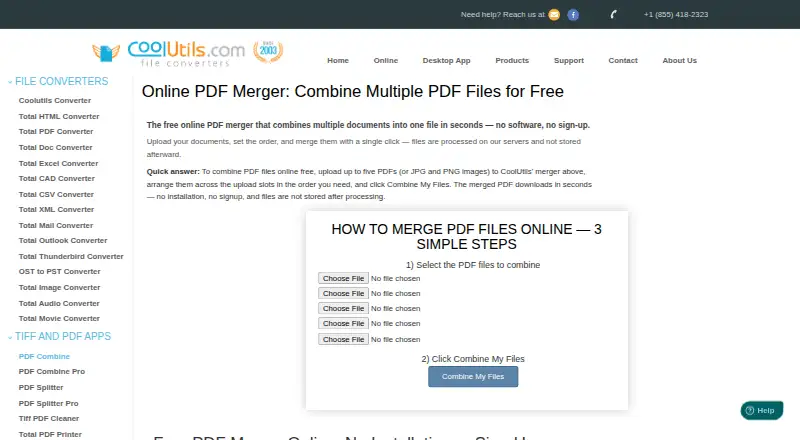
What CoolUtils Online PDF Merger is
CoolUtils Online PDF Merger combines multiple files into one PDF in a browser, without requiring signup or software installation. The free tool accepts up to five files per pass, with a 50 MB limit for each file. The final document follows the upload slots from top to bottom. JPG, PNG and GIF images are accepted as well, with each image becoming a page in the PDF. The primary platform is web, and listed platform availability also includes Android, iOS, Linux, macOS and Windows. CoolUtils says uploads and downloads travel over encrypted SSL/TLS connections and are processed in isolated environments. Its product page says uploaded documents are used for merging and are not stored afterward; the company also says uploaded files and converted results are automatically deleted from its servers within 24 hours. The online merger does not list batch merging, page selection or integrations. CoolUtils describes it as an option for one-off work and directs users needing recurring, folder-level or command-line work to its desktop PDF Combine product.
Good
- Works in a browser without signup or installation.
- Accepts up to five files per pass.
- Supports JPG, PNG and GIF input.
- Upload order determines page order.
- CoolUtils says transfers use encrypted SSL/TLS.
Watch out
- Limited to five files per pass.
- Each file has a 50 MB limit.
- No batch merging or page selection is listed.
Who it suits
It suits someone who needs to join a small number of PDFs or images for a one-off task. Users with recurring or folder-level needs may want to consider the desktop product CoolUtils points to.
Verdict
CoolUtils Online PDF Merger is a straightforward browser option for small, one-off merges. Its file and feature limits make it a less suitable fit for recurring or folder-level workflows.
Plans and prices
From CoolUtils Online PDF Merger's own pricing page, checked 4 Oct 2026.
| Plan | Price | What it gives you |
|---|---|---|
| Online PDF Merger | Free | Up to 5 files per pass · 50 MB each · accepts PDF, JPG, PNG, GIF |
| Online PDF Merger Free | Free | Up to 5 files per pass · 50 MB per file · PDF, JPG, PNG and GIF inputs · no signup |
| PDF Combine Personal License | $59.90, paid once | Personal, educational or nonprofit use · up to 2 computers for one user · Windows · one-time lifetime license |
| PDF Combine Commercial License | $75.90, paid once | Commercial use for 1 person · one-time lifetime license; page also shows $90 regular price |
| PDF Combine Server License | $350, paid once | One Windows server · SDK · ActiveX included · one-time lifetime license |
| PDF Combine Site License | $750, paid once | Commercial GUI and command-line use for up to 50 employees · one-time lifetime license |
| PDF Combine Royalty-free License | $1,400, paid once | Redistribution inside an end-user product · 1 developer · 1 derived-work location · one-time lifetime license |
The facts
Each one read from CoolUtils Online PDF Merger's own pages, with the date it was checked.
What it does
- Batch processing
- PDF Combine can process multiple files or whole folders in batch jobs.checked 15 Oct 2026
- Command line
- CoolUtils documents command-line operation and provides a ready-to-use BAT file from GUI settings.checked 15 Oct 2026
- Compliance and certifications
- CoolUtils states its GDPR and US privacy-law commitments and says it does not currently advertise formal ISO 27001 or SOC 2 certification.checked 4 Oct 2026
- Data handling
- CoolUtils says online uploads are used for processing and are not stored or shared afterward.checked 15 Oct 2026
- Desktop features
- The desktop product provides clickable bookmarks and tables of contents, cover pages, blank-page deletion and blank-page insertion for duplex printing.checked 15 Oct 2026
- Desktop scope
- The Windows desktop edition merges folders and hundreds of files without uploading them to a third-party server.checked 15 Oct 2026
- Documentation
- CoolUtils provides a PDF Combine guidance manual covering workflow and PDF security settings.checked 15 Oct 2026
- File limits
- The online tool accepts up to five files per pass, with a 50 MB limit per file.checked 4 Oct 2026
- File order
- The merged document follows the order of the upload slots from top to bottom.checked 4 Oct 2026
- File ordering
- Output order follows the upload slots from first to last.checked 15 Oct 2026
- Founder fact
- A LinkedIn profile for Alexander Buzaev identifies him as CoolUtils founder and CEO and says he started the company in 2003.checked 15 Oct 2026
- Image input
- The upload slots also accept JPG, PNG, and GIF images, with each image becoming a page in the merged PDF.checked 4 Oct 2026
- Image inputs
- The web merger accepts JPG, PNG and GIF images and turns each image into a page in the output PDF.checked 15 Oct 2026
- Integrations and automation
- The online merger page does not list integrations; it directs users needing command-line automation to the desktop PDF Combine product.checked 4 Oct 2026
- Intended use
- CoolUtils describes the online merger as a quick option for one-off merges and recommends its desktop version for recurring or folder-level work.checked 4 Oct 2026
- Licence
- The product is distributed under paid personal, commercial, server, site and royalty-free proprietary licence terms rather than an open-source licence.checked 15 Oct 2026
- Limit: negative-review share
- Trustpilot shows 9% of ratings as one-star reviews despite the 4.9 overall score.checked 15 Oct 2026
- Limit: review representativeness
- Trustpilot states that CoolUtils has not recently invited customers to review, so its review sample may not be representative.checked 15 Oct 2026
Where it runs
- Browser platforms
- The online merger is stated to work in modern browsers on Windows, Mac, Linux, iOS and Android.checked 15 Oct 2026
The company
- Company capabilities
- LinkedIn describes Softplicity as making audio, image, document, PDF and mail converters and SDKs for different platforms.checked 15 Oct 2026
- Company founding
- LinkedIn lists Softplicity as founded in 1998.checked 15 Oct 2026
- Company history
- CoolUtils says it has operated online since 2003 and supports more than 1,400 file types across its tools.checked 15 Oct 2026
- Company size
- LinkedIn lists Softplicity, the CoolUtils company, as self-owned with 2–10 employees.checked 15 Oct 2026
- Maker history
- CoolUtils says it has been online since 2003 and provides file conversion tools for more than 1,400 file types.checked 4 Oct 2026
The full review of CoolUtils Online PDF Merger
CoolUtils Online PDF Merger is a browser-based tool for combining PDFs and common image files without an account or installation. It suits occasional document assembly when whole-file ordering is enough. Its narrow scope is useful for a quick merge, but not for jobs that need page-level editing or repeatable batch work.
Overview
The workflow is focused: add files, put them in the desired top-to-bottom slot order, and merge them into one PDF. This gives users control over the sequence of whole files, but not over which pages make the final document. JPG, PNG, and GIF files can be included too, with each image becoming a page.
The five-file limit per pass and 50 MB cap per file keep the tool oriented toward modest jobs. There is no batch merging, and CoolUtils recommends its desktop PDF Combine product for recurring or folder-level work. The online page also directs users seeking command-line automation to that desktop product.
Key features
- Mixed PDF and image input: Merge PDFs with JPG, PNG, or GIF images in one output. Making each image a page avoids a separate conversion step when adding scans or graphics.
- Whole-file ordering: The merged document follows the upload slots from top to bottom. That is sufficient when the source files are already prepared, but the absence of page selection rules it out for assembling only chosen pages.
- Defined file caps: Each pass accepts at most five files, with a 50 MB maximum for each. These limits are manageable for a short set of documents but restrictive for larger collections.
- Privacy and transfers: CoolUtils says uploads and downloads use encrypted SSL/TLS connections and files are processed in isolated environments. Its product page says documents are used for the merge and not stored afterward; CoolUtils also says uploaded files and converted results are automatically deleted from its servers within 24 hours.
- Support: CoolUtils says it provides human support and usually answers requests the same day, a useful fallback for a simple utility that otherwise has no listed integrations.
Pricing
Online PDF Merger — free: The free plan accepts up to five files per pass, allows files up to 50 MB each, and supports PDF, JPG, PNG, and GIF input. It is a sensible choice for occasional merges with prepared files. There is no paid online tier or free trial; users who need recurring or folder-level workflows should consider the desktop PDF Combine product instead.
CoolUtils states its GDPR and US privacy-law commitments, but does not currently advertise formal ISO 27001 or SOC 2 certification. Readers who require those certifications should take that into account when choosing a service for sensitive documents.
Platforms
The primary platform is web, so the merger runs in a browser without software installation. It is categorized for Android, iOS, Linux, macOS, and Windows as well as web, making it a browser option across those device types.
Who it's for
This is a good fit for someone who needs to combine a handful of PDFs, or add a few supported images, into one ordered document without creating an account. It is a poor fit for frequent work, large sets, folder-level processing, command-line automation, or any task requiring selection of individual pages.
Pros and cons
Pros
- No account or installation: A one-off merge can be handled in a browser without setting up software.
- PDFs and images in one output: JPG, PNG, and GIF files become pages alongside PDFs, reducing steps when assembling mixed material.
- Clear file ordering: Upload-slot order determines the output sequence, making whole-file arrangement straightforward.
- Stated transfer safeguards: CoolUtils describes encrypted transfers, isolated processing, and automatic deletion within 24 hours.
Cons
- Five-file and 50 MB limits: Larger merges require another workflow or repeated passes.
- No batch merge or page selection: It cannot streamline recurring collections or refine a document page by page.
- No listed integrations: Users seeking command-line automation are directed to the desktop product.
- No advertised ISO 27001 or SOC 2 certification: Organizations that require either formal certification may need another option.
Alternatives
- PDF Merger Software is the broader category to consult when comparing merger tools for a different workflow.
- HiPDF is worth considering when batch processing or OCR access matters more than keeping to this tool’s one-off, five-file scope; its Basic plan is $39.95 a year, billed annually.
- PDF Candy is another free option if its Web + Desktop Free plan’s page and hourly restrictions, limited file size, and lack of batch processing fit the job.
- PDF24 Compare PDF is an alternative with a free plan described as having no limits, no registration, and no time restrictions.
- LightPDF may suit users looking for a free plan with a 10 MB maximum file size and cloud-file storage, rather than CoolUtils’ 50 MB per-file cap.
- Smallpdf is an alternative for readers who want access to a wider set of tools; its free plan includes 30+ tools and two Sign.com documents per month.
- AvePDF is a free option with 50+ document tools, up to two processing operations per six hours, a 128 MB maximum file size, and ten files per processing.
- Sejda PDF Editor is an alternative for readers considering time-limited web access through a week pass or monthly plan.
- DoKit is another web-based option with a free registered-user plan.
Verdict
Choose CoolUtils Online PDF Merger for an occasional, no-signup merge of a few PDFs and supported images, especially when whole-file ordering is all the control you need. Its free access and straightforward browser workflow are the main reasons to choose it; the five-file cap, lack of page selection, and absence of batch merging are the reasons to look elsewhere for ongoing or more involved work.
Alternatives to CoolUtils Online PDF Merger
- 1

HiPDF
Free planAndroidiOSWebAPI8.2Free plan - 2

LightPDF
Free planAndroidiOSWebAPI8.2From $15.99 a year - 3

Smallpdf
Free planAndroidiOSWebWindows8.1From $10 a month - 4

PDF4me Merge & Split
Free planAndroidiOSWebAPI8.0$25 one-time - 5

PDF Candy
Free planAndroidiOSWebLinux7.9From $4 a year - 6

PDFgear
Free planAndroidiOSWebExtension7.7Free plan