
Congressio
Congressio brings conference submissions, peer review, decisions, scheduling, and attendee registration into one platform.
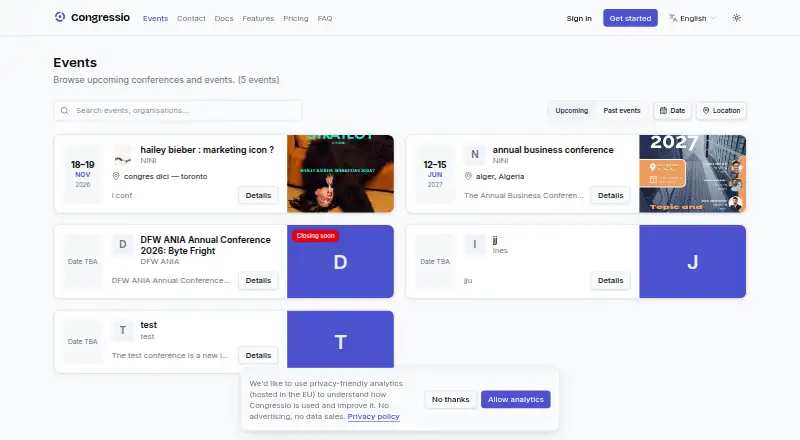
What Congressio is
Congressio brings conference submissions, peer review, decisions, scheduling, and attendee registration into one platform. Organizers can build forms with conditional logic, file uploads, and co-author invitations, then auto-assign reviewers, set deadlines, detect conflicts of interest, and enable double-blind review. The public program can include attendee agendas, with iCal and PDF exports. Ticket sales support tiers, discount codes, add-ons, VAT invoices, and refunds through Stripe. QR passes can be stored in Apple and Google Wallet and scanned at check-in, with access zones gated by ticket tier or capacity. For virtual events, Congressio supports live and on-demand streaming, recordings, e-posters, Q&A, and polls. The free plan is limited to one active event, 100 submissions, and three team seats. Online ticket payments support EUR, GBP, and USD only. Congressio is designed for academic and non-academic conferences, and its interface is available in six languages.
Good
- Forms support conditional logic and file uploads.
- Double-blind review and conflict detection are available.
- Public programs offer iCal and PDF exports.
- Virtual events include streaming, recordings, Q&A, and polls.
- QR passes work with Apple and Google Wallet.
Watch out
- Free plan allows one active event.
- Free plan is limited to 100 submissions.
- Online payments support EUR, GBP, and USD only.
Who it suits
Congressio suits academic or non-academic conference organizers who want submission, review, program, registration, and event access tools in one platform. It may also fit events that need virtual sessions or multilingual interfaces.
Verdict
Congressio combines conference workflows from submissions and review through registration and virtual sessions. Check the free plan’s event and submission limits and the supported ticket-payment currencies before choosing it.
Plans and prices
From Congressio's own pricing page, checked 14 Oct 2026.
| Plan | Price | What it gives you |
|---|---|---|
| Free | Free | 1 active event · 100 submissions · 3 team seats · forms, review, decisions, program and email |
| Standard | $49 a month | up to 5 active events · 1,000 submissions · 15 team seats · custom branding · email campaigns and reminders · or $800/year, billed annually |
| Professional | $149 a month | unlimited active events · unlimited submissions · unlimited team seats · advanced review analytics · custom branding · priority support · or $1,900/year, billed annually |
| Enterprise | Priced on request | everything in Professional · SSO/SAML · custom contracts and invoicing · dedicated support |
The facts
Each one read from Congressio's own pages, with the date it was checked.
What it does
- AI controls
- Organization administrators can disable AI, set token budgets and edit prompts; features hide when the budget is exhausted.checked 14 Oct 2026
- AI implementation
- AI features use Llama models through Groq and are described as advisory drafts requiring human review.checked 14 Oct 2026
- Analytics
- Analytics includes submission, decision, acceptance-rate, track and review-coverage metrics plus CSV, Excel and PDF reports.checked 14 Oct 2026
- API
- Organization administrators can create scoped API keys for event, submission and registration access, including a registration write endpoint.checked 14 Oct 2026
- Audience and languages
- Congressio says it is designed for academic and non-academic conferences, and its interface is available in English, German, Spanish, French, Italian and Portuguese.checked 28 Sep 2026
- Audit trail
- The audit log records significant status, tag, decision and reviewer-assignment changes with actor and timestamp.checked 14 Oct 2026
- Blind review
- Double-blind mode automatically hides author identities from reviewers.checked 14 Oct 2026
- Camera-ready publishing
- Accepted authors can submit final versions and organizers can compile proceedings and optionally mint DOIs.checked 14 Oct 2026
- Check-in
- QR passes can be stored in Apple Wallet and Google Wallet and scanned with zone and capacity controls.checked 14 Oct 2026
- Data and payments
- The About page says data is kept in the European Union and card details are handled by Stripe rather than stored in Congressio’s systems.checked 28 Sep 2026
- Data export
- Attendee registrations export to CSV, while programs export to iCal and PDF; submission and review data remains accessible in the dashboard.checked 14 Oct 2026
- Decision workflows
- Chairs can accept, reject or request revisions, collect structured feedback, run rebuttals and use meta-reviews across rounds.checked 14 Oct 2026
- Documentation depth
- The documentation covers organizer setup, review, registration, programs, communications, AI governance, analytics, billing, API/webhooks and participant workflows.checked 14 Oct 2026
- Education credits
- CPD/CME credit hours, badge-scan attendance recording and automatic certificates are supported.checked 14 Oct 2026
- Email tools
- Editable templates, automatic triggers, one-off campaigns, reminders and delivery tracking are available.checked 14 Oct 2026
- Enterprise features
- Enterprise adds white-label landing pages, custom domains, higher limits, SSO/SAML, custom contracts and dedicated support.checked 14 Oct 2026
- Event access
- QR passes can be stored in Apple and Google Wallet and scanned at check-in, with zones gated by ticket tier or capacity.checked 28 Sep 2026
- Form builder
- A drag-and-drop builder supports conditional logic, file uploads and co-author invitations without coding.checked 14 Oct 2026
- Form field types
- Documentation says submission, review, decision and registration forms support 27 field types.checked 14 Oct 2026
- Integrations
- The maker describes Stripe payments, Apple and Google Wallet passes, ORCID and institutional single sign-on, and API keys and webhooks for integrating with other systems.checked 28 Sep 2026
- Languages
- The interface is offered in English, German, Spanish, French, Italian and Portuguese.checked 14 Oct 2026
- Limit: no mobile listing
- The maker’s public platform information identifies web and API access and does not list native iOS, Android, Windows, macOS or Linux applications.checked 14 Oct 2026
- Limit: unsupported currencies
- Organizers charging tickets in currencies other than EUR, GBP or USD cannot use Congressio online checkout for those tiers.checked 14 Oct 2026
Money
- Limit: free capacity
- The Free plan is limited to one active event, 100 submissions and three team seats.checked 14 Oct 2026
The full review of Congressio
Overview
Congressio brings conference submissions, peer review, decisions, scheduling and attendee registration together for organizers of academic and non-academic events. It suits teams that want to manage the scholarly workflow alongside ticketing and virtual sessions. Its free plan is a practical starting point, but its event, submission and seat caps—and its limited ticket-payment currencies—matter.
Key features
Congressio’s form builder combines conditional logic, file uploads and co-author invitations in a drag-and-drop interface. That gives organizers flexibility to collect different information for different submissions without coding. Multiple submission types, author revisions and poster handling support a range of conference workflows.
Review tools cover automatic reviewer assignment, deadlines, conflict-of-interest detection, scoring, custom workflows and double-blind review. Together, these address much of the process from submission through decision, while review analytics become an advanced feature on Professional.
Organizers can publish a public program with attendee agendas and iCal and PDF exports. Ticketing supports tiered sales through Stripe, discount codes, add-ons, VAT invoices and refunds. QR passes work with Apple and Google Wallet and can be scanned at check-in; access zones can be restricted by ticket tier or capacity. Those features tie registration to on-site access, though online ticket payments are limited to EUR, GBP and USD.
Virtual events include live and on-demand streaming, recordings, an e-poster gallery, Q&A and polls. Integrations include ORCID, institutional single sign-on, API keys and webhooks. Congressio says data is kept in the European Union and card details are handled by Stripe rather than stored in its systems. Support typically replies within one business day, with urgent requests prioritized during an active event.
Pricing
The free plan costs nothing and includes one active event, 100 submissions, three team seats, forms, review, decisions, a program and email. It covers a small event’s core workflow, but the caps leave little room for multiple events or a larger organizing team.
Standard costs $49 a month and raises the allowance to five active events, 1,000 submissions and 15 team seats. It adds custom event branding, email campaigns and reminders, making it the more suitable tier for recurring events that still fit within defined quotas.
Professional costs $149 a month and includes unlimited active events, submissions and team seats, plus advanced review analytics, custom event branding and priority support. It is the clearest fit for organizations with substantial or variable event volume; its higher monthly price is harder to justify when the Standard limits are sufficient.
Enterprise has custom pricing and includes everything in Professional, plus SSO / SAML, custom limits, custom contracts and invoicing, and dedicated support. A 14-day trial is available. The free plan has explicit caps; the paid plans replace those with tier-specific quotas or unlimited usage, and Enterprise allows custom limits.
Platforms
Congressio is available on the web and through an API. Its interface is available in English, German, Spanish, French, Italian and Portuguese.
Who it's for
Congressio is a strong fit for conference teams that want submissions, reviewing, programming, registration and virtual sessions in one platform, especially when Stripe ticketing and QR-based access are useful. Its stated audience includes both academic and non-academic conferences. Teams that need to charge attendees in currencies other than EUR, GBP or USD should look elsewhere for payment processing.
Pros and cons
- Pros: The submission, review and decision workflow sits alongside program, registration and virtual-event tools, reducing the need to coordinate separate conference functions.
- Pros: Double-blind review, conflict checks, reviewer assignment and author revisions support a structured scholarly process.
- Pros: Apple and Google Wallet passes, QR check-in and ticket-based access zones connect ticket sales with event entry.
- Cons: The free plan is limited to one active event, 100 submissions and three team seats, so it can constrain even a modestly expanding conference.
- Cons: Online ticket payments support only EUR, GBP and USD, excluding organizers who need to charge in other currencies.
- Cons: Standard and Professional are monthly subscriptions at 49.00 USD and 149.00 USD respectively; teams that need more than the free caps must budget for an ongoing paid plan.
Alternatives
Event Abstract Management Software is the broader category to browse when you want to compare tools for this particular workflow.
Sciencesconf is worth considering for scientific events if a free service for organizers is the priority; event-creation requests require validation, and it is intended primarily for scientific events.
Indico is a free, open-source option for teams that want self-hosting or broader platform support, including Android and iOS, rather than Congressio’s paid tiers.
Microsoft CMT is a free web-based alternative for managing academic conferences.
EasyChair may suit organizers with smaller submission volumes who can work within its free tier of 20 submissions or pay $3.90, paid once for its Professional plan, which allows up to 60 submissions.
SimplyConf is an alternative for teams that value self-hosting or want a free core plan with unlimited events, submissions and users.
Oxford Abstracts offers a free Basic plan with unlimited submissions, collection, review and decisions, ticketing, reviewer tracking, and customizable forms and emails; consider it when those abstract-management capabilities are the priority.
HotCRP is a free option for ACM- or USENIX-sponsored conferences, journals and workshops.
ConfTool may fit smaller non-commercial events that qualify for its free license on request: the Standard license is limited to 150 participants, local installation and no support.
Verdict
Choose Congressio if your conference team wants one workflow for submissions, review, programming, attendee registration and virtual sessions, and the free caps or paid quotas match your scale. Its combination of review controls, ticketing and event-access tools is the main reason to choose it. Look elsewhere if you need online ticket payments in a currency outside EUR, GBP or USD, or if the free plan’s event and team limits are too restrictive.
Alternatives to Congressio
- 1

Fourwaves
Free planAndroidiOSWebAPI8.2From $999 a year - 2
HotCRP
Free planOpen sourceWebAPILinuxmacOS8.1$7.50 one-time - 3
Indico
Free planAndroidiOSWebAPI7.4Free plan - 4

Eventact
AndroidiOSWebAPI7.3From $210 a month - 5
ConfTool
Free planAndroidiOSWebSelf-hosted6.9Free plan - 6
OpenConf
Free planWebSelf-hosted6.9From $600 a year