CombinePDF
CombinePDF joins PDF files and images into a single downloadable PDF.
What CombinePDF is
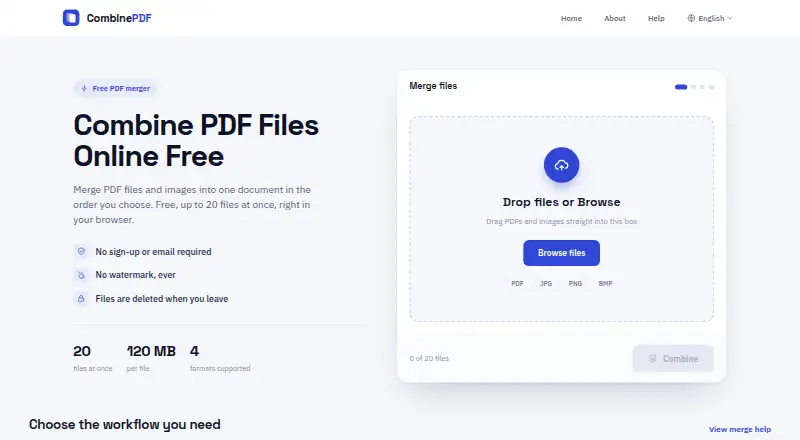
CombinePDF joins PDF files and images into a single downloadable PDF. It accepts PDF, JPG, JPEG, PNG, and BMP files, and lets users arrange the uploads in the order they want in the finished document. PDF pages and image pages can be mixed in one output, and JPG, JPEG, or PNG images can also be compiled into a PDF.
The web service is free to use without registration or an email address, and it says it does not add a watermark. Uploads can include up to 20 files at once, with each file limited to 120 MB. Uploaded files and generated PDFs are deleted from the server when the user leaves the page; the privacy policy says files are stored temporarily during processing rather than permanently. Transfers use HTTPS. The service also collects usage information such as browser type, access times, and pages viewed, and uses cookies for preferences and site analysis. Described uses include assembling document packs, scanned forms, invoices, class handouts, image collections, receipts, and PDF chapters.
Good
- Free to use without registration
- Combines PDFs and supported image formats
- Users can arrange file order
- No watermark added
- Files are deleted when the user leaves the page
Watch out
- Maximum of 20 files per upload
- Each file is limited to 120 MB
- Collects usage data and uses cookies
Who it suits
CombinePDF suits people who need to assemble PDFs and image files into one document, such as document packs, scanned forms, receipts, or class handouts. It is available on the web and does not require an account.
Verdict
CombinePDF offers a straightforward way to arrange supported files into one PDF without signing up. Keep its file-count and size limits in mind, and note that the service collects usage data and uses cookies.
Plans and prices
From CombinePDF's own pricing page, checked 9 Oct 2026.
| Plan | Price | What it gives you |
|---|---|---|
| Free | Free | Up to 20 files at once · up to 120 MB per file · no sign-up · no watermark |
The facts
Each one read from CombinePDF's own pages, with the date it was checked.
What it does
- Cookies and usage data
- The privacy policy says the service collects usage data such as browser type, access times, and pages viewed, and uses cookies for preferences and site analysis.checked 9 Oct 2026
- Data handling
- The privacy policy says files are temporarily stored during processing and are not permanently stored.checked 9 Oct 2026
- File deletion
- Uploaded files and generated PDFs are deleted from the server when the user leaves the page.checked 9 Oct 2026
- File formats
- Accepts PDF, JPG, JPEG, PNG, and BMP files.checked 9 Oct 2026
- File ordering
- Users can arrange uploaded files in the order they want in the final PDF.checked 9 Oct 2026
- Image conversion
- Can compile JPG, JPEG, and PNG images into one PDF.checked 9 Oct 2026
- Mixed documents
- Can combine image pages and PDF pages in the same output document.checked 9 Oct 2026
- No account required
- The service is free to use without registration or an email address.checked 9 Oct 2026
- Support
- The help page directs users with questions to its support email address.checked 9 Oct 2026
- Transmission security
- The privacy policy says files are protected by secure HTTPS transmission.checked 9 Oct 2026
- Usage limits
- Users can upload up to 20 files at once, with each file up to 120 MB.checked 9 Oct 2026
- Watermarks
- The service says it does not add a watermark.checked 9 Oct 2026
- What it does
- Combines PDF files and images into one downloadable PDF.checked 9 Oct 2026
- Who it is for
- The maker describes use cases including document packs, scanned forms, invoices, class handouts, image collections, receipts, and PDF chapters.checked 9 Oct 2026
The full review of CombinePDF
Overview
CombinePDF is a browser-based utility for joining PDFs and common image files into one downloadable PDF. It suits people assembling occasional document packs, scans, receipts, or handouts who do not want to create an account. Its focused workflow and 120 MB per-file allowance are useful for routine jobs, but the 20-file batch ceiling limits very large collections.
The service concentrates on arranging source files, selecting pages, and producing a single PDF. It is a practical merger rather than a full document-management suite, so readers needing editing, OCR, or broader PDF tools should consider alternatives.
Key features
CombinePDF accepts PDF, JPG, JPEG, PNG, and BMP files. PDF pages and image pages can be mixed in the same output, while JPG, JPEG, and PNG collections can be converted into a PDF. You can arrange uploaded files in the sequence required for the finished document, which is particularly helpful for scanned forms, invoices, receipts, class handouts, image collections, and separate PDF chapters.
Page selection is supported, giving users a way to include only the relevant pages, although the service does not describe the extent of its page-level controls. Uploads are capped at 20 files per operation, with each file limited to 120 MB. Those limits cover many ordinary document packs; larger projects require splitting the work, and a single oversized file will not fit.
No sign-up or email address is required. CombinePDF says it adds no watermark, so the downloaded file is suitable when branding or promotional marks would be unacceptable. Files and generated PDFs are deleted from the server when you leave the page. Its privacy policy says files are held temporarily during processing rather than permanently stored and are transmitted over HTTPS. The same policy says the service collects usage information such as browser type, access times, and pages viewed, and uses cookies for preferences and site analysis. Questions are directed to a support email address.
Pricing
CombinePDF has one plan: Free at free. It includes up to 20 files at once, a maximum of 120 MB per file, no sign-up, and no watermark. There is no free trial because the entire service is free, and no paid tier or renewal term is presented. This is a strong fit for occasional users who want a quick, no-commitment merge; it offers no higher quota for teams or heavy recurring workloads.
Platforms
CombinePDF is primarily a web service and is listed for Android, iOS, Linux, macOS, Windows, and the web. The browser-first approach avoids installation and makes it practical across devices, provided the job stays within the stated file limits.
Who it's for
Choose CombinePDF for one-off or periodic assembly of invoices, receipts, scanned forms, handouts, image sets, document packs, and PDF chapters. It is especially appropriate when anonymity, a watermark-free result, and mixed image/PDF input matter more than advanced editing. Look elsewhere if you routinely process more than 20 files, need capabilities beyond merging and page selection, or require a paid plan with expanded quotas.
Pros and cons
Pros
- Mixed-source output: PDF and supported image pages can be combined in one document, avoiding a separate image-conversion step.
- Order control: Files can be arranged before export, which keeps multi-part packs in the intended sequence.
- Low friction: No account or email is required, and the service says downloads contain no watermark.
- Large per-file allowance: A 120 MB maximum accommodates many high-resolution scans and image-heavy PDFs.
- Temporary handling: Files are deleted when the page is left, with HTTPS used during transmission.
Cons
- Batch cap: Only 20 files can be uploaded at once, so extensive archives must be divided into separate jobs.
- Focused scope: The service is centered on combining and page selection rather than a wider PDF editing toolkit.
- Usage tracking: The privacy policy describes collection of browsing-related usage data and cookie use.
- No scale-up plan: There is no paid option offering larger batches, team seats, or higher quotas.
Alternatives
For a broader directory of merging tools, see PDF Merger Software.
HiPDF is the better choice when you want a freemium suite with OCR, batch processing, web access, and a paid Basic plan at $39.95 a year; it also offers a free trial.
Pick PDF Candy when you need PDF tools across web and desktop and can accept page and hourly restrictions, no batch processing, and limited file size on its free tier.
PDF24 Compare PDF suits users seeking a free, advertising-supported service with no limits, registration, or time restrictions.
Choose CoolUtils Online PDF Merger for a simpler free merger capped at five files per pass and 50 MB each, with PDF, JPG, PNG, and GIF support.
LightPDF is preferable when a freemium platform, free trial, and wider PDF features are more important than CombinePDF's minimal workflow.
PDFMerged is worth considering if unlimited file size and PDF count are the priority, with device memory as the practical constraint.
Smallpdf fits readers wanting a larger freemium toolkit and a seven-day free trial, rather than a dedicated merger alone.
AvePDF offers more than 50 document tools, but its free plan limits processing to two operations per six hours, 128 MB per file, and 10 files per operation.
Verdict
CombinePDF is a sensible recommendation for occasional users who need to place PDFs and images in a chosen order, export without a watermark, and avoid registration. Its main reason to choose it is the straightforward free workflow with a 120 MB per-file allowance. Look elsewhere for batches beyond 20 files, broader PDF editing, or a paid service with higher quotas and additional controls.
Getting started
- Open https://combinepdf.app/ in a browser
- Upload PDF, JPG, JPEG, PNG, or BMP files
- Arrange the files in the desired order
- Combine them into one downloadable PDF
- Download the generated document
Limits worth knowing
The Free plan allows up to 20 files at once, with each file up to 120 MB. There is no free-trial period because the service is provided as a free plan.
Questions
Is CombinePDF free?
Yes. Its Free plan costs nothing and includes up to 20 files at once, files up to 120 MB, no sign-up, and no watermark.
Which files can it combine?
It accepts PDF, JPG, JPEG, PNG, and BMP files. PDF pages and image pages can be included together.
Do I need an account?
No. CombinePDF can be used without registration or an email address.
What happens to uploaded files?
Uploaded files and generated PDFs are deleted when you leave the page. The privacy policy says files are temporarily stored during processing, transferred over HTTPS, and not permanently stored.
Which platforms are supported?
The listed platforms are Android, iOS, Linux, macOS, web, and Windows.
Alternatives to CombinePDF
- 1

HiPDF
Free planAndroidiOSWebAPI8.2Free plan - 2

LightPDF
Free planAndroidiOSWebAPI8.2From $15.99 a year - 3
CoolUtils Online PDF Merger
Free planAndroidiOSWebAPI8.1$59.90 one-time - 4

Smallpdf
Free planAndroidiOSWebWindows8.1From $10 a month - 5

PDF4me Merge & Split
Free planAndroidiOSWebAPI8.0$25 one-time - 6

PDF Candy
Free planAndroidiOSWebLinux7.9From $4 a year